JavaScript is disabled. For a better experience, please enable JavaScript in your browser before proceeding.
You are using an out of date browser. It may not display this or other websites correctly.
You should upgrade or use an
alternative browser .
Solved Bigger and smaller pictogramms
i want the main folder to be detailed and then in that folder there is a folder called sprites and i want to make that when you are in that folder that the pictogramms are big.
Computer type PC/Desktop Computer Manufacturer/Model Number Acer OS Windows 7 Home Premium 64 bit
R.I.P. 7/09/2014
Guru
VIP
Welcome to Seven Forums.
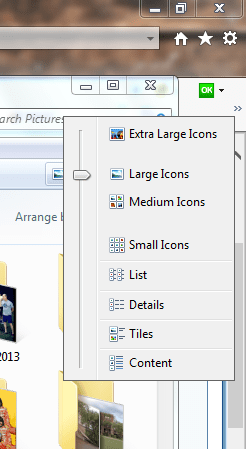
By "pictograms" I assume you mean icons. At the upper right of any folder there is a little icon that looks like a picture, click it and you will see these option, choose the one you want.
Computer type PC/Desktop Computer Manufacturer/Model Number Home Built Desktop By DataTech OS Windows 7 Ultimate X64 SP1 CPU Intel i5-2550K, Differing ~4.4-4.8GHz No built in GPU Motherboard ASUS P8Z68-V PRO/GEN3 Memory 16GB G.Skill Sniper 1866MHz @ 2133MHz 2x8GB Graphics Card(s) ASUS GTX650TIB-DC2OC-2GD5, (650TI Boost) Sound Card Onboard Realtek 5-1 Monitor(s) Displays Samsung P2570HD Screen Resolution 1920x1080 Hard Drives Samsung 840 Pro 256GB SSD for OS, 500GB Seagate Constellation (Enterprise drive) for Data PSU Corsair HX650W Case Inwin Dragon Rider Cooling Hyper 212 EVO w/two Noctua fans, push-pull, @1300 RPM Keyboard E-Z Eyes, bright yellow keys with large characters Mouse steelseries SENSEI Laser Pro Gaming Internet Speed 48-51Mbs Mbs down, 11 Mbs up Xfinity Cable Antivirus Norton Internet Security 2013 Browser IE 10, Opera, Pale Moon if needed Other Info 4 case fans, LG BluRay-RE, ASUS DVD-RW, Mr. Fusion power supply, 1.21 gigawatts.
New member
Member
Thread Starter
Yes i mean that, but i mean that when i go in the first folder that it's on detailed and when i go into the 2nd folder that it's on large icons
Computer type PC/Desktop Computer Manufacturer/Model Number Acer OS Windows 7 Home Premium 64 bit
R.I.P. 7/09/2014
Guru
VIP
Do what I suggested in each folder.
Computer type PC/Desktop Computer Manufacturer/Model Number Home Built Desktop By DataTech OS Windows 7 Ultimate X64 SP1 CPU Intel i5-2550K, Differing ~4.4-4.8GHz No built in GPU Motherboard ASUS P8Z68-V PRO/GEN3 Memory 16GB G.Skill Sniper 1866MHz @ 2133MHz 2x8GB Graphics Card(s) ASUS GTX650TIB-DC2OC-2GD5, (650TI Boost) Sound Card Onboard Realtek 5-1 Monitor(s) Displays Samsung P2570HD Screen Resolution 1920x1080 Hard Drives Samsung 840 Pro 256GB SSD for OS, 500GB Seagate Constellation (Enterprise drive) for Data PSU Corsair HX650W Case Inwin Dragon Rider Cooling Hyper 212 EVO w/two Noctua fans, push-pull, @1300 RPM Keyboard E-Z Eyes, bright yellow keys with large characters Mouse steelseries SENSEI Laser Pro Gaming Internet Speed 48-51Mbs Mbs down, 11 Mbs up Xfinity Cable Antivirus Norton Internet Security 2013 Browser IE 10, Opera, Pale Moon if needed Other Info 4 case fans, LG BluRay-RE, ASUS DVD-RW, Mr. Fusion power supply, 1.21 gigawatts.
New member
Member
Thread Starter
Then i have to do that everytime i switch from folders?
Computer type PC/Desktop Computer Manufacturer/Model Number Acer OS Windows 7 Home Premium 64 bit
R.I.P. 7/09/2014
Guru
VIP
No, it should only apply to the folder you make the change.
Computer type PC/Desktop Computer Manufacturer/Model Number Home Built Desktop By DataTech OS Windows 7 Ultimate X64 SP1 CPU Intel i5-2550K, Differing ~4.4-4.8GHz No built in GPU Motherboard ASUS P8Z68-V PRO/GEN3 Memory 16GB G.Skill Sniper 1866MHz @ 2133MHz 2x8GB Graphics Card(s) ASUS GTX650TIB-DC2OC-2GD5, (650TI Boost) Sound Card Onboard Realtek 5-1 Monitor(s) Displays Samsung P2570HD Screen Resolution 1920x1080 Hard Drives Samsung 840 Pro 256GB SSD for OS, 500GB Seagate Constellation (Enterprise drive) for Data PSU Corsair HX650W Case Inwin Dragon Rider Cooling Hyper 212 EVO w/two Noctua fans, push-pull, @1300 RPM Keyboard E-Z Eyes, bright yellow keys with large characters Mouse steelseries SENSEI Laser Pro Gaming Internet Speed 48-51Mbs Mbs down, 11 Mbs up Xfinity Cable Antivirus Norton Internet Security 2013 Browser IE 10, Opera, Pale Moon if needed Other Info 4 case fans, LG BluRay-RE, ASUS DVD-RW, Mr. Fusion power supply, 1.21 gigawatts.
New member
Member
Thread Starter
Last edited: Jun 11, 2014
Computer type PC/Desktop Computer Manufacturer/Model Number Acer OS Windows 7 Home Premium 64 bit
R.I.P. 7/09/2014
Guru
VIP
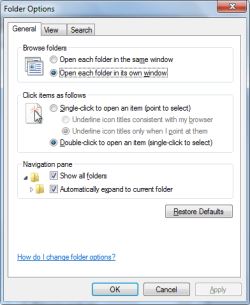
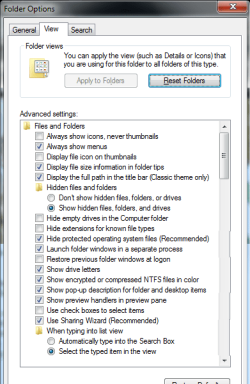
Odd, my folders don't behave like yours. Try going to Control Panel/Folder Options and put your setting as I have mine in General and View tabs.
Computer type PC/Desktop Computer Manufacturer/Model Number Home Built Desktop By DataTech OS Windows 7 Ultimate X64 SP1 CPU Intel i5-2550K, Differing ~4.4-4.8GHz No built in GPU Motherboard ASUS P8Z68-V PRO/GEN3 Memory 16GB G.Skill Sniper 1866MHz @ 2133MHz 2x8GB Graphics Card(s) ASUS GTX650TIB-DC2OC-2GD5, (650TI Boost) Sound Card Onboard Realtek 5-1 Monitor(s) Displays Samsung P2570HD Screen Resolution 1920x1080 Hard Drives Samsung 840 Pro 256GB SSD for OS, 500GB Seagate Constellation (Enterprise drive) for Data PSU Corsair HX650W Case Inwin Dragon Rider Cooling Hyper 212 EVO w/two Noctua fans, push-pull, @1300 RPM Keyboard E-Z Eyes, bright yellow keys with large characters Mouse steelseries SENSEI Laser Pro Gaming Internet Speed 48-51Mbs Mbs down, 11 Mbs up Xfinity Cable Antivirus Norton Internet Security 2013 Browser IE 10, Opera, Pale Moon if needed Other Info 4 case fans, LG BluRay-RE, ASUS DVD-RW, Mr. Fusion power supply, 1.21 gigawatts.
New member
Member
Thread Starter
Still doesn't work
I changed it to your settings and i made the settings to factory settings.
the weird thing is when i open a folder in c drive which has some sprites and some folders in it
then it shows those sprites and folders with big icons
Computer type PC/Desktop Computer Manufacturer/Model Number Acer OS Windows 7 Home Premium 64 bit
Computer type PC/Desktop Computer Manufacturer/Model Number Self-Built OS Win10 Pro 64-bit CPU AMD Ryzen 7 3800X Motherboard Gigabyte X570 UD Memory 32 GB Kingston DDR4-2666 Graphics Card(s) MSI nVidia GT 710 (2GB) Sound Card Creative Audigy FX 5.1 Monitor(s) Displays ViewSonic VG2439Smh 24" Screen Resolution 1920x1080 Hard Drives 3xWD1TB; 1xSeagate 1TB... all spinning rust PSU EVGA 100-W1-0500-KR (500w) Case SilverStone PS10 (modified) Cooling CPU:AMD Wraith Prism. Case:3x Noctua 120mm Keyboard Compaq Professional PS/2 Mouse Microsoft Basic Optical Mouse 2.0 Internet Speed Fiber 1Gbit/sec down/up Antivirus Avast Free Browser FF, Chrome Other Info 2x LG GH24NSC0 DVD burners, Mackie CR3 monitor speakers
New member
Member
Thread Starter
I downloaded and installed it, but when i change it now it doesn't work.
Computer type PC/Desktop Computer Manufacturer/Model Number Acer OS Windows 7 Home Premium 64 bit
Righteous Dude
Guru
VIP
SF Team
Welcome to Seven Forums xX4m4zingXx. Are you accessing the folders to make changes via the Library pane? I believe that automatically applies settings to all similar/sub folders. Try accessing the folder directly and changing the folder view manually. DO NOT click on Apply to folders. A Guy
Computer type PC/Desktop OS Windows 10 Home x64 CPU INTEL Core i5-750 Quad-Core 3.37GHz Motherboard ASUS P7P55D Memory HyperX Fury Black Series 8GB (2 x 4GB) 1866Mhz Graphics Card(s) EVGA GeForce GTX 750 Superclocked 1GB 128-Bit GDDR5 Monitor(s) Displays LG 32MA68HY 32" IPS Screen Resolution 1920 x 1080 Hard Drives Samsung 840 Evo 120GB, SEAGATE 500GB Barracuda® 7200.12, SATA 3 Gb/s, 7200 RPM, 16MB cache PSU ANTEC TruePower New TP-550, 80 PLUS, 550W Case ANTEC Three Hundred Illusion Cooling COOLER MASTER Hyper 212 Plus, 4 x 120mm 1 x 140mm Noctua's Internet Speed 85 + Mbps Antivirus Avast Browser Vivaldi
New member
Member
Thread Starter
How can i access the folder directly?
Computer type PC/Desktop Computer Manufacturer/Model Number Acer OS Windows 7 Home Premium 64 bit
Righteous Dude
Guru
VIP
SF Team
Which folder(s) is it? A Guy
Computer type PC/Desktop OS Windows 10 Home x64 CPU INTEL Core i5-750 Quad-Core 3.37GHz Motherboard ASUS P7P55D Memory HyperX Fury Black Series 8GB (2 x 4GB) 1866Mhz Graphics Card(s) EVGA GeForce GTX 750 Superclocked 1GB 128-Bit GDDR5 Monitor(s) Displays LG 32MA68HY 32" IPS Screen Resolution 1920 x 1080 Hard Drives Samsung 840 Evo 120GB, SEAGATE 500GB Barracuda® 7200.12, SATA 3 Gb/s, 7200 RPM, 16MB cache PSU ANTEC TruePower New TP-550, 80 PLUS, 550W Case ANTEC Three Hundred Illusion Cooling COOLER MASTER Hyper 212 Plus, 4 x 120mm 1 x 140mm Noctua's Internet Speed 85 + Mbps Antivirus Avast Browser Vivaldi
New member
Member
Thread Starter
Well, this is the map which i want to be with big icons.
Computer type PC/Desktop Computer Manufacturer/Model Number Acer OS Windows 7 Home Premium 64 bit
Righteous Dude
Guru
VIP
SF Team
Computer type PC/Desktop OS Windows 10 Home x64 CPU INTEL Core i5-750 Quad-Core 3.37GHz Motherboard ASUS P7P55D Memory HyperX Fury Black Series 8GB (2 x 4GB) 1866Mhz Graphics Card(s) EVGA GeForce GTX 750 Superclocked 1GB 128-Bit GDDR5 Monitor(s) Displays LG 32MA68HY 32" IPS Screen Resolution 1920 x 1080 Hard Drives Samsung 840 Evo 120GB, SEAGATE 500GB Barracuda® 7200.12, SATA 3 Gb/s, 7200 RPM, 16MB cache PSU ANTEC TruePower New TP-550, 80 PLUS, 550W Case ANTEC Three Hundred Illusion Cooling COOLER MASTER Hyper 212 Plus, 4 x 120mm 1 x 140mm Noctua's Internet Speed 85 + Mbps Antivirus Avast Browser Vivaldi
New member
Member
Thread Starter
It doesn't work.
Computer type PC/Desktop Computer Manufacturer/Model Number Acer OS Windows 7 Home Premium 64 bit
New member
Member
Thread Starter
Computer type PC/Desktop Computer Manufacturer/Model Number Acer OS Windows 7 Home Premium 64 bit
R.I.P. 7/09/2014
Guru
VIP
It doesn't work.
Sounds normal, you're going "back" to the folder that's already opened.
Computer type PC/Desktop Computer Manufacturer/Model Number Home Built Desktop By DataTech OS Windows 7 Ultimate X64 SP1 CPU Intel i5-2550K, Differing ~4.4-4.8GHz No built in GPU Motherboard ASUS P8Z68-V PRO/GEN3 Memory 16GB G.Skill Sniper 1866MHz @ 2133MHz 2x8GB Graphics Card(s) ASUS GTX650TIB-DC2OC-2GD5, (650TI Boost) Sound Card Onboard Realtek 5-1 Monitor(s) Displays Samsung P2570HD Screen Resolution 1920x1080 Hard Drives Samsung 840 Pro 256GB SSD for OS, 500GB Seagate Constellation (Enterprise drive) for Data PSU Corsair HX650W Case Inwin Dragon Rider Cooling Hyper 212 EVO w/two Noctua fans, push-pull, @1300 RPM Keyboard E-Z Eyes, bright yellow keys with large characters Mouse steelseries SENSEI Laser Pro Gaming Internet Speed 48-51Mbs Mbs down, 11 Mbs up Xfinity Cable Antivirus Norton Internet Security 2013 Browser IE 10, Opera, Pale Moon if needed Other Info 4 case fans, LG BluRay-RE, ASUS DVD-RW, Mr. Fusion power supply, 1.21 gigawatts.
New member
Member
Thread Starter
I mean that the window of the folder goes back to another place on the screen
Computer type PC/Desktop Computer Manufacturer/Model Number Acer OS Windows 7 Home Premium 64 bit