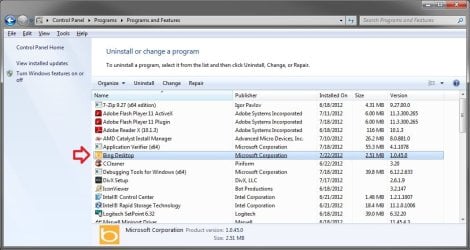
About three weeks ago I installed some MS updates. One of them was something about Bing, I was tired of looking at the update. After doing the update my desktop screen became a blue semi circle water scene wallpaper with fish and a large word BING in the lower right corner. I have been advised to go to the Control Panel - Programs and Features and uninstall the Bing Desktop item. I have no Bing Desktop item there so could not remove it. I was told to right click on the desktop and select Personalize and select a new Theme. I have also done this and when I select a new theme it simply ignores me. What can I do to get rid of the Bing desktop wallpaper and regain control of my desktop environment?
gvdpal
gvdpal
My Computer
- Computer Manufacturer/Model Number
- Three year old Dell XPS 800
- OS
- 64
- Memory
- 2 GB
- Hard Drives
- 1
- Keyboard
- MS Ergonomic
- Mouse
- Logitech