

Tablets are an important part of the Bing success story, with many users looking for the latest news, checking out sport scores and searching for entertainment. To better optimize for such user intent across devices of varying screens sizes and aspect ratios while providing fluid and aesthetically pleasing experience we at Microsoft completely redesigned the Bing homepage on Amazon Fire tablets using React + Redux.

This is the first major browser experience on Bing that is completely rendered on the client using React, while Redux handles the state management across tabs. Most of the browser Bing ecosystem is rendered on the server-side, however, for experiences that are highly interactive, highly adaptable and API-powered, such as feeds with personalized news stories from the web, the client-rendering is a better choice. We evaluated multiple options for client rendering and settled on React + Redux given its full range of great features, high performance and development simplicity, and since other Bing experiences were using React already (such as the camera features on our Bing iOS app), it was a natural choice for us.
Designing for a spectrum of different form factors can be a challenge. For example, the Fire tablet is available in a wide range of dimensions, 7'’ to 10.1'’ as seen on the Amazon Site:

For this reason, building a truly responsive experience was paramount to us. We built the UI to be responsive to single-column or multi-column layouts — adapting to all the different Fire tablets screen sizes. Its smooth transition on the browser is what makes client-rendering and React great for such experience.
The client is powered by a RESTFUL API that serves our data and caching needs. The API encapsulates a service built on our Microsoft Azure based micro-services platform which helps us with our goals of >99.99% availability, elastic scalability at the level of internet and geo-redundancy across five continents. In addition to reducing the data retrieval latency, we use caching to minimize the Bing API payload.
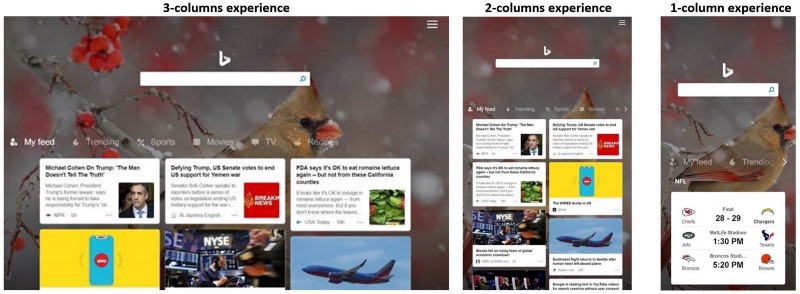
The experience at the moment can only be accessed on Amazon Fire tablets using their Silk browser, although we’re always experimenting on other platforms too. You can see the responsiveness of the experience in the screenshots below, auto-adjusting to different device widths (in this case, self-adapting the UI to three columns, two columns and one column):
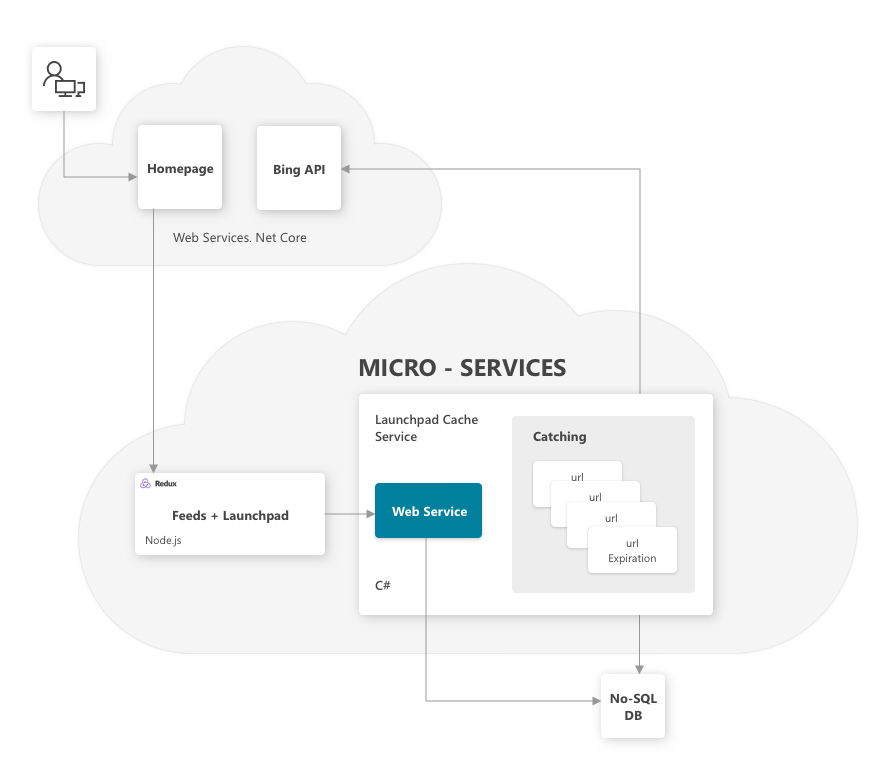
Architecturally, we have scalable web services built using .Net Core which take and process the initial HTTPS requests from the user. The service connects with our micro-service running Node.js in Azure and our React+Redux libraries.
To get the actual data, we have a set of RESTFUL APIs which are constantly fetching the information from our in-memory No-SQL DB, which gets populated continuously by a set of services calling the Bing APIs. Caching services allow for fault-resiliency and performance optimization. The latency between the information from the Bing APIs and the No-SQL DB is kept to a minimum to allow for fresh content to be available to the end-user (which is crucial since the feeds and trending contents are primarily news-centered).
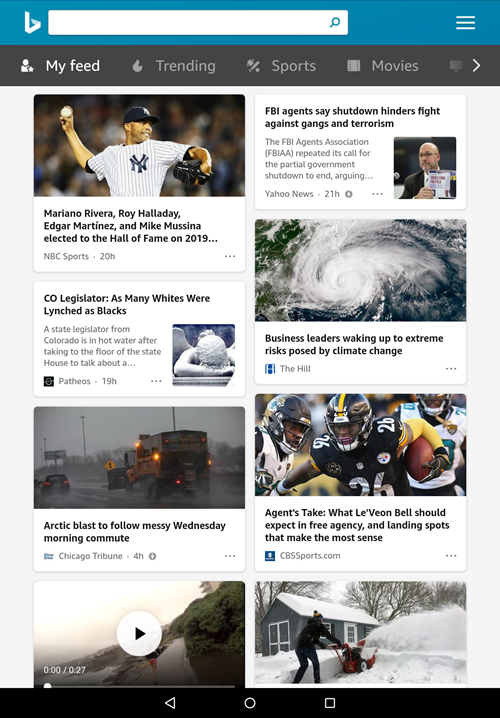
On the client side we also make use of CSS parallax so that scrolling will smoothly transition the page into full-screen, docking our search box and header together at the top. We originally created this animation by modifying the DOM on browser scroll events but found that parallax is much more lightweight and stays smooth on any hardware, so long as it has browser support. Once the user scrolls and docks (shown below), they can endlessly scroll the embedded iframe to browse their feed. When finished, one simple click on the Bing logo will return them to the default state and refresh their feed for any new available content.
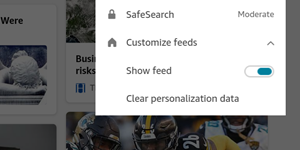
The feeds that you get using the Fire tablets are the same that you get using the Bing iOS or Android app. If you don’t want to get the Feeds, there is always an option in the Bing settings page to minimize it:
In addition to the personalized feeds, our users can also enjoy a number of other content such as news, sports, recipes and much more.
Hope you enjoy the experience and let us know if you have any feedback. We’ll continue to develop and improve the experience — cheers!
Source: https://blogs.bing.com/search-quality-insights/2019-03/Bing-and-React-on-Amazon-Tablets
My Computer
- Computer type
- PC/Desktop
- Computer Manufacturer/Model Number
- Self built custom
- OS
- 64-bit Windows 11 Pro for Workstations
- CPU
- Intel i7-8700K OC'd to 5 GHz
- Motherboard
- ASUS ROG Maximus XI Formula Z390
- Memory
- 64 GB (4x16GB) G.SKILL TridentZ RGB DDR4 3600 MHz
- Graphics Card(s)
- ASUS ROG-STRIX-GTX1080TI-O11G-GAMING
- Sound Card
- Integrated
- Monitor(s) Displays
- 2 x Samsung Odyssey G7 27"
- Screen Resolution
- 2560x1440
- Hard Drives
- 1TB Samsung 990 PRO M.2,
4TB Samsung 990 PRO PRO M.2,
TerraMaster F8 SSD Plus NAS
- PSU
- Seasonic Prime Titanium 850W
- Case
- Thermaltake Core P3
- Cooling
- Corsair Hydro H115i
- Keyboard
- Logitech wireless K800
- Mouse
- Logitech MX Master 4
- Internet Speed
- 2 Gb/s Download and 100 Mb/s Upload
- Antivirus
- Malwarebyte Anti-Malware Premium
- Browser
- Google Chrome
- Other Info
- Logitech Z625 speaker system,
Logitech BRIO 4K Pro webcam,
HP Color LaserJet Pro MFP M477fdn,
APC SMART-UPS RT 1000 XL - SURT1000XLI,
Galaxy S23 Plus phone
