Bing Search Machine: Start screen

ariespaan

New member
Member
Local time
10:51 AM
Messages
71
Hi,

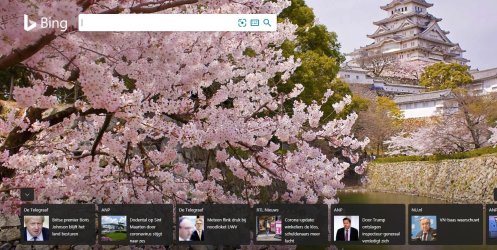
When i use the Microsoft Search-engine: BING I notice that a get a menu at the bottom of the screen filled with news-titems and a little image within each item

But in the most cases, this news-menu does not appear in the Bing-Startup screen
What must i do to get that news-menu back at the screen?

I added a Binq Screenshot, with that news-menu, at the bottom of the screen.
So you can see what i mean
 

Attachments
  • Fs Cap 0441.jpg
    Fs Cap 0441.jpg
    523 KB · Views: 0

My Computer

Computer type
Laptop
Computer Manufacturer/Model Number
Sony
OS
Windows-7 64 Bits Home Premium
CPU
Intel I5
Hello,

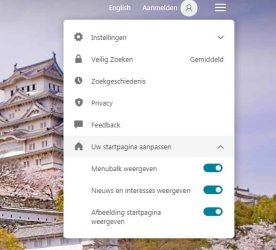
Click on Settings and Quick Links (the three horizontal bars icon):

Bing settings and quick links.PNG

then under Customise Your Homepage, check Show News and Interests .
 

My Computer

Computer type
PC/Desktop
OS
Windows 7 x64, Vista x64, 8.1 smartphone
CPU
Intel E8400 65W 64-bit
Motherboard
Gigabyte EP45-UD3LR
Memory
DDR2 2 x 2GB, 1GB x 2
Graphics Card(s)
XFX Radeon HD5750
Sound Card
AMD High Definition Audio; Realtek High Definition Audio
Monitor(s) Displays
iiyama prolite X2377HDS
Screen Resolution
1920 x 1080
Hard Drives
500GB 7200 rpm Seagate ST3500413AS 16MB, 500GB 5400 rpm Toshiba MQ02ABF050H 32MB, 200GB 7200 rpm Seagate ST3200820AS 8MB, 2TB 7200 rpm Western Digital WD20EZRX 64MB
PSU
Enermax Liberty Modular
Case
Antec P193 Midi Tower
Keyboard
Mionix ZIBAL 60
Mouse
Razer USB 2.0 Diamondback Mouse or Huion Graphics Tablet
Browser
Internet Explorer, Lunascape, Firefox, Opera, Avast Safezone
Hello Iko22

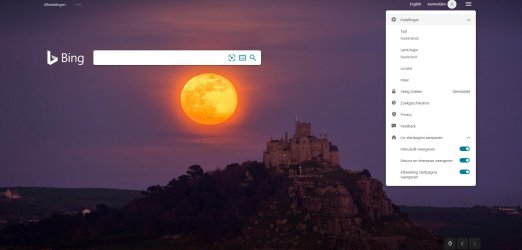
I did what you have answered, but still i don't get: The Show News and Interest boxes, visable
I have enclosed a screenshot, to show it to you
By the way, i have not changed anything (switches) for they where already set correctly, as you can see
 

Attachments

  • Fs Cap 0442.jpg
    Fs Cap 0442.jpg
    53.9 KB · Views: 2

My Computer

Computer type
Laptop
Computer Manufacturer/Model Number
Sony
OS
Windows-7 64 Bits Home Premium
CPU
Intel I5

My Computer

Computer type
PC/Desktop
OS
Windows 7 x64, Vista x64, 8.1 smartphone
CPU
Intel E8400 65W 64-bit
Motherboard
Gigabyte EP45-UD3LR
Memory
DDR2 2 x 2GB, 1GB x 2
Graphics Card(s)
XFX Radeon HD5750
Sound Card
AMD High Definition Audio; Realtek High Definition Audio
Monitor(s) Displays
iiyama prolite X2377HDS
Screen Resolution
1920 x 1080
Hard Drives
500GB 7200 rpm Seagate ST3500413AS 16MB, 500GB 5400 rpm Toshiba MQ02ABF050H 32MB, 200GB 7200 rpm Seagate ST3200820AS 8MB, 2TB 7200 rpm Western Digital WD20EZRX 64MB
PSU
Enermax Liberty Modular
Case
Antec P193 Midi Tower
Keyboard
Mionix ZIBAL 60
Mouse
Razer USB 2.0 Diamondback Mouse or Huion Graphics Tablet
Browser
Internet Explorer, Lunascape, Firefox, Opera, Avast Safezone
Fs Cap 0443.jpg

Fs Cap 0444 - kopie.jpg

Fs Cap 0445.jpgIko22, Here it is
 

My Computer

Computer type
Laptop
Computer Manufacturer/Model Number
Sony
OS
Windows-7 64 Bits Home Premium
CPU
Intel I5
No idea, sorry. The Homepage Image is different also. Does that mean the picture was taken on a different day? Or could be that the Homepage image is also not being updated. Have you tried a different browser?
 

My Computer

Computer type
PC/Desktop
OS
Windows 7 x64, Vista x64, 8.1 smartphone
CPU
Intel E8400 65W 64-bit
Motherboard
Gigabyte EP45-UD3LR
Memory
DDR2 2 x 2GB, 1GB x 2
Graphics Card(s)
XFX Radeon HD5750
Sound Card
AMD High Definition Audio; Realtek High Definition Audio
Monitor(s) Displays
iiyama prolite X2377HDS
Screen Resolution
1920 x 1080
Hard Drives
500GB 7200 rpm Seagate ST3500413AS 16MB, 500GB 5400 rpm Toshiba MQ02ABF050H 32MB, 200GB 7200 rpm Seagate ST3200820AS 8MB, 2TB 7200 rpm Western Digital WD20EZRX 64MB
PSU
Enermax Liberty Modular
Case
Antec P193 Midi Tower
Keyboard
Mionix ZIBAL 60
Mouse
Razer USB 2.0 Diamondback Mouse or Huion Graphics Tablet
Browser
Internet Explorer, Lunascape, Firefox, Opera, Avast Safezone
Yes, the Homepage-Image Background) changes every day, each day a different image
I have tried BING with Winwdows-Xp en Windows-& and both with Chrome and Firefox as Internet-browser
All af them dont display that field: Show News and Interested boxes, that what i showed yqou in my previous post (the first Screenshot)

And i boxed that item: Nieuws en Interesses weergeven, to show that item (Note i'am using a Dutch-version!)\

The box. that i mentioned does not show me at all, it sometimes appears, but mostly not.

Question: Because BING is a Microsoft Item, should i inform Microsoft about it, and so how can i send Microsoft a problem-reprto about this?
 

My Computer

Computer type
Laptop
Computer Manufacturer/Model Number
Sony
OS
Windows-7 64 Bits Home Premium
CPU
Intel I5
Hello ariespaan

Yes, you can inform Microsoft.

At the Bing Homepage, scroll down to the bottom, and "feedback" tab is next to "European data protection". You wont receive a reply from Microsoft, should you choose that route.

Alternatively, questions about Bing can be directed to Microsoft Answers website. There is a category especially for Bing on that site. There maybe a Dutch language version of that site ? Bing | Microsoft Answers
 

My Computer

Computer type
PC/Desktop
OS
Windows 7 x64, Vista x64, 8.1 smartphone
CPU
Intel E8400 65W 64-bit
Motherboard
Gigabyte EP45-UD3LR
Memory
DDR2 2 x 2GB, 1GB x 2
Graphics Card(s)
XFX Radeon HD5750
Sound Card
AMD High Definition Audio; Realtek High Definition Audio
Monitor(s) Displays
iiyama prolite X2377HDS
Screen Resolution
1920 x 1080
Hard Drives
500GB 7200 rpm Seagate ST3500413AS 16MB, 500GB 5400 rpm Toshiba MQ02ABF050H 32MB, 200GB 7200 rpm Seagate ST3200820AS 8MB, 2TB 7200 rpm Western Digital WD20EZRX 64MB
PSU
Enermax Liberty Modular
Case
Antec P193 Midi Tower
Keyboard
Mionix ZIBAL 60
Mouse
Razer USB 2.0 Diamondback Mouse or Huion Graphics Tablet
Browser
Internet Explorer, Lunascape, Firefox, Opera, Avast Safezone
Back
Top