
Bios Access

VahidTaslimi

New member
Local time
5:56 PM
Messages
7
Hi everyone;

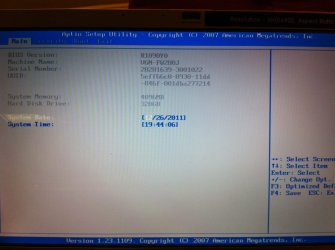
I need your help. I am going to install 7, but, I have a problem during installation that I should disable AHCI mode. I found that I should go into BIOS. I have a Sony vaio laptop that I tried all keys like F1, F2, DEL, ESC, F10 ...Just F2 works and go to setup. In setup screen, I can see just main, security, boot and exit tabs. I don't know is it bios? If so, how can I disable AHCI mode? I didn't find anything.
Thanks in advance
 

Attachments
  • photo.JPG
    photo.JPG
    96.7 KB · Views: 574

My Computer

OS
windows 7 premium x-64
Hi,

Usually its the F2 key for the Vaio's if I'm not mistaken. Hold that down when you reboot.

Regards,
Golden
 

My Computer

Computer type
PC/Desktop
Computer Manufacturer/Model Number
Golden Mk. I.4
OS
Windows 10 Pro x64 ; Xubuntu x64
CPU
Intel i7 860 @ 2.80 GHz O/C'ed to 4.0GHz
Motherboard
Gigabyte P55A-UD3R Rev.1. Award BIOS F13
Memory
16GB Corsair Vengance DDR3 @ 661 MHz Dual Channel (9-9-9-24)
Graphics Card(s)
EVGA NVidia GTX 560 1024MB
Sound Card
Realtek Integrated
Monitor(s) Displays
Dual Samsung SyncMaster 2494HS
Screen Resolution
1920*1080 and 1920*1080
Hard Drives
1*Samsung 840 EVO 120GB SSD;
1*OCZ Vertex 2 60GB SSD;
2*Samsung F3 SpinPoint 1TB in RAID0;
1*Samsung F1 SpinPoint 1TB;
2*Western Digital 1TB External USB 3.0
1*Western Digital 500GB External USB 3.0
1*Seagate 500GB External USB 2.0
PSU
Thermaltake ToughPower QFan 750W
Case
Thermaltake Element S VK60001W2Z
Cooling
Corsair H60 Water Cooling, 2*230mm and 2*80mm case fans
Keyboard
Logitech G110
Mouse
Logitech MX518
I think you may need to enable Advanced options in the Sony Vaio BIOS
which may be locked by default for AHCI and other options.

If your machine has Phoenix BIOS, check out the following article on
how to enable/ disable AHCI in adavanced options:
http://forum.notebookreview.com/son...a-rosa-platform-phoenix-bios-vaio-laptop.html

You may also like to take a look at this thread for information
which may assist you:
http://forum.notebookreview.com/sony/429203-can-i-disable-ahci-vaio-z-bios-2.html

Hope this helps
 

My Computer

OS
Windows 7 Home Premium 64 Bit OS
Thanks for your help
I tried F2, but, as you can see in the image, it goes into setup. I want to know is it BIOS? If so, how can I disable AHCI?
 

My Computer

OS
windows 7 premium x-64
Yes that is the BIOS.

You have to Tab key to the other options or use the arrow
keys as explained on the right hand side of your screen to view
the other options.

In your case, you are on the main tab and could use the arrow keys to
select the other options, again in your case, these are Security, Boot
and Exit.

Have a look at the links I have provided to see if they can
assist you in setting up the BIOS for your requirement.
 

My Computer

OS
Windows 7 Home Premium 64 Bit OS
What exact error did you get that said you need to disable AHCI in BIOS? When?

Where did you get Win7? Did you burn it to DVD yourself?

Please tell us exactly what happens when you try to install and verbatim error messages.
 
Thanks for help.
This is the whole story:
I have a vaio laptop VGN-FW 280J. I had a vista and Ubunutu on my machine. I had many problems with my windows and I decided to recover it. I used from recovery menu of Grub2 and tried to recover it. Maybe it was wrong. Anyway, I lost both ubunutu and vista. I tried to recover windows using recovery DVD. It did n't work. Finally, I decided to install windows 7. During installation, when it asked to where do you want to install windows? I found an error: "Windows cannot be installed to this disk. This computer's hardware maynot support booting to this disk. Ensure that the disk's controller is enabled in the computer's BIOS menu." After that, I started working with command prompt and using disk part, I cleaned HDD and repartitioned and set it as primary partition and the formatted it. I thought that the problem has been solved, but, it is still remaining. In some forums, I found that if I can disable AHCI mode in BIOS, I will not have this error message. I tried to disable, it was unsuccessful. Becase my BIOS is aptio setup utility 1.23.1109 and it doesn't advanced menu. With this situation, how can I install windows 7?
Yes, I burned it to DVD myself.
Thanks in advance
Vahid
 

My Computer

OS
windows 7 premium x-64
Check for a newer BIOS update on Sony's Support Downloads webpage for your model.

Did you make your Vaio Recovery Disks before wiping the HD? I'd try running them first to see if Vista can be restored to it. You can then run Windows 7 Upgrade Advisor to check for issues and upgrade BIOS easier if needed.

Where did you get Win7? How do you plan to Activate it?

Confirm the ISO integrity then burn another DVD using ImgBurn at 4x speed, then boot it to Custom install, delete all partitions and click Next to let installer format and begin.

Try writing confirmed ISO to flash stick using Universal USB Installer with Win7 in dropdown menu. Boot under USB, Removable on HD's in BIOS setup Boot tab.

Try resetting the BIOS to defaults: Clear CMOS - 3 Ways to Clear the CMOS - Reset BIOS. While in BIOS setup check every tab for SATA controller settings to find out current setting.
 
Forget it - on a Sony you can do nothing with the BIOS - they restricted BIOS access by design. That was the one and only reason I just returned an otherwise superb Vaio and got my money back.

There was no way to set AHCI, no way to change the boot sequence and no way to run live CDs . the cursor froze.
 

My Computer

Computer Manufacturer/Model Number
HP, Dell, Gateway, Toshiba - 4 laptops and 2 desktops
OS
Vista, Windows7, Mint Mate, Zorin, Windows 8
CPU
from 1.6GHz Duo to i7
Monitor(s) Displays
2x HP w2207
Hard Drives
5x HDD, 7x SSD, 12x Externals
Keyboard
with trackball - no mices
Mouse
Trackball mice
Internet Speed
DSL 6000
Oh dear!!

Drop the bomb Wolfgang!!
That is some bad news indeed.
 

My Computer

OS
Windows 7 Home Premium 64 Bit OS
Yeah, right. It was really a superb laptop with an i7, 1GB graphics, USB3 and eSata ports, a HD screen (1960x1260 - or something like that), a backlit keyboard and all the other bells and whistles. But the BIOS was so retarded that you could hardly do anything with it. A super system designed for mom and pap to write emails - what a shame.

I really hated to give it up. Had to write a letter to their CEO to get my money back. The rest of their morons where wheeling me around.

I understand that it is possible to jailbreak the BIOS. But if you get stuck with that, you are really on your own.
 

My Computer

Computer Manufacturer/Model Number
HP, Dell, Gateway, Toshiba - 4 laptops and 2 desktops
OS
Vista, Windows7, Mint Mate, Zorin, Windows 8
CPU
from 1.6GHz Duo to i7
Monitor(s) Displays
2x HP w2207
Hard Drives
5x HDD, 7x SSD, 12x Externals
Keyboard
with trackball - no mices
Mouse
Trackball mice
Internet Speed
DSL 6000
If kicking and screaming to upper management is required to
get one's money back then one must kick and scream.

Jailbraek BIOS :eek: Money back :D
 

My Computer

OS
Windows 7 Home Premium 64 Bit OS
Back
Top