BIOS No Beep.

haqeem18

New member
Member
Local time
1:48 PM
Messages
32
I have a acer m3910 desktop pc and its good.so about last year,i have change the gpu from hd5570 to gts450.my problem is that when i switch on my pc,there's no the 'beep' sound,everything is blank on the screen.So i remove my gpu,use the onboard graphics and i boot up fine.then i install back my gpu and it boot up just fine.any ideas?happen only like 3-4 time in my one year usage of the new card.

(By the way,sorry for my english as i try to be specific as possible)
 

My Computer

OS
Windows 7 Home Premium 64bit
CPU
Intel Core i5 650
Memory
4GB RAM
Graphics Card(s)
GTS 450
Screen Resolution
1600x900
PSU
550W Cooler Master
You say it only has happened 3 or 4 times in a year. That is strange. If the onboard graphics is as good, you could go with that. You might also try downloading updated drivers for the card. It is strange that the failure only happens one in a while. Let us know how this turns out.
 

My Computer

Computer type
PC/Desktop
Computer Manufacturer/Model Number
Custom Build
OS
Windows 7 Home Premium 32-Bit - Build 7600 SP1
CPU
Intel Core i3-2120 3.30Ghz
Motherboard
Asus P8Z68-V LX Intel Z68 Socket H2 ATX
Memory
Kingston 4 GB DDR3 1333 mhz
Graphics Card(s)
AMD Radeon HD6670
Sound Card
Sound Blaster Audigy SE 24-Bit
Monitor(s) Displays
Asus VE228
Screen Resolution
1440 X 900
Hard Drives
OCZ Vertex 3 120 GB Sata 3 SSD ==
Kingston SH103/S3 120 G Hyper X 120 GB SSD ==
Western Digital 500 GB Caviar Green 7200 RPM ==
PSU
Corsair CX600M == 600 Watt
Case
NZXT Apollo - Silver with Clear Side Panel
Cooling
Three 120 mm Fans
Keyboard
Microsoft Natural 4000
Mouse
Microsoft Custom Optical 3000
Internet Speed
AT&T Fiber Optic Wireless Network
Antivirus
Microsoft Security Essentials
Browser
Chrome
Other Info
120 mm Blue LED Fan -- Three Blue LED Lazer Light Sticks
You say it only has happened 3 or 4 times in a year. That is strange. If the onboard graphics is as good, you could go with that. You might also try downloading updated drivers for the card. It is strange that the failure only happens one in a while. Let us know how this turns out.

Ya,I'll try later when I'm back because im on my vacation now.it annoyed me sometime because I have to reinstall the graphics card.:)
 

My Computer

OS
Windows 7 Home Premium 64bit
CPU
Intel Core i5 650
Memory
4GB RAM
Graphics Card(s)
GTS 450
Screen Resolution
1600x900
PSU
550W Cooler Master
By the way,I also change my PSU to 550w cooler master PSU.Changed the PSU the same time with Graphicd card.My gts450 is from asus,clocked at 925mhz.
 

My Computer

OS
Windows 7 Home Premium 64bit
CPU
Intel Core i5 650
Memory
4GB RAM
Graphics Card(s)
GTS 450
Screen Resolution
1600x900
PSU
550W Cooler Master
I don't know if believing the salesman is so good or not. Some of those guys know nothing about PC's. The card might be OK, I don't know. == I don't think the post not beeping is a problem. Mine doesn't beep and I asked about it and was told that there is an internal speaker that needs to be hooked up to hear the beep. == If there was a problem with the card, it would happen all the time, not just once in a while.
 

My Computer

Computer type
PC/Desktop
Computer Manufacturer/Model Number
Custom Build
OS
Windows 7 Home Premium 32-Bit - Build 7600 SP1
CPU
Intel Core i3-2120 3.30Ghz
Motherboard
Asus P8Z68-V LX Intel Z68 Socket H2 ATX
Memory
Kingston 4 GB DDR3 1333 mhz
Graphics Card(s)
AMD Radeon HD6670
Sound Card
Sound Blaster Audigy SE 24-Bit
Monitor(s) Displays
Asus VE228
Screen Resolution
1440 X 900
Hard Drives
OCZ Vertex 3 120 GB Sata 3 SSD ==
Kingston SH103/S3 120 G Hyper X 120 GB SSD ==
Western Digital 500 GB Caviar Green 7200 RPM ==
PSU
Corsair CX600M == 600 Watt
Case
NZXT Apollo - Silver with Clear Side Panel
Cooling
Three 120 mm Fans
Keyboard
Microsoft Natural 4000
Mouse
Microsoft Custom Optical 3000
Internet Speed
AT&T Fiber Optic Wireless Network
Antivirus
Microsoft Security Essentials
Browser
Chrome
Other Info
120 mm Blue LED Fan -- Three Blue LED Lazer Light Sticks
I don't know if believing the salesman is so good or not. Some of those guys know nothing about PC's. The card might be OK, I don't know. == I don't think the post not beeping is a problem. Mine doesn't beep and I asked about it and was told that there is an internal speaker that needs to be hooked up to hear the beep. == If there was a problem with the card, it would happen all the time, not just once in a while.

My pc doesn't need to hooked up a internal speaker because on a normal boot up,I can hear the POST with short beep once.Well I still not sure thoe what is the prob.
 

My Computer

OS
Windows 7 Home Premium 64bit
CPU
Intel Core i5 650
Memory
4GB RAM
Graphics Card(s)
GTS 450
Screen Resolution
1600x900
PSU
550W Cooler Master
I had this issue when I upgraded from a Nvidia 6200 to an 8500, what is your Power Supply rated at, with my system I was using the one that came with it, which was only a 250 Watt, but the new GPU required 350 Watts minimum. The video card you upgraded to requires at a bare minimum of 350 Watt, but with your system I would recommend at least 450-500 Watts.

What is happening, is since PSUs don't constantly bring up full power all the time, it doesn't initialize your newer card, I bet if you unplug the monitor from the new card to the onboard while it is still on and acting up like this you will find your onboard was loaded instead.
 

My Computer

Computer Manufacturer/Model Number
HP C2N70UA#ABA Laptop
OS
Windows 8 64-bit (6.2, Build 9200) (9200.win8_rtm.120725-1247)
CPU
AMD Quad-Core A10-4600M APU 2.3Ghz Turbo to 3.4
Memory
8GB DDR3
Graphics Card(s)
AMD Radeon HD 7660G
Sound Card
Altec Lansing with SRS Premium Sound
Monitor(s) Displays
17" Laptop HD Display (720p)
Screen Resolution
1600*900
Hard Drives
750GB (5400 RPM), with smart protect
Western Digital 1TB Passport
Cooling
HP Cool Sense
Keyboard
Island Style
Mouse
Logitech 625 Wireless
Internet Speed
30MBps
According to the graphics card specifications, a 400W PSU is needed as a minimum, and the OP has a 550W therefore your probably correct about the PSU wattage.
 

My Computer

Computer type
Laptop
According to the graphics card specifications, a 400W PSU is needed as a minimum, and the OP has a 550W therefore your probably correct about the PSU wattage.

I just read that post on page one that he had a cooler master 550, which holds a constant of approx 375 Watts for about 4-5 hours, max wattage is 550 watts, but it rarely gets that much power out according to reviews of that PSU.

Not only that, but his CPU probably requires 175-200 Watts, plus the 350 the GPU requires, means at a bare minimum he would need about a 550 + the Wattage the CD-Rom/DVD and HDD require, the PSU is slightly too small in the wattage department.
 

My Computer

Computer Manufacturer/Model Number
HP C2N70UA#ABA Laptop
OS
Windows 8 64-bit (6.2, Build 9200) (9200.win8_rtm.120725-1247)
CPU
AMD Quad-Core A10-4600M APU 2.3Ghz Turbo to 3.4
Memory
8GB DDR3
Graphics Card(s)
AMD Radeon HD 7660G
Sound Card
Altec Lansing with SRS Premium Sound
Monitor(s) Displays
17" Laptop HD Display (720p)
Screen Resolution
1600*900
Hard Drives
750GB (5400 RPM), with smart protect
Western Digital 1TB Passport
Cooling
HP Cool Sense
Keyboard
Island Style
Mouse
Logitech 625 Wireless
Internet Speed
30MBps
So the cause would come from the PSU?During gaming,my PSU does run noisy.Googled about the noise and most people experience that to so I thought it just a normal problem.
 

My Computer

OS
Windows 7 Home Premium 64bit
CPU
Intel Core i5 650
Memory
4GB RAM
Graphics Card(s)
GTS 450
Screen Resolution
1600x900
PSU
550W Cooler Master

My Computer

OS
Windows 7 Home Premium 64bit
CPU
Intel Core i5 650
Memory
4GB RAM
Graphics Card(s)
GTS 450
Screen Resolution
1600x900
PSU
550W Cooler Master
I had this issue when I upgraded from a Nvidia 6200 to an 8500, what is your Power Supply rated at, with my system I was using the one that came with it, which was only a 250 Watt, but the new GPU required 350 Watts minimum. The video card you upgraded to requires at a bare minimum of 350 Watt, but with your system I would recommend at least 450-500 Watts.

What is happening, is since PSUs don't constantly bring up full power all the time, it doesn't initialize your newer card, I bet if you unplug the monitor from the new card to the onboard while it is still on and acting up like this you will find your onboard was loaded instead.

I think post #6 in this thread answers the PSU wattage being used.
 

My Computer

Computer type
PC/Desktop
Computer Manufacturer/Model Number
Custom Built
OS
Windows 7 Professional x64
CPU
Intel i5 quad processor
Motherboard
DP67BG
Memory
16 GB
Graphics Card(s)
Radeon HD 5770
Sound Card
Realtek High Definition Audio
Monitor(s) Displays
Samsung SyncMaster
Screen Resolution
1920X1080
Hard Drives
WD 2TB (SATA Internal)
WD 1TB (USB External)
PSU
Corsair GS800
Case
Tower (Generic)
Cooling
3 Internal Fans
Keyboard
MS Wireless
Mouse
MS Optical Wired
Internet Speed
54 mbps
Antivirus
Emsisoft
Browser
IE-Version 9, Palemoon-Version 24.2.0
My pc doesn't need to hooked up a internal speaker because on a normal boot up,I can hear the POST with short beep once.Well I still not sure thoe what is the prob.
Actually it does. Something needs to make the beep sounds. Did it beep before all of the changes you've done? If your PSU is making "noise" while gaming I think it is being stressed too much, like other people's. What is the exact model number of it?

When you reinstalled the GPU did you physically remove it and the power cables and put them back? Many, many times people don't get it or cables fully inserted, although they swear it can't be that.

Won't cost anything to check.;)
 

My Computer

Computer type
PC/Desktop
Computer Manufacturer/Model Number
Home Built Desktop By DataTech
OS
Windows 7 Ultimate X64 SP1
CPU
Intel i5-2550K, Differing ~4.4-4.8GHz No built in GPU
Motherboard
ASUS P8Z68-V PRO/GEN3
Memory
16GB G.Skill Sniper 1866MHz @ 2133MHz 2x8GB
Graphics Card(s)
ASUS GTX650TIB-DC2OC-2GD5, (650TI Boost)
Sound Card
Onboard Realtek 5-1
Monitor(s) Displays
Samsung P2570HD
Screen Resolution
1920x1080
Hard Drives
Samsung 840 Pro 256GB SSD for OS, 500GB Seagate Constellation (Enterprise drive) for Data
PSU
Corsair HX650W
Case
Inwin Dragon Rider
Cooling
Hyper 212 EVO w/two Noctua fans, push-pull, @1300 RPM
Keyboard
E-Z Eyes, bright yellow keys with large characters
Mouse
steelseries SENSEI Laser Pro Gaming
Internet Speed
48-51Mbs Mbs down, 11 Mbs up Xfinity Cable
Antivirus
Norton Internet Security 2013
Browser
IE 10, Opera, Pale Moon if needed
Other Info
4 case fans, LG BluRay-RE, ASUS DVD-RW, Mr. Fusion power supply, 1.21 gigawatts.
My pc doesn't need to hooked up a internal speaker because on a normal boot up,I can hear the POST with short beep once.Well I still not sure thoe what is the prob.
Actually it does. Something needs to make the beep sounds. Did it beep before all of the changes you've done? If your PSU is making "noise" while gaming I think it is being stressed too much, like other people's. What is the exact model number of it?

When you reinstalled the GPU did you physically remove it and the power cables and put them back? Many, many times people don't get it or cables fully inserted, although they swear it can't be that.

Won't cost anything to check.;)

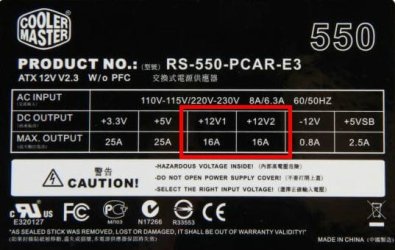
It does beep before the changes.My PSU is Cooler Master Extreme Power Plus 550w.I disconnect the 6 pin power from the card and remove the card from the board.
 

My Computer

OS
Windows 7 Home Premium 64bit
CPU
Intel Core i5 650
Memory
4GB RAM
Graphics Card(s)
GTS 450
Screen Resolution
1600x900
PSU
550W Cooler Master

My Computer

Computer type
PC/Desktop
Computer Manufacturer/Model Number
Home Built Desktop By DataTech
OS
Windows 7 Ultimate X64 SP1
CPU
Intel i5-2550K, Differing ~4.4-4.8GHz No built in GPU
Motherboard
ASUS P8Z68-V PRO/GEN3
Memory
16GB G.Skill Sniper 1866MHz @ 2133MHz 2x8GB
Graphics Card(s)
ASUS GTX650TIB-DC2OC-2GD5, (650TI Boost)
Sound Card
Onboard Realtek 5-1
Monitor(s) Displays
Samsung P2570HD
Screen Resolution
1920x1080
Hard Drives
Samsung 840 Pro 256GB SSD for OS, 500GB Seagate Constellation (Enterprise drive) for Data
PSU
Corsair HX650W
Case
Inwin Dragon Rider
Cooling
Hyper 212 EVO w/two Noctua fans, push-pull, @1300 RPM
Keyboard
E-Z Eyes, bright yellow keys with large characters
Mouse
steelseries SENSEI Laser Pro Gaming
Internet Speed
48-51Mbs Mbs down, 11 Mbs up Xfinity Cable
Antivirus
Norton Internet Security 2013
Browser
IE 10, Opera, Pale Moon if needed
Other Info
4 case fans, LG BluRay-RE, ASUS DVD-RW, Mr. Fusion power supply, 1.21 gigawatts.
The graphics card itself is not the problem, and have reconnected the cables properly as suggested by Britton30?

How old is the PSU? Is it still under warranty or able to be returned? The PSU may be the problem; I would suggest getting a PSU with a much higher wattage.
 

My Computer

Computer type
Laptop
Yep i did reconnect the cable properly.So actually,my GC doesn't receive it's minimum power to boot up the pc right?But how reinstalling the GC can boot up my pc?:confused:
 

My Computer

OS
Windows 7 Home Premium 64bit
CPU
Intel Core i5 650
Memory
4GB RAM
Graphics Card(s)
GTS 450
Screen Resolution
1600x900
PSU
550W Cooler Master
Your PC is not booting at all now?

What is GC?
 

My Computer

Computer type
PC/Desktop
Computer Manufacturer/Model Number
Home Built Desktop By DataTech
OS
Windows 7 Ultimate X64 SP1
CPU
Intel i5-2550K, Differing ~4.4-4.8GHz No built in GPU
Motherboard
ASUS P8Z68-V PRO/GEN3
Memory
16GB G.Skill Sniper 1866MHz @ 2133MHz 2x8GB
Graphics Card(s)
ASUS GTX650TIB-DC2OC-2GD5, (650TI Boost)
Sound Card
Onboard Realtek 5-1
Monitor(s) Displays
Samsung P2570HD
Screen Resolution
1920x1080
Hard Drives
Samsung 840 Pro 256GB SSD for OS, 500GB Seagate Constellation (Enterprise drive) for Data
PSU
Corsair HX650W
Case
Inwin Dragon Rider
Cooling
Hyper 212 EVO w/two Noctua fans, push-pull, @1300 RPM
Keyboard
E-Z Eyes, bright yellow keys with large characters
Mouse
steelseries SENSEI Laser Pro Gaming
Internet Speed
48-51Mbs Mbs down, 11 Mbs up Xfinity Cable
Antivirus
Norton Internet Security 2013
Browser
IE 10, Opera, Pale Moon if needed
Other Info
4 case fans, LG BluRay-RE, ASUS DVD-RW, Mr. Fusion power supply, 1.21 gigawatts.
Back
Top