Solved BIOS of Lenovo Yoga 2 11, need its early version

siliconbeaver

Member
Guru
VIP
Local time
6:58 PM
Messages
355
Anyone has Lenovo Yoga 2 11 BIOS early version? v1.03 or v1.06
I did a mistake last weekend. now see if a chance to let me flash back. :-)

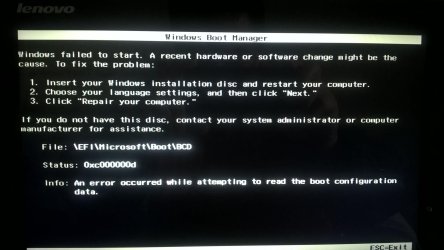
Status: 0xc000000d, or #1223

BIOS v1.03 was with CSM option. support both Windows 7 32/64-bit
BIOS v1.06 started with UEFI only.
BIOS v1.9x is with Win 8.1/10 only. No 32-bit. No Windows 7 any more.
 

My Computers My Computers

  • At a glance

    Windows 7 Pro 64-bitI7-970032 GB
    Computer type
    PC/Desktop
    Computer Manufacturer/Model Number
    HP Elite 800 G5
    OS
    Windows 7 Pro 64-bit
    CPU
    I7-9700
    Memory
    32 GB
  • At a glance

    Windows 7 Pro 64-bit
    Computer type
    Laptop
    System Manufacturer/Model Number
    ASUS UX305C
    OS
    Windows 7 Pro 64-bit
Anyone has Lenovo Yoga 2 11 BIOS early version? v1.03 or v1.06
I did a mistake last weekend. now see if a chance to let me flash back. :-)

Status: 0xc000000d, or #1223

BIOS v1.03 was with CSM option. support both Windows 7 32/64-bit
BIOS v1.06 started with UEFI only.
BIOS v1.9x is with Win 8.1/10 only. No 32-bit. No Windows 7 any more.
Lenovo only lists the following BIOS updates for the Yoga 2 11:

  • BIOS Update for Windows 8.1 (64-bit), Windows 10 (64-bit) - Yoga 2 11
    (Haswell) BIOS Update #94 16 Sep 2015 4.2 MB
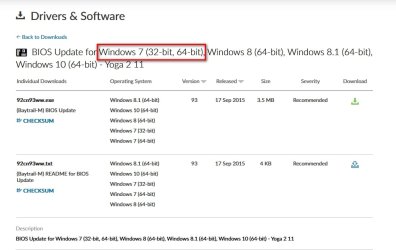
  • BIOS Update for Windows 7 (32-bit, 64-bit), Windows 8 (64-bit), Windows 8.1 (64-bit), Windows 10 (64-bit) - Yoga 2 11
    (Baytrail-M) BIOS Update #93 16 Sep 2015 3.5 MB

Are you trying to install Windows 7? If so, would BIOS #93 work for you?
 

My Computers My Computers

  • At a glance

    Windows 7 Professional 64bit / Windows 10 Hom...AMD FX-8350GSKILL Ripjaw-X PC3 12800 12GB (2x4GB, 2x2GB)ASUS ENGTX560 DCII OC/2DI/1GD5 1GB
    Computer type
    PC/Desktop
    Computer Manufacturer/Model Number
    Custom build
    OS
    Windows 7 Professional 64bit / Windows 10 Home 64bit
    CPU
    AMD FX-8350
    Motherboard
    Gigabyte GA-990FXA-UD3 (AM3+) Rev. 4.0
    Memory
    GSKILL Ripjaw-X PC3 12800 12GB (2x4GB, 2x2GB)
    Graphics Card(s)
    ASUS ENGTX560 DCII OC/2DI/1GD5 1GB
    Sound Card
    Integrated
    Monitor(s) Displays
    Asus VE228H (21.5-in)
    Screen Resolution
    1920x1080 60Hz
    Hard Drives
    SAMSUNG 870 EVO 1TB (2.5" SATA SSD)
    SAMSUNG 870 EVO 500GB (2.5" SATA SSD)
    PSU
    Antec TruePower (new) TP-650 (650 watts)
    Case
    Antec Three Hundred
    Cooling
    AMD stock (plan to upgrade to Cooler Master Hyper 212 EVO)
    Keyboard
    Logitech K540 (wireless)
    Mouse
    Logitech M310 (wireless)
    Internet Speed
    Comcast Gigabit X2 Internet (2100Mbps down / 300Mbps up)
    Browser
    Firefox, Edge, Chrome
    Other Info
    Optical drive: ASUS DRW-24B3ST/BLK/G (Black) (24X)
    External hard drives: 2TB & 6TB
    Internet Gateway: Comcast XB8
  • Computer type
    PC/Desktop
Don't do that flash

my Yoga was running Win7.

not any more (read my post #1223). boot failure. no way to repair.
had to move to Win8.1 last night (installed from Win8.1 ISO). now my Yoga 2 11 looks like a big size Windows Phone. :p

- - - Updated - - -

Lenovo has removed early versions which could run Windows 7. (read my #1 post)
 

My Computers My Computers

  • At a glance

    Windows 7 Pro 64-bitI7-970032 GB
    Computer type
    PC/Desktop
    Computer Manufacturer/Model Number
    HP Elite 800 G5
    OS
    Windows 7 Pro 64-bit
    CPU
    I7-9700
    Memory
    32 GB
  • At a glance

    Windows 7 Pro 64-bit
    Computer type
    Laptop
    System Manufacturer/Model Number
    ASUS UX305C
    OS
    Windows 7 Pro 64-bit
Don't do that flash

my Yoga was running Win7.

not any more (read my post #1223). boot failure. no way to repair.
had to move to Win8.1 last night (installed from Win8.1 ISO). now my Yoga 2 11 looks like a big size Windows Phone. :p

- - - Updated - - -

Lenovo has removed early versions which could run Windows 7. (read my #1 post)
Sounds like you are talking about the mode where you have a lot of apps. They wanted to call it Metro mode but had to change it to Modern mode because of a copyright dispute. They envisioned making Windows, phones and tablets to have a similar look with computers also having a touchscreen interface. Unfortunately, they forgot to ask actual users what they thought of that idea because most rejected it. Note, even Windows 10 has a remnant of that idea with some apps in the start menu.

It has been a while since I ran Windows 8.1 on a computer. It has two modes:

  1. Modern mode with apps
  2. Traditional Windows desktop mode
I think I remember in the settings you can make the Windows desktop mode the default when you boot the computer.

I started with Windows 8. I missed the Windows start menu so much I installed a program called Classic Shell. This start menu emulator at least made Windows 8 and Windows 8.1 tolerable.

Classic Shell
http://www.classicshell.net/
 

My Computers My Computers

  • At a glance

    Windows 7 Professional 64bit / Windows 10 Hom...AMD FX-8350GSKILL Ripjaw-X PC3 12800 12GB (2x4GB, 2x2GB)ASUS ENGTX560 DCII OC/2DI/1GD5 1GB
    Computer type
    PC/Desktop
    Computer Manufacturer/Model Number
    Custom build
    OS
    Windows 7 Professional 64bit / Windows 10 Home 64bit
    CPU
    AMD FX-8350
    Motherboard
    Gigabyte GA-990FXA-UD3 (AM3+) Rev. 4.0
    Memory
    GSKILL Ripjaw-X PC3 12800 12GB (2x4GB, 2x2GB)
    Graphics Card(s)
    ASUS ENGTX560 DCII OC/2DI/1GD5 1GB
    Sound Card
    Integrated
    Monitor(s) Displays
    Asus VE228H (21.5-in)
    Screen Resolution
    1920x1080 60Hz
    Hard Drives
    SAMSUNG 870 EVO 1TB (2.5" SATA SSD)
    SAMSUNG 870 EVO 500GB (2.5" SATA SSD)
    PSU
    Antec TruePower (new) TP-650 (650 watts)
    Case
    Antec Three Hundred
    Cooling
    AMD stock (plan to upgrade to Cooler Master Hyper 212 EVO)
    Keyboard
    Logitech K540 (wireless)
    Mouse
    Logitech M310 (wireless)
    Internet Speed
    Comcast Gigabit X2 Internet (2100Mbps down / 300Mbps up)
    Browser
    Firefox, Edge, Chrome
    Other Info
    Optical drive: ASUS DRW-24B3ST/BLK/G (Black) (24X)
    External hard drives: 2TB & 6TB
    Internet Gateway: Comcast XB8
  • Computer type
    PC/Desktop
Thanks,

Will try.

Wish you had early BIOS version. I am missing Win7 on Yoga. :cry:


Right,

Windows, if no "Start" button is NOT Windows any more. feel NOT good.
Are you going to upgrade to Win10?

I have tried Win10 32-bit. but cannot boot.(UEFI only by last BIOS flash)
Win10 64-bit is my next try. If its Touchpad works, I would stay with Win10 64-bit (due to I2C issue, most 32-bit has data serial IO port problem, touchpad NOT functional correctly)
 

My Computers My Computers

  • At a glance

    Windows 7 Pro 64-bitI7-970032 GB
    Computer type
    PC/Desktop
    Computer Manufacturer/Model Number
    HP Elite 800 G5
    OS
    Windows 7 Pro 64-bit
    CPU
    I7-9700
    Memory
    32 GB
  • At a glance

    Windows 7 Pro 64-bit
    Computer type
    Laptop
    System Manufacturer/Model Number
    ASUS UX305C
    OS
    Windows 7 Pro 64-bit
Last edited:

My Computers My Computers

  • At a glance

    7 X64i5 84002x8gb 3200mhz
    Computer type
    PC/Desktop
    OS
    7 X64
    CPU
    i5 8400
    Motherboard
    gigabyte b365m ds3h
    Memory
    2x8gb 3200mhz
    Hard Drives
    various
    PSU
    pure power 11 400w cm
    Case
    Coolermaster
    Cooling
    cryorig m9i
  • At a glance

    7x64g54008gb ddr4 2400
    Computer type
    PC/Desktop
    OS
    7x64
    CPU
    g5400
    Motherboard
    ga b365m ds3h
    Memory
    8gb ddr4 2400
    PSU
    xfx pro 450w
Thanks SIW2,

Did try immediately with a dream. below is result.

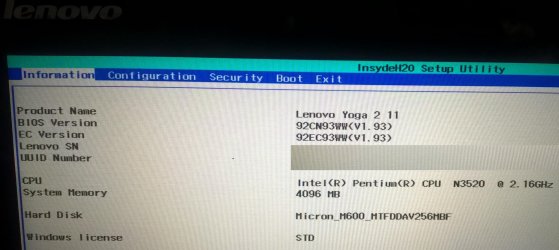
BIOS ver. 1.93
image.jpg

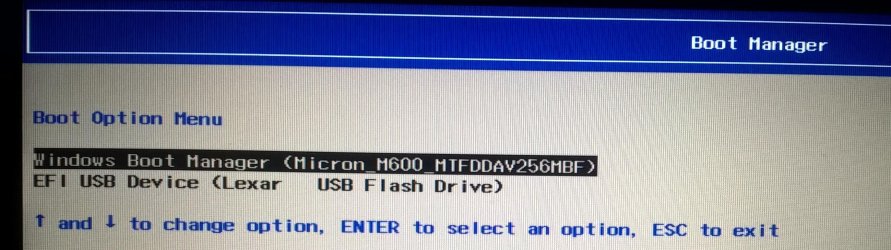
the USB drive is with Win 7 64-bit install media. Its boot failed (either USB drive or external DVD-ROM. I tried both)
image.jpgimage.jpg

my Yoga is done. Win7 game is over on Yoga. I am holding a super-size windows phone (running Win8.1) now. ;)

Thank for Lenovo community link. sounded Lenovo was forced to do that (hardware Intel wouldn't support)
English Community-Lenovo Community
 

My Computers My Computers

  • At a glance

    Windows 7 Pro 64-bitI7-970032 GB
    Computer type
    PC/Desktop
    Computer Manufacturer/Model Number
    HP Elite 800 G5
    OS
    Windows 7 Pro 64-bit
    CPU
    I7-9700
    Memory
    32 GB
  • At a glance

    Windows 7 Pro 64-bit
    Computer type
    Laptop
    System Manufacturer/Model Number
    ASUS UX305C
    OS
    Windows 7 Pro 64-bit
my Yoga is done. Win7 game is over on Yoga. I am holding a super-size windows phone (running Win8.1) now. ;)
I don't understand why you think that you are done when you are left with Windows 8.1. Like I said in post #4 you can configure Windows 8.1 to start in the regular desktop mode. That way you can ignore the phone-like apps if you want. You can also install a program like Classic Shell to give a more Windows 7 like start menu if you want.

I have the use of a 12 year old Dell laptop that came with Windows 7. Its CPU has 2 core and 4 threads. It has 4GBs RAM.

When Windows 8 came out I installed it on the laptop as a dual-boot with Windows 7. When Windows 8.1 came out I upgraded Windows 8 to it. When Windows 10 came out I upgraded Windows 8.1 to it. Now the computer has a dual-boot of Windows 7 and Windows 10. I mainly use Windows 10 on it now and only boot Windows 7 to check for updates.
 

My Computers My Computers

  • At a glance

    Windows 7 Professional 64bit / Windows 10 Hom...AMD FX-8350GSKILL Ripjaw-X PC3 12800 12GB (2x4GB, 2x2GB)ASUS ENGTX560 DCII OC/2DI/1GD5 1GB
    Computer type
    PC/Desktop
    Computer Manufacturer/Model Number
    Custom build
    OS
    Windows 7 Professional 64bit / Windows 10 Home 64bit
    CPU
    AMD FX-8350
    Motherboard
    Gigabyte GA-990FXA-UD3 (AM3+) Rev. 4.0
    Memory
    GSKILL Ripjaw-X PC3 12800 12GB (2x4GB, 2x2GB)
    Graphics Card(s)
    ASUS ENGTX560 DCII OC/2DI/1GD5 1GB
    Sound Card
    Integrated
    Monitor(s) Displays
    Asus VE228H (21.5-in)
    Screen Resolution
    1920x1080 60Hz
    Hard Drives
    SAMSUNG 870 EVO 1TB (2.5" SATA SSD)
    SAMSUNG 870 EVO 500GB (2.5" SATA SSD)
    PSU
    Antec TruePower (new) TP-650 (650 watts)
    Case
    Antec Three Hundred
    Cooling
    AMD stock (plan to upgrade to Cooler Master Hyper 212 EVO)
    Keyboard
    Logitech K540 (wireless)
    Mouse
    Logitech M310 (wireless)
    Internet Speed
    Comcast Gigabit X2 Internet (2100Mbps down / 300Mbps up)
    Browser
    Firefox, Edge, Chrome
    Other Info
    Optical drive: ASUS DRW-24B3ST/BLK/G (Black) (24X)
    External hard drives: 2TB & 6TB
    Internet Gateway: Comcast XB8
  • Computer type
    PC/Desktop
HeHe,

IMO,

  1. Windows 7 is a working machine. good for Office and engineering tasks (my Win7 run various macros and scripts. all of my Win7 are busy)
  2. Windows 10/11 is an entertainment machine, good for online media surfing (video, audio, social media, , ,). It is popping up all kinds of topics/ADs. when I watch them, must NOT focus on work. distraction. :D. Macros are running slow on Win10/11.

  3. Windows 8/8.1 is a big phone (no "Start" button is NOT Windows). need a plan to use it. as most if its functions, AAPL can do better.
 

My Computers My Computers

  • At a glance

    Windows 7 Pro 64-bitI7-970032 GB
    Computer type
    PC/Desktop
    Computer Manufacturer/Model Number
    HP Elite 800 G5
    OS
    Windows 7 Pro 64-bit
    CPU
    I7-9700
    Memory
    32 GB
  • At a glance

    Windows 7 Pro 64-bit
    Computer type
    Laptop
    System Manufacturer/Model Number
    ASUS UX305C
    OS
    Windows 7 Pro 64-bit

My Computers My Computers

  • At a glance

    Windows 7 pro/Windows 10 ProIntel i7 860 Quad core 2.8 ghz8 gbATI Radeon HD 5770 1 gb ram
    Computer type
    PC/Desktop
    Computer Manufacturer/Model Number
    HP Pavillion Elite HPE-250f
    OS
    Windows 7 pro/Windows 10 Pro
    CPU
    Intel i7 860 Quad core 2.8 ghz
    Memory
    8 gb
    Graphics Card(s)
    ATI Radeon HD 5770 1 gb ram
    Monitor(s) Displays
    Alienware 25 AW2521HF & Viewsonic
    Screen Resolution
    1920 x1080 & 1680x1050
    Hard Drives
    WD blue 1 tb & 500 gb.
    Browser
    FF of course.
    Other Info
    https://www.bestbuy.com/site/hp-pavilion-elite-desktop-intel-core-i7-processor-8gb-memory-1tb-hard-drive/9921493.p?skuId=9921493
  • At a glance

    Windows 2012 R2 Data center/Linux Minti3 9100 3.6GHz, 8M cache, 4C/4T8GB 2666MT/s DDR4 ECC UDIMM
    Computer type
    PC/Desktop
    System Manufacturer/Model Number
    Dell Poweredge T140
    OS
    Windows 2012 R2 Data center/Linux Mint
    CPU
    i3 9100 3.6GHz, 8M cache, 4C/4T
    Memory
    8GB 2666MT/s DDR4 ECC UDIMM
    Monitor(s) Displays
    Viewsonic
    Screen Resolution
    1680x1050
    Hard Drives
    1 TB & 750 GB
    Other Info
    https://www.dell.com/en-us/work/shop/productdetailstxn/poweredge-t140?~ck=bt
@MisterEd Classic shell has been replaced by open shell. It is exactly the same so I'm not sure what they changed. It is also the only way I can tolerate 8.1. Open Shell 4.4.169 Download | TechSpot
I though I was missing something so I uninstalled ClassicShell and installed OpenShell in its place. I really couldn't find any difference.

siliconbeaverI wish you would reconsider. Adding OpenShell to Windows 8.1 really makes a difference. Not 100% like Windows 7 but close enough to be tolerable.

Like I said in a previous post, once you install OpenShell you can mostly ignore the dreadful Modern menu and its apps.

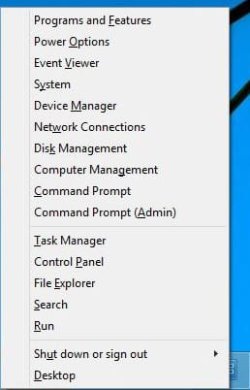
The original Windows 8.1 Start Button is almost useless. However, you can right-click on it and get a configuration menu.

os1.jpg

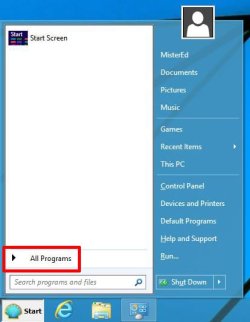
After OpenShell is installed the Start Button now acts similar to how it is in Windows 7.
Click on Start Button

os2.jpg

Now you can see the familiar Start Menu
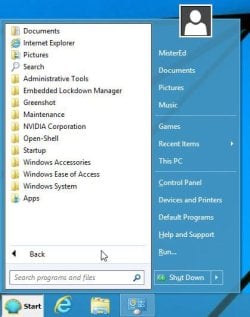
Click on All Programs...

os3.jpg

And you see a list of Programs

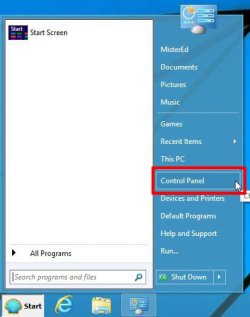
os4.jpg

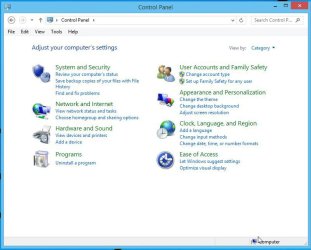
In the Start Menu click on Control Panel...

os5.jpg

And you see the familiar Control Panel

os6.jpg

If you right-click on the original Windows 8.1 Start Menu button you got a configuration menu. This no longer works that way with the OpenShell. However, you can still bring up the configuration menu by pressing the Windows-key + X-key.

os7.jpg
 

My Computers My Computers

  • At a glance

    Windows 7 Professional 64bit / Windows 10 Hom...AMD FX-8350GSKILL Ripjaw-X PC3 12800 12GB (2x4GB, 2x2GB)ASUS ENGTX560 DCII OC/2DI/1GD5 1GB
    Computer type
    PC/Desktop
    Computer Manufacturer/Model Number
    Custom build
    OS
    Windows 7 Professional 64bit / Windows 10 Home 64bit
    CPU
    AMD FX-8350
    Motherboard
    Gigabyte GA-990FXA-UD3 (AM3+) Rev. 4.0
    Memory
    GSKILL Ripjaw-X PC3 12800 12GB (2x4GB, 2x2GB)
    Graphics Card(s)
    ASUS ENGTX560 DCII OC/2DI/1GD5 1GB
    Sound Card
    Integrated
    Monitor(s) Displays
    Asus VE228H (21.5-in)
    Screen Resolution
    1920x1080 60Hz
    Hard Drives
    SAMSUNG 870 EVO 1TB (2.5" SATA SSD)
    SAMSUNG 870 EVO 500GB (2.5" SATA SSD)
    PSU
    Antec TruePower (new) TP-650 (650 watts)
    Case
    Antec Three Hundred
    Cooling
    AMD stock (plan to upgrade to Cooler Master Hyper 212 EVO)
    Keyboard
    Logitech K540 (wireless)
    Mouse
    Logitech M310 (wireless)
    Internet Speed
    Comcast Gigabit X2 Internet (2100Mbps down / 300Mbps up)
    Browser
    Firefox, Edge, Chrome
    Other Info
    Optical drive: ASUS DRW-24B3ST/BLK/G (Black) (24X)
    External hard drives: 2TB & 6TB
    Internet Gateway: Comcast XB8
  • Computer type
    PC/Desktop
@MisterEd

Thanks,

I did try to use Win8.1 several days last week. trying to deal with it. :-)

Modern mode (with many apps) is indeed fancy (I didn't use Win8.1 in past. It's new to me). however, I clicked many sites (news, finance, whether, , ,), the links are broken. or took too long time to Open.

Traditional Windows desktop mode.
I tested Office97/2007/2010. Among Win7, 8.1 and 10, Win7 is best. Win10 seemed ok. Win8.1, for somehow, was slowest in my test (Yoga RAM only 4GB). This was my only Win8.1. not much experience.
Eventually, I thought, either back to old Win7 (easily use for me), or Win10, a relatively new and stable computer (my son's Lenovo Win11 gets blue screen occasionally).
 

My Computers My Computers

  • At a glance

    Windows 7 Pro 64-bitI7-970032 GB
    Computer type
    PC/Desktop
    Computer Manufacturer/Model Number
    HP Elite 800 G5
    OS
    Windows 7 Pro 64-bit
    CPU
    I7-9700
    Memory
    32 GB
  • At a glance

    Windows 7 Pro 64-bit
    Computer type
    Laptop
    System Manufacturer/Model Number
    ASUS UX305C
    OS
    Windows 7 Pro 64-bit
@MisterEd Classic shell has been replaced by open shell. It is exactly the same so I'm not sure what they changed....
I though I was missing something so I uninstalled ClassicShell and installed OpenShell in its place. I really couldn't find any difference....
The developer of ClassicShell decided to call it a day at the end of 2017...

Sad news, everyone.
After months of deliberation, I have decided to stop the development of Classic Shell....

...So, moving forward, I am making the latest version of Classic Shell open-source and adding it back to SourceForge ... where it all began. I encourage other people to fork it and go with it....
Classic Shell • View topic - Classic Shell no longer in development. Source code released

...and that's where OpenShell took up the reigns and moved forward. For copyright reasons they had to use a new name.
 

My Computers My Computers

  • At a glance

    Windows 7 Home Premium x64AMD V1204GB
    Computer type
    Laptop
    Computer Manufacturer/Model Number
    Toshiba satellite C650D
    OS
    Windows 7 Home Premium x64
    CPU
    AMD V120
    Memory
    4GB
    Internet Speed
    150 Mbps
    Antivirus
    MSE
    Browser
    IE11, Edge, Firefox
    Other Info
    I also have W7 Pro on my System Two, and several W7 Hyper-V VMs. My other machines run Windows 10/11. Their specs are in my Ten Forums & Eleven Forum profiles.
  • At a glance

    Windows 7 Pro x64Intel i5-3320M8 GB
    Computer type
    Laptop
    System Manufacturer/Model Number
    Lenovo Thinkpad T430
    OS
    Windows 7 Pro x64
    CPU
    Intel i5-3320M
    Memory
    8 GB
    Hard Drives
    250GB Samsung SSD 860 EVO
    Antivirus
    MSE
@MisterEd
Thanks,
I did try to use Win8.1 several days last week. trying to deal with it. :-)
Modern mode (with many apps) is indeed fancy (I didn't use Win8.1 in past. It's new to me). however, I clicked many sites (news, finance, whether, , ,), the links are broken. or took too long time to Open.
Traditional Windows desktop mode.
I tested Office97/2007/2010. Among Win7, 8.1 and 10, Win7 is best. Win10 seemed ok. Win8.1, for somehow, was slowest in my test (Yoga RAM only 4GB). This was my only Win8.1. not much experience.
Eventually, I thought, either back to old Win7 (easily use for me), or Win10, a relatively new and stable computer (my son's Lenovo Win11 gets blue screen occasionally).
I first installed Windows 8 Pro on a laptop in 2013. I did a dual-boot so I also kept the existing Windows 7 Pro on it. I was unhappy about the lack of a real start menu so I installed Classic Shell on it. It was also annoying that the computer booted to the Modern Menu since I really wanted to use the regular desktop mode. Fortunately Classic Shell has an option to boot to the regular desktop mode. I tried experimenting with the Modern menu. You can add your own programs to it or delete one you don't like. Eventually I got bored with it and ignored it most of the time. The following year Windows 8.1 was offered as a free upgrade so updated to it. Windows 8.1 was an improvement but not enough. About five years ago I replaced Windows 8.1 Pro by doing the free upgrade to Windows 10 Pro. I have no regrets doing that.

Note this laptop is 12 years old, has a dual-core Intel CPU, 4 GB RAM, and a 250GB hard drive. It also currently has Office 2013 Pro with Windows 10. For Windows 7 it has Free Office 2021. It does work well with both Windows 7 and Windows 10.

Currently I have a least one computer with Windows XP, Windows 7, Windows 8,1 and Windows 10. One computer was upgraded to Windows 11 but after 10 days was returned to Windows 10. My favorite right now by far is Windows 10.

As far as I know you can still do a free upgrade of either Windows 7 or Windows 8.1 to Windows 10. You might consider that if you are unhappy with Windows 8.1. However, how well your computer runs on Windows 10 is for you to decide. In any case always make a backup of your computer before you do this in case you want to go back to what you had.

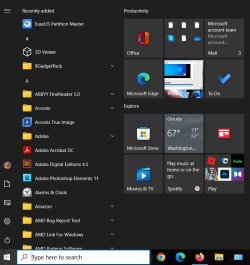
Below, is a screenshot of the Start menu on my laptop that came with Windows 10. Note to the right is the remnant of what was the Modern menu in Windows 8. It is mainly tied to the Microsoft App Store. I have used it occasionally but not much anymore.

Windows 10 start.jpg
 

My Computers My Computers

  • At a glance

    Windows 7 Professional 64bit / Windows 10 Hom...AMD FX-8350GSKILL Ripjaw-X PC3 12800 12GB (2x4GB, 2x2GB)ASUS ENGTX560 DCII OC/2DI/1GD5 1GB
    Computer type
    PC/Desktop
    Computer Manufacturer/Model Number
    Custom build
    OS
    Windows 7 Professional 64bit / Windows 10 Home 64bit
    CPU
    AMD FX-8350
    Motherboard
    Gigabyte GA-990FXA-UD3 (AM3+) Rev. 4.0
    Memory
    GSKILL Ripjaw-X PC3 12800 12GB (2x4GB, 2x2GB)
    Graphics Card(s)
    ASUS ENGTX560 DCII OC/2DI/1GD5 1GB
    Sound Card
    Integrated
    Monitor(s) Displays
    Asus VE228H (21.5-in)
    Screen Resolution
    1920x1080 60Hz
    Hard Drives
    SAMSUNG 870 EVO 1TB (2.5" SATA SSD)
    SAMSUNG 870 EVO 500GB (2.5" SATA SSD)
    PSU
    Antec TruePower (new) TP-650 (650 watts)
    Case
    Antec Three Hundred
    Cooling
    AMD stock (plan to upgrade to Cooler Master Hyper 212 EVO)
    Keyboard
    Logitech K540 (wireless)
    Mouse
    Logitech M310 (wireless)
    Internet Speed
    Comcast Gigabit X2 Internet (2100Mbps down / 300Mbps up)
    Browser
    Firefox, Edge, Chrome
    Other Info
    Optical drive: ASUS DRW-24B3ST/BLK/G (Black) (24X)
    External hard drives: 2TB & 6TB
    Internet Gateway: Comcast XB8
  • Computer type
    PC/Desktop
I would think,
any SSD is ok to go Win10
any hdd, better stay with Win7
(Win11 has much tougher requirement for hardware)

Thank you for Win10 upgrade information. my new Win10 is NOT registered yet.
Can I do a Win10 clean-install after upgrade from Win7/8.1. or have to first install Win7/8.1, then upgrade every re-install. I didn't try yet (What I read, Win8.1/10 register BIOS. hence I would think clean-install ok)

(This Win7 on UEFI is my headache, still trying a combo of SIW2 (Updated Win 7 installation media) and manatails (UefiSeven), freezing up after reboot and rename, , ,. If no go, will take Win10 then register)
 

My Computers My Computers

  • At a glance

    Windows 7 Pro 64-bitI7-970032 GB
    Computer type
    PC/Desktop
    Computer Manufacturer/Model Number
    HP Elite 800 G5
    OS
    Windows 7 Pro 64-bit
    CPU
    I7-9700
    Memory
    32 GB
  • At a glance

    Windows 7 Pro 64-bit
    Computer type
    Laptop
    System Manufacturer/Model Number
    ASUS UX305C
    OS
    Windows 7 Pro 64-bit
After you upgrade from Windows 7 or 8.1 to Windows 10 check to see if it has been activated. If it is it will have received a digital license that Microsoft saves on its servers. Once it has received the digital license you can do a clean install any time and it will activated automatically.

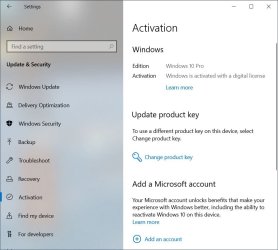
For example, here is a screenshot from the laptop that received the free upgrade from Windows 8.1 Pro to Windows 10 Pro.

Settings > Update & Security > Activation on the old laptop. At the upper right you can see Windows has been activated with a digital license.

Windows10DigitalLicense.jpg
 

My Computers My Computers

  • At a glance

    Windows 7 Professional 64bit / Windows 10 Hom...AMD FX-8350GSKILL Ripjaw-X PC3 12800 12GB (2x4GB, 2x2GB)ASUS ENGTX560 DCII OC/2DI/1GD5 1GB
    Computer type
    PC/Desktop
    Computer Manufacturer/Model Number
    Custom build
    OS
    Windows 7 Professional 64bit / Windows 10 Home 64bit
    CPU
    AMD FX-8350
    Motherboard
    Gigabyte GA-990FXA-UD3 (AM3+) Rev. 4.0
    Memory
    GSKILL Ripjaw-X PC3 12800 12GB (2x4GB, 2x2GB)
    Graphics Card(s)
    ASUS ENGTX560 DCII OC/2DI/1GD5 1GB
    Sound Card
    Integrated
    Monitor(s) Displays
    Asus VE228H (21.5-in)
    Screen Resolution
    1920x1080 60Hz
    Hard Drives
    SAMSUNG 870 EVO 1TB (2.5" SATA SSD)
    SAMSUNG 870 EVO 500GB (2.5" SATA SSD)
    PSU
    Antec TruePower (new) TP-650 (650 watts)
    Case
    Antec Three Hundred
    Cooling
    AMD stock (plan to upgrade to Cooler Master Hyper 212 EVO)
    Keyboard
    Logitech K540 (wireless)
    Mouse
    Logitech M310 (wireless)
    Internet Speed
    Comcast Gigabit X2 Internet (2100Mbps down / 300Mbps up)
    Browser
    Firefox, Edge, Chrome
    Other Info
    Optical drive: ASUS DRW-24B3ST/BLK/G (Black) (24X)
    External hard drives: 2TB & 6TB
    Internet Gateway: Comcast XB8
  • Computer type
    PC/Desktop
This one is marked "Solved".

yes, @MisterEd
It's noticed, "Windows is activated with a digital license" when a clean-install done of Windows 10 OS (but Win10 couldn't recognize my Win7 GPT disk and data on the disk)

Sunday eventually I got BIOS UEFI boot and Win7 re-installed on yoga. hence no need of its early BIOS version.

Win/7/10 OS both look good for Yoga.
at this time, image size is the difference I can tell. Win7 clean-install image is 5-6 GB. Win 10 is some 23 GB. nearly 4X difference. (I save/there is a copy on the same disk. so its size matters)
 

My Computers My Computers

  • At a glance

    Windows 7 Pro 64-bitI7-970032 GB
    Computer type
    PC/Desktop
    Computer Manufacturer/Model Number
    HP Elite 800 G5
    OS
    Windows 7 Pro 64-bit
    CPU
    I7-9700
    Memory
    32 GB
  • At a glance

    Windows 7 Pro 64-bit
    Computer type
    Laptop
    System Manufacturer/Model Number
    ASUS UX305C
    OS
    Windows 7 Pro 64-bit
Back
Top