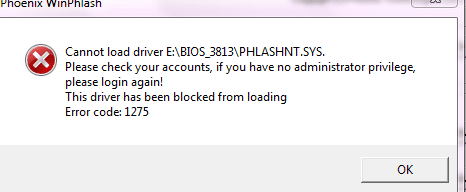
Why do you want to flash the bios? My view is that if you haven't a problem that cannot be otherwise resolved then leave well alone!
My Computer
Computer type
PC/Desktop
OS
Microsoft Windows 7 Home Premium 64-bit 7601 Multiprocessor Free Service Pack 1
CPU
Intel(R) Core(TM) i7-3770 CPU @ 3.40GHz
Motherboard
ASUSTeK COMPUTER INC. P8H77-M
Memory
8.00 GB
Graphics Card(s)
Intel(R) HD Graphics 4000
Sound Card
On Board
Monitor(s) Displays
Dell 24"
Screen Resolution
1920 x 1080
Hard Drives
(1) INTEL SSDSC2CT180A3 ATA Device (2) ST500DM002-1BD142 ATA Device (3) WDC WD3200AAKS-75L9A0 ATA Device (4) Generic- Compact Flash USB Device (5) Generic- MS/MS-Pro USB Device (6) Generic- SD/MMC USB Device (7) Generic- SM/xD-Picture USB
I must confess i have no idea. I still think if you have a hardware problem it is better to solve that the conventional way rather than the route you have chosen. Everywhere i read about flashing the BIOS carries a warning that side effects can be expected. What's the hardware problem you are having? What did the "Service Person" say when you asked him this question?
My Computer
Computer type
PC/Desktop
OS
Microsoft Windows 7 Home Premium 64-bit 7601 Multiprocessor Free Service Pack 1
CPU
Intel(R) Core(TM) i7-3770 CPU @ 3.40GHz
Motherboard
ASUSTeK COMPUTER INC. P8H77-M
Memory
8.00 GB
Graphics Card(s)
Intel(R) HD Graphics 4000
Sound Card
On Board
Monitor(s) Displays
Dell 24"
Screen Resolution
1920 x 1080
Hard Drives
(1) INTEL SSDSC2CT180A3 ATA Device (2) ST500DM002-1BD142 ATA Device (3) WDC WD3200AAKS-75L9A0 ATA Device (4) Generic- Compact Flash USB Device (5) Generic- MS/MS-Pro USB Device (6) Generic- SD/MMC USB Device (7) Generic- SM/xD-Picture USB
In my opinion you should only flash your bios when the version you want to flash to specifically addresses an issue you are experiencing. Other wise their is no real reason to.Fabe
Logitech Z2300 Speakers/ Bose Noise Cancelling Headphones/Avermedia PCI-e Hybrid TV Bravo/Epson NX415 all in one/ 4 Port Powered USB Hub/ LG 10x Bluray Burner /TSST Corp DVDRW External
what system number? Nothing will be erased your bios will simply be updated to the latest version adding support or fixes for new hardware.
what are you using to flash your bios are you trying to do it from within windows? or are you using a bootable rom file.
your may be experiancing issues because you need to put the downloaded file onto bootable media
EDIT.....ive just downloaded and checked the bios file for your laptop (the vista version there isnt one for win 7) looking at the readme file it does suggest running as admin but it may just not work cos its for vista