
gwmckinley
New member
- Local time
- 8:18 PM
- Messages
- 2
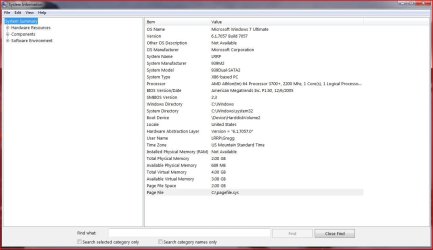
Okay let me start by saying that I am new to this Windows 7 OS all together. Tonight we installed 7057 x86 on my older PC. The install went great, it was a fresh clean install. Didn't have any problems until I noticed that the Resource Manager was only showing 2096 RAM.
I know that there were some problems previously with x86 and 4 GB of RAM, but it seems like it is not even recognizing that there are two additional sticks (4 sticks of 1GB all the same type of RAM).
We have tried physically changing it through msconfig, no luck. We have verified that the BIOS does see the 4 GB, which it does. Now I am at a loss, is there anything else we can do?
Also, I cannot get the WEI to run. I have installed a k-lite codec pack, which upon reading I uninstalled, restarted, attempted to run WEI again and still failure. I do have STEAM installed, should I uninstall that and try again?
I also tried the winstat formal command at the prompt - that ran fine but WEI wouldn't run after that.
I appreciate any help that anyone can give. I just feel at a loss here and don't know enough of what else to try. I don't care if all 4GB are seen as I know this can be a problem in x86, but I would like to get to the 3.5 that Vista allowed.
I have attached the system information to this as well.
I know that there were some problems previously with x86 and 4 GB of RAM, but it seems like it is not even recognizing that there are two additional sticks (4 sticks of 1GB all the same type of RAM).
We have tried physically changing it through msconfig, no luck. We have verified that the BIOS does see the 4 GB, which it does. Now I am at a loss, is there anything else we can do?
Also, I cannot get the WEI to run. I have installed a k-lite codec pack, which upon reading I uninstalled, restarted, attempted to run WEI again and still failure. I do have STEAM installed, should I uninstall that and try again?
I also tried the winstat formal command at the prompt - that ran fine but WEI wouldn't run after that.
I appreciate any help that anyone can give. I just feel at a loss here and don't know enough of what else to try. I don't care if all 4GB are seen as I know this can be a problem in x86, but I would like to get to the 3.5 that Vista allowed.
I have attached the system information to this as well.
My Computer
- Computer Manufacturer/Model Number
- x86-based PC - self assembled
- OS
- Windows 7
- CPU
- AMD Athlon 64 3700+, 2200 Mhz, 1 Core
- Motherboard
- ASRock 939 Dual-SATA2
- Memory
- 4GB Installed
- Graphics Card(s)
- ATI Radeon HD 4550
- Sound Card
- OnBoard Realtek AC'97 Audio
- Monitor(s) Displays
- ACER AL1917W/SONY CPD-G200
- Screen Resolution
- 1440x900/1024x768
- Hard Drives
- NTFS 120GB
NTFS 82 GB
NTFS 13 GB
NTFS 500 GB - USB Connected
- PSU
- 500W
- Cooling
- 4 80mm Fans, 1 120mm fan
- Keyboard
- Microsoft Digital Media 3000
- Mouse
- Logitech MX400
- Internet Speed
- Cable Hi-Speed


 SK
SK


