BIOS reports wrong values in RAM, crashing AMD video card

Osd1000

New member
Local time
12:42 AM
Messages
3
Lately, I have installed 2x 4 GB RAM sticks into my HP Slimline s5-1200z a few hours ago, however, upon doing this, my graphics for my games have been messing up, and sometimes my AMD video driver will crash, causing major annoyance when trying to play any games I intend to play. :picnic: When I downloaded an application called Portable SIW, I noticed something quite alarming, as shown in the picture below, circled.
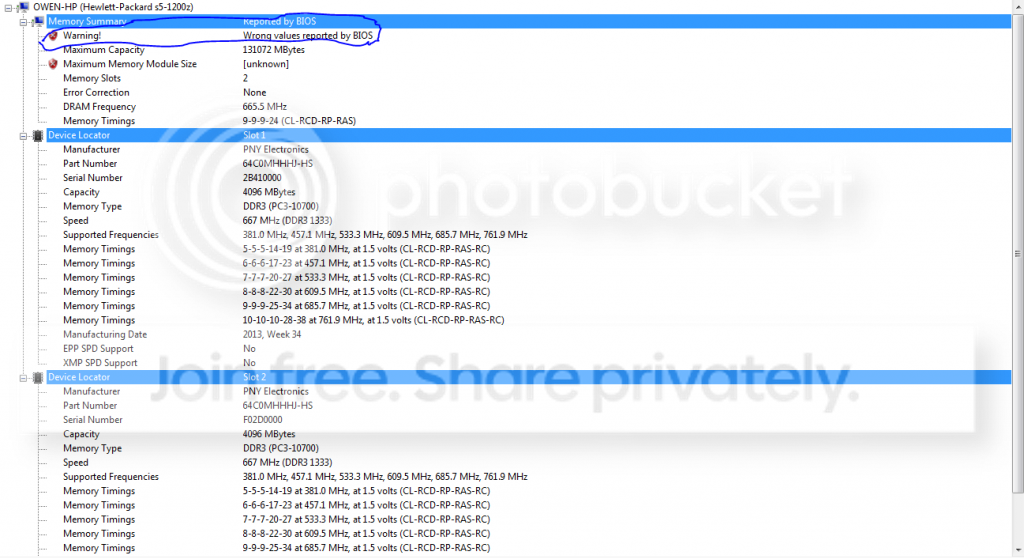
Capture1_zps50f3909b.png


Here is a second picture for reference.
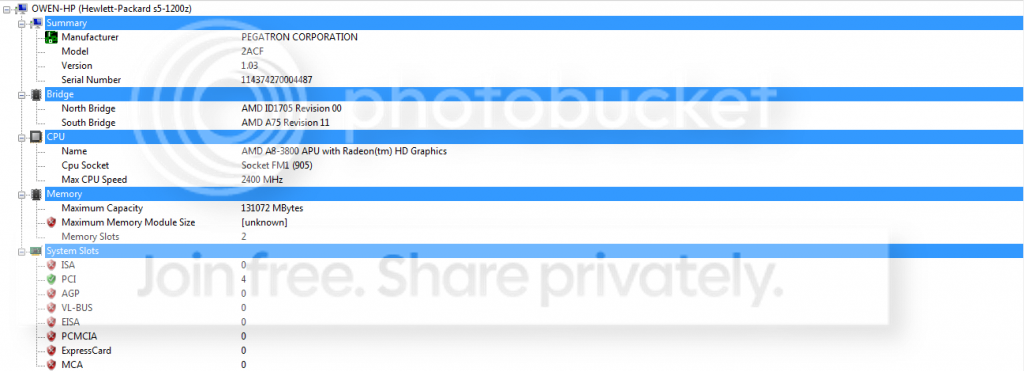
Capture2_zpsee413114.png


And for another reference.
Capture3_zpsd3b58009.png


Any possible reason for this to occur? Thanks if you can help.
 

My Computer My Computer

At a glance

Windows 7 Home Premium 64bitAMD A8-3800DDR3 PNY Electronics 2x 4 GBAMD Radeon HD 6550D Graphics
Computer type
PC/Desktop
Computer Manufacturer/Model Number
HP
OS
Windows 7 Home Premium 64bit
CPU
AMD A8-3800
Motherboard
PEGATRON model 2ACF Version 1.03
Memory
DDR3 PNY Electronics 2x 4 GB
Graphics Card(s)
AMD Radeon HD 6550D Graphics
Sound Card
?
Monitor(s) Displays
?
Hard Drives
?
Well; since you are saying the bios is reporting wrong values; you probably should check your system board "builders" site to check for any bios updates that may hopefully correct this issue. If not; also check the ram modules one by one to make sure non of them are bad and that none of the ram slots are possibly bad. Take all ram sticks out and put one at a time back in and see if you can pinpoint the issue.
 

My Computer My Computer

At a glance

Windows 7 ultimate 64-bitIntel I7 2600K 3.4ghzCorsair 16gb ddr3 1600mhzNvidia Geforce gt 430
Computer type
PC/Desktop
Computer Manufacturer/Model Number
custom built
OS
Windows 7 ultimate 64-bit
CPU
Intel I7 2600K 3.4ghz
Motherboard
Asus Evo P8P67
Memory
Corsair 16gb ddr3 1600mhz
Graphics Card(s)
Nvidia Geforce gt 430
Sound Card
Sound Blaster Titanium x-fi pci express
Monitor(s) Displays
Dell E198WFP
Hard Drives
1 western digital 2TB drive.
PSU
Antec 1200 watt
Case
Inwin Dragon Rider
Cooling
6 case supplied cooling fans
Keyboard
logitech mk700
Mouse
logitech m705
Internet Speed
25-50mbps download; 10mbps upload(i think)
Antivirus
avg free 2014
Browser
mozilla firefox
Other Info
Also have a pretty bad speaker setup which is a klipsch promedia 5.1 surround speaker setup with huge subwoofer and lg blu ray player/writer. Also a hp officejet pro 8600 plus wireless all in one and a logitech s7500 webcam.
Can you explain how the AMD video card that I have randomly crashes from time to time?
 

My Computer My Computer

At a glance

Windows 7 Home Premium 64bitAMD A8-3800DDR3 PNY Electronics 2x 4 GBAMD Radeon HD 6550D Graphics
Computer type
PC/Desktop
Computer Manufacturer/Model Number
HP
OS
Windows 7 Home Premium 64bit
CPU
AMD A8-3800
Motherboard
PEGATRON model 2ACF Version 1.03
Memory
DDR3 PNY Electronics 2x 4 GB
Graphics Card(s)
AMD Radeon HD 6550D Graphics
Sound Card
?
Monitor(s) Displays
?
Hard Drives
?
Hi Osd1000, welcome to Seven forums.

As mentioned above, do check for the RAM sticks. Regarding the AMD card crashing. Issue can be due to bad drivers or bad RAM module. Run the PC with just one RAM stick and check.
Have you updated the drivers recently? IF not, do update. Get the latest drivers from here. Also, download Driver Sweeper. Uninstall the drivers you currently have and run driver sweeper app to clean the leftovers of that old drivers. Install the latest drivers.
 

My Computer My Computer

At a glance

Windows 11 x64i5 2500K @ 3.3 GHz16 GB DDR 3 @ 1600MhzMSI 1050TI 4GB OC version
Computer type
PC/Desktop
Computer Manufacturer/Model Number
Custom Bulid/Self made
OS
Windows 11 x64
CPU
i5 2500K @ 3.3 GHz
Motherboard
ASUS P8 Z77 V pro
Memory
16 GB DDR 3 @ 1600Mhz
Graphics Card(s)
MSI 1050TI 4GB OC version
Sound Card
On Board (Realtek HD audio)
Monitor(s) Displays
Samsung 22" LCD
Screen Resolution
1920*1080
Hard Drives
Seagate 1 TB, WD 1TB, Seagate 2 TB ( I use a lot of space)
PSU
coolermaster 750 W
Case
Coolermaster HAF912
Cooling
Coolermaster hyper 212 EVO
Keyboard
Samsung
Mouse
Dell Wireless
Internet Speed
Wireless 50 Mbps
Antivirus
AVG 2016 Internet Security
Browser
Google Chrome
I might of figured out the issue using information from both replies:
The BIOS is conflicting with Windows about the new RAM installed, and from that conflict, my graphics card will cause flickering, and occasionally, crashing upon itself and restarting. I will attempt to first update the card, see if anything happens, then check the RAM, then check the BIOS and update it.
Not so sure though. :sarc:
 

My Computer My Computer

At a glance

Windows 7 Home Premium 64bitAMD A8-3800DDR3 PNY Electronics 2x 4 GBAMD Radeon HD 6550D Graphics
Computer type
PC/Desktop
Computer Manufacturer/Model Number
HP
OS
Windows 7 Home Premium 64bit
CPU
AMD A8-3800
Motherboard
PEGATRON model 2ACF Version 1.03
Memory
DDR3 PNY Electronics 2x 4 GB
Graphics Card(s)
AMD Radeon HD 6550D Graphics
Sound Card
?
Monitor(s) Displays
?
Hard Drives
?
I will suggest to check for RAM first, then check the BIOS and in the end check for GPU drivers.
 

My Computer My Computer

At a glance

Windows 11 x64i5 2500K @ 3.3 GHz16 GB DDR 3 @ 1600MhzMSI 1050TI 4GB OC version
Computer type
PC/Desktop
Computer Manufacturer/Model Number
Custom Bulid/Self made
OS
Windows 11 x64
CPU
i5 2500K @ 3.3 GHz
Motherboard
ASUS P8 Z77 V pro
Memory
16 GB DDR 3 @ 1600Mhz
Graphics Card(s)
MSI 1050TI 4GB OC version
Sound Card
On Board (Realtek HD audio)
Monitor(s) Displays
Samsung 22" LCD
Screen Resolution
1920*1080
Hard Drives
Seagate 1 TB, WD 1TB, Seagate 2 TB ( I use a lot of space)
PSU
coolermaster 750 W
Case
Coolermaster HAF912
Cooling
Coolermaster hyper 212 EVO
Keyboard
Samsung
Mouse
Dell Wireless
Internet Speed
Wireless 50 Mbps
Antivirus
AVG 2016 Internet Security
Browser
Google Chrome
Not all RAM dimms are compatible with all devices. It could just be faulty, and if your GPU uses shared memory it would also cause GPU issues.
 

My Computer My Computer

At a glance

Windows 7 Ultimate x64, & Mac OS X 10.9.2Intel Core i5 2500kCorsair Vengence 8gb 1866mhzNvidia GTX 770 OC
Computer type
PC/Desktop
Computer Manufacturer/Model Number
Built by badgers!!!
OS
Windows 7 Ultimate x64, & Mac OS X 10.9.2
CPU
Intel Core i5 2500k
Motherboard
Asus P8z68 LE
Memory
Corsair Vengence 8gb 1866mhz
Graphics Card(s)
Nvidia GTX 770 OC
Monitor(s) Displays
2x ASUS LED 22" IPS
Screen Resolution
3840x1080
Hard Drives
240GB Crucial M500 SSD
120gb Corsair Force 3 SSD
1TB Western Digital
PSU
Corsair HX650w Modular
Case
Corsair Air 540
Cooling
Corsair H60 Push/Pull
Keyboard
Corsair K70/ Logitech G27 wheel
Mouse
Saitek R.A.T 9
Internet Speed
Too slow!
Other Info
AMD fusion E350N Home server-Windows Home Server 2011 (also made by badgers!)
2011 Macbook 2.4ghz Core2Duo, 4gb ddr3, 120gb Ocz Vertex SSD
Your new RAM modules must be compatible with the motherboard. The most important specification is RAM voltage.

If the modules you bought are on the motherboard manufacturer's Qualified Vendors List, or if they were recommended by the RAM retailer for your motherboard, then you are probably good as far as compatible RAM is concerned.
If not, then you need to look at RAM that is recommended for your motherboard and compare the specs of those modules to the specs for your modules. Other than speed and timings they must match.

You can also determine here if your motherboard supports 1333MHz RAM natively.
The RAM you bought is not XMP, so in order to run at 1333 you might have to change timings manually. (you can run this RAM at a native speed - 1066MHz for instance - however).
If you have been playing with your BIOS settings to get it to run at 1333 then you might want to reset the BIOS Optimized Defaults and see if the Video errors clear up before proceeding.
 

My Computer My Computer

At a glance

Windows 7 64 Bit Home Premium SP1i7-3820GSkill F3-14900CL9Q - 16GBEVGA GeForce GTX660 - Driver 352.86
Computer type
PC/Desktop
Computer Manufacturer/Model Number
Home Built - Jan 2013
OS
Windows 7 64 Bit Home Premium SP1
CPU
i7-3820
Motherboard
Asus P9X79-PRO - Bios 4608
Memory
GSkill F3-14900CL9Q - 16GB
Graphics Card(s)
EVGA GeForce GTX660 - Driver 352.86
Sound Card
On board Realtek ALC898
Monitor(s) Displays
Acer S271HL
Screen Resolution
1920 x 1080
Hard Drives
#1- Samsung 840 Pro Series
#2- Western Digital WD1002FAEX Sata3 Black
#3- Western Digital WD1002FAEX Sata3 Black
PSU
Corsair CMPSU-850TX-V2 - 850 watt (by Seasonic)
Case
Corsair Obsidian 550D
Cooling
Standard 3 120mm case fans, Cooler Master Hyper 212 EVO
Keyboard
MS KC-0405
Mouse
Intellimouse 5-button
Internet Speed
56 Mbits/Sec (on a good day)
Antivirus
Avast & Malwarebytes
Browser
Firefox
Other Info
Asus DVD - DRW-24B1ST 24X
I agree with some of the above; you definitely want to do a ram check; and also check the builders site for a possible bios update to maybe resolve the issue if you have not already done so.
 

My Computer My Computer

At a glance

Windows 7 ultimate 64-bitIntel I7 2600K 3.4ghzCorsair 16gb ddr3 1600mhzNvidia Geforce gt 430
Computer type
PC/Desktop
Computer Manufacturer/Model Number
custom built
OS
Windows 7 ultimate 64-bit
CPU
Intel I7 2600K 3.4ghz
Motherboard
Asus Evo P8P67
Memory
Corsair 16gb ddr3 1600mhz
Graphics Card(s)
Nvidia Geforce gt 430
Sound Card
Sound Blaster Titanium x-fi pci express
Monitor(s) Displays
Dell E198WFP
Hard Drives
1 western digital 2TB drive.
PSU
Antec 1200 watt
Case
Inwin Dragon Rider
Cooling
6 case supplied cooling fans
Keyboard
logitech mk700
Mouse
logitech m705
Internet Speed
25-50mbps download; 10mbps upload(i think)
Antivirus
avg free 2014
Browser
mozilla firefox
Other Info
Also have a pretty bad speaker setup which is a klipsch promedia 5.1 surround speaker setup with huge subwoofer and lg blu ray player/writer. Also a hp officejet pro 8600 plus wireless all in one and a logitech s7500 webcam.
Ok hold on a second here. You are running a APU processor with onboard graphics hd 6550D AMD Radeon HD 6550D - NotebookCheck.net Tech which is specified as Radeon HD 6550D 400 @ 600MHz. Why not trying to run your ram @ 7-7-7-20 27 533.3mhz and report back.
 

My Computer My Computer

At a glance

Windows 7 Ultimate x64FX 8350 @ 4.8ghz, turbo clocked to 5.4ghzMushkin Enhanced Blackline 16GB 1760mhz 10-10...Gigabyte-660 Windforce OC- GPU Clock 1212MHz ...
Computer type
PC/Desktop
Computer Manufacturer/Model Number
Custom Build
OS
Windows 7 Ultimate x64
CPU
FX 8350 @ 4.8ghz, turbo clocked to 5.4ghz
Motherboard
Asus Sabertooth FX990 Gen 3.0 R2.0
Memory
Mushkin Enhanced Blackline 16GB 1760mhz 10-10-9-24 T1
Graphics Card(s)
Gigabyte-660 Windforce OC- GPU Clock 1212MHz /3504MHz ram
Sound Card
Creative Sound Blaster Recon3D PCIe Sound Card
Monitor(s) Displays
Samsung SyncMaster S27B350H (HDMI)
Screen Resolution
1920x1080 60HZ
Hard Drives
1 x SSD Crucial M4 256GB (Primary OS)
3 x HDD WD 1TB
4 x HDD 2TB
1 x HDD 160GB (Secondary Backup OS)
Raid SATA III 6GB/s 4-port PCI-e Controller Card, Marvel 88SE9215 chipset
PSU
Chieftec-650-14CS (Modular) 80 Plus Gold-650 Watt
Case
Akasa Venom Toxic Gaming Big tower ( Custom Black ) Ver 2.0
Cooling
Water 2.0 PRO / GEIL Cyclone VRM / 6x120mm 2x220mm 2x140mm
Keyboard
Logitech G19
Mouse
Wireless Notebook Presenter Mouse 8000
Internet Speed
Fiber GBS
Antivirus
Don't Announce it to the world :)
Browser
Gotta have at least 1!
Back
Top