Solved BIOS sees 12GB Windows 7 x64 sees 12GB (9.96 Usable)

SnakeFist

New member
Member
Local time
4:22 PM
Messages
73
My wifes motherboard got fried. So i bought her a new one along with a slightly upgraded cpu. She has a gtx 960 2gb pci-e 16x dedicated card. But windows for some weird reason is seeing all 12 gb of her ram but only 3.96 gb is usable. I got her a motherboard that has no onboard video to avoid the memory sharing unless you switch it over to dedicated in the bios.
With only 3.96 usable she can't run most of her games.
Any way to fix this? I never ran into this problem in the decades i have been building pc's. Mine don't do this and her's didn't do this on her old msi motherboard. The only time i seen this was with onboard video since it shares the ram.

Gigabyte GA-970A-DS3P
AMD FX 8350 Stock Clock
MSI GTX 960 2GB Dedicated
12GB ram.
700 Watt PSU
2TB WD Black 7200RPM drive for steam games.
Windows 7 x64 Ultimate installed on an SSD

Bios is upto date according to the list of bios on gigabyte's website.

Running stock speeds on Ram and CPU. Fresh install of windows 7 x64. I always do a fresh install on a major hardware change like motherboard and or cpu. Ram i don't. Bios sees all 12 GB of ram.

Tested all her 4 sticks in my pc and my pc seen all 12GB and all 12GB was usable. Her bios sees 12GB and windows sees 12GB but only 4GB usable. After messing around i did get it to go up to 9.96gb usable.

This is what i tried so far.

I installed the 2x4GB sticks in a1 and a2.

Then installed the 2x2GB sticks in a3 and a4 according to the manual for dual channel.

Tried them one at a time and checked each was read at their stated size and windows did also.

So i put one stick of the 2x4 sticks and stuck it in a1 and the other 2x4 in slot a2. Turned on the pc and bios and windows seen 8gb full usage.

Turned the pc off and took 1 stick of the 2x2 sticks and stuck it in a3. Turned on the pc and bios and windows seen the full 10GB.

Turned the pc off one last time to put the final stick of the 2x2 into slot a4. Turned the pc on and bios and windows both see the 12GB but now windows says 12GB (9.96GB Usable).

I tried switching on XMP profile in bios, only one option Profile 1. So i enable that saved and rebooted and no change. Windows sees 12GB (9.96GB usable).

In BIOS i even switched from other os to Windows 8 and still no change.

Looked at msconfig under boot tab and advanced and the maximum memory check box was unchecked.


I'm stumped about what could be causing this. I even reinstalled windows 7 x64 and still the same problem.


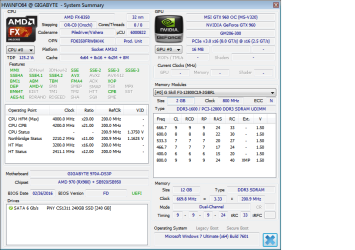
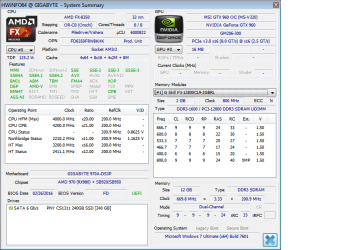
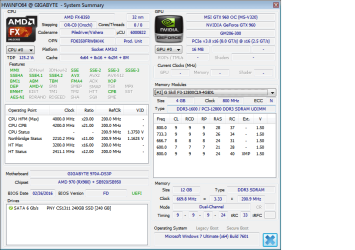
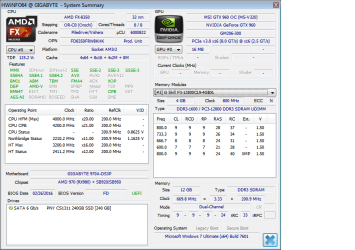
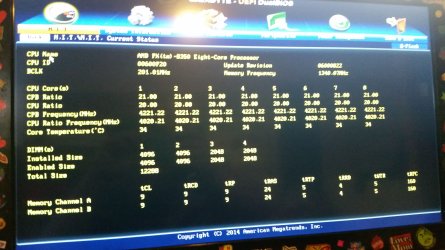
I'm attaching pictures of her bios and the log file and pictures of HWinfo in case you need them to help with my problem. I also attached a picture of the CPU. I don't see a bent pin but maybe a more keener eye can see what i don't see.
 

Attachments
  • Bios memory status.jpg
    Bios memory status.jpg
    1.2 MB · Views: 1
  • Ram stick one.png
    Ram stick one.png
    28.6 KB · Views: 2
  • ram stick 2.png
    ram stick 2.png
    28.7 KB · Views: 1
  • ram stick 3.png
    ram stick 3.png
    28.5 KB · Views: 0
  • ram stick 4.png
    ram stick 4.png
    28.4 KB · Views: 0
  • HWinfo Hardware log file.LOG
    HWinfo Hardware log file.LOG
    17.6 KB · Views: 1
  • cpu.jpg
    cpu.jpg
    843.2 KB · Views: 0
Last edited:

My Computer My Computer

At a glance

Windows 7 Ultimate x64 SP1AMD FX 8350G-Skill Sniper Series 16 GBMSI GTX 970
Computer type
PC/Desktop
Computer Manufacturer/Model Number
Custom Built By Yours Truly.
OS
Windows 7 Ultimate x64 SP1
CPU
AMD FX 8350
Motherboard
Gigabyte 990FXA-UD3
Memory
G-Skill Sniper Series 16 GB
Graphics Card(s)
MSI GTX 970
Monitor(s) Displays
Sony Bravia 40 Inch
Screen Resolution
1920x1080 Full Pixel
Hard Drives
Kingston Hyper X Savage SSD 240GB (OS Drive)
Seagate FireCuda 2TB SSHD
Western Digital Black 2TB
PSU
Antec 900 Watt High Current Gamer
Case
Cooler Master Trooper Full Tower With View Window
Cooling
Noctua D14 Push Pull Air Cooler
Keyboard
Razer Blackwidow Chroma v2
Mouse
Logitech G700s 13 Button Gaming Mouse
Internet Speed
250 mB/s
Antivirus
None
Browser
Firefox
Hi SnakeFist,

Can you edit your post and make the text Black instead of Grey as it is very hard to read and will put people off answering you!

Thanks.
 

My Computer My Computer

At a glance

Win 7 HP SP1 64-bit Vista HB SP2 32-bit Linux...Intel(R) Pentium(R) CPU P6200 @ 2.13GHz4.00 GBIntel(R) Graphics Media Accelerator HD
Computer type
Laptop
Computer Manufacturer/Model Number
Fujitsu LIFEBOOK
OS
Win 7 HP SP1 64-bit Vista HB SP2 32-bit Linux Mint 18.3
CPU
Intel(R) Pentium(R) CPU P6200 @ 2.13GHz
Motherboard
FUJITSU FJNBB06
Memory
4.00 GB
Graphics Card(s)
Intel(R) Graphics Media Accelerator HD
Sound Card
[1] Realtek High Definition Audio [2] Intel(R) Display Audio
Screen Resolution
1366 x 768 x 32 bits (4294967296 colors) @ 59 Hz
Hard Drives
TOSHIBA MK5076GSX
Antivirus
AVG FREE
Hi SnakeFist,

Can you make the text Black instead of Grey as it is very hard to read!

Thanks.

It did that when i copied it over from notepad++. I'll try and make it black.

Edit: I fixed it.
 

My Computer My Computer

At a glance

Windows 7 Ultimate x64 SP1AMD FX 8350G-Skill Sniper Series 16 GBMSI GTX 970
Computer type
PC/Desktop
Computer Manufacturer/Model Number
Custom Built By Yours Truly.
OS
Windows 7 Ultimate x64 SP1
CPU
AMD FX 8350
Motherboard
Gigabyte 990FXA-UD3
Memory
G-Skill Sniper Series 16 GB
Graphics Card(s)
MSI GTX 970
Monitor(s) Displays
Sony Bravia 40 Inch
Screen Resolution
1920x1080 Full Pixel
Hard Drives
Kingston Hyper X Savage SSD 240GB (OS Drive)
Seagate FireCuda 2TB SSHD
Western Digital Black 2TB
PSU
Antec 900 Watt High Current Gamer
Case
Cooler Master Trooper Full Tower With View Window
Cooling
Noctua D14 Push Pull Air Cooler
Keyboard
Razer Blackwidow Chroma v2
Mouse
Logitech G700s 13 Button Gaming Mouse
Internet Speed
250 mB/s
Antivirus
None
Browser
Firefox
Changing the motherboard means you will have to reinstall Windows. The motherboard is the heart of the computer & no doubt it has a different driver & set up configurations that does not match what you have on the old version of Windows on the SSD.
 

My Computer My Computer

At a glance

Windows 7 Home Premium 64 bit sp1Intel i5 3570 3.4Ghz Ivy Bridge SKT 1155 quad...G-Skill Rip Jaws 16Gb (8x2) DDR3 -1600 PC3 12...Gigabyte NVIDIA GT610 1Gb DDR3 810/1200 PCI-E...
Computer type
PC/Desktop
Computer Manufacturer/Model Number
Self built using existing case
OS
Windows 7 Home Premium 64 bit sp1
CPU
Intel i5 3570 3.4Ghz Ivy Bridge SKT 1155 quad core
Motherboard
Gigabyte Z77-HD3 SKT 1155 2xSata 3, 4x USB 3.0
Memory
G-Skill Rip Jaws 16Gb (8x2) DDR3 -1600 PC3 12800 CL 10 red
Graphics Card(s)
Gigabyte NVIDIA GT610 1Gb DDR3 810/1200 PCI-E 2.0 Silent
Sound Card
NVIDIA High Definition & Realtech High Definition Audio
Monitor(s) Displays
2 x Philips 226V4L 16:9 aspect ratio
Screen Resolution
1920 x 1080 HD
Hard Drives
Samsung 840 Pro 256gb SSD, SATA 3.
Hitachi Touro Portable 1tb, USB 3.0 HDD used for image b/ups.
PSU
Corsair VS450
Case
Codeng
Cooling
PSU fan & CPU fan
Keyboard
Logitech
Mouse
Logitech Wireless trackball M570
Internet Speed
Wireless 3G. 3mg down & 550kb up.
Antivirus
Bitdefender Internet Security 2020
Browser
Opera (Current Version) & Firefox
Other Info
MS Office 2013 Pro. Davis weather station software. MGE Nova 600 avr UPS.
Changing the motherboard means you will have to reinstall Windows. The motherboard is the heart of the computer & no doubt it has a different driver & set up configurations that does not match what you have on the old version of Windows on the SSD.

I already did a fresh install.
 
Last edited:

My Computer My Computer

At a glance

Windows 7 Ultimate x64 SP1AMD FX 8350G-Skill Sniper Series 16 GBMSI GTX 970
Computer type
PC/Desktop
Computer Manufacturer/Model Number
Custom Built By Yours Truly.
OS
Windows 7 Ultimate x64 SP1
CPU
AMD FX 8350
Motherboard
Gigabyte 990FXA-UD3
Memory
G-Skill Sniper Series 16 GB
Graphics Card(s)
MSI GTX 970
Monitor(s) Displays
Sony Bravia 40 Inch
Screen Resolution
1920x1080 Full Pixel
Hard Drives
Kingston Hyper X Savage SSD 240GB (OS Drive)
Seagate FireCuda 2TB SSHD
Western Digital Black 2TB
PSU
Antec 900 Watt High Current Gamer
Case
Cooler Master Trooper Full Tower With View Window
Cooling
Noctua D14 Push Pull Air Cooler
Keyboard
Razer Blackwidow Chroma v2
Mouse
Logitech G700s 13 Button Gaming Mouse
Internet Speed
250 mB/s
Antivirus
None
Browser
Firefox
Hi

from first post

After messing around i did get it to go up to 9.96gb usable.
MSI GTX 960 2GB Dedicated


9.96 + 2 for dedicated graphics = 12.

Your fine


Roy

according to your specs no AntiVirus, assuming your gaming using P2P you need one
 

My Computer My Computer

At a glance

W7 home premium 32bit/W7HP 64bit/w10 tp insid...E5300 dual core3gbNvidia Geforce 7100 Nforce 630i
Computer type
PC/Desktop
Computer Manufacturer/Model Number
medionl/Aspire 6930G/acer x55a
OS
W7 home premium 32bit/W7HP 64bit/w10 tp insider ring
CPU
E5300 dual core
Motherboard
medion MS7366
Memory
3gb
Graphics Card(s)
Nvidia Geforce 7100 Nforce 630i
Monitor(s) Displays
avixc
Internet Speed
n (isp resticted to 72)
Antivirus
mse/pands
Browser
palemoon
Other Info
Belkin Fd7050 n USB using Railink RT2870 drivers, more upto date
Hi

from first post

After messing around i did get it to go up to 9.96gb usable.
MSI GTX 960 2GB Dedicated


9.96 + 2 for dedicated graphics = 12.

Your fine


Roy

according to your specs no AntiVirus, assuming your gaming using P2P you need one

I think you are confusing dedicated to onboard graphics. Her motherboard don't have an onboard videocard. She is only using the one she plugged into the PCIe-x16 slot. Which don't share memory like onboard video card does. So no that is not the problem.
The specs you see here on my profile is the specs for my pc not her's. The specs in the OP is the ones from her pc. She don't do p2p she only plays steam games and only SP games.

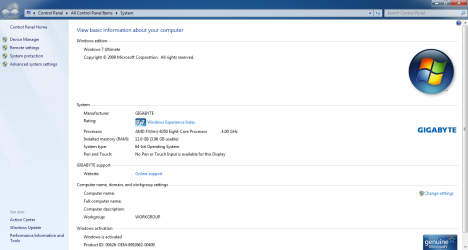
Just for reference i have a dedicated graphics card no on board video and this is what mine says. And if that was the case that it's sharing memory even with a dedicated pcie card then mine should only be 12GB usable.
Here is a pic.
 

Attachments

  • My system properties.png
    My system properties.png
    64.1 KB · Views: 1

My Computer My Computer

At a glance

Windows 7 Ultimate x64 SP1AMD FX 8350G-Skill Sniper Series 16 GBMSI GTX 970
Computer type
PC/Desktop
Computer Manufacturer/Model Number
Custom Built By Yours Truly.
OS
Windows 7 Ultimate x64 SP1
CPU
AMD FX 8350
Motherboard
Gigabyte 990FXA-UD3
Memory
G-Skill Sniper Series 16 GB
Graphics Card(s)
MSI GTX 970
Monitor(s) Displays
Sony Bravia 40 Inch
Screen Resolution
1920x1080 Full Pixel
Hard Drives
Kingston Hyper X Savage SSD 240GB (OS Drive)
Seagate FireCuda 2TB SSHD
Western Digital Black 2TB
PSU
Antec 900 Watt High Current Gamer
Case
Cooler Master Trooper Full Tower With View Window
Cooling
Noctua D14 Push Pull Air Cooler
Keyboard
Razer Blackwidow Chroma v2
Mouse
Logitech G700s 13 Button Gaming Mouse
Internet Speed
250 mB/s
Antivirus
None
Browser
Firefox
Hi

I referenced 2 different OS's yours/hers.

The graphics card details YOU posted Show as 2gb dedicated, thats why i did it in blue, is removed from the total RAM available, your para1 in the last post is irrelevant, if its there it takes it.
Its NOT sharing its allocated against your total RAM
open search type MSINFO32, look at the detail on the right, (for both), then you will see total/available RAM, graphics cards ALLWAYS take RAM, integreted or dedicated, otherwise they wouldn't work

The screenshot of System details does NOT account for this
NOTE this value can be changed, but its not advisable

The peer to peer, P2P, relates to you. No AntiVirus


Roy
 
Last edited:

My Computer My Computer

At a glance

W7 home premium 32bit/W7HP 64bit/w10 tp insid...E5300 dual core3gbNvidia Geforce 7100 Nforce 630i
Computer type
PC/Desktop
Computer Manufacturer/Model Number
medionl/Aspire 6930G/acer x55a
OS
W7 home premium 32bit/W7HP 64bit/w10 tp insider ring
CPU
E5300 dual core
Motherboard
medion MS7366
Memory
3gb
Graphics Card(s)
Nvidia Geforce 7100 Nforce 630i
Monitor(s) Displays
avixc
Internet Speed
n (isp resticted to 72)
Antivirus
mse/pands
Browser
palemoon
Other Info
Belkin Fd7050 n USB using Railink RT2870 drivers, more upto date
Hi

I referenced 2 different OS's yours/hers.

The graphics card details YOU posted Show as 2gb dedicated, thats why i did it in blue, is removed from the total RAM available, your para1 in the last post is irrelevant, if its there it takes it.
Its NOT sharing its allocated against your total RAM
open search type MSINFO32, look at the detail on the right, (for both), then you will see total/available RAM, graphics cards ALLWAYS take RAM, integreted or dedicated, otherwise they wouldn't work

The screenshot of System details does NOT account for this
NOTE this value can be changed, but its not advisable

The peer to peer, P2P, relates to you. No AntiVirus


Roy
But games that she plays that require 8 gb of ram fail to play with an error not enough system memory. Steam only sees 6gb. Her old mobo never had this problem. What system properties said was 12 gb and that was it. And she is using the same video card same ram and same version of windows 7 x64. The only difference is the mobo and cpu which i'm going to switch out to her 8320 to see if it does it still. But see the thing is this didn't have no problem before her mosfet blew up and had to buy a new mobo. Her system properties said 12gb no usable. Till i got her a new mobo and cpu. Which i'm thinking one or the other is a bad part and needs sent back to newegg for an exchange.

I don't play p2p games. As all MP games like cod or fortnight people cheat into much so i avoid them. I play SP games and i only got 1 co-op game l4d2 that i haven't touched in over a year. I only play FPS or TPS games. I also know how to use the internet and know not to open e-mail attachments or downloads files from unknown sites. i also don't use any kind of torrent sites or torrent programs. So i don't think i need an antivirus when i only go to msn yahoo and a few sites i buy stuff from like newegg or staples or bestbuy.

Here is a pic of what it said before taking the ram out and putting it back in to get the 9.96 gb usable.

Also if both onboard video and dedicated graphic cards share system memory then why don'y my system properties that i posted in the pic have the same thing. even in msinfo32 it says a full 16gb for me on my system. And like my wifes mobo i have no onboard video. I bought them like that on purpose since we both had video cards and to avoid the memory sharing.
 

Attachments

  • image of specs.png
    image of specs.png
    55.8 KB · Views: 2

My Computer My Computer

At a glance

Windows 7 Ultimate x64 SP1AMD FX 8350G-Skill Sniper Series 16 GBMSI GTX 970
Computer type
PC/Desktop
Computer Manufacturer/Model Number
Custom Built By Yours Truly.
OS
Windows 7 Ultimate x64 SP1
CPU
AMD FX 8350
Motherboard
Gigabyte 990FXA-UD3
Memory
G-Skill Sniper Series 16 GB
Graphics Card(s)
MSI GTX 970
Monitor(s) Displays
Sony Bravia 40 Inch
Screen Resolution
1920x1080 Full Pixel
Hard Drives
Kingston Hyper X Savage SSD 240GB (OS Drive)
Seagate FireCuda 2TB SSHD
Western Digital Black 2TB
PSU
Antec 900 Watt High Current Gamer
Case
Cooler Master Trooper Full Tower With View Window
Cooling
Noctua D14 Push Pull Air Cooler
Keyboard
Razer Blackwidow Chroma v2
Mouse
Logitech G700s 13 Button Gaming Mouse
Internet Speed
250 mB/s
Antivirus
None
Browser
Firefox
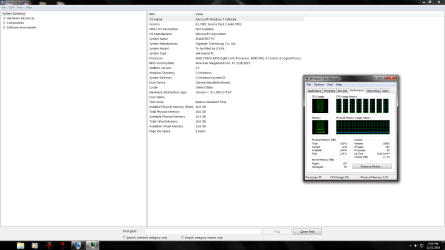
Here is my msinfo 32 screenshot.
If you take what windows processes are using in task manager plus what is available in msinfo32 and do the math it will equal 16gb. Nothing is being shared with my video card. Cause it adds up. If i open up more programs, then the available ram in msinfo32 will go down, then back up when i close them out.
Yes i don't have a page file i turned it off to save reads and writes on my ssd. I was told by a pc repair tech that a page file is only needed when you have 8gb of ram or less.
 

Attachments

  • my ms32 information.png
    my ms32 information.png
    73.3 KB · Views: 4

My Computer My Computer

At a glance

Windows 7 Ultimate x64 SP1AMD FX 8350G-Skill Sniper Series 16 GBMSI GTX 970
Computer type
PC/Desktop
Computer Manufacturer/Model Number
Custom Built By Yours Truly.
OS
Windows 7 Ultimate x64 SP1
CPU
AMD FX 8350
Motherboard
Gigabyte 990FXA-UD3
Memory
G-Skill Sniper Series 16 GB
Graphics Card(s)
MSI GTX 970
Monitor(s) Displays
Sony Bravia 40 Inch
Screen Resolution
1920x1080 Full Pixel
Hard Drives
Kingston Hyper X Savage SSD 240GB (OS Drive)
Seagate FireCuda 2TB SSHD
Western Digital Black 2TB
PSU
Antec 900 Watt High Current Gamer
Case
Cooler Master Trooper Full Tower With View Window
Cooling
Noctua D14 Push Pull Air Cooler
Keyboard
Razer Blackwidow Chroma v2
Mouse
Logitech G700s 13 Button Gaming Mouse
Internet Speed
250 mB/s
Antivirus
None
Browser
Firefox
Couple of things.

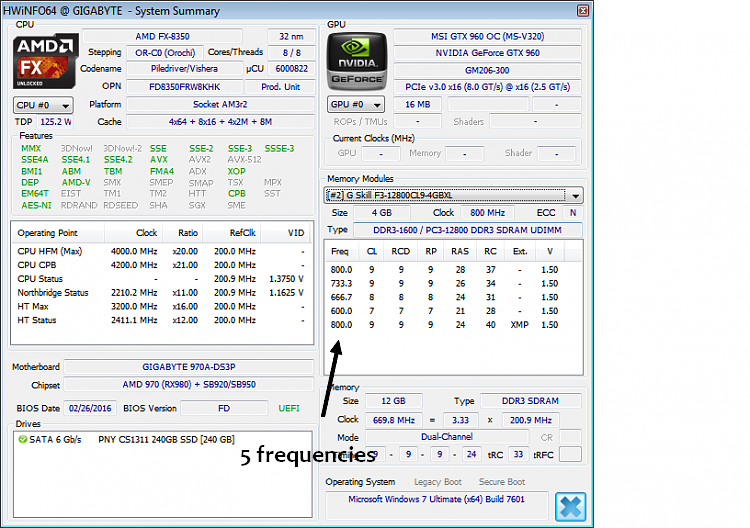
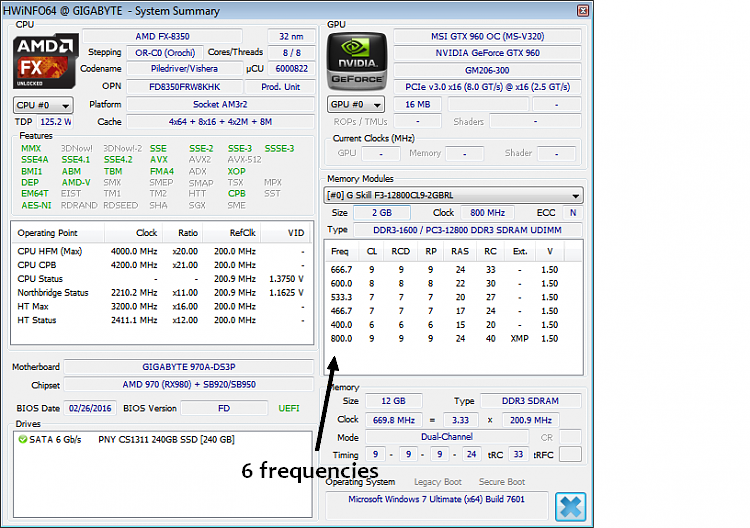
In RAM slot #2 and #3 from your images I see only five freq listed. Where's the first screen shot for RAM slot #1 shows six.

Also, you might need to purchase another 4GB stick to have 16 GB total for dual channel capability. While that may seem like it's not needed, the motherboard may be picky. If you do buy another 4GB, make sure it's the same exact type you have now.
 
Last edited:

My Computer My Computer

At a glance

Windows 7 Ultimate x64
Computer type
PC/Desktop
OS
Windows 7 Ultimate x64
Couple of things.

In RAM slot #2 and #3 from your images I see only five freq listed. Where's the first screen shot for RAM slot #1 shows seven.

Also, you might need to purchase another 4GB stick to have 16 GB total for dual channel capability. While that may seem like it's not needed, the motherboard may be picky. If you do buy another 4GB, make sure it's the same exact type you have now.

For some odd reason hwinfo goes by 0 1 2 3. Not 1 2 3 4. I thought that it was odd also.
 

My Computer My Computer

At a glance

Windows 7 Ultimate x64 SP1AMD FX 8350G-Skill Sniper Series 16 GBMSI GTX 970
Computer type
PC/Desktop
Computer Manufacturer/Model Number
Custom Built By Yours Truly.
OS
Windows 7 Ultimate x64 SP1
CPU
AMD FX 8350
Motherboard
Gigabyte 990FXA-UD3
Memory
G-Skill Sniper Series 16 GB
Graphics Card(s)
MSI GTX 970
Monitor(s) Displays
Sony Bravia 40 Inch
Screen Resolution
1920x1080 Full Pixel
Hard Drives
Kingston Hyper X Savage SSD 240GB (OS Drive)
Seagate FireCuda 2TB SSHD
Western Digital Black 2TB
PSU
Antec 900 Watt High Current Gamer
Case
Cooler Master Trooper Full Tower With View Window
Cooling
Noctua D14 Push Pull Air Cooler
Keyboard
Razer Blackwidow Chroma v2
Mouse
Logitech G700s 13 Button Gaming Mouse
Internet Speed
250 mB/s
Antivirus
None
Browser
Firefox
Here's what I'm referring to.


LbXwERi.png


GGbGeNw.png
 

My Computer My Computer

At a glance

Windows 7 Ultimate x64
Computer type
PC/Desktop
OS
Windows 7 Ultimate x64
I see what's up now. You have a 2GB stick and a 4GB stick. At least that's what it says.

What does CPUz give you? CPU-Z | Softwares | CPUID
 

My Computer My Computer

At a glance

Windows 7 Ultimate x64
Computer type
PC/Desktop
OS
Windows 7 Ultimate x64
Here's what I'm referring to.


LbXwERi.png


GGbGeNw.png

Why is that for? I never noticed that. I mean i build pc's and can fix some stuff on them but i have to say i'm confused on that.
We must of posted at the same time. I'll run cpuz and post screenshots.
 

My Computer My Computer

At a glance

Windows 7 Ultimate x64 SP1AMD FX 8350G-Skill Sniper Series 16 GBMSI GTX 970
Computer type
PC/Desktop
Computer Manufacturer/Model Number
Custom Built By Yours Truly.
OS
Windows 7 Ultimate x64 SP1
CPU
AMD FX 8350
Motherboard
Gigabyte 990FXA-UD3
Memory
G-Skill Sniper Series 16 GB
Graphics Card(s)
MSI GTX 970
Monitor(s) Displays
Sony Bravia 40 Inch
Screen Resolution
1920x1080 Full Pixel
Hard Drives
Kingston Hyper X Savage SSD 240GB (OS Drive)
Seagate FireCuda 2TB SSHD
Western Digital Black 2TB
PSU
Antec 900 Watt High Current Gamer
Case
Cooler Master Trooper Full Tower With View Window
Cooling
Noctua D14 Push Pull Air Cooler
Keyboard
Razer Blackwidow Chroma v2
Mouse
Logitech G700s 13 Button Gaming Mouse
Internet Speed
250 mB/s
Antivirus
None
Browser
Firefox
Read post 14 I just made. You have two 2GB sticks and two 4 GB sticks. That may be your issue there with mixed RAM. You should have all 4GB sticks or all 2GB sticks. I think the MOBO may be picky.
 

My Computer My Computer

At a glance

Windows 7 Ultimate x64
Computer type
PC/Desktop
OS
Windows 7 Ultimate x64
Read post 14 I just made. You have two 2GB sticks and two 4 GB sticks. That may be your issue there with mixed RAM. You should have all 4GB sticks or all 2GB sticks. I think the MOBO may be picky.

I think i got it fixed. I'll have to keep an eye on it for a few more days to see if it is in fact fixed.
 

Attachments

  • windows experience index.png
    windows experience index.png
    54.1 KB · Views: 1

My Computer My Computer

At a glance

Windows 7 Ultimate x64 SP1AMD FX 8350G-Skill Sniper Series 16 GBMSI GTX 970
Computer type
PC/Desktop
Computer Manufacturer/Model Number
Custom Built By Yours Truly.
OS
Windows 7 Ultimate x64 SP1
CPU
AMD FX 8350
Motherboard
Gigabyte 990FXA-UD3
Memory
G-Skill Sniper Series 16 GB
Graphics Card(s)
MSI GTX 970
Monitor(s) Displays
Sony Bravia 40 Inch
Screen Resolution
1920x1080 Full Pixel
Hard Drives
Kingston Hyper X Savage SSD 240GB (OS Drive)
Seagate FireCuda 2TB SSHD
Western Digital Black 2TB
PSU
Antec 900 Watt High Current Gamer
Case
Cooler Master Trooper Full Tower With View Window
Cooling
Noctua D14 Push Pull Air Cooler
Keyboard
Razer Blackwidow Chroma v2
Mouse
Logitech G700s 13 Button Gaming Mouse
Internet Speed
250 mB/s
Antivirus
None
Browser
Firefox
Be nice to know what you did to fix it.
 

My Computer My Computer

At a glance

Windows 7 Ultimate x64
Computer type
PC/Desktop
OS
Windows 7 Ultimate x64
Be nice to know what you did to fix it.

I took the cpu out and reseated the cpu. I also took the ram out and put it in as 2gb 4gb 2gb 4gb. Where before i had it 4gb 2gb 4gb 2gb. So one of them fixed it. Or some thing like that i switched the ram around so either reseating the cpu or switching the ram around fixed it.
 

My Computer My Computer

At a glance

Windows 7 Ultimate x64 SP1AMD FX 8350G-Skill Sniper Series 16 GBMSI GTX 970
Computer type
PC/Desktop
Computer Manufacturer/Model Number
Custom Built By Yours Truly.
OS
Windows 7 Ultimate x64 SP1
CPU
AMD FX 8350
Motherboard
Gigabyte 990FXA-UD3
Memory
G-Skill Sniper Series 16 GB
Graphics Card(s)
MSI GTX 970
Monitor(s) Displays
Sony Bravia 40 Inch
Screen Resolution
1920x1080 Full Pixel
Hard Drives
Kingston Hyper X Savage SSD 240GB (OS Drive)
Seagate FireCuda 2TB SSHD
Western Digital Black 2TB
PSU
Antec 900 Watt High Current Gamer
Case
Cooler Master Trooper Full Tower With View Window
Cooling
Noctua D14 Push Pull Air Cooler
Keyboard
Razer Blackwidow Chroma v2
Mouse
Logitech G700s 13 Button Gaming Mouse
Internet Speed
250 mB/s
Antivirus
None
Browser
Firefox
Probably the RAM order. If it was CPU, I can only imagine the whole PC wouldn't run right at all.

I wonder if your MOBO manual talks about the RAM configuration with different RAM size modules?
 

My Computer My Computer

At a glance

Windows 7 Ultimate x64
Computer type
PC/Desktop
OS
Windows 7 Ultimate x64
Back
Top