
Solved Bios see's sata drive but windows doesn't?

0Gravity

New member
Member
Local time
11:07 AM
Messages
31
Hi All,
I have searched and tried several different things that are suggested to fix this problem, but can't figure it out..... I'm simply trying to add a extra storage drive to my HTPC and when I install the drive it's recognized in the bios, but when I start up windows 7 it says it's installing new hardware then comes up with the error "Hardware drivers could not be installed for your device" or something along that line..... and the drive shows up in device managers unknown devices with a yellow mark. I have tried two sperate drives a 1TB WD Blue and a 2TB Seagate both are Sata3 6g drives and my Motherboard is a Gigabyte GA-890GPA-UD3H that has 6 sata3 ports.
Here's what I've tried
As I said 2 seperate drives, both reacted this same.
Tried different sata cables.
Tried going into disk management to make the disk usable BUT it is not listed there.
I used a Linux based "recovery tools" cd to boot the system (which BTW sees the drive just fine) to use the Seagate drive utility to partition the drive and format it NTFS.
I also read here to try uninstalling the drive controllers in the device manager and reboot and let windows set them back up.
Obviously.... None of this has worked, and I'm at the end of my wits here... lol
Any suggestions that you all can give me would be VERY appreciated!
Thanks!
 

My Computer My Computer

At a glance

Windows 7 Pro 64AMD Athlon 64 X2 6000+4 GB OCZ DDR2 800 Dual ChannelDual NVidea 8800's
Computer Manufacturer/Model Number
HomeBrew
OS
Windows 7 Pro 64
CPU
AMD Athlon 64 X2 6000+
Motherboard
ASUS M2N32-SLI Deluxe
Memory
4 GB OCZ DDR2 800 Dual Channel
Graphics Card(s)
Dual NVidea 8800's
Sound Card
Onboard
Monitor(s) Displays
Sceptre 24"
Hard Drives
500 GB Seagate
PSU
750 watt
Case
Antec 850
Cooling
Processor = Thermaltake Bigwater 760i Rest = Air Cooled
Hmmm..... no suggestions?
 

My Computer My Computer

At a glance

Windows 7 Pro 64AMD Athlon 64 X2 6000+4 GB OCZ DDR2 800 Dual ChannelDual NVidea 8800's
Computer Manufacturer/Model Number
HomeBrew
OS
Windows 7 Pro 64
CPU
AMD Athlon 64 X2 6000+
Motherboard
ASUS M2N32-SLI Deluxe
Memory
4 GB OCZ DDR2 800 Dual Channel
Graphics Card(s)
Dual NVidea 8800's
Sound Card
Onboard
Monitor(s) Displays
Sceptre 24"
Hard Drives
500 GB Seagate
PSU
750 watt
Case
Antec 850
Cooling
Processor = Thermaltake Bigwater 760i Rest = Air Cooled
I would use Seatools for DOS, burn it to CD and boot from the CD and run both the short and long test to see if there are problems with the drive.
 

My Computers My Computers

  • At a glance

    Windows 11 ProRyzen 9 5900X32GB G Skill DDR4-3600EVGA RTX 3080 FTW 3 Ultra
    Computer type
    PC/Desktop
    Computer Manufacturer/Model Number
    ALWAYS UNDER CONSTRUCTION
    OS
    Windows 11 Pro
    CPU
    Ryzen 9 5900X
    Motherboard
    Asus X570 Crosshair Viii Hero
    Memory
    32GB G Skill DDR4-3600
    Graphics Card(s)
    EVGA RTX 3080 FTW 3 Ultra
    Sound Card
    On Board/Sennheiser PC37X Headset
    Monitor(s) Displays
    3 X Asus 27"
    Screen Resolution
    2560x1440
    Hard Drives
    2 X 1 TB NVME drives
    PSU
    EVGA 850
    Case
    Phanteks Eclipse P400A
    Cooling
    EVGA 280 AIO
    Keyboard
    Logitech G510s/ Logitech G13
    Mouse
    Logitech G502
    Internet Speed
    24/1
    Antivirus
    ESET/MBAM Pro/SAS Pro
    Browser
    Chrome/ Firefox/ Edge
  • At a glance

    Windows 11 ProIntel Ultra 9 288V32 GB LPDDR5X 8533
    Computer type
    Laptop
    System Manufacturer/Model Number
    Dell 16 Plus
    OS
    Windows 11 Pro
    CPU
    Intel Ultra 9 288V
    Memory
    32 GB LPDDR5X 8533
    Monitor(s) Displays
    16" Mini-LED HDR600 Touch 90 Hz
    Screen Resolution
    2560X1600
    Hard Drives
    1 TB NVME
Thanks for the reply essenbe, I will give that a try, but I gotta wonder what the chances are that two separate brand new drives from different manufactures would have the exact same problem.... Also I did use a couple disk tools from within that Linux recovery tool CD to check the drives and they found no errors or problems, but I will try the seatool to check it again.
The again
 

My Computer My Computer

At a glance

Windows 7 Pro 64AMD Athlon 64 X2 6000+4 GB OCZ DDR2 800 Dual ChannelDual NVidea 8800's
Computer Manufacturer/Model Number
HomeBrew
OS
Windows 7 Pro 64
CPU
AMD Athlon 64 X2 6000+
Motherboard
ASUS M2N32-SLI Deluxe
Memory
4 GB OCZ DDR2 800 Dual Channel
Graphics Card(s)
Dual NVidea 8800's
Sound Card
Onboard
Monitor(s) Displays
Sceptre 24"
Hard Drives
500 GB Seagate
PSU
750 watt
Case
Antec 850
Cooling
Processor = Thermaltake Bigwater 760i Rest = Air Cooled
A surprising number of new drives arrive damaged. I think thanks to UPS or the Postal Service, but it does happen. I believe you said you changed cables, you may also consider changing sata ports on the board and check both ends of the data and power cables to make sure they are properly seated. I always prefer to use the manufacturer's drive diagnostic tool, although I do use others too. The manufacturer made the drive, so should know the specifics of exactly what to look for, but I also use other diagnostic tools too.
 

My Computers My Computers

  • At a glance

    Windows 11 ProRyzen 9 5900X32GB G Skill DDR4-3600EVGA RTX 3080 FTW 3 Ultra
    Computer type
    PC/Desktop
    Computer Manufacturer/Model Number
    ALWAYS UNDER CONSTRUCTION
    OS
    Windows 11 Pro
    CPU
    Ryzen 9 5900X
    Motherboard
    Asus X570 Crosshair Viii Hero
    Memory
    32GB G Skill DDR4-3600
    Graphics Card(s)
    EVGA RTX 3080 FTW 3 Ultra
    Sound Card
    On Board/Sennheiser PC37X Headset
    Monitor(s) Displays
    3 X Asus 27"
    Screen Resolution
    2560x1440
    Hard Drives
    2 X 1 TB NVME drives
    PSU
    EVGA 850
    Case
    Phanteks Eclipse P400A
    Cooling
    EVGA 280 AIO
    Keyboard
    Logitech G510s/ Logitech G13
    Mouse
    Logitech G502
    Internet Speed
    24/1
    Antivirus
    ESET/MBAM Pro/SAS Pro
    Browser
    Chrome/ Firefox/ Edge
  • At a glance

    Windows 11 ProIntel Ultra 9 288V32 GB LPDDR5X 8533
    Computer type
    Laptop
    System Manufacturer/Model Number
    Dell 16 Plus
    OS
    Windows 11 Pro
    CPU
    Intel Ultra 9 288V
    Memory
    32 GB LPDDR5X 8533
    Monitor(s) Displays
    16" Mini-LED HDR600 Touch 90 Hz
    Screen Resolution
    2560X1600
    Hard Drives
    1 TB NVME
I agree with all you've said, and will give it a shot, but I am really leaning towards it being a problem within windows 7 or my build... Mainly because the drive is accessible from within every other environment I've tried it in.... I actually transferred files to and from it within a "mini xp" program on my recovery tools CD.
Also when I was swapping different cables I also tried different ports and they all see the drive the same way, just listed under the different port.
I really do appreciate and will try anything at this point to figure this out!
 

My Computer My Computer

At a glance

Windows 7 Pro 64AMD Athlon 64 X2 6000+4 GB OCZ DDR2 800 Dual ChannelDual NVidea 8800's
Computer Manufacturer/Model Number
HomeBrew
OS
Windows 7 Pro 64
CPU
AMD Athlon 64 X2 6000+
Motherboard
ASUS M2N32-SLI Deluxe
Memory
4 GB OCZ DDR2 800 Dual Channel
Graphics Card(s)
Dual NVidea 8800's
Sound Card
Onboard
Monitor(s) Displays
Sceptre 24"
Hard Drives
500 GB Seagate
PSU
750 watt
Case
Antec 850
Cooling
Processor = Thermaltake Bigwater 760i Rest = Air Cooled
Click the start button, type cmd in the search box, when the cmd entry appears, right click it and select run as administrator. In the box that appears type diskpart and press enter, it will take a few seconds, but the window will return and say diskpart. Type list disk and press enter. See if it sees your drive.

Also, do you have 2 sata controllers on that board listed in BIOS?
 

My Computers My Computers

  • At a glance

    Windows 11 ProRyzen 9 5900X32GB G Skill DDR4-3600EVGA RTX 3080 FTW 3 Ultra
    Computer type
    PC/Desktop
    Computer Manufacturer/Model Number
    ALWAYS UNDER CONSTRUCTION
    OS
    Windows 11 Pro
    CPU
    Ryzen 9 5900X
    Motherboard
    Asus X570 Crosshair Viii Hero
    Memory
    32GB G Skill DDR4-3600
    Graphics Card(s)
    EVGA RTX 3080 FTW 3 Ultra
    Sound Card
    On Board/Sennheiser PC37X Headset
    Monitor(s) Displays
    3 X Asus 27"
    Screen Resolution
    2560x1440
    Hard Drives
    2 X 1 TB NVME drives
    PSU
    EVGA 850
    Case
    Phanteks Eclipse P400A
    Cooling
    EVGA 280 AIO
    Keyboard
    Logitech G510s/ Logitech G13
    Mouse
    Logitech G502
    Internet Speed
    24/1
    Antivirus
    ESET/MBAM Pro/SAS Pro
    Browser
    Chrome/ Firefox/ Edge
  • At a glance

    Windows 11 ProIntel Ultra 9 288V32 GB LPDDR5X 8533
    Computer type
    Laptop
    System Manufacturer/Model Number
    Dell 16 Plus
    OS
    Windows 11 Pro
    CPU
    Intel Ultra 9 288V
    Memory
    32 GB LPDDR5X 8533
    Monitor(s) Displays
    16" Mini-LED HDR600 Touch 90 Hz
    Screen Resolution
    2560X1600
    Hard Drives
    1 TB NVME
OK, in my quest to find an answer to this problem I have found a possible cause, but have no idea what to do about it... So here goes...
My original setup consisted of only two drives (one 1TB hard drive and a CD/DVD drive) connected to the data ports, but I now believe they were installed incorrectly, but still worked.
First, in the bios it was installed in ide mode instead of AHCI mode, also they were installed in ports so that the CD drive is listed in the bios as the "Master" and the Primary hard drive is listed as "Slave" my ports are marked on the board as Sata3_0 thru Sata3_5, The CD drive was installed in the Sata3_0 port and the Hard drive in the Sata3_2 port, I've read that the primary HDD should be in the very first data port which would be sata3_0....if I try to move the HDD to that port now it is then listed in the bios as the "master" but my system won't boot into windows!
Could this be what is causing my problems with installing the new drive and if so how do I fix it?
Thanks,
Mike
 

My Computer My Computer

At a glance

Windows 7 Pro 64AMD Athlon 64 X2 6000+4 GB OCZ DDR2 800 Dual ChannelDual NVidea 8800's
Computer Manufacturer/Model Number
HomeBrew
OS
Windows 7 Pro 64
CPU
AMD Athlon 64 X2 6000+
Motherboard
ASUS M2N32-SLI Deluxe
Memory
4 GB OCZ DDR2 800 Dual Channel
Graphics Card(s)
Dual NVidea 8800's
Sound Card
Onboard
Monitor(s) Displays
Sceptre 24"
Hard Drives
500 GB Seagate
PSU
750 watt
Case
Antec 850
Cooling
Processor = Thermaltake Bigwater 760i Rest = Air Cooled
You are usually better off with the OS drive in port 0, but it is not absolutely necessary. You usually get better performance on sata port 0 or 1. When you say IDE mode, is that the sata mode or are you using IDE connections? If they are both sata drives, (your CD and hard drive) I don't know why they are listed as Master/slave. If you installed in IDE sata mode, you cannot just change bios to AHCI or the computer will not boot. Are they connected with an IDE cable ot 2 sata cables? If sata you should have 2 cables, a data cable connected to the drive and motherboard and a sata power cable connected to the PSU. Which type drive and CD Drive do you have?

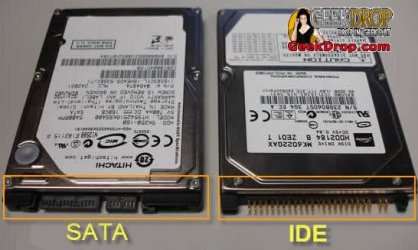
sata-ide-laptop-hard-drive-1.jpg
 

My Computers My Computers

  • At a glance

    Windows 11 ProRyzen 9 5900X32GB G Skill DDR4-3600EVGA RTX 3080 FTW 3 Ultra
    Computer type
    PC/Desktop
    Computer Manufacturer/Model Number
    ALWAYS UNDER CONSTRUCTION
    OS
    Windows 11 Pro
    CPU
    Ryzen 9 5900X
    Motherboard
    Asus X570 Crosshair Viii Hero
    Memory
    32GB G Skill DDR4-3600
    Graphics Card(s)
    EVGA RTX 3080 FTW 3 Ultra
    Sound Card
    On Board/Sennheiser PC37X Headset
    Monitor(s) Displays
    3 X Asus 27"
    Screen Resolution
    2560x1440
    Hard Drives
    2 X 1 TB NVME drives
    PSU
    EVGA 850
    Case
    Phanteks Eclipse P400A
    Cooling
    EVGA 280 AIO
    Keyboard
    Logitech G510s/ Logitech G13
    Mouse
    Logitech G502
    Internet Speed
    24/1
    Antivirus
    ESET/MBAM Pro/SAS Pro
    Browser
    Chrome/ Firefox/ Edge
  • At a glance

    Windows 11 ProIntel Ultra 9 288V32 GB LPDDR5X 8533
    Computer type
    Laptop
    System Manufacturer/Model Number
    Dell 16 Plus
    OS
    Windows 11 Pro
    CPU
    Intel Ultra 9 288V
    Memory
    32 GB LPDDR5X 8533
    Monitor(s) Displays
    16" Mini-LED HDR600 Touch 90 Hz
    Screen Resolution
    2560X1600
    Hard Drives
    1 TB NVME
Diskpart only sees my original HD, not the one I am trying to install.

In not sure where to look for two controllers in bios, although nothing is jumping out at me BUT my Gigabyte GA-890GPA-UD3H does actually have 8 sata ports 2 of which are marked GSata2_6 and _7 that I believe do use another controller of some kind, but I am not using those ports.
 

My Computer My Computer

At a glance

Windows 7 Pro 64AMD Athlon 64 X2 6000+4 GB OCZ DDR2 800 Dual ChannelDual NVidea 8800's
Computer Manufacturer/Model Number
HomeBrew
OS
Windows 7 Pro 64
CPU
AMD Athlon 64 X2 6000+
Motherboard
ASUS M2N32-SLI Deluxe
Memory
4 GB OCZ DDR2 800 Dual Channel
Graphics Card(s)
Dual NVidea 8800's
Sound Card
Onboard
Monitor(s) Displays
Sceptre 24"
Hard Drives
500 GB Seagate
PSU
750 watt
Case
Antec 850
Cooling
Processor = Thermaltake Bigwater 760i Rest = Air Cooled
They are both sata drives with sata cables but were installed in sata-ide mode.... sorry for not clarifying that.
 

My Computer My Computer

At a glance

Windows 7 Pro 64AMD Athlon 64 X2 6000+4 GB OCZ DDR2 800 Dual ChannelDual NVidea 8800's
Computer Manufacturer/Model Number
HomeBrew
OS
Windows 7 Pro 64
CPU
AMD Athlon 64 X2 6000+
Motherboard
ASUS M2N32-SLI Deluxe
Memory
4 GB OCZ DDR2 800 Dual Channel
Graphics Card(s)
Dual NVidea 8800's
Sound Card
Onboard
Monitor(s) Displays
Sceptre 24"
Hard Drives
500 GB Seagate
PSU
750 watt
Case
Antec 850
Cooling
Processor = Thermaltake Bigwater 760i Rest = Air Cooled
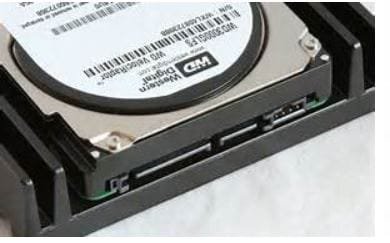
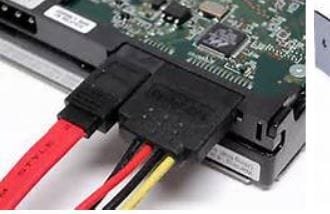
Most bios's it will be listed as sata controllers in the advanced section, or it could be listed in something like on board connections. This is a sata drive and connections. Make sure they are connected securely on both ends. Here is a sata drive and the connections. The wide connection is the sata power connector and the narrow one is the sata data connection. Make sure they are both fully seated. The pictures have the drive right side up and the connections just have it turned over.

sata drive.JPG

sata drive connections.JPG
 

My Computers My Computers

  • At a glance

    Windows 11 ProRyzen 9 5900X32GB G Skill DDR4-3600EVGA RTX 3080 FTW 3 Ultra
    Computer type
    PC/Desktop
    Computer Manufacturer/Model Number
    ALWAYS UNDER CONSTRUCTION
    OS
    Windows 11 Pro
    CPU
    Ryzen 9 5900X
    Motherboard
    Asus X570 Crosshair Viii Hero
    Memory
    32GB G Skill DDR4-3600
    Graphics Card(s)
    EVGA RTX 3080 FTW 3 Ultra
    Sound Card
    On Board/Sennheiser PC37X Headset
    Monitor(s) Displays
    3 X Asus 27"
    Screen Resolution
    2560x1440
    Hard Drives
    2 X 1 TB NVME drives
    PSU
    EVGA 850
    Case
    Phanteks Eclipse P400A
    Cooling
    EVGA 280 AIO
    Keyboard
    Logitech G510s/ Logitech G13
    Mouse
    Logitech G502
    Internet Speed
    24/1
    Antivirus
    ESET/MBAM Pro/SAS Pro
    Browser
    Chrome/ Firefox/ Edge
  • At a glance

    Windows 11 ProIntel Ultra 9 288V32 GB LPDDR5X 8533
    Computer type
    Laptop
    System Manufacturer/Model Number
    Dell 16 Plus
    OS
    Windows 11 Pro
    CPU
    Intel Ultra 9 288V
    Memory
    32 GB LPDDR5X 8533
    Monitor(s) Displays
    16" Mini-LED HDR600 Touch 90 Hz
    Screen Resolution
    2560X1600
    Hard Drives
    1 TB NVME
They are both sata drives with sata cables but were installed in sata-ide mode.... sorry for not clarifying that.

That's OK. It is OK to install them in IDE mode. That should cause no problems. In bios, which drive is listed as 1st boot device? Set it to your hard drive and leave your controller in IDE mode for now. If you change the controller, the computer will not boot.
 

My Computers My Computers

  • At a glance

    Windows 11 ProRyzen 9 5900X32GB G Skill DDR4-3600EVGA RTX 3080 FTW 3 Ultra
    Computer type
    PC/Desktop
    Computer Manufacturer/Model Number
    ALWAYS UNDER CONSTRUCTION
    OS
    Windows 11 Pro
    CPU
    Ryzen 9 5900X
    Motherboard
    Asus X570 Crosshair Viii Hero
    Memory
    32GB G Skill DDR4-3600
    Graphics Card(s)
    EVGA RTX 3080 FTW 3 Ultra
    Sound Card
    On Board/Sennheiser PC37X Headset
    Monitor(s) Displays
    3 X Asus 27"
    Screen Resolution
    2560x1440
    Hard Drives
    2 X 1 TB NVME drives
    PSU
    EVGA 850
    Case
    Phanteks Eclipse P400A
    Cooling
    EVGA 280 AIO
    Keyboard
    Logitech G510s/ Logitech G13
    Mouse
    Logitech G502
    Internet Speed
    24/1
    Antivirus
    ESET/MBAM Pro/SAS Pro
    Browser
    Chrome/ Firefox/ Edge
  • At a glance

    Windows 11 ProIntel Ultra 9 288V32 GB LPDDR5X 8533
    Computer type
    Laptop
    System Manufacturer/Model Number
    Dell 16 Plus
    OS
    Windows 11 Pro
    CPU
    Intel Ultra 9 288V
    Memory
    32 GB LPDDR5X 8533
    Monitor(s) Displays
    16" Mini-LED HDR600 Touch 90 Hz
    Screen Resolution
    2560X1600
    Hard Drives
    1 TB NVME
OK, the HDD is the 1st boot device, and both the data and power cable are seated properly.
Last night b4 going to a Halloween party I decided to try something, so I booted into that "mini xp" mode and used the Seagate drive tool to clone my original drive onto the new drive, when I got home I shut it down and swapped drives out, it booted into windows fine, did the whole "installing new device" routine which ended up failing again and listing the new drive in device manager as an "unknown device"... but I could see the whole 2TB volume in file manager... UNTIL...I rebooted... Then the system refuses to boot into windows until I reinstall the original HD! I just don't get it and it is really starting to piss me off...lol
 

My Computer My Computer

At a glance

Windows 7 Pro 64AMD Athlon 64 X2 6000+4 GB OCZ DDR2 800 Dual ChannelDual NVidea 8800's
Computer Manufacturer/Model Number
HomeBrew
OS
Windows 7 Pro 64
CPU
AMD Athlon 64 X2 6000+
Motherboard
ASUS M2N32-SLI Deluxe
Memory
4 GB OCZ DDR2 800 Dual Channel
Graphics Card(s)
Dual NVidea 8800's
Sound Card
Onboard
Monitor(s) Displays
Sceptre 24"
Hard Drives
500 GB Seagate
PSU
750 watt
Case
Antec 850
Cooling
Processor = Thermaltake Bigwater 760i Rest = Air Cooled
Try running Startup Repair from the install DVD 3 separate times with just the new HD as the 1st boot device. All other HD's disconnected. It sounds like you have boot files linked accross different HD's.
 

My Computer My Computer

At a glance

Win7 Enterprise, Win7 x86 (Ult 7600), Win7 x6...AMD fx8350 4ghz, AMD-32 2400mhz, AMD-64 3200m...2gb, 4gb on the Ult 7600, 4gb on Technet RTM,...Draw my own Graphics, several nVidia cards
Computer type
PC/Desktop
Computer Manufacturer/Model Number
Built them myself, Science Experiments !
OS
Win7 Enterprise, Win7 x86 (Ult 7600), Win7 x64 Ult 7600, TechNet RTM on AMD x64 (2.8Ghz)
CPU
AMD fx8350 4ghz, AMD-32 2400mhz, AMD-64 3200mhz, AMDx64 2.8G
Motherboard
SIS 755, ECS-K8M890M-M (Ult 7600), GigaByte & others
Memory
2gb, 4gb on the Ult 7600, 4gb on Technet RTM, 32gb on FX8350
Graphics Card(s)
Draw my own Graphics, several nVidia cards
Sound Card
on motherboard
Monitor(s) Displays
19" flat scr, 28" I-Inc widescr,22" Emprex Widescr, 23" Acer
Screen Resolution
1280 x 1024, 1440 x 900, 1920 x 1080
Hard Drives
6 pata Ide HD's & 2 Sata HD's
added 80gb external on Ult 7600 computer,
numerous extra 1tb, 2TB, 3Tb SATA HD's
A collection of ext HD Docks w/ HDs
PSU
430w, 550w, 600w, 700, 800, etc
Case
All Generic Full Towers
Cooling
Open Air & a few fans, some w/ colored LEDs
Keyboard
Compaq & Dell recycled from GoodWill
Mouse
Made in China Optical Wired Mouse
Internet Speed
Fast Cable InterNet
Antivirus
AVG Free on 24 different Desktops, NO Problems!
Browser
IE 8 is preferred, but use FireFox sometimes
Other Info
Linksys Routers, switches, & Hubs
Too Many USB Flash Drives to count, Biggest is 64GB !
Eight computers in my home network.
Sixteen computers at my business network.
Linked via TeamViewer !
Lots of old used spare computer parts everywhere!
I ended up having to do a fresh install of windows to fix my problem, I must have had some corrupt files!
Thanks for the suggestions to try to help with this!
 

My Computer My Computer

At a glance

Windows 7 Pro 64AMD Athlon 64 X2 6000+4 GB OCZ DDR2 800 Dual ChannelDual NVidea 8800's
Computer Manufacturer/Model Number
HomeBrew
OS
Windows 7 Pro 64
CPU
AMD Athlon 64 X2 6000+
Motherboard
ASUS M2N32-SLI Deluxe
Memory
4 GB OCZ DDR2 800 Dual Channel
Graphics Card(s)
Dual NVidea 8800's
Sound Card
Onboard
Monitor(s) Displays
Sceptre 24"
Hard Drives
500 GB Seagate
PSU
750 watt
Case
Antec 850
Cooling
Processor = Thermaltake Bigwater 760i Rest = Air Cooled
Back
Top