Solved BIOS tweaking for SSD

mohab

New member
Local time
11:48 AM
Messages
130
Folks, I've had two SSD hard disks for some time now (one contains windows and the other is for imaging the C drive) but my PC has'nt got any faster after installing the SSDs. I read online somewhere that you have to set a AHCI option in the BIOS. Either I can't find it or it's not there, is there anythig that can be done about it?
 

My Computer

Computer type
PC/Desktop
Computer Manufacturer/Model Number
Dell Optiplex 7020
OS
Windows 7 Professional 64 bits
CPU
Core i5 3.3 GHz
Motherboard
original
Memory
12GB
Graphics Card(s)
original (Intel HD graphics 4600
Monitor(s) Displays
Samsung SyncMaster 713N
Screen Resolution
1280 x 1024
Hard Drives
Kingstone SSDnow 480GB
Antivirus
Kaspersky Internet security 2016
Browser
Opera
You've got a Pentium D. Hmmm........Vista era? I think Vista supported AHCI, but HP does weird stuff with motherboards. All you can do is pull down all possible menus in the BIOS or possibly dive deeply into HP support for that machine.

But if I'm not mistaken, it doesn't make a night and day difference.

You say your PC hasn't gotten any faster.

Maybe you have unrealistic expectations for the SSD. That's not unheard of.

It should help with boot speed and disk-intensive stuff like virus scans or opening applications, but would have little effect on many other operations that are more reliant on brute force CPU speed.

Your second SSD is used only to store images? Kind of a waste for that technology.
 

My Computer

Computer type
PC/Desktop
Computer Manufacturer/Model Number
Ignatz Special; 4 speed manual gearbox; factory air conditioning; one of one
OS
Windows 7 Home Premium SP1, 64-bit
CPU
Intel Skylake i5-6600K, not overclocked
Motherboard
AsRock Z170M Extreme 4, micro ATX
Memory
8 GB HyperX DDR4-2666 (2 x 4 GB)
Graphics Card(s)
none; graphics are integrated on CPU
Sound Card
onboard: Realtek ALC1150; external: USB Behringer UF0-202
Monitor(s) Displays
Dell S2340M 23 inch IPS
Screen Resolution
1600 x 900
Hard Drives
System: Crucial MX100 series SSD, 128 GB;
Data: Samsung Spinpoint 103SJ, 1 TB;
Backup: WD Caviar Green WD30EZRX-00D8PB0, 3 TB
PSU
Rosewill SilentNight 500 watt fanless, semi-modular
Case
Antec Solo II
Cooling
Noctua NH-U12S; Noctua F12 intake, Noctua S12A exhaust
Keyboard
Microsoft 200 6JH-00001 USB
Mouse
Dell or Microsoft optical wired; USB
Antivirus
Microsoft Security Essentials and Malwarebytes Premium
Browser
Pale Moon
Other Info
All fans PWM; speeds at idle: CPU circa 500 rpm; intake circa 600 rpm; exhaust circa 600 rpm; CPU temps 27 idle and 47 C load in a warm room (27 C/81 F) when running Intel Extreme Tuning Utility stress test.

My Computer

Computer type
PC/Desktop
Computer Manufacturer/Model Number
Custom Build
OS
Windows 7 Ultimate x64 SP1
CPU
AMD Phenom 2 1090T
Motherboard
Gigabyte GA-890FXA-UD5
Memory
2x8GB Kingston HyperX Fury Black 1600Mhz Unganged
Graphics Card(s)
MSI GTX 970 Gaming 4G
Sound Card
Realtek On-Board HD 7.1 Audio / Logitech G35
Monitor(s) Displays
3xAcer GD245HQ
Screen Resolution
1920x1080
Hard Drives
Samsung 850 Pro 512GB SSD - OS /
WD Caviar Black SATA 3 - 1 TBx2 - Dynamic RAID 0 /
WD Caviar Green SATA 2 - 640GBx2 - Dynamic RAID 0 /
WD Caviar Green SATA 2 - 640GB - Internal Backup /
Seagate Barracude SATA 3 - 3TB - External Backup/ Sync
PSU
HighPower 1000W
Case
Cooler Master HAF 932
Cooling
Noctua NH-D14
Keyboard
Logitech G19
Mouse
Logitech G500
Internet Speed
100/4 Mbit Cable (100GB quota)
Antivirus
ZoneAlarm Extreme Security / MBAM Pro / MBAE Free / SAS Free
Browser
IE 11 - Firefox - Chrome
Other Info
Logitech F710/ G27/ G940/ Z5500 // TrackIR 5 // Nvidia 3D Surround Vision
OK Both are Kingstone SSDnow drives capacities are 225GB and 11GB.
I forgot to say I did the following before installing thm:

1) Enabled trim
2) disabled degragmentation, superfetch , prefetch and indexing
 

My Computer

Computer type
PC/Desktop
Computer Manufacturer/Model Number
Dell Optiplex 7020
OS
Windows 7 Professional 64 bits
CPU
Core i5 3.3 GHz
Motherboard
original
Memory
12GB
Graphics Card(s)
original (Intel HD graphics 4600
Monitor(s) Displays
Samsung SyncMaster 713N
Screen Resolution
1280 x 1024
Hard Drives
Kingstone SSDnow 480GB
Antivirus
Kaspersky Internet security 2016
Browser
Opera
UserBenchmark: Kingston SSDNow V300 240GB SV300S37A/240G

Effective Speed: Terrible (10th percentile)http://ssd.userbenchmark.com/Faq/What-is-the-effective-SSD-speed-index/42
This is yet another Sandforce 2881 based SSD from Kingston, this time coupled with newer 19nm Nand flash. In terms of performance the V300 is nothing we haven't seen before with other Sandforce based SSDs. A side-by-side comparison with the HyperX shows that the two drives have a near identical performance profile which is more than a little disappointing given that the V300 is 16 months newer. With a sequential write speed of just 280 MB/s the V300 lags the group leaders by 62%, an expected result for a Sandforce based drive. To conclude, Kingston aren't offering anything new with the V300, consequently there are far faster (and cheaper) drives available elsewhere including the excellent Samsung Evo which is the current group leader

It still should make a difference, don't forget above comment is with respect to other SSDs on the market.

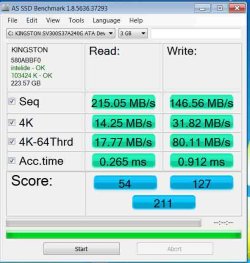
Please post AS SSD results, and lets see what's going on.
 

My Computer

Computer type
PC/Desktop
Computer Manufacturer/Model Number
Custom Build
OS
Windows 7 Ultimate x64 SP1
CPU
AMD Phenom 2 1090T
Motherboard
Gigabyte GA-890FXA-UD5
Memory
2x8GB Kingston HyperX Fury Black 1600Mhz Unganged
Graphics Card(s)
MSI GTX 970 Gaming 4G
Sound Card
Realtek On-Board HD 7.1 Audio / Logitech G35
Monitor(s) Displays
3xAcer GD245HQ
Screen Resolution
1920x1080
Hard Drives
Samsung 850 Pro 512GB SSD - OS /
WD Caviar Black SATA 3 - 1 TBx2 - Dynamic RAID 0 /
WD Caviar Green SATA 2 - 640GBx2 - Dynamic RAID 0 /
WD Caviar Green SATA 2 - 640GB - Internal Backup /
Seagate Barracude SATA 3 - 3TB - External Backup/ Sync
PSU
HighPower 1000W
Case
Cooler Master HAF 932
Cooling
Noctua NH-D14
Keyboard
Logitech G19
Mouse
Logitech G500
Internet Speed
100/4 Mbit Cable (100GB quota)
Antivirus
ZoneAlarm Extreme Security / MBAM Pro / MBAE Free / SAS Free
Browser
IE 11 - Firefox - Chrome
Other Info
Logitech F710/ G27/ G940/ Z5500 // TrackIR 5 // Nvidia 3D Surround Vision
Here are the AS Benchmark results

OK Here are the AS Benchmark results
 

Attachments

  • copy.jpg
    copy.jpg
    59.8 KB · Views: 13

My Computer

Computer type
PC/Desktop
Computer Manufacturer/Model Number
Dell Optiplex 7020
OS
Windows 7 Professional 64 bits
CPU
Core i5 3.3 GHz
Motherboard
original
Memory
12GB
Graphics Card(s)
original (Intel HD graphics 4600
Monitor(s) Displays
Samsung SyncMaster 713N
Screen Resolution
1280 x 1024
Hard Drives
Kingstone SSDnow 480GB
Antivirus
Kaspersky Internet security 2016
Browser
Opera
Ok, you are running in IDE mode.
Now, I don't know if your BIOS has option for AHCI, maybe it has RAID. You have to check the menus for something like SATA Operation Mode - it may be set to legacy or IDE at the moment. See what options are there. If you can't find, take a photograph of main menu in BIOS with your phone and attach here http://www.sevenforums.com/tutorials/9733-screenshots-files-upload-post-seven-forums.html

Does your motherboard has SATA 3 ports? Looks like it is connected to SATA 2.
 

My Computer

Computer type
PC/Desktop
Computer Manufacturer/Model Number
Custom Build
OS
Windows 7 Ultimate x64 SP1
CPU
AMD Phenom 2 1090T
Motherboard
Gigabyte GA-890FXA-UD5
Memory
2x8GB Kingston HyperX Fury Black 1600Mhz Unganged
Graphics Card(s)
MSI GTX 970 Gaming 4G
Sound Card
Realtek On-Board HD 7.1 Audio / Logitech G35
Monitor(s) Displays
3xAcer GD245HQ
Screen Resolution
1920x1080
Hard Drives
Samsung 850 Pro 512GB SSD - OS /
WD Caviar Black SATA 3 - 1 TBx2 - Dynamic RAID 0 /
WD Caviar Green SATA 2 - 640GBx2 - Dynamic RAID 0 /
WD Caviar Green SATA 2 - 640GB - Internal Backup /
Seagate Barracude SATA 3 - 3TB - External Backup/ Sync
PSU
HighPower 1000W
Case
Cooler Master HAF 932
Cooling
Noctua NH-D14
Keyboard
Logitech G19
Mouse
Logitech G500
Internet Speed
100/4 Mbit Cable (100GB quota)
Antivirus
ZoneAlarm Extreme Security / MBAM Pro / MBAE Free / SAS Free
Browser
IE 11 - Firefox - Chrome
Other Info
Logitech F710/ G27/ G940/ Z5500 // TrackIR 5 // Nvidia 3D Surround Vision
This is what I found:

Under Storage>Device configuration >Hard disk> SATA 0 and SATA1

selecting SATA0 displays Multi sector transfer- disabled ( I tried to enable but couldn't)

Transfer modes: Automatic
Bit shift
User
 

My Computer

Computer type
PC/Desktop
Computer Manufacturer/Model Number
Dell Optiplex 7020
OS
Windows 7 Professional 64 bits
CPU
Core i5 3.3 GHz
Motherboard
original
Memory
12GB
Graphics Card(s)
original (Intel HD graphics 4600
Monitor(s) Displays
Samsung SyncMaster 713N
Screen Resolution
1280 x 1024
Hard Drives
Kingstone SSDnow 480GB
Antivirus
Kaspersky Internet security 2016
Browser
Opera

My Computer

Computer type
PC/Desktop
Computer Manufacturer/Model Number
Custom Build
OS
Windows 7 Ultimate x64 SP1
CPU
AMD Phenom 2 1090T
Motherboard
Gigabyte GA-890FXA-UD5
Memory
2x8GB Kingston HyperX Fury Black 1600Mhz Unganged
Graphics Card(s)
MSI GTX 970 Gaming 4G
Sound Card
Realtek On-Board HD 7.1 Audio / Logitech G35
Monitor(s) Displays
3xAcer GD245HQ
Screen Resolution
1920x1080
Hard Drives
Samsung 850 Pro 512GB SSD - OS /
WD Caviar Black SATA 3 - 1 TBx2 - Dynamic RAID 0 /
WD Caviar Green SATA 2 - 640GBx2 - Dynamic RAID 0 /
WD Caviar Green SATA 2 - 640GB - Internal Backup /
Seagate Barracude SATA 3 - 3TB - External Backup/ Sync
PSU
HighPower 1000W
Case
Cooler Master HAF 932
Cooling
Noctua NH-D14
Keyboard
Logitech G19
Mouse
Logitech G500
Internet Speed
100/4 Mbit Cable (100GB quota)
Antivirus
ZoneAlarm Extreme Security / MBAM Pro / MBAE Free / SAS Free
Browser
IE 11 - Firefox - Chrome
Other Info
Logitech F710/ G27/ G940/ Z5500 // TrackIR 5 // Nvidia 3D Surround Vision
Thank you all for your help and suggestions. It's obvious, I have a hopelessly old PC which I don't want to waste anymore of your time and my time on it, as I'm going to replace it soon
 

My Computer

Computer type
PC/Desktop
Computer Manufacturer/Model Number
Dell Optiplex 7020
OS
Windows 7 Professional 64 bits
CPU
Core i5 3.3 GHz
Motherboard
original
Memory
12GB
Graphics Card(s)
original (Intel HD graphics 4600
Monitor(s) Displays
Samsung SyncMaster 713N
Screen Resolution
1280 x 1024
Hard Drives
Kingstone SSDnow 480GB
Antivirus
Kaspersky Internet security 2016
Browser
Opera
Back
Top