
bios update

mie333

New member
Member
Local time
5:12 AM
Messages
71
hye can anybody here teach me how to updated my bios with a proper method..thnk you :)

spec:

moterboard: Micro-Star Inc. MS-6566E 1.0
BIOS: American Megatrends Inc. 07.00T 04/02/01
OS :windows 7 ultimate
processor : intel pentium 4 2.00 GHZ
ram : DDR 2.00 GB
 
Last edited:

My Computer

Computer Manufacturer/Model Number
Satellite E300 / PSE30L-009007
OS
Microsoft Windows 7 Ultimate x64 6.1.7601 Service Pack 1
CPU
Intel(R) Core(TM) i5-2410M CPU @ 2.30GHz
Motherboard
Intel Corp. Base Board Product Name (CPU1)
Memory
4.00 GB Dual-Channel DDR3 @ 665MHz (9-9-9-24)
Graphics Card(s)
Intel(R) HD Graphics Family version=8.15.10.2353
Sound Card
onexant SmartAudio HD, Intel(R) Display Audio version=6.14
Screen Resolution
1366 x 768 Pixels
Hard Drives
625GB TOSHIBA TOSHIBA MK6465GSXN (SATA)
Mouse
e-view
Other Info
NETWORK CARD

-HUAWEI Mobile Connect - 3G Network Card version=6,0,1,279
-Intel(R) Centrino(R) Advanced-N 6230 version=15.3.1.2
-Atheros AR8152/8158 PCI-E Fast Ethernet Controller (NDIS 6.20) version=2.0.15.16
Maybe this will help: Microstar motherboard BIOS updates

There are several methods and it depends on what is available or used with your system. One common method used on many systems is a BIOS routine that is run from within Windows (and many of these are OS dependent). There are other methods such as booting and running from a CD or floppy drive. The exact procedure is usually what is specified by your motherboard vendor and their install instructions.

Keep in mind BIOS updates are in the "if it ain't broke don't fix it category" unless what is in the BIOS update pertains to your specific installation (e.g. if the BIOS update only adds support for newer CPU's and you do not plan on updating the CPU the BIOS update is not needed). In many cases (most) a failed BIOS update and corruption means the motherboard must be replaced.
 

My Computer

Computer type
PC/Desktop
Computer Manufacturer/Model Number
My Own Build
OS
Windows 10 64 bit
CPU
Intel i7 6700K
Motherboard
ASUS ROG Maximus VIII Hero
Memory
16GB Corsair Dominator
Graphics Card(s)
Intel CPU Graphics
Sound Card
RealTek
Monitor(s) Displays
27" Dell S2719dgf
Screen Resolution
2560X1440
Hard Drives
1 TB Samsung 850 EVO SSD for Win 10 Pro
500GB Samsung 850 EVO SSD for Win 10 Insider
2 TB drive for backup
PSU
EVGA Supernova 750G2
Case
BeQuiet Silent Base 600
Cooling
Deepcool Captain 120EX
Keyboard
Microsoft Wireless 2000
Mouse
Microsoft wireless
Internet Speed
100 MB/sec (Cable)
Antivirus
Microsoft Defender and Malwarebytes
Browser
Edge/Firefox
Other Info
Cakewalk (Sonar) by BandLab and Studio One 4.1 Pro recording studio software. MOTU 896Mk3 Hybrid recording interface, Frontier Tranzport wireless control unit, Behringer X-Touch Control Surface.
Five USB connected optical drives for CD Audio production using Nero BurningROM
Maybe this will help: Microstar motherboard BIOS updates

There are several methods and it depends on what is available or used with your system. One common method used on many systems is a BIOS routine that is run from within Windows (and many of these are OS dependent). There are other methods such as booting and running from a CD or floppy drive. The exact procedure is usually what is specified by your motherboard vendor and their install instructions.

Keep in mind BIOS updates are in the "if it ain't broke don't fix it category" unless what is in the BIOS update pertains to your specific installation (e.g. if the BIOS update only adds support for newer CPU's and you do not plan on updating the CPU the BIOS update is not needed). In many cases (most) a failed BIOS update and corruption means the motherboard must be replaced.

( In many cases (most) a failed BIOS update and corruption means the motherboard must be replaced.) r sure sir if my bios fail after update,it will effect my moterboard too? n i also got a possibility to replace my motherboard?
 

My Computer

Computer Manufacturer/Model Number
Satellite E300 / PSE30L-009007
OS
Microsoft Windows 7 Ultimate x64 6.1.7601 Service Pack 1
CPU
Intel(R) Core(TM) i5-2410M CPU @ 2.30GHz
Motherboard
Intel Corp. Base Board Product Name (CPU1)
Memory
4.00 GB Dual-Channel DDR3 @ 665MHz (9-9-9-24)
Graphics Card(s)
Intel(R) HD Graphics Family version=8.15.10.2353
Sound Card
onexant SmartAudio HD, Intel(R) Display Audio version=6.14
Screen Resolution
1366 x 768 Pixels
Hard Drives
625GB TOSHIBA TOSHIBA MK6465GSXN (SATA)
Mouse
e-view
Other Info
NETWORK CARD

-HUAWEI Mobile Connect - 3G Network Card version=6,0,1,279
-Intel(R) Centrino(R) Advanced-N 6230 version=15.3.1.2
-Atheros AR8152/8158 PCI-E Fast Ethernet Controller (NDIS 6.20) version=2.0.15.16

My Computer

Computer Manufacturer/Model Number
Lenovo ThinkPad T60
OS
Windows 7 Ultimate 64Bit
CPU
GenuineIntel Intel(R) Core(TM) DuoCore T2400 @ 1.83GHz
Motherboard
Intel(R) 82801G (ICH7 Family)
Memory
2.00 GB
Graphics Card(s)
Mobile Intel(R) 945 Express Chipset
Sound Card
SoundMAX Integrated Digital HD Audio
Monitor(s) Displays
ThinkPad Display
Screen Resolution
1400x1050
Hard Drives
100Gb SATA
Keyboard
Standard Keyboard
Mouse
HID-compliant Mouse
Internet Speed
Cable Broadband - 54Mbps
Other Info
Intel(R) PRO/1000 PL Network Connection
11a/b/g Wireless LAN Mini PCI Express Adapter
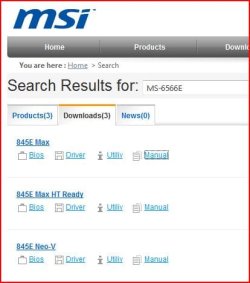
Go to the MSI web site download the manual.
 

Attachments

  • 1.JPG
    1.JPG
    29.9 KB · Views: 55

My Computer

OS
ME/XP/Vista/Win7
Due to the fact that anything that disrupts a BIOS flash will ruin the BIOS chip, I prefer to download the firmware and put it on a floppy, CD or flash drive, and do the flash at a time that power disruption isn't too likely, such as not during a thunderstorm or high winds. On some motherboards you can simply purchase a new chip already flashed, but I didn't find one for your motherboard.
 

My Computer

Computer Manufacturer/Model Number
DIY
OS
W7x64 Pro, SuSe 12.1/** W7 x64 Pro, XP MCE
CPU
Phenom II 1090T w/Noctua NH-D14 /**4400+ X2 w/CM Hyper TX 3
Motherboard
ASRock 890FX Deluxe 4/**A8N-SLI
Memory
2 x 2GB Patriot PGS34g1600LLKA/**4x1GB Corsair VS
Graphics Card(s)
EVGA GTX460 SC/**EVGA 8800GTS
Sound Card
Asus Xonar D2X/**Xonar D1
Monitor(s) Displays
Acer X233H, Dell E152FPc /**LG M237-WD
Screen Resolution
1920x1080 & 1024x768/**1980x1080
Hard Drives
WDC 2TB, 1.5TB, 1TB, 500GB,Seagate 500GB , Maxtor 80GB /**500GB Seagate & WDC 1TB Black
PSU
CM RS600 w/ APC BX1000G/**Antec 500 TP w/ APC BX1000
Case
HAF922/**Antec 1040IIB
Cooling
3x200mm, 1x140 and 1x120mm/**5x80mm fans
Keyboard
Logitech Media USB/**Saitek Eclipse
Mouse
Cordless Trackman Wheel/**Ditto
Internet Speed
3.3Mbps
Other Info
SB 560 5.1 w/ Sennheiser RS140/**Creative T20 speakers, Dvico FusionHDTV7 Gold RT, Cisco E3000, HP 5510V AIO, Linksys E3000, Belkin F5U237 hub and **F5D8055 adapter
(** = 2nd rig)
Due to the fact that anything that disrupts a BIOS flash will ruin the BIOS chip, I prefer to download the firmware and put it on a floppy, CD or flash drive, and do the flash at a time that power disruption isn't too likely, such as in a thunderstorm or high winds. On some motherboards you can simply purchase a new chip already flashed, but I didn't find one for your motherboard.

it's too risky..oh..then i change my mind..dunt want to update it anymore,since my bios right now is working well n i dunt have any plan to update my cpu..so just chnge my mind..thank all of you guys coz try to help me..at least,i get a new knowledge..thnks :o
 

My Computer

Computer Manufacturer/Model Number
Satellite E300 / PSE30L-009007
OS
Microsoft Windows 7 Ultimate x64 6.1.7601 Service Pack 1
CPU
Intel(R) Core(TM) i5-2410M CPU @ 2.30GHz
Motherboard
Intel Corp. Base Board Product Name (CPU1)
Memory
4.00 GB Dual-Channel DDR3 @ 665MHz (9-9-9-24)
Graphics Card(s)
Intel(R) HD Graphics Family version=8.15.10.2353
Sound Card
onexant SmartAudio HD, Intel(R) Display Audio version=6.14
Screen Resolution
1366 x 768 Pixels
Hard Drives
625GB TOSHIBA TOSHIBA MK6465GSXN (SATA)
Mouse
e-view
Other Info
NETWORK CARD

-HUAWEI Mobile Connect - 3G Network Card version=6,0,1,279
-Intel(R) Centrino(R) Advanced-N 6230 version=15.3.1.2
-Atheros AR8152/8158 PCI-E Fast Ethernet Controller (NDIS 6.20) version=2.0.15.16
it's too risky..oh..then i change my mind..dunt want to update it anymore,since my bios right now is working well
Grow a pair and get it updated!:p I dream of a bios update, so think yourself lucky you're able to.
 

My Computer

Computer Manufacturer/Model Number
Sony Vaio FZ21Z
OS
Windows 7 Ultimate x64 ®™
CPU
Intel Core 2 Duo (2.2 GHz)
Motherboard
Sony (Intel Chipset)
Memory
2x 2GB Corsair (667 MHz)
Graphics Card(s)
NVIDIA 8600M GS (256MB)
Sound Card
Sigmatel
Monitor(s) Displays
15.4" TFT X-Black
Screen Resolution
1280x800
Hard Drives
Western Digital 300GB Scorpio Black (7200rpm)
Mouse
Logitech Anywhere MX
Internet Speed
Sky 5MB

My Computer

Computer Manufacturer/Model Number
Satellite E300 / PSE30L-009007
OS
Microsoft Windows 7 Ultimate x64 6.1.7601 Service Pack 1
CPU
Intel(R) Core(TM) i5-2410M CPU @ 2.30GHz
Motherboard
Intel Corp. Base Board Product Name (CPU1)
Memory
4.00 GB Dual-Channel DDR3 @ 665MHz (9-9-9-24)
Graphics Card(s)
Intel(R) HD Graphics Family version=8.15.10.2353
Sound Card
onexant SmartAudio HD, Intel(R) Display Audio version=6.14
Screen Resolution
1366 x 768 Pixels
Hard Drives
625GB TOSHIBA TOSHIBA MK6465GSXN (SATA)
Mouse
e-view
Other Info
NETWORK CARD

-HUAWEI Mobile Connect - 3G Network Card version=6,0,1,279
-Intel(R) Centrino(R) Advanced-N 6230 version=15.3.1.2
-Atheros AR8152/8158 PCI-E Fast Ethernet Controller (NDIS 6.20) version=2.0.15.16
Back
Top