
Bios Update

Winddows7uSeR

New member
Local time
5:20 AM
Messages
7
I have no clue on how to update my bios driver ( yes i know its dangerous)

I used biosAgentPlus and this is the result:
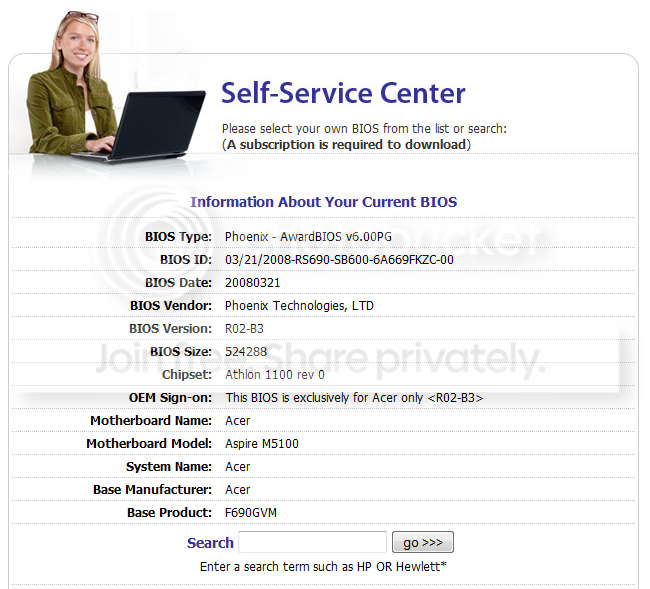
Capture.png


But i searched the list down the result and it doesnt have phoenix.

Could anybody help me?

EDIT: I clicked Acer and than aspire 5100, but i must register and pay to update, so i give up.

Thread can be closed.
 

My Computer

Computer Manufacturer/Model Number
Acer
OS
Windows 7 Ultimate 32-bit
CPU
AMD sempron Dual core 2.0 ghz
Motherboard
Acer F690GVM
Memory
2gb
Graphics Card(s)
Nvidia 9600GT
Monitor(s) Displays
Acer AL1716
Screen Resolution
1280*1024
Hard Drives
External lacie 750GB
Mouse
Logitech G5
Internet Speed
3MB/s DL
Hello Winddows7User,

If you have a Acer Aspire H5100 Notebook, then you can go to Acer's download link below to select your computer model, click on the BIOS tab, then download the current BIOS for you model number. They show v3.13 as the latest BIOS version right now since March 9th, 2009. Be sure that you only use the BIOS for your specific computer model number. If you do not, you could transfer your notebook into a paperweight.

Acer Support - Download Drivers

BIOS flash instructions from download:
To flash BIOS in Windows mode, please extract CW51313.zip and execute the flash32.exe to flash BIOS.


   Warning
However, unless you are having any issues, you might consider not trying to flash the BIOS since you have never done this before. One mistake could render your notebook into a paperweight.


Hope this helps,
Shawn
 

My Computer

Computer type
PC/Desktop
Computer Manufacturer/Model Number
Self built custom
OS
64-bit Windows 11 Pro for Workstations
CPU
Intel i7-8700K OC'd to 5 GHz
Motherboard
ASUS ROG Maximus XI Formula Z390
Memory
64 GB (4x16GB) G.SKILL TridentZ RGB DDR4 3600 MHz
Graphics Card(s)
ASUS ROG-STRIX-GTX1080TI-O11G-GAMING
Sound Card
Integrated
Monitor(s) Displays
2 x Samsung Odyssey G7 27"
Screen Resolution
2560x1440
Hard Drives
1TB Samsung 990 PRO M.2,
4TB Samsung 990 PRO PRO M.2,
TerraMaster F8 SSD Plus NAS
PSU
Seasonic Prime Titanium 850W
Case
Thermaltake Core P3
Cooling
Corsair Hydro H115i
Keyboard
Logitech wireless K800
Mouse
Logitech MX Master 4
Internet Speed
2 Gb/s Download and 100 Mb/s Upload
Antivirus
Malwarebyte Anti-Malware Premium
Browser
Google Chrome
Other Info
Logitech Z625 speaker system,
Logitech BRIO 4K Pro webcam,
HP Color LaserJet Pro MFP M477fdn,
APC SMART-UPS RT 1000 XL - SURT1000XLI,
Galaxy S23 Plus phone
First question you need to ask yourself prior to thinking about doing a BIOS upgrade is, does my PC do everything I need it to do with all my programs, hardware and OS, if the answer is yes, safe yourself some grief and leave well enough alone.
 

My Computer

Computer Manufacturer/Model Number
DELL XPS Studio 435T
OS
Vista 64 Ultimate, Windows 7 64 Ultimate, Ubuntu 9.10
CPU
i7 975 3.3 GHz Extreme (Factory OC'd to 3.6 GHz)
Motherboard
DELL provided
Memory
18 Gb Tri-Channel 1066
Graphics Card(s)
ATI 5970 2048 Mb
Sound Card
X-Fi Extreme Gamer
Monitor(s) Displays
Vizio 37" HD-TV
Screen Resolution
1920 x 1080
Hard Drives
1.5 Tb HDD
1.5 Tb HDD
2.0 Tb Network Drive
512 Gb Crucial SSD
PSU
DELL Provided 475 watts
Case
DELL
Cooling
3 fans
Keyboard
Logitech Performance K350 Wireless
Mouse
Logitech Performance MX Wireless
Internet Speed
3 Mb up 750 Kb down
Other Info
Bamboo Fun Tablet, Belkin N+ Wireless router, Pioneer Dolby System Wireless Headphones, Bose 5.1 Dolby Surround Sound System, LifeCam VX 3000 Webcam, Blu-Ray/Hi Def DVD +RW combo and Blu-ray +RW,l 15 in 1 media card reader, Logitech Rumblepad 2, Hauppauge 2250 DTV Tuner with MS Media Center Remote

Laptop:Alienware M17x, Q9100 CPU, 8Gb RAM, 1920x1200 WUXGA LCD driven by 4870's in CrossFireX, Bl
Hello Winddows7User,

If you have a Acer Aspire H5100 Notebook, then you can go to Acer's download link below to select your computer model, click on the BIOS tab, then download the current BIOS for you model number. They show v3.13 as the latest BIOS version right now since March 9th, 2009. Be sure that you only use the BIOS for your specific computer model number. If you do not, you could transfer your notebook into a paperweight.

Acer Support - Download Drivers

BIOS flash instructions from download:
To flash BIOS in Windows mode, please extract CW51313.zip and execute the flash32.exe to flash BIOS.


   Warning
However, unless you are having any issues, you might consider not trying to flash the BIOS since you have never done this before. One mistake could render your notebook into a paperweight.


Hope this helps,
Shawn

Ive got a desktop PC, not a notebook. Its a Acer M5100 but in that search list it doesnt have a M for it.

And for fish, i think its needed because i get way to low fps in games if i look at my specs. But that's just what i think.
 

My Computer

Computer Manufacturer/Model Number
Acer
OS
Windows 7 Ultimate 32-bit
CPU
AMD sempron Dual core 2.0 ghz
Motherboard
Acer F690GVM
Memory
2gb
Graphics Card(s)
Nvidia 9600GT
Monitor(s) Displays
Acer AL1716
Screen Resolution
1280*1024
Hard Drives
External lacie 750GB
Mouse
Logitech G5
Internet Speed
3MB/s DL
Winddows7uSeR,

It looks like Acer doesn't have a new BIOS version for your desktop M5100. :(

BIOS.jpg
 

My Computer

Computer type
PC/Desktop
Computer Manufacturer/Model Number
Self built custom
OS
64-bit Windows 11 Pro for Workstations
CPU
Intel i7-8700K OC'd to 5 GHz
Motherboard
ASUS ROG Maximus XI Formula Z390
Memory
64 GB (4x16GB) G.SKILL TridentZ RGB DDR4 3600 MHz
Graphics Card(s)
ASUS ROG-STRIX-GTX1080TI-O11G-GAMING
Sound Card
Integrated
Monitor(s) Displays
2 x Samsung Odyssey G7 27"
Screen Resolution
2560x1440
Hard Drives
1TB Samsung 990 PRO M.2,
4TB Samsung 990 PRO PRO M.2,
TerraMaster F8 SSD Plus NAS
PSU
Seasonic Prime Titanium 850W
Case
Thermaltake Core P3
Cooling
Corsair Hydro H115i
Keyboard
Logitech wireless K800
Mouse
Logitech MX Master 4
Internet Speed
2 Gb/s Download and 100 Mb/s Upload
Antivirus
Malwarebyte Anti-Malware Premium
Browser
Google Chrome
Other Info
Logitech Z625 speaker system,
Logitech BRIO 4K Pro webcam,
HP Color LaserJet Pro MFP M477fdn,
APC SMART-UPS RT 1000 XL - SURT1000XLI,
Galaxy S23 Plus phone
I can agree with that fishnbanjo
"If it ain't broke, don't fix it"BTW...it didn't give me much confidence when I got an update for mine and a message came up stating:

"Please EXITS all windows programs before running"

Just an error in spelling, but unnerving for something like a BIOS upgrade....
 

My Computer

Computer type
PC/Desktop
Computer Manufacturer/Model Number
Dell Hell oh Well
OS
Win 7 32 Home Premium, Win 7 64 Pro, Win 8.1, Win 10
CPU
Intel Core 2 Duo 2.93GHz
Memory
Not much with my ADHD
Graphics Card(s)
ATI Radeon HD 4350
Monitor(s) Displays
24" HDTV/Monitor
Screen Resolution
Blurry after a Scotch or 2
Hard Drives
1 HDD 250 GB, 1 HDD 1 TB, 3 - 1 TB Externals
Case
Don't get on my case...man :D
Cooling
I have an Air Conditioner & Diet Pepsi
Keyboard
Saitek Cyborg
Mouse
10 yr old MS optical mouse that still works
Internet Speed
Never fast enough
Antivirus
Various
Browser
Various
My suggestion is to read the release notes on the bios you want to flash to, most usualy say what problem it addresses then make your determination from their if you think it is going to improve the way your system is running.
Low FPS can be caused by all kinds of different things, unless this new bios addresses your cpu or memory or graphics card I don't think your going to see any dfference.
You have listed a Sempron duo core at 2.0 and a 9600gt unknown memory amount.
It would also be helpful to know what game)s) your playing that are giving you FPS your not happy with, do you have all the latest patches for them ect.
I personaly don't think a bios update will make a difference, I would check task manager and see how much memory is avalible and what programs are running in the background. For starters before doing a bios update. Fabe (edit) found this on games might want to check it out lots of information http://www.sevenforums.com/gaming/77293-tips-troubleshooting-game-issues.html
 

My Computer

Computer Manufacturer/Model Number
Self Built
OS
Windows 7 ultimate 64 bit / XP Home sp3
CPU
intel Core 2 Duo E8400 3.0ghz
Motherboard
Asus P5ND bios 1401
Memory
8 gigs 1066 OCZ Fata1ty
Graphics Card(s)
EVGA GTX 580 Call of Duty Black Ops Edition
Sound Card
Creative Soundblaster Audigy 2zs
Monitor(s) Displays
Asus 24in LCD's 2MS X2
Screen Resolution
1920x1080p @60Hz
Hard Drives
WD Caviar 500 Black/ WD Caviar 200 Blue
PSU
OCZ 700W GameXtreme
Case
NZXT Apollo
Cooling
Corsair H50 CPU/120mm x3 /60mm x2 /Corsair Dominator Ram
Keyboard
Logitech Bluetooth Wireless MX5000
Mouse
Logitech Bluetooth Wireless MX1000
Internet Speed
Download 19.83 Upload 0.97
Other Info
Logitech Z2300 Speakers/ Bose Noise Cancelling Headphones/Avermedia PCI-e Hybrid TV Bravo/Epson NX415 all in one/ 4 Port Powered USB Hub/ LG 10x Bluray Burner /TSST Corp DVDRW External
My suggestion is to read the release notes on the bios you want to flash to, most usualy say what problem it addresses then make your determination from their if you think it is going to improve the way your system is running.
Low FPS can be caused by all kinds of different things, unless this new bios addresses your cpu or memory or graphics card I don't think your going to see any dfference.
You have listed a Sempron duo core at 2.0 and a 9600gt unknown memory amount.
It would also be helpful to know what game)s) your playing that are giving you FPS your not happy with, do you have all the latest patches for them ect.
I personaly don't think a bios update will make a difference, I would check task manager and see how much memory is avalible and what programs are running in the background. For starters before doing a bios update. Fabe (edit) found this on games might want to check it out lots of information http://www.sevenforums.com/gaming/77293-tips-troubleshooting-game-issues.html

My 9600GT got 512MB DDR3, and the game is counter-strike: source.
 

My Computer

Computer Manufacturer/Model Number
Acer
OS
Windows 7 Ultimate 32-bit
CPU
AMD sempron Dual core 2.0 ghz
Motherboard
Acer F690GVM
Memory
2gb
Graphics Card(s)
Nvidia 9600GT
Monitor(s) Displays
Acer AL1716
Screen Resolution
1280*1024
Hard Drives
External lacie 750GB
Mouse
Logitech G5
Internet Speed
3MB/s DL
Back
Top