
jdizzle921
New member
- Local time
- 3:28 AM
- Messages
- 24
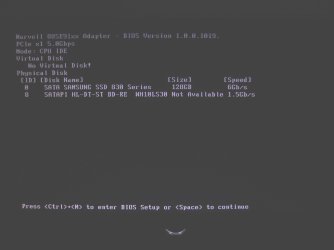
I recently added a SSD to my desktop setup. After setting up the drive and installing Windows on my SSD, I receive this prompt on every boot-up. (File: IMG_1430)
I've made sure to set the boot priority in the BIOS to the SSD instead of the default drive as well.
I'm currently running Windows 7 Professional 64bit (An upgrade key version used after installing Windows Home Premium 64bit)
My system specs from my profile are listed below...
OS
Windows 7 Professional 64 bit
CPU
Intel (R) Core (TM) i7 CPU 950 @ 3.07 GHz
Motherboard
ASUSTeK Computer INC. SABERTOOTH X58
Memory
24.0 GB
Graphics Card(s)
AMD Radeon HD 6800 Series
Sound Card
(1) AMD High Definition Audio Device (2) Realtek High Defi
Hard Drives
Samsung 128gb SSD, WDC 1TB HDD, Hitachi 1TB HDD,
Any help and time you can lend me on how I can get this figured out would be greatly appreciated.
I've made sure to set the boot priority in the BIOS to the SSD instead of the default drive as well.
I'm currently running Windows 7 Professional 64bit (An upgrade key version used after installing Windows Home Premium 64bit)
My system specs from my profile are listed below...
OS
Windows 7 Professional 64 bit
CPU
Intel (R) Core (TM) i7 CPU 950 @ 3.07 GHz
Motherboard
ASUSTeK Computer INC. SABERTOOTH X58
Memory
24.0 GB
Graphics Card(s)
AMD Radeon HD 6800 Series
Sound Card
(1) AMD High Definition Audio Device (2) Realtek High Defi
Hard Drives
Samsung 128gb SSD, WDC 1TB HDD, Hitachi 1TB HDD,
Any help and time you can lend me on how I can get this figured out would be greatly appreciated.
Attachments
Last edited:
My Computer
- OS
- Windows 7 Professional 64 bit
- CPU
- Intel (R) Core (TM) i7 CPU 950 @ 3.07 GHz
- Motherboard
- ASUSTeK Computer INC. SABERTOOTH X58
- Memory
- 24.0 GB
- Graphics Card(s)
- AMD Radeon HD 6800 Series
- Sound Card
- (1) AMD High Definition Audio Device (2) Realtek High Defi
- Hard Drives
- Samsung 128gb SSD, WDC 1TB HDD, Hitachi 1TB HDD,
- Case
- Cooler Master