
You are using an out of date browser. It may not display this or other websites correctly.
You should upgrade or use an alternative browser.
You should upgrade or use an alternative browser.
Bios won't Boot Windows 7 installation
- Thread starter Fantaji
- Start date

Welcome to Windows 7 Support forums,Hello, My Computer won't Boot windows 7 DVD to make a clean install, I did everything on bios to Boot from "DVD first" but It won't work but It works when you make the Windows 7 istallation from Windows.
Fantaji, reboot and while system runs its post touch your F-8 key to bring up boot priority menu, select DVD to boot first.
My Computer
- Computer Manufacturer/Model Number
- Custom Build
- OS
- Windows 7 7600 1 X64
- CPU
- AMD PHENOM II X 550 PROCESSOR 3.1 ghz
- Motherboard
- ASUS M4A78-TE
- Memory
- Corsair 4 gig ddr 3
- Graphics Card(s)
- ati radeon 3300
- Sound Card
- ati hd
- Monitor(s) Displays
- syncmaster 2033sw
- Screen Resolution
- 1600X900 60 hz refresh
- Hard Drives
- twin_seagates SATA's 1 TB & 500 Gig, hitachi_slimline 160 gig
- PSU
- antec_550 watt
- Case
- cooler master GLite
- Cooling
- stock_heat sink
- Internet Speed
- 20mbs up/ 1.5mbs down
- Other Info
- favorite child "stewie"
favorite dog "brian"
Well in my computer, I use F-12. F8 is for safe mode for me. O.O
My Computer
- Computer Manufacturer/Model Number
- Gateway KAV60
- OS
- Windows 7 Home Premium 32-bit
- Memory
- 2 GB
- Screen Resolution
- 1024x600
- Hard Drives
- 250 GB HDD
- Internet Speed
- Time Warner Cable/Road Runner
- Other Info
- Intel Atom processor N270
Multi-in-1 card reader
802.11b/g
NO optical drive
NO WWAN
NO Bluetooth

- Local time
- 8:42 PM
- Messages
- 50,634
Where did you get Windows 7? Did you burn the DVD yourself?
I don't think that would matter. I have done this with other operating systems and it works fine.Where did you get Windows 7? Did you burn the DVD yourself?
My Computer
- Computer Manufacturer/Model Number
- Gateway KAV60
- OS
- Windows 7 Home Premium 32-bit
- Memory
- 2 GB
- Screen Resolution
- 1024x600
- Hard Drives
- 250 GB HDD
- Internet Speed
- Time Warner Cable/Road Runner
- Other Info
- Intel Atom processor N270
Multi-in-1 card reader
802.11b/g
NO optical drive
NO WWAN
NO Bluetooth

I don't think that would matter. I have done this with other operating systems and it works fine.Where did you get Windows 7? Did you burn the DVD yourself?
Sounds like someone has been sailing the "Bays" ...

My Computer
- Computer type
- PC/Desktop
- Computer Manufacturer/Model Number
- LENOVO K450 @3.0GHZ
- OS
- 64-bit Windows 8.1 Pro
- CPU
- Core(TM) i5 CPU 4330 Haswell @ 3.20GHz
- Motherboard
- LENOVO
- Memory
- 12.00 GB
- Graphics Card(s)
- Intel(R) HD Graphics
- Sound Card
- Intel HD integtrated
- Monitor(s) Displays
- HP 25' ISP Monitor
- Screen Resolution
- 1900/1020
- Hard Drives
- (1) ST1000DM003-1CH162 (2) Generic STORAGE DEVICE USB Device (3) Generic STORAGE DEVICE USB Device
- Internet Speed
- 100mb down/10mb up
No, I just copied it from people that do have the CD. >.>I don't think that would matter. I have done this with other operating systems and it works fine.Where did you get Windows 7? Did you burn the DVD yourself?
Sounds like someone has been sailing the "Bays" ...
My Computer
- Computer Manufacturer/Model Number
- Gateway KAV60
- OS
- Windows 7 Home Premium 32-bit
- Memory
- 2 GB
- Screen Resolution
- 1024x600
- Hard Drives
- 250 GB HDD
- Internet Speed
- Time Warner Cable/Road Runner
- Other Info
- Intel Atom processor N270
Multi-in-1 card reader
802.11b/g
NO optical drive
NO WWAN
NO Bluetooth
- Local time
- 8:42 PM
- Messages
- 50,634
I only asked because the first thing we need to eliminate is ISO, then burn.
Install ImgBurn, select "Verify Disk" and then load ISO using file icon.
Confirm "bootable" in text, as given below:
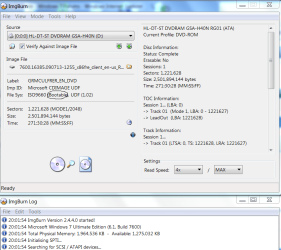
Then insert DVD and click Disk button to verify the DVD.
If the DVD is bad, insert another and Burn Image to Disk at 4x speed with Verify.
View attachment 41669
Install ImgBurn, select "Verify Disk" and then load ISO using file icon.
Confirm "bootable" in text, as given below:
Then insert DVD and click Disk button to verify the DVD.
If the DVD is bad, insert another and Burn Image to Disk at 4x speed with Verify.
View attachment 41669
warning!No, I just copied it from people that do have the CD. >.>I don't think that would matter. I have done this with other operating systems and it works fine.
Sounds like someone has been sailing the "Bays" ...
If you are a gamer, and as your name indicates xbox, you may be subject to removal from the xbox community if you use and disabling of certain equipment if you modify/bootleg software and equipment.
My Computer
- Computer Manufacturer/Model Number
- Custom Build
- OS
- Windows 7 7600 1 X64
- CPU
- AMD PHENOM II X 550 PROCESSOR 3.1 ghz
- Motherboard
- ASUS M4A78-TE
- Memory
- Corsair 4 gig ddr 3
- Graphics Card(s)
- ati radeon 3300
- Sound Card
- ati hd
- Monitor(s) Displays
- syncmaster 2033sw
- Screen Resolution
- 1600X900 60 hz refresh
- Hard Drives
- twin_seagates SATA's 1 TB & 500 Gig, hitachi_slimline 160 gig
- PSU
- antec_550 watt
- Case
- cooler master GLite
- Cooling
- stock_heat sink
- Internet Speed
- 20mbs up/ 1.5mbs down
- Other Info
- favorite child "stewie"
favorite dog "brian"
Commanderbdokey
New member
- Local time
- 10:42 PM
- Messages
- 2
Hello, My Computer won't Boot windows 7 DVD to make a clean install, I did everything on bios to Boot from "DVD first" but It won't work but It works when you make the Windows 7 istallation from Windows.
hello, I'm dealing with the exact same problem that this other guy was having
I do know how the bios settings work and all but there is one problem...
for some odd reason, the option to load the bios settings won't even appear (not even the HP logo will show up at the startup)
it'll just have " _ " blinking for a bit as if it was reading a cd (installation) but won't boot it up

help?
My Computer
- OS
- Windows 7 home premium (x64) and professional (x32)

Hello commander. You best bet would be to make a new thread in this same section of the forum. Also, it would helpful if you could fill out your system specs. You can do this by going to User CP at the top of the page, and then going to Edit System Spec. It would be especially helpful to know the exact model number of your HP, and any other info you can give us would be helpful.
My Computer
- Computer type
- Laptop
- Computer Manufacturer/Model Number
- Toshiba P775-S7100
- OS
- Windows 7 Professional SP1 64-bit
- CPU
- Intel Core i5-2450M @2.5 GHz
- Memory
- 6 GB DDR3 1333MHz
- Graphics Card(s)
- Intel HD 3000
- Monitor(s) Displays
- Built-in 17.3" LED; 22" Insignia NS-L22Q-10A
- Screen Resolution
- 1600x900; 1360x768
- Hard Drives
- 750 GB Hitachi
1TB Seagate FreeAgent External
- Internet Speed
- Verizon DSL Speed(Down/Up): 3360 Kbps / 800 Kbps
- Antivirus
- MSE and MBAM Pro
- Browser
- IE10
Commanderbdokey
New member
- Local time
- 10:42 PM
- Messages
- 2
Pete,
I just realize that even thought the HP logo doesn't show up, I could still press the buttons to load up bios. i just have to guess it lol
anyways, I guess I'll make a new thread with the computer specs.
thanks for the help
I just realize that even thought the HP logo doesn't show up, I could still press the buttons to load up bios. i just have to guess it lol
anyways, I guess I'll make a new thread with the computer specs.
thanks for the help
My Computer
- OS
- Windows 7 home premium (x64) and professional (x32)