
Bioshock and GEF

Opi8

New member
Local time
3:45 PM
Messages
56
For some reason, my bioshock icon is blank in the GEF. I checked and it also is in the main directory for some reason. How can I go about changing this. I don't need it to appear in the main directory but really need it to show in GEF. I've tried adding "BoxArt" string to regedit and typing location of a new icon, but that didn't work, and when I try to put in a completely different game id, that doesn't work either.

Also, on another note, im trying to put my GEF as a stack docklet in Rocketdock, but I can't seem to link the location of the folder. Anybody know how i can go about doing this, so that instead of having a normal shortcut to GEF, i would click the shortcut and all the games would pop off of rocketdock?

much appreciated
 

My Computer

Computer Manufacturer/Model Number
MSI/MS-7309
OS
Windows 7 Ultimate x64
Graphics Card(s)
Radeon HD 4830
Other Info
Don't know enough about computers to fill in the rest, if any important info is missing, feel free to message me on where or how to find the details.
Hi Opi8.

Bioshock should register itself in the Game Explorer on install.
However, You may need to install the game in Vista SP Compatability mode to get it to work properly.
I do not recall having to do so, but its been a while. I do know it will register itself.


As far as your problem goes, Im assuming your trying to manually add the game with your own box art etc?

What do you mean blank?
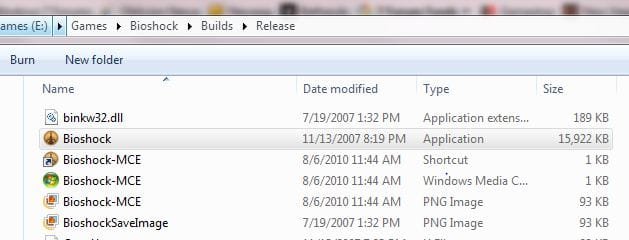
The executable you need for Bioshock Should be at your install location in the Builds --> Release folder as seen in my snip below.

If its having these issues once you change the ApplicationID, try a differnt AppId.
I have noticed there a re a couple that will not work properly.

You will need to go into RegEdit and delete the Reg Key for the failed attempt, and start over however (Assuming you added manually)


If you are refering to the icon it installs itself, you may want to uninstall the game and re-install in compatability mode as mentioned above to see if that helps.
 

Attachments

  • Capture.JPG
    Capture.JPG
    28.8 KB · Views: 12

My Computer

Computer Manufacturer/Model Number
Custom (Self Build)
OS
Windows 7 Home Premium 64bit
CPU
Intel Core i7 2700k
Motherboard
eVGA P67 SLI
Memory
8GB Mushkin Redline Ridgebacks @1866
Graphics Card(s)
EVGA GTX570 SC
Sound Card
XiFi Titanium HD
Monitor(s) Displays
LG W2453V
Screen Resolution
1920x1080
Hard Drives
Intel 320 80GB -- Intel X25-V 40GB --WD Black 1TB x2 -- WD Blue 640GB
PSU
Seasonic x750
Case
Corsair 600T SE White
Cooling
eVGA Superclocked CPU Cooler
Keyboard
Saitek Cyborg
Antivirus
Kaspersky
Browser
IE
Other Info
LG BD/DVD

My Computer

Computer type
PC/Desktop
Computer Manufacturer/Model Number
Custom built by me.
OS
Windows 10 Pro
CPU
Intel Core i7-4770K (3.5Ghz)
Motherboard
Gigabyte G1 Sniper 5 (F10 Bios)
Memory
32 gig Corsair Dominator Platinum (4x8Gig)
Graphics Card(s)
Sapphire Tri-X R9 Fury
Sound Card
Soundblaster ZXR
Monitor(s) Displays
NEC PA242W 24" LCD Monitor
Screen Resolution
1920 x 1200
Hard Drives
Primary - Samsung 850 Pro (512gig), Samsung 840 Pro (256gig), 2TB WD Caviar Black.
PSU
EVGA Supernova 1000 G2
Case
Cooler Master HAF X
Cooling
Corsair H100i with Corsair Air Series SP120 Quiet Fans
Keyboard
Logitech Wireless Wave
Mouse
Logitech Performance MX
Internet Speed
High Speed Cable
Antivirus
Norton Security
Browser
IE11
Other Info
Memory Timings - 1866MHz @ 9-9-9-27-1T @ 1.5 volts
thanks everyone for the efforts, Bioshock Icon fixed itself, or something I did only took effect after restart I'm not sure. In any case the reason was probably due to the fact that it wasnt erm.. an "official" installation lets say, lets just say i went with the "custom" install ;)
As for my question about the stack docklet, I shouldn't have assumed you all know what that is. I will assume you all know what RocketDock is however.
So, for RocketDock there is a docklet called "Stack", it allows you to assign the shortcut to a folder, and then when clicked on it will show you all the contents of that folder without actually opening it, it sorta just does a pop up from the dock itself.
I am trying to set it up for my GEF, cause that would be really cool looking and convenient (and im obsessed with customizing my computer for small things like this, since I got rainmeter).
However, when I try to locate GEF it doesn't show up anywhere, the ONE folder I managed to add was "Game" folder, which contains the Game explorer...anyone know like, the exact path of the Game Explorer folder, or how I can do this? For some reason it's being difficult (GEF that is), I tried just adding "Game Explorer" to the end of the game folder path but that didn't work
 

My Computer

Computer Manufacturer/Model Number
MSI/MS-7309
OS
Windows 7 Ultimate x64
Graphics Card(s)
Radeon HD 4830
Other Info
Don't know enough about computers to fill in the rest, if any important info is missing, feel free to message me on where or how to find the details.
I know what it is, but not at all familiar with either as I do not use them.


There is a Game folder located at:
C:/Users/username/AppData/Roaming/Microsoft/Windows/StartMenu/Programs/Games

which contains all the game shortcuts that are present in your game explorer, if that helps any.

They are hidden folders BTW.
 

My Computer

Computer Manufacturer/Model Number
Custom (Self Build)
OS
Windows 7 Home Premium 64bit
CPU
Intel Core i7 2700k
Motherboard
eVGA P67 SLI
Memory
8GB Mushkin Redline Ridgebacks @1866
Graphics Card(s)
EVGA GTX570 SC
Sound Card
XiFi Titanium HD
Monitor(s) Displays
LG W2453V
Screen Resolution
1920x1080
Hard Drives
Intel 320 80GB -- Intel X25-V 40GB --WD Black 1TB x2 -- WD Blue 640GB
PSU
Seasonic x750
Case
Corsair 600T SE White
Cooling
eVGA Superclocked CPU Cooler
Keyboard
Saitek Cyborg
Antivirus
Kaspersky
Browser
IE
Other Info
LG BD/DVD
There is a Game folder located at:
C:/Users/username/AppData/Roaming/Microsoft/Windows/StartMenu/Programs/Games

once again, you have managed to help me completely. That is exactly what I was looking for, I find the only downside to having Windows 7 now is that folders such as these are made so difficult to find, it's not as simple as just typing "Game Explorer" in search, then opening the folder and then navigating to the folder which contains it (cause now windows explorer doesn't have that option for a lot of folders such as GEF).
In any case, you have helped me a lot, I am very appreciative :D I think you know what that means ;)

edit: sadly, not many other people have helped me as much as you, i need to spread more rep before I can give you more (I am gonna try to give you rep as much as possible)
 

My Computer

Computer Manufacturer/Model Number
MSI/MS-7309
OS
Windows 7 Ultimate x64
Graphics Card(s)
Radeon HD 4830
Other Info
Don't know enough about computers to fill in the rest, if any important info is missing, feel free to message me on where or how to find the details.
Thanks OPi8

I'm glad to hear your issue was sorted.

Peace :cool:
 

My Computer

Computer type
PC/Desktop
Computer Manufacturer/Model Number
Custom built by me.
OS
Windows 10 Pro
CPU
Intel Core i7-4770K (3.5Ghz)
Motherboard
Gigabyte G1 Sniper 5 (F10 Bios)
Memory
32 gig Corsair Dominator Platinum (4x8Gig)
Graphics Card(s)
Sapphire Tri-X R9 Fury
Sound Card
Soundblaster ZXR
Monitor(s) Displays
NEC PA242W 24" LCD Monitor
Screen Resolution
1920 x 1200
Hard Drives
Primary - Samsung 850 Pro (512gig), Samsung 840 Pro (256gig), 2TB WD Caviar Black.
PSU
EVGA Supernova 1000 G2
Case
Cooler Master HAF X
Cooling
Corsair H100i with Corsair Air Series SP120 Quiet Fans
Keyboard
Logitech Wireless Wave
Mouse
Logitech Performance MX
Internet Speed
High Speed Cable
Antivirus
Norton Security
Browser
IE11
Other Info
Memory Timings - 1866MHz @ 9-9-9-27-1T @ 1.5 volts
Glad that worked for you :)
 

My Computer

Computer Manufacturer/Model Number
Custom (Self Build)
OS
Windows 7 Home Premium 64bit
CPU
Intel Core i7 2700k
Motherboard
eVGA P67 SLI
Memory
8GB Mushkin Redline Ridgebacks @1866
Graphics Card(s)
EVGA GTX570 SC
Sound Card
XiFi Titanium HD
Monitor(s) Displays
LG W2453V
Screen Resolution
1920x1080
Hard Drives
Intel 320 80GB -- Intel X25-V 40GB --WD Black 1TB x2 -- WD Blue 640GB
PSU
Seasonic x750
Case
Corsair 600T SE White
Cooling
eVGA Superclocked CPU Cooler
Keyboard
Saitek Cyborg
Antivirus
Kaspersky
Browser
IE
Other Info
LG BD/DVD
Back
Top