Bioshock Issues

Capcar

New member
Local time
5:58 PM
Messages
6
I downloaded the BioShock Demo from Steam and have been trying to get it to work with no avail. I'm hoping if I can get the demo to work, then I'll buy the whole game. But if not then I'll just save my money. Does anyone have any advice on getting it to work at all?
 

My Computer

Computer Manufacturer/Model Number
Asus/UL80VT
OS
Windows 7
Graphics Card(s)
Nvidia Geforce G210M

My Computer

Computer Manufacturer/Model Number
Custom
OS
Windows 7 Professional x64
CPU
Intel i7 2600K OC'd @ 4620 MHz
Motherboard
Asus P8Z68-V Pro
Memory
16GB GSkill Sniper 2133 Mhz (4x4GB)
Graphics Card(s)
EVGA GeForce GTX 480 SuperClocked+
Sound Card
Realtek High Definition Audio
Monitor(s) Displays
2x Acer S273HLbmii 27"
Screen Resolution
2 x 1920x1080
Hard Drives
64GB Crucial M4 SSD

Storage: Hitachi 1TB 5400RPM, Samsung 1.5TB 5400RPM
PSU
Corsair HW Series 750w (modular)
Case
Cooler Master HAF 932 Advanced Blue Edition
Cooling
CM Hyper 212+ CPU cooler, 3x 230mm + 1x 140mm case fans
Keyboard
Logitech MK320 (wireless)
Mouse
Logitech MK320 (wireless)
Internet Speed
30 Mb/s : 2 Mb/s
I can get as far as the loading screen after you choose what level of difficulty to play on. Itll load for a bit and go through the quotes and pictures, but then it freezes and on the windows task manager it says BioShock is Not Responding.

I have also tried changing the properties by clicking compatibility and choosing the Windows XP (service pack 2). I have also downloaded Game Booster.

Does that help at all?
 

My Computer

Computer Manufacturer/Model Number
Asus/UL80VT
OS
Windows 7
Graphics Card(s)
Nvidia Geforce G210M

My Computer

Computer Manufacturer/Model Number
Custom
OS
Windows 7 Professional x64
CPU
Intel i7 2600K OC'd @ 4620 MHz
Motherboard
Asus P8Z68-V Pro
Memory
16GB GSkill Sniper 2133 Mhz (4x4GB)
Graphics Card(s)
EVGA GeForce GTX 480 SuperClocked+
Sound Card
Realtek High Definition Audio
Monitor(s) Displays
2x Acer S273HLbmii 27"
Screen Resolution
2 x 1920x1080
Hard Drives
64GB Crucial M4 SSD

Storage: Hitachi 1TB 5400RPM, Samsung 1.5TB 5400RPM
PSU
Corsair HW Series 750w (modular)
Case
Cooler Master HAF 932 Advanced Blue Edition
Cooling
CM Hyper 212+ CPU cooler, 3x 230mm + 1x 140mm case fans
Keyboard
Logitech MK320 (wireless)
Mouse
Logitech MK320 (wireless)
Internet Speed
30 Mb/s : 2 Mb/s
just tried that but It wouldn't even go past the initial advertisments (who made the game and stuff) :/
 

My Computer

Computer Manufacturer/Model Number
Asus/UL80VT
OS
Windows 7
Graphics Card(s)
Nvidia Geforce G210M
Let's try updating your video card drivers. Go to Device Manager, right-click on your card, and select Update Driver Software.

If it can't find a better driver, we can look for some online. Please be sure to fill out your system specs, as explained in my signature.
 

My Computer

Computer Manufacturer/Model Number
Custom
OS
Windows 7 Professional x64
CPU
Intel i7 2600K OC'd @ 4620 MHz
Motherboard
Asus P8Z68-V Pro
Memory
16GB GSkill Sniper 2133 Mhz (4x4GB)
Graphics Card(s)
EVGA GeForce GTX 480 SuperClocked+
Sound Card
Realtek High Definition Audio
Monitor(s) Displays
2x Acer S273HLbmii 27"
Screen Resolution
2 x 1920x1080
Hard Drives
64GB Crucial M4 SSD

Storage: Hitachi 1TB 5400RPM, Samsung 1.5TB 5400RPM
PSU
Corsair HW Series 750w (modular)
Case
Cooler Master HAF 932 Advanced Blue Edition
Cooling
CM Hyper 212+ CPU cooler, 3x 230mm + 1x 140mm case fans
Keyboard
Logitech MK320 (wireless)
Mouse
Logitech MK320 (wireless)
Internet Speed
30 Mb/s : 2 Mb/s
could you tell me where that is located. I'm not exactly computer savvy and thus why my system specs are not filled out. I should have that done by the end of the week with the help from some friends. Sorry again.
 

My Computer

Computer Manufacturer/Model Number
Asus/UL80VT
OS
Windows 7
Graphics Card(s)
Nvidia Geforce G210M
Search for Device Manager in the start menu.
 

My Computer

Computer Manufacturer/Model Number
Custom
OS
Windows 7 Professional x64
CPU
Intel i7 2600K OC'd @ 4620 MHz
Motherboard
Asus P8Z68-V Pro
Memory
16GB GSkill Sniper 2133 Mhz (4x4GB)
Graphics Card(s)
EVGA GeForce GTX 480 SuperClocked+
Sound Card
Realtek High Definition Audio
Monitor(s) Displays
2x Acer S273HLbmii 27"
Screen Resolution
2 x 1920x1080
Hard Drives
64GB Crucial M4 SSD

Storage: Hitachi 1TB 5400RPM, Samsung 1.5TB 5400RPM
PSU
Corsair HW Series 750w (modular)
Case
Cooler Master HAF 932 Advanced Blue Edition
Cooling
CM Hyper 212+ CPU cooler, 3x 230mm + 1x 140mm case fans
Keyboard
Logitech MK320 (wireless)
Mouse
Logitech MK320 (wireless)
Internet Speed
30 Mb/s : 2 Mb/s
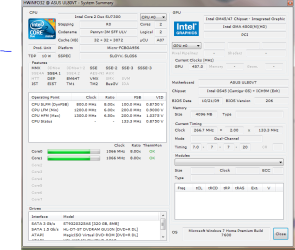
That game will push your laptop - lower the resolution and settings. For me, I had to change the compatibility settings to Vista SP1 and running as admin to get it running perfectly. Crashed once, but that's expected. If you need help with your specs, download HWInfo32 and then post a screenshot of the summary screen. Search for snip in the start menu.
 

My Computer

Computer Manufacturer/Model Number
Sony Vaio Z46GDU
OS
Windows 7 Ultimate x86-64
CPU
[email protected] 1066MHz FSB
Motherboard
Sony branded
Memory
6GB DDR3 1066MHz
Graphics Card(s)
9300M GS 256MB Dedicated (Speed) + Intel4500MHD (Stamina)
Sound Card
Realtek HD Audio
Monitor(s) Displays
13.1' WXGA
Screen Resolution
1600x900
Hard Drives
320GB 7200RPM w/ 16MB cache
Internet Speed
1MB/s
hopefully this works. And I tried restarting my computer and all you other advice and nothing works yet. :/
 

Attachments

  • Capture.PNG
    Capture.PNG
    32.2 KB · Views: 57

My Computer

Computer Manufacturer/Model Number
Asus/UL80VT
OS
Windows 7
Graphics Card(s)
Nvidia Geforce G210M
The game will not run with those specs:

Recommended Requirements
CPU – Intel Core 2 Duo processor
System RAM – 2GB
Video card – DX9 – Direct X 9.0c compliant video card with 512MB RAM (NVIDIA GeForce 7900 GT or better) / DX10 – NVIDIA GeForce 8600 or better
Sound Card – Sound Blaster X-Fi series (Optimized for use with Creative Labs EAX ADVANCED HD 4.0 or EAX ADVANCED HD 5.0 compatible sound cards)

The Intel graphics will choke and your CPU is too slow to run it - 3.0GHz is recommended in the readme.
 

My Computer

Computer Manufacturer/Model Number
Sony Vaio Z46GDU
OS
Windows 7 Ultimate x86-64
CPU
[email protected] 1066MHz FSB
Motherboard
Sony branded
Memory
6GB DDR3 1066MHz
Graphics Card(s)
9300M GS 256MB Dedicated (Speed) + Intel4500MHD (Stamina)
Sound Card
Realtek HD Audio
Monitor(s) Displays
13.1' WXGA
Screen Resolution
1600x900
Hard Drives
320GB 7200RPM w/ 16MB cache
Internet Speed
1MB/s
Back
Top