Solved Bit coin Mining Sites uses PC secretly for Mining Hence Cause CPU temp

kujvi

New member
Local time
6:47 AM
Messages
23
Location
Ontario
Hi!
Today everybody knows about cryptocurrency and of course there are lot of websites talking about it. The next think is mining many software are there which lets you mine coin. But my friends today told me that there are some sites which uses users PC hardware secretly for mining.
like when you visit their site they automatically start using system hardware and earn money by using strangers computer. Another aspects of this problem is that the computer hardware works more than usual even no application is working on it. It increases the temperature of PC sometimes causing overheating but uses never know what actually is the problem.

So what do you guys suggest me to look out for? and is there any why to monitor system? Like can i know if my PC is being used by the these sites?
I want to know whether there is any software check my PC or any easy tips.
Thanks Regards;
 

My Computer My Computer

At a glance

Windows 7 Home PremiumIntel Core i 34 GB
Computer type
PC/Desktop
OS
Windows 7 Home Premium
CPU
Intel Core i 3
Memory
4 GB
So what do you guys suggest me to look out for? and is there any why to monitor system? Like can i know if my PC is being used by the these sites?

You could check the temperatures of your PC. If your CPU is running very hot, that may be an indication. Also, check your CPU utilization -- if it is running at or near 100%, that could be another indication.

Run Task Manager. See if there are suspicious programs running. Write down the names of these programs. Then restart into Safe Mode with Networking, and see if those same programs are running. It may be that they are the programs you are concerned about. To get further information, do a Google search on each one of them. Perhaps someone else has information about them.
 

My Computer My Computer

At a glance

Linux Mint 18.2 xfce 64-bit (VMWare host) / W...Haswell4 GB
Computer type
PC/Desktop
Computer Manufacturer/Model Number
Dell
OS
Linux Mint 18.2 xfce 64-bit (VMWare host) / Windows 8.1 Pro 32-bit (VMWare guest)
CPU
Haswell
Memory
4 GB
Monitor(s) Displays
Acer 23"
Screen Resolution
1920 x 1080
Hard Drives
Two hard drives, 1TB each: One for Linux, one for my data.
Keyboard
IBM Model M
Antivirus
Sophos (Linux), Trend Micro (Windows)
Browser
Firefox, Opera
Other Info
I use Samba to share my data drive with the other computers at my house and with my guest session in VMWare Workstation Player.
You could check the temperatures of your PC. If your CPU is running very hot, that may be an indication. Also, check your CPU utilization -- if it is running at or near 100%, that could be another indication.

Run Task Manager. See if there are suspicious programs running. Write down the names of these programs. Then restart into Safe Mode with Networking, and see if those same programs are running. It may be that they are the programs you are concerned about. To get further information, do a Google search on each one of them. Perhaps someone else has information about them.[/QUOT

okay
 

Attachments

  • task manager.png
    task manager.png
    13.1 KB · Views: 31
Last edited:

My Computer My Computer

At a glance

Windows 7 Home PremiumIntel Core i 34 GB
Computer type
PC/Desktop
OS
Windows 7 Home Premium
CPU
Intel Core i 3
Memory
4 GB
I'm having a hard time believing that someone is so inexperienced they don't know the difference between a desktop and a laptop, can't t tell if they have a dual core or quad core CPU, and not even sure if they're running Win 7 or Win 10 :huh: And Then Trying to run a miner :doh:

I'd suggest if you really need help that you start by filling out your Complete System Specs: System Info - See Your System Specs - Windows 7 Help Forums

Then give a list of ALL Software you've installed, especially mining related. If You've installed any Pirated software, I strongly suggest a fresh install after low level formatting the HDD with http://hddguru.com/software/HDD-LLF-Low-Level-Format-Tool/ and removing the power (battery IF a laptop} as well as the CMOS battery and holding down the power button for 30 seconds.
 

My Computer My Computer

At a glance

8.1 home x64
Computer type
PC/Desktop
OS
8.1 home x64
I'm having a hard time believing that someone is so inexperienced they don't know the difference between a desktop and a laptop, can't t tell if they have a dual core or quad core CPU, and not even sure if they're running Win 7 or Win 10 :huh: And Then Trying to run a miner :doh:

I'd suggest if you really need help that you start by filling out your Complete System Specs: Best CPU Temperature How to check my CPU Temperature in windows
Then give a list of ALL Software you've installed, especially mining related. If You've installed any Pirated software, I strongly suggest a fresh install after low level formatting the HDD with and removing the power (battery IF a laptop} as well as the CMOS battery and holding down the power button for 30 seconds.

okay i will do that.
 
Last edited:

My Computer My Computer

At a glance

Windows 7 Home PremiumIntel Core i 34 GB
Computer type
PC/Desktop
OS
Windows 7 Home Premium
CPU
Intel Core i 3
Memory
4 GB
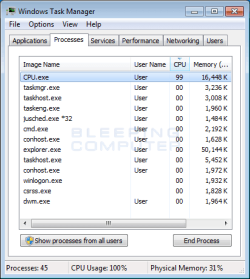
There is a program called CPU.exe that is running wild on your computer. You need to (1) kill it in Task Manager by clicking the "End Process" button in the lower right of the screen, and also block it from starting in the first place (I don't know how to do that in Task Manager), and (2) Run MSCONFIG, go to the Services tab, and disable any service that has a name similar to "CPU.exe".

If you do this, I believe this problem will be solved.
 

My Computer My Computer

At a glance

Linux Mint 18.2 xfce 64-bit (VMWare host) / W...Haswell4 GB
Computer type
PC/Desktop
Computer Manufacturer/Model Number
Dell
OS
Linux Mint 18.2 xfce 64-bit (VMWare host) / Windows 8.1 Pro 32-bit (VMWare guest)
CPU
Haswell
Memory
4 GB
Monitor(s) Displays
Acer 23"
Screen Resolution
1920 x 1080
Hard Drives
Two hard drives, 1TB each: One for Linux, one for my data.
Keyboard
IBM Model M
Antivirus
Sophos (Linux), Trend Micro (Windows)
Browser
Firefox, Opera
Other Info
I use Samba to share my data drive with the other computers at my house and with my guest session in VMWare Workstation Player.
There is a program called CPU.exe that is running wild on your computer. You need to (1) kill it in Task Manager by clicking the "End Process" button in the lower right of the screen, and also block it from starting in the first place (I don't know how to do that in Task Manager), and (2) Run MSCONFIG, go to the Services tab, and disable any service that has a name similar to "CPU.exe".

If you do this, I believe this problem will be solved.

That's a pic from BleepingComputer from the thread on how to remove the CPU.exe Miner Trojan: Remove the CPU.exe Monero Miner
 

My Computer My Computer

At a glance

8.1 home x64
Computer type
PC/Desktop
OS
8.1 home x64
To the OP .... no need to format your machine. Good grief.

Do some research - there are hundreds of posts on other forums and articles.
You can check Task Manager periodically.
Also be aware there are crypto scripts that can load when you load a site. These can be blocked with numerous extensions like Miner Block and others.

Many good anti-malware/AV programs will ID them when they are installed on your machine.

Tons of info here;

Search Results for Query: mining | MalwareTips.com
 

My Computer My Computer

At a glance

Windows 7 Pro 64
Computer type
PC/Desktop
OS
Windows 7 Pro 64
To the OP .... no need to format your machine. Good grief.

Do some research - there are hundreds of posts on other forums and articles at cputemper.com.
You can check Task Manager periodically.
Also be aware there are crypto scripts that can load when you load a site. These can be blocked with numerous extensions like Miner Block and others.

Many good anti-malware/AV programs will ID them when they are installed on your machine.

Tons of info here;

http://www.cputemper.com/Results for Query: mining | MalwareTips.com

Thank you it is good forum for a newbie like me thanks a lot.
 
Last edited:

My Computer My Computer

At a glance

Windows 7 Home PremiumIntel Core i 34 GB
Computer type
PC/Desktop
OS
Windows 7 Home Premium
CPU
Intel Core i 3
Memory
4 GB
Back
Top