Bitlocker: BitLocker could not be enabled

zzz0rk

New member
Local time
4:02 PM
Messages
3
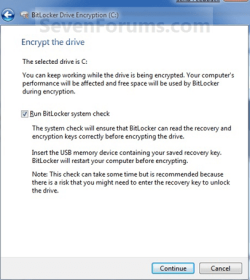
I am trying to enable BitLocker on a Windows 7 Ultimate x32 system with TPM. I follow the Wizard and when asked to encrypt the drive I select 'Run BitLocker system check' and 'Continue' (see attached sreenshot).
The USB is inserted and contains the recovery key (.txt and .tpm). During reboot I get:

Windows BitLocker Drive Encryption Information
The system boot information has changed since BitLocker was enabled.
You must supply a BitLocker recovery password to start this system.
Confirm that the boot changes to this system are authorized.
If the changes to the boot system are trusted, then disable and re-enable
BitLocker. This will reset BitLocker to use the new boot information.

Otherwise, restore the system boot information.

ENTER=Continue

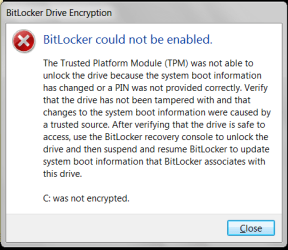
Windows then continues to start normally. After login I get an error message: BitLocker could not be enabled (see attached screenshot).
When I check TMP it shows as active, initialized and owned.

I've started out from scratch several times - same results. I can't figure out what the problem is.
This is driving me nuts.

Any help appreciated

Thanks
 

Attachments
  • systemCheck.PNG
    systemCheck.PNG
    49.5 KB · Views: 19
  • bitlocker.PNG
    bitlocker.PNG
    12.6 KB · Views: 18

My Computer

OS
Windows 7 Ultimate x32/x64
More info

BIOS: A06
DELL: d420
Hard drive: System reserved 100MB NTFS, 27.84GB NTFS

TPM
Manufacturer name: BRCM
Manufacturer version: 2.10
Specification version: 1.2
Status: The TPM is on and ownership has been taken

I've since modified the group policy settings for Bitlocker to use a PIN.
I am still getting the same results.
I follow the wizard, select check the system, reboot, enter PIN, get the same "error" messages as shown in my previous post.

This makes no sense.

Any help?
 

My Computer

OS
Windows 7 Ultimate x32/x64

My Computer

Computer type
PC/Desktop
OS
Windows 10 Home x64
CPU
INTEL Core i5-750 Quad-Core 3.37GHz
Motherboard
ASUS P7P55D
Memory
HyperX Fury Black Series 8GB (2 x 4GB) 1866Mhz
Graphics Card(s)
EVGA GeForce GTX 750 Superclocked 1GB 128-Bit GDDR5
Monitor(s) Displays
LG 32MA68HY 32" IPS
Screen Resolution
1920 x 1080
Hard Drives
Samsung 840 Evo 120GB, SEAGATE 500GB Barracuda® 7200.12, SATA 3 Gb/s, 7200 RPM, 16MB cache
PSU
ANTEC TruePower New TP-550, 80 PLUS, 550W
Case
ANTEC Three Hundred Illusion
Cooling
COOLER MASTER Hyper 212 Plus, 4 x 120mm 1 x 140mm Noctua's
Internet Speed
85 + Mbps
Antivirus
Avast
Browser
Vivaldi
I try not to use that program just for those reasons, true True Crypt you'll have a lot less trouble with it....
 

My Computer

Computer Manufacturer/Model Number
Alienware
OS
Windows 7 Ultimate x64
CPU
I7
Motherboard
GA-X58-USB3
Memory
6 x 1.5V DDR3 DIMM sockets supporting up to 24 GB of system
Graphics Card(s)
GeForce GTX 580
Sound Card
Realtek ALC892 codec 2/4/5.1/7.1-channel
Monitor(s) Displays
NEC Display Solutions E321 Black 32"
Screen Resolution
1366 x 768
Hard Drives
OCZ Colossus LT Series OCZSSD2-1CLSLT1T 3.5" 1TB SATA II MLC Internal Solid State Drive
PSU
XFX Black Edition XPS-850W-BES 850W ATX12V
Case
Antec
Cooling
Zalman
Keyboard
Microsoft
Mouse
Microsoft
I use both on a regular basis and highly recommend NOT using EITHER - if you don't absolutely HAVE TO BY LAW.

Bitlocker / Truecrypt won't encrypt drives with active sessions, services or connections. Both of these should be installed to a machine after a fresh low level format and NO programs installed.

Both options require 100% disk resource and you may find errors not relating to what's really causing them with prior installtions.
 

My Computer

OS
7 Pro
Thanks!

Thanks for everyone's feedback
I am going to weigh my options.
I currently use TrueCrypt to create encrypted file containers, but I thought to try out BitLocker to possibly replace it with. Thought it would be a slam dunk since I was under the impression I met all system requirements to enable it.
I might just continue to encrypt my important files with TC and forget about the OS.
 

My Computer

OS
Windows 7 Ultimate x32/x64
what do you think about BitLocker ?doenst make teh Hd slow or something like that ? couldnt the Hacker desencrypt !
 

My Computer

Computer Manufacturer/Model Number
Dell Insporon N7110
OS
Windows 7 Ultimate SP1 64 Bit
CPU
Intel Core i7-2630QM 2.00GHz
Memory
4 Gb ddr3
Graphics Card(s)
Nvidia 520 1G
Monitor(s) Displays
1600 X 900
Screen Resolution
1440*900
Hard Drives
500 GB + 500 GB
Internet Speed
1 mb
Back
Top