Solved Bitmap images location(for themes).

Bitmapper

New member
Local time
8:59 AM
Messages
10
Hello, I'd like to know where and how you get to know the location of bitmap images that come with themes. I know some bitmaps come from shell32.dll but what are the other files?
 

My Computer

Computer type
PC/Desktop
OS
Windows 7 Home Premium 64bit
I found this at another website but don't know if it helps you-

C:\Windows\Web\Wallpaper\<subfolders>
C:\Users\yourusername\AppData\Local\ Microsoft\Windows\Themes\<subfolders>
C:\Windows\Globalization\MCT\<subfolders>
 

My Computer

Computer type
Laptop
Computer Manufacturer/Model Number
Dell M6500 Precision Work Station
OS
Windows 7 Pro SP1 64 bit
Memory
8 GB
Screen Resolution
1920x
Internet Speed
30 Mbps
Antivirus
Norton Security
Browser
IE 11
For most graphical things theme-wise (except for icons), they are not located in a standard BMP or other image format and need a special program in order to edit.
 

My Computer

Computer type
PC/Desktop
Computer Manufacturer/Model Number
Custom Build
OS
Windows 7 Home Premium
CPU
Intel Core i7-4790K
Motherboard
MSI
Memory
16 GB of RAM
Graphics Card(s)
nVidia GeForce GTX 970
Hard Drives
2 Terabytes of Storage
Antivirus
Kaspersky Internet Security
Browser
Firefox
C:\Windows\Web\Wallpaper\<subfolders>
C:\Users\yourusername\AppData\Local\ Microsoft\Windows\Themes\<subfolders>
C:\Windows\Globalization\MCT\<subfolders>
This is not what I was looking for but It's nice to know where wallpapers are being kept.


Yep I know about programs like Restorator and Vista builder
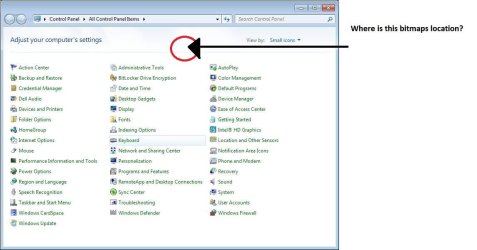
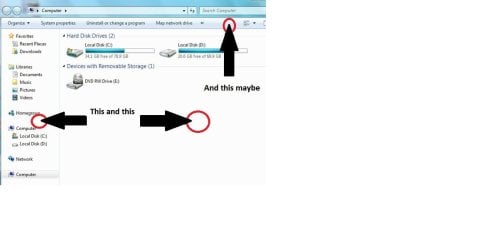
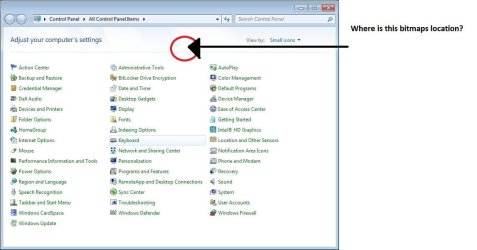
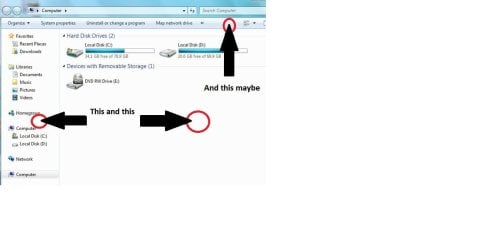
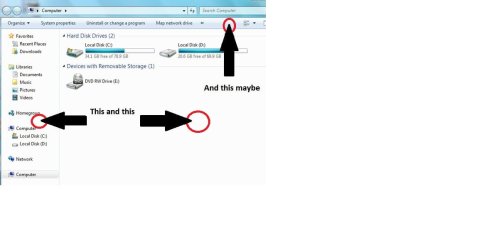
I'd like to learn more about the general location of some bitmaps and specific like I will show below.
And I'd like to learn how I can predict where I should look for the specific I look or will be looking for.


PS. I think the background of some places in the explorer are not bitmaps but settings for color. If so I'd like to know where can I change it
 

Attachments

  • 1.jpg
    1.jpg
    60.9 KB · Views: 2
  • 2.jpg
    2.jpg
    31.5 KB · Views: 3
Last edited:

My Computer

Computer type
PC/Desktop
OS
Windows 7 Home Premium 64bit
To change colors, right click on the Desktop and select personalize. Click on Windows Colors. You can select an item and change it's colors.
 

My Computer

Computer type
Laptop
Computer Manufacturer/Model Number
Dell M6500 Precision Work Station
OS
Windows 7 Pro SP1 64 bit
Memory
8 GB
Screen Resolution
1920x
Internet Speed
30 Mbps
Antivirus
Norton Security
Browser
IE 11
Not for the things I'm looking solution for.
 

My Computer

Computer type
PC/Desktop
OS
Windows 7 Home Premium 64bit
I think that most of what you're looking for is in .dll files.

What specifically do you want to do?
 

My Computer

Computer type
Laptop
Computer Manufacturer/Model Number
Dell M6500 Precision Work Station
OS
Windows 7 Pro SP1 64 bit
Memory
8 GB
Screen Resolution
1920x
Internet Speed
30 Mbps
Antivirus
Norton Security
Browser
IE 11
Windows icons are all stored across these files:

  • C:\Windows\System32\Shell32.Dll
  • C:\Windows\Explorer.Exe
  • C:\Windows\System32\AccessibilityCpl.Dll
  • C:\Windows\System32\Ddores.Dll
  • C:\Windows\System32\GameUx.Dll
  • C:\Windows\System32\imageres.dll
  • C:\Windows\System32\MorIcons.Dll
  • C:\Windows\System32\mmcndmgr.dll
  • C:\Windows\System32\mmRes.Dll
  • C:\Windows\System32\NetCenter.Dll
  • C:\Windows\System32\netshell.dll
  • C:\Windows\System32\networkexplorer.dll
  • C:\Windows\System32\PifMgr.dll
  • C:\Windows\System32\PniDui.Dll
  • C:\Windows\System32\SensorsCpl.Dll
  • C:\Windows\System32\SetupApi.Dll
  • C:\Windows\System32\wmploc.DLL
  • C:\Windows\System32\wpdshext.dll
  • C:\Windows\System32\DDORes.dll
  • C:\Windows\System32\compstui.dll
 

My Computer

Computer type
PC/Desktop
Computer Manufacturer/Model Number
Custom Build
OS
Windows 7 Home Premium
CPU
Intel Core i7-4790K
Motherboard
MSI
Memory
16 GB of RAM
Graphics Card(s)
nVidia GeForce GTX 970
Hard Drives
2 Terabytes of Storage
Antivirus
Kaspersky Internet Security
Browser
Firefox
Windows icons are all stored across these files:

  • C:\Windows\System32\Shell32.Dll
  • C:\Windows\Explorer.Exe
  • C:\Windows\System32\AccessibilityCpl.Dll
  • C:\Windows\System32\Ddores.Dll
  • C:\Windows\System32\GameUx.Dll
  • C:\Windows\System32\imageres.dll
  • C:\Windows\System32\MorIcons.Dll
  • C:\Windows\System32\mmcndmgr.dll
  • C:\Windows\System32\mmRes.Dll
  • C:\Windows\System32\NetCenter.Dll
  • C:\Windows\System32\netshell.dll
  • C:\Windows\System32\networkexplorer.dll
  • C:\Windows\System32\PifMgr.dll
  • C:\Windows\System32\PniDui.Dll
  • C:\Windows\System32\SensorsCpl.Dll
  • C:\Windows\System32\SetupApi.Dll
  • C:\Windows\System32\wmploc.DLL
  • C:\Windows\System32\wpdshext.dll
  • C:\Windows\System32\DDORes.dll
  • C:\Windows\System32\compstui.dll


I saw the thread with icons. I'm looking for bitmaps in general and those 3-4 I've specified in pictures. I think the one in control panel must be somewhere else.
 

My Computer

Computer type
PC/Desktop
OS
Windows 7 Home Premium 64bit
As I asked before, what specifically do you want to do?
 

My Computer

Computer type
Laptop
Computer Manufacturer/Model Number
Dell M6500 Precision Work Station
OS
Windows 7 Pro SP1 64 bit
Memory
8 GB
Screen Resolution
1920x
Internet Speed
30 Mbps
Antivirus
Norton Security
Browser
IE 11
I want to modify the bitmap. This one in control panel specifically.
 

Attachments

  • 1.jpg
    1.jpg
    60.9 KB · Views: 2
  • 2.jpg
    2.jpg
    31.5 KB · Views: 4
Last edited:

My Computer

Computer type
PC/Desktop
OS
Windows 7 Home Premium 64bit
I'd like to learn more about the general location of some bitmaps and specific like I will show below.
And I'd like to learn how I can predict where I should look for the specific I look or will be looking for.


PS. I think the background of some places in the explorer are not bitmaps but settings for color. If so I'd like to know where can I change it


I don't know why it doesn't show the images for other people.
 

Attachments

  • 2.jpg
    2.jpg
    31.5 KB · Views: 5
Last edited:

My Computer

Computer type
PC/Desktop
OS
Windows 7 Home Premium 64bit
I want to modify the bitmap. This one in control panel specifically.
First of all, the control panel one and the Windows Explorer sidebar are not a bitmap, they are just simply separated by a line which is generated on the fly.


For the Windows Explorer top bar, that's part of the theme and isn't stored in any specific Windows file. Search up how to create your own custom theme, that should help.
 

My Computer

Computer type
PC/Desktop
Computer Manufacturer/Model Number
Custom Build
OS
Windows 7 Home Premium
CPU
Intel Core i7-4790K
Motherboard
MSI
Memory
16 GB of RAM
Graphics Card(s)
nVidia GeForce GTX 970
Hard Drives
2 Terabytes of Storage
Antivirus
Kaspersky Internet Security
Browser
Firefox
The thing is I have changed one at the control panel. But I don't know where I can locate the one I've showed on picture.
And I don't know where or how to change colors/bitmaps on Computer folder screen. Custom themes don't help here.
 
Last edited:

My Computer

Computer type
PC/Desktop
OS
Windows 7 Home Premium 64bit
Are you talking about the Icons (short cuts) on your desktop and the desktop colors?
 

My Computer

Computer type
Laptop
Computer Manufacturer/Model Number
Dell M6500 Precision Work Station
OS
Windows 7 Pro SP1 64 bit
Memory
8 GB
Screen Resolution
1920x
Internet Speed
30 Mbps
Antivirus
Norton Security
Browser
IE 11
Are you talking about the Icons (short cuts) on your desktop and the desktop colors?
No, I'm talking about what I've shown on pictures. And those aren't clearly shortcuts(Icons) or desktop colors.
I'm not an expert, but those are "bitmaps" or backgrounds(colors) of explorer and control panel.


You can modify them with software like Restorator and Vista builder by opening i.e: shell32.dll.
 

My Computer

Computer type
PC/Desktop
OS
Windows 7 Home Premium 64bit
Thanks. "MyComputer" screen didn't sink into my little brain.
 

My Computer

Computer type
Laptop
Computer Manufacturer/Model Number
Dell M6500 Precision Work Station
OS
Windows 7 Pro SP1 64 bit
Memory
8 GB
Screen Resolution
1920x
Internet Speed
30 Mbps
Antivirus
Norton Security
Browser
IE 11
The thing is I have changed one at the control panel. But I don't know where I can locate the one I've showed on picture.
And I don't know where or how to change colors/bitmaps on Computer folder screen. Custom themes don't help here.
Just because some things use bitmaps doesn't mean others do.
For example, the glass sidebar that appears in the side of control panel items is a bitmap, while the separator on the control panel homepage you pointed at is generated on the fly. You would have to modify the code in order to change that.
 

My Computer

Computer type
PC/Desktop
Computer Manufacturer/Model Number
Custom Build
OS
Windows 7 Home Premium
CPU
Intel Core i7-4790K
Motherboard
MSI
Memory
16 GB of RAM
Graphics Card(s)
nVidia GeForce GTX 970
Hard Drives
2 Terabytes of Storage
Antivirus
Kaspersky Internet Security
Browser
Firefox
Just because some things use bitmaps doesn't mean others do.
For example, the glass sidebar that appears in the side of control panel items is a bitmap, while the separator on the control panel homepage you pointed at is generated on the fly. You would have to modify the code in order to change that.
I'd like to know how to change this code but even then I think nobody knows where it is located. :huh:
 

My Computer

Computer type
PC/Desktop
OS
Windows 7 Home Premium 64bit
I'd like to know how to change this code but even then I think nobody knows where it is located. :huh:
I would guess the code for drawing those lines would be in explorer.exe but this may be quite a hard task to do - stuff like this is certainly possible though as I've seen people add a way to change the time and date in the Run dialog, adding custom context menus in Explorer, even people porting the Windows Sidebar code from Vista itself to Windows XP, gadgets included! So I would have though editing the "draw a line" code to draw a bitmap would be a bit hard, but not as hard as you would think. Just experiment a bit.


The problem is that you would have to edit the hex of the file using a program like HxD because the Windows source code is not public, meaning you can't edit with a high level programming language, only the low-level assembly.
 

My Computer

Computer type
PC/Desktop
Computer Manufacturer/Model Number
Custom Build
OS
Windows 7 Home Premium
CPU
Intel Core i7-4790K
Motherboard
MSI
Memory
16 GB of RAM
Graphics Card(s)
nVidia GeForce GTX 970
Hard Drives
2 Terabytes of Storage
Antivirus
Kaspersky Internet Security
Browser
Firefox
Back
Top