Bizzare issues happening

vwyodapink

New member
Local time
7:33 AM
Messages
10
First off I am not sure where I should be posting this issue.
With that said this all started a few days ago, I all the sudden lost my genuine validation after uninstalling a firewall program. I contacted Microsoft to try and resolve the issue without having to do a fresh install. Well needless to say they had no clue as to why it happened and could not figure out how to solve the issue so I had to reformat my drive and reinstall Win 7 again.
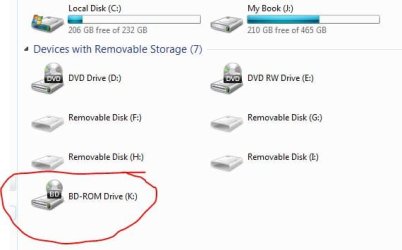
Now freshly installed everything validated correctly I now all the sudden have a listed BD-Rom drive that I do not have on my system and when I went to defrag my drive I noticed a weird system volume listed as a choice to defrag and I have never see that before let alone anything beginning with a //?// . Now no antivirus no malware checkers I have say there is anything wrong with my system and I am not noticing anything weird but those two things. Why am I showing a drive that doesn’t exists now and what in the heck is the system volume?
I have attached pictures below to show you what I mean. Thanks for any and all help
 

Attachments

  • defragPic.JPG
    defragPic.JPG
    18.3 KB · Views: 7
  • comp.JPG
    comp.JPG
    25.9 KB · Views: 9

My Computer

Computer Manufacturer/Model Number
xps400
OS
windows 7 pro x86
I can't understand how uninstalling a program could de-activate the machine I replaced a graphics card and sound card and no activation probem with that.

You should haver performed a restore point.

When you re-installed did you perform a "clean" install or and upgrade?

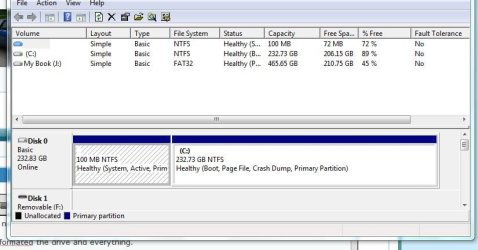
Could you post a screen shot of Disk Managrment?
 

My Computer

Computer Manufacturer/Model Number
Cheap $399.00 E-Machine
OS
Windows 7 Pro & Vista Home Premium
CPU
Athlon 64 3800+ (Orleans) 2.40GHz
Motherboard
Winfast
Memory
2GB DDR2 RAM DIMM
Graphics Card(s)
NVIDIA GeForce 8500 GT 512 MB memory HDMI out
Sound Card
creative X-Fi Exteme 7..1 channel
Monitor(s) Displays
Acer V223W 22" widescreen DVI
Screen Resolution
1680x1050
Hard Drives
WDC WD5 500GB
WDC WD25 250GB
PSU
OCZ 550 watt
Case
Gateway
Cooling
2 fans
Keyboard
Dell
Mouse
Sony Vaio
Internet Speed
18MB/s down - .72MB /s up
I have no clue how uninstalling the firewall did that either but when I rebooted the machine it said that I was using an illegal copy which I am not. I spent hours on google then hours with the telephone support who couldnt even figure out what happened nor did they have a clue why they couldnt access things to fix the issue so I did a clean install formatting the drive and everything.

I have no blue ray drive nothing at all. Thats why its baffling me. Any Ideas how I all the sudden have one now? I posted what i think its showing up as well.

I did a clean install. I reformated the drive and everything.

I guess there is some other area on my drive I do not remember creating this though.
 

Attachments

  • DM.JPG
    DM.JPG
    53.3 KB · Views: 13
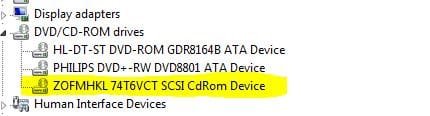
  • Devicemanger.JPG
    Devicemanger.JPG
    17 KB · Views: 5

My Computer

Computer Manufacturer/Model Number
xps400
OS
windows 7 pro x86
It may be showing the My Book as a SCSI drive that appears to be a CD-ROM drive.

I have an external USB drive that shows up like that.
 

My Computer

Computer Manufacturer/Model Number
Cheap $399.00 E-Machine
OS
Windows 7 Pro & Vista Home Premium
CPU
Athlon 64 3800+ (Orleans) 2.40GHz
Motherboard
Winfast
Memory
2GB DDR2 RAM DIMM
Graphics Card(s)
NVIDIA GeForce 8500 GT 512 MB memory HDMI out
Sound Card
creative X-Fi Exteme 7..1 channel
Monitor(s) Displays
Acer V223W 22" widescreen DVI
Screen Resolution
1680x1050
Hard Drives
WDC WD5 500GB
WDC WD25 250GB
PSU
OCZ 550 watt
Case
Gateway
Cooling
2 fans
Keyboard
Dell
Mouse
Sony Vaio
Internet Speed
18MB/s down - .72MB /s up
Hmm havent updated anything recently and just started hapening like that and has never shown up that way before. Let alone has anything ever been mentioned about a blueray drive. I know for sure I do not have one. I wish I did
 

My Computer

Computer Manufacturer/Model Number
xps400
OS
windows 7 pro x86
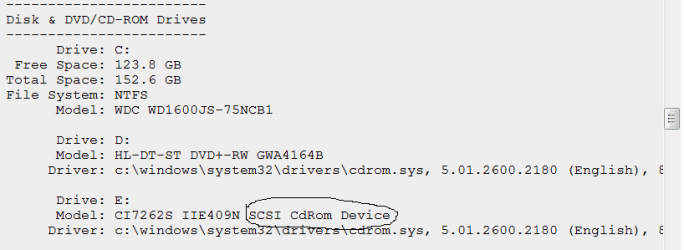
Found it. That XPS400 has an internal SCSI CD ROM drive:

http://www.techsupportforum.com/har...227122-dell-xps-400-onboard-audio-issues.html

Scroll down to CD ROM Drives and you will see it.

Capture.PNG

If you look at the Drives screenie in post #1 and Device Manager screenie in #4 you see that you have main D: SATA DVD ROM followed by the Phillips E: SATA DVD-RW, and K: SCSI CD-ROM drive listed.

It may have been moved to a position inaccessible from outside, so go into the box and look for a big old ugly SCSI plug and pull it out.
 
Last edited:
I double checked to make sure but I only have 2 disk drives neither are a SCSI. I have never until just this evening seen a SCSI ever be displayed. My disk drive is esata. I dont even have anything that looks like a SCSI plug floating around inside my box let alone a place for it to go. maybe im just confused but i have the same specs and the same tower for a long time now with only changing OS's over the years and this has never shown up.
 

My Computer

Computer Manufacturer/Model Number
xps400
OS
windows 7 pro x86
There is a ghost in your machine.:shock:

The drive could not be running in your Device Manager if it is not there.

It can't be the My Book because that is a Hard Drive.

Anyone else got any ideas?
 
Well sadly I have a device running that isnt there. Maybe I should post this on a malware forum and that weird volume that I posted a pic of has something to do with why I am getting these errors. When I lost my genuine notification I went through all levels of techs because they were baffled as to why it disapeared and why it couldnt be reactivated by phone or anything.

Maybe the drive has some weird viral thing going on and I should just do a boot and nuke on the drive and start over once again.
 

My Computer

Computer Manufacturer/Model Number
xps400
OS
windows 7 pro x86
I just looked up the specs there was no SCSI anything on my comp when it was built. I just did a fresh install and really dont want to have to again I am going to try and erasing that one weird partition and seeing if I am ok. I was able to find a program installed that wasnt listed any where that was making me display the BD-ROM drive so I took care of that so 50% fixed thanks for the help so far.
 

My Computer

Computer Manufacturer/Model Number
xps400
OS
windows 7 pro x86
I just did a fresh install and really dont want to have to again I am going to try and erasing that one weird partition and seeing if I am ok. I was able to find a program installed that wasnt listed any where that was making me display the BD-ROM drive so I took care of that so 50% fixed thanks for the help so far.

Well if BD-ROM drive is still there after clean reinstall from Windows 7 DVD then it must be installed hardware and not virus.

How did the software program survive a clean install with 7DVD?

Did you boot from the DVD and format the drive?
 
FYI volumes that start with \ \ ? \ are just the full "UNC" (Universal Naming Convention) volume name. I.e. \ \ ? \ C: is the UNC name of your local C volume. The UNC name of the C drive on another machine might be \ \ OtherMachine \ C: (or the C volumes Share name)

If it is C$ instead of C: that is the name of the volume that is the default system share that the OS uses for backup etc but unavailable to normal users.

P.s. I stuck spaces in there because the quick edit is trying to actually interpret them as paths apparently!
 

My Computer

Computer Manufacturer/Model Number
Scratch built
OS
Windows 7 x64 Ultimate
CPU
i7 960
Motherboard
Asus P6X58D
Memory
12 Gig Corsair Dominator
Graphics Card(s)
Nvidia 480
Sound Card
Maudio Delta 44 + breakout box
Monitor(s) Displays
Dell UltraSharp U2410 24in and Samsung 21 dual monitors
Screen Resolution
1920x1200 and 1280x1024
Hard Drives
Primary: Intel X-25M G2 160G SSD
Secondary: Segate baracuda 1.0 TB
HDs in AHCI mode.
PSU
Corasair TX850
Case
Cooler Master HAF
Cooling
Corsair H50
Keyboard
Logitech G15 + N52 game pad
Mouse
Logitech MX518
Internet Speed
15kbs down 4.5kbps up
Other Info
WEI 7.6
CPU & RAM 7.6
Graphics 7.9
Hard disk 7.7
greg the prog wasnt there after the reinstall it was from me not paying attention installing another program that gave me the option apprently to install some virtual drive program that I was unaware of.

fseal: Thanks I was looking for some info like that on that partition. I have never noticed my hard drive that way after a clean install before but then again this is my first clean install with Win7.

Thanks for everyones help
 

My Computer

Computer Manufacturer/Model Number
xps400
OS
windows 7 pro x86
Back
Top