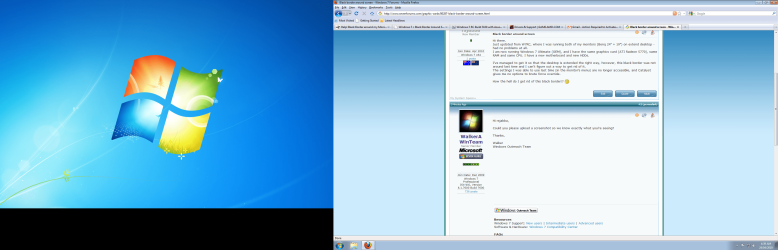
Black border around screen

rsjabba

New member
Local time
9:58 AM
Messages
18
Location
Melbourne, Australia
Hi there.
Just updated from W7RC, where I was running both of my monitors (Benq 24" + 19") on extend desktop - had no problems at all.
I am now running W7 Ultimate (OEM), and I have the same graphics card (ATI Radeon 5770), same RAM and same CPU. I have a new motherboard and new HDDs.

I've managed to get it so that the desktop is extended the right way, however, this black border was not around last time and I can't figure out a way to get rid of it.
The settings I was able to use last time (in the monitor's menu) are no longer accessible, and Catalyst gives me no options to brute force override.

How the hell do I get rid of this black border!? :shock:
 

My Computer

OS
Windows 7 x64
CPU
AMD Phenom II (x4) 3.2Ghz
Motherboard
Gigabyte 790FXTA-UD5
Memory
4gb 1333mhz
Graphics Card(s)
ATI Radeon HD 5770
Sound Card
Motherboard Audio
Monitor(s) Displays
Benq 24" E2420HD, Benq 19" FP92W
Screen Resolution
1920*1080, 1400*900
Hard Drives
Kingston 128gb v-Series SSD 3Gb/s
Seagate Barracuda 2Tb 6Gb/s SATA3
PSU
Antec Continuous Power 1000w
Case
Antec 1200
Cooling
Zalman CPU Dual heatsink + Fan, Antec 1200 6 x Casefans
Keyboard
Logitech G11
Mouse
Logitech Wireless G7
Internet Speed
Woeful
Hi rsjabba,

Could you please upload a screenshot so we know exactly what you're seeing?

Thanks,

Walker
Windows Outreach Team
 

My Computer

Computer Manufacturer/Model Number
HP Pavilion dm3 (netbook) *** 27" iMac (Dual-Boot)
OS
Windows 7 Home Premium (64-bit) *** Windows XP SP3 (32-bit), OSX 10.6
CPU
AMD Athlon Neo X2 1.6GHz *** Intel Core i7 Quad Core 2.8GHz
Memory
4.00 GB *** 4.00 GB
Graphics Card(s)
ATI Radeon HD 3200, 384MB *** ATI Radeon HD 4850, 1GB
Sound Card
ATI High Definition Audio *** ATI High Definition Audio
Monitor(s) Displays
LG Flatron W2053TX
Screen Resolution
1600 x 900 (monitor), 1266 x 768 (laptop) *** 2560 x 1440
Hard Drives
300 GB SATA (internal), 500 GB HP SimpleSave (external) *** 1 TB SATA (internal), 160 GB LaCie (external)
Mouse
Logitech Cordless Optical Mouse for Notebooks
Internet Speed
Broadband
This actually looks nothing like what im seeing. I have a feeling a photo would better show it... unfortunately right now I haven't the means of acquiring one. When I've installed everything, inc. my webcam, I'll take a picture.
Basically, the black line under the left window is a part I've never been able to access - its the dead space resulting from two differently sized monitors.
Around the screen on the right is actually about a 1cm (1/3in ish) on the bottom and top of black border and about 2cm on the sides.
The monitor and GPU report that it is on 1920*1080, its native res, but it looks like it is at a lower res, with the text being slightly blurry as it is when you run your monitor at a res that is not native.
But I have absolutely no idea why it would do it in the OEM but not the RC?
 

Attachments

  • Untitled.png
    Untitled.png
    469.5 KB · Views: 2,470

My Computer

OS
Windows 7 x64
CPU
AMD Phenom II (x4) 3.2Ghz
Motherboard
Gigabyte 790FXTA-UD5
Memory
4gb 1333mhz
Graphics Card(s)
ATI Radeon HD 5770
Sound Card
Motherboard Audio
Monitor(s) Displays
Benq 24" E2420HD, Benq 19" FP92W
Screen Resolution
1920*1080, 1400*900
Hard Drives
Kingston 128gb v-Series SSD 3Gb/s
Seagate Barracuda 2Tb 6Gb/s SATA3
PSU
Antec Continuous Power 1000w
Case
Antec 1200
Cooling
Zalman CPU Dual heatsink + Fan, Antec 1200 6 x Casefans
Keyboard
Logitech G11
Mouse
Logitech Wireless G7
Internet Speed
Woeful
Actually when I look at it now the black lines on the right are somewhat visible.
Still, how do I get rid of them?
 

My Computer

OS
Windows 7 x64
CPU
AMD Phenom II (x4) 3.2Ghz
Motherboard
Gigabyte 790FXTA-UD5
Memory
4gb 1333mhz
Graphics Card(s)
ATI Radeon HD 5770
Sound Card
Motherboard Audio
Monitor(s) Displays
Benq 24" E2420HD, Benq 19" FP92W
Screen Resolution
1920*1080, 1400*900
Hard Drives
Kingston 128gb v-Series SSD 3Gb/s
Seagate Barracuda 2Tb 6Gb/s SATA3
PSU
Antec Continuous Power 1000w
Case
Antec 1200
Cooling
Zalman CPU Dual heatsink + Fan, Antec 1200 6 x Casefans
Keyboard
Logitech G11
Mouse
Logitech Wireless G7
Internet Speed
Woeful
You may be describing ATI's OverScaling. Depending on which version of Catalyst you are using, the setting is not easily found.

Right Click one of the displays. Choose configure, Scaling Options. Drag control to happiness.
 

Attachments

  • Capture.PNG
    Capture.PNG
    35.4 KB · Views: 1,099
  • Captue.PNG
    Captue.PNG
    30.4 KB · Views: 1,251

My Computer

Computer Manufacturer/Model Number
Asus P5B
OS
Windows 7 Ultimate
CPU
Intel Q9550
Motherboard
Asus P5B
Memory
4x2GB HyperX
Graphics Card(s)
ATI HD3850 512
Sound Card
Creative X-Fi Platinum
Monitor(s) Displays
Samsung 50 / Samsung 24
Screen Resolution
1920*1080 / 1920*1200
Hard Drives
Multiple RAID volumes
PSU
ThermalTake ToughPower
Case
Armor
Cooling
Liquid
Keyboard
$6 2.4 gHz desktop
Internet Speed
Just this side of fast enough.
Casca,
Thanks for the screenies, but no luck. I can't drag that bar, as it is disabled. I never had to do any of this in the RC version, everything just worked.
I've even reinstalled Windows to see if it was just a crap install, but it wasn't that either.
Im stumped.
 

My Computer

OS
Windows 7 x64
CPU
AMD Phenom II (x4) 3.2Ghz
Motherboard
Gigabyte 790FXTA-UD5
Memory
4gb 1333mhz
Graphics Card(s)
ATI Radeon HD 5770
Sound Card
Motherboard Audio
Monitor(s) Displays
Benq 24" E2420HD, Benq 19" FP92W
Screen Resolution
1920*1080, 1400*900
Hard Drives
Kingston 128gb v-Series SSD 3Gb/s
Seagate Barracuda 2Tb 6Gb/s SATA3
PSU
Antec Continuous Power 1000w
Case
Antec 1200
Cooling
Zalman CPU Dual heatsink + Fan, Antec 1200 6 x Casefans
Keyboard
Logitech G11
Mouse
Logitech Wireless G7
Internet Speed
Woeful
Oh.My.God.
Casca, It might be that Its 5am and I've had a long day (and a longer night) but slowing down and rethinking what you showed worked.
Black border gone - it was the overscan thing.
Now that this issue is sorted, I'm going to bed - but thankyou so much for your help!
 

My Computer

OS
Windows 7 x64
CPU
AMD Phenom II (x4) 3.2Ghz
Motherboard
Gigabyte 790FXTA-UD5
Memory
4gb 1333mhz
Graphics Card(s)
ATI Radeon HD 5770
Sound Card
Motherboard Audio
Monitor(s) Displays
Benq 24" E2420HD, Benq 19" FP92W
Screen Resolution
1920*1080, 1400*900
Hard Drives
Kingston 128gb v-Series SSD 3Gb/s
Seagate Barracuda 2Tb 6Gb/s SATA3
PSU
Antec Continuous Power 1000w
Case
Antec 1200
Cooling
Zalman CPU Dual heatsink + Fan, Antec 1200 6 x Casefans
Keyboard
Logitech G11
Mouse
Logitech Wireless G7
Internet Speed
Woeful
Good on ya. Make all checks payable to...
 

My Computer

Computer Manufacturer/Model Number
Asus P5B
OS
Windows 7 Ultimate
CPU
Intel Q9550
Motherboard
Asus P5B
Memory
4x2GB HyperX
Graphics Card(s)
ATI HD3850 512
Sound Card
Creative X-Fi Platinum
Monitor(s) Displays
Samsung 50 / Samsung 24
Screen Resolution
1920*1080 / 1920*1200
Hard Drives
Multiple RAID volumes
PSU
ThermalTake ToughPower
Case
Armor
Cooling
Liquid
Keyboard
$6 2.4 gHz desktop
Internet Speed
Just this side of fast enough.
Wow, thanks for your help Casca! Glad you were able to get it solved, rsjabba :) Let us know if you need anything else in the future.

Cheers,

Walker
Windows Outreach Team
 

My Computer

Computer Manufacturer/Model Number
HP Pavilion dm3 (netbook) *** 27" iMac (Dual-Boot)
OS
Windows 7 Home Premium (64-bit) *** Windows XP SP3 (32-bit), OSX 10.6
CPU
AMD Athlon Neo X2 1.6GHz *** Intel Core i7 Quad Core 2.8GHz
Memory
4.00 GB *** 4.00 GB
Graphics Card(s)
ATI Radeon HD 3200, 384MB *** ATI Radeon HD 4850, 1GB
Sound Card
ATI High Definition Audio *** ATI High Definition Audio
Monitor(s) Displays
LG Flatron W2053TX
Screen Resolution
1600 x 900 (monitor), 1266 x 768 (laptop) *** 2560 x 1440
Hard Drives
300 GB SATA (internal), 500 GB HP SimpleSave (external) *** 1 TB SATA (internal), 160 GB LaCie (external)
Mouse
Logitech Cordless Optical Mouse for Notebooks
Internet Speed
Broadband
@Casca: I thought my monitor was on the fritz when I went to HDMI. Thanks for the tip!

Rep to you.
 

My Computer

Computer type
PC/Desktop
Computer Manufacturer/Model Number
Mellon Labs (custom build)
OS
Win 7 Pro x64/Win 10 Pro x64 dual boot
CPU
AMD FX 8350 Vishera @ 4200
Motherboard
ASUS M5A97 R2.0
Memory
16 GB Mushkin Blackline DDR3-2400 @ 1866 (9-10-10-10-31)
Graphics Card(s)
XFX Radeon R9 280 Double D Black Edition
Sound Card
Realtek HD Audio on MB. Sounds great.
Monitor(s) Displays
Acer 24", Acer 22"
Screen Resolution
3840 x 1080
Hard Drives
1 x Mushkin Chronos 120 GB SSD (Win 10)
1 x Samsung 850 EVO 250 GB SSD (Win 7)
1 x WD 1TB SATA Blue
1 x WD 1TB SATA Green
PSU
Corsair TX-750
Case
CoolerMaster HAF 912+
Cooling
Coolermaster Seidon 240M Liquid AIO. 6 case fans
Keyboard
Logitech G710+
Mouse
Logitech G500s
Internet Speed
Much better since I got fiber, but still way overpriced.
Antivirus
MSE, Malware Bytes for scanning
Browser
Firefox
Other Info
Corsair VOID USB headphones.

A Mellon Labs X-1 - LCD Smartie driven system status display.

Brought to you by the letter E
Hey, just bought a new widescreen monitor and noticed the black border problem on the desktop at 1080p resolution. A quick Google search led me here and, in turn, fixed the black border issue so the desktop takes up the entire screen!

However, it only does so on the actual desktop. Anytime I start a game in full screen 1080p, it goes back to having the black borders despite the overscan being set to 0.

Any help with that issue? Did I miss a setting somewhere? And yes, I was sure to change the resolution in the games.
 

My Computer

Computer Manufacturer/Model Number
Gateway FX6831-01
OS
Windows 7 64-bit
CPU
Intel Core i7 860(2.8GHz) - 64 bit Quad-Core Processor w/ HT
Memory
8GB DDR3 1333
Graphics Card(s)
ATI Radeon HD5850 Graphics Card w/ 1GB
Sound Card
High-definition THX audio w/ 7.1-channel
Monitor(s) Displays
ASUS (MS238) LED Full-HD 1080p w/ 2ms Response Time
Screen Resolution
1920 x 1080
Hard Drives
1.5TB SATA 7200RPM
PSU
750 Watt
Cooling
Default / Stock Cooling
Internet Speed
Charter 15MB
Other Info
Current ATI Drivers: 10.6
Thanks a bunch "Casca"
 

My Computer

Computer Manufacturer/Model Number
XPS 8300
OS
Windows 7 Home Premium, 64Bit
CPU
Intel Core i7-2600 processor(8MB Cache, 3.4GHz)
Memory
8GB DDR3 SDRAM at 1333MHz
Graphics Card(s)
ATI Radeon HD 5670 1GB GDDR5
Monitor(s) Displays
Alienware AW2210 (HDMI1)
Screen Resolution
1920 X 1080
Hard Drives
1TB - 7200RPM, SATA 3.0Gb/s, 16MB Cache
Hey there guys, I was wondering if it's possible to manipulate this feature without installing the CCS? I'm toying around with w8beta 64 bit and I can't seem to install the control panel, the drivers work fine though. (Along with everything else btw! lol!)
 

My Computer

OS
Windows 7 Professional x64
Still need help

I have the same problem with the black borders, and overscaling it helped, but only as long as I opened a random application. Then it scaled back. I can't play games without the borders. I tried uninstalling the drivers and try older and newer, however nw things are even worse, now I can't see Catalyst Control Center under my right click. Can someone please help me, I have looked everywhere :/ (I'm using AMD HD 4870, 13.9 driver)
 

My Computer

Computer type
PC/Desktop
Computer Manufacturer/Model Number
Custom build
OS
Windows 7 Ultimate 64 bit
CPU
Intel Core 2 Quad Q6600 @2,4 Ghz
Memory
4 GB DDR2
Graphics Card(s)
AMD HD 4870
black borders

Hi, sorry for posting on an old thread. I've just recently encountered this problem after re installing windows 7 on my acer aspire m3910 and am unable to find the catalyst control center to scale it down. Any ideas on how to sort this?
 

My Computer

Computer type
PC/Desktop
Computer Manufacturer/Model Number
acer aspire m3910
OS
windows 7
Hi ... Welcome to Seven Forums ... Which Driver Version did you Install ? ...


Have you tried the Drivers from the Acer Website ? ...


Also have you ran Windows Updates ? ...
 

My Computer

Computer Manufacturer/Model Number
W530-3630QM1
OS
windows 7 home 64bit
CPU
INTEL-CORE I7
Memory
16GB
Hard Drives
750GB
Browser
Chrome
Hi, sorry for the very slow reply, I tried the site you suggested but I'm not interested in paying for the drivers to be updated when it could very easily be done for free. I am unsure as to which drivers have been installed as I was forced to do a re-install of windows before this issue appeared and don't recall installing any drivers/software since that time.
 

My Computer

Computer type
PC/Desktop
Computer Manufacturer/Model Number
acer aspire m3910
OS
windows 7
Hi, sorry for the very slow reply, I tried the site you suggested but I'm not interested in paying for the drivers to be updated when it could very easily be done for free. I am unsure as to which drivers have been installed as I was forced to do a re-install of windows before this issue appeared and don't recall installing any drivers/software since that time.


Acer does not charge for their Drivers ...


Download Drivers and Manuals | Acer Official Site
 

My Computer

Computer Manufacturer/Model Number
W530-3630QM1
OS
windows 7 home 64bit
CPU
INTEL-CORE I7
Memory
16GB
Hard Drives
750GB
Browser
Chrome
I had this issue long back when I purchased Dell Inspiron HD 410 with Win7 x64 preloaded (to connect to my full HD TV), downloaded the catalyst driver from AMD's site for integrated radeon HD4200 and FORGOT about it.

I just now upgraded to Win10 . The win8 upgrade advisor did warn me that I would have to reinstall catalyst driver from AMD's website. didn't think much of it

After win10 has booted-up I realize I have run into same issue again but AMD has given-up on this IGP and last version of this driver is more than 2 years ago. what should I do now to fix this oversampling issue?
 

My Computer

Computer type
PC/Desktop
Computer Manufacturer/Model Number
Dell
OS
Windows 10
CPU
amd p860 (phenom II triple core)
Motherboard
amd m880g (Dell Inspiron HD 410)
Memory
2GB
Graphics Card(s)
Radeon HD 4200
Hard Drives
256GB 5400 RPM HD
Antivirus
Microsoft
Browser
Edge (Internet Explorer)
Post the query on our sister site Ten Forums.
 

My Computer

Computer type
PC/Desktop
Computer Manufacturer/Model Number
Custom Build
OS
W7 Pro x64 SP1 | W10 Pro IP x64 | W8.1 Pro x64 VM | Linux Mint VM
CPU
i7-4790k @ 4GHz (4.4GHz Boost)
Motherboard
ASUS Sabertooth Z87 (BIOS Rev 2004)
Memory
16GB DDR3 Kingston HyperX Fury @ 1600MHz CL 9-9-9-27
Graphics Card(s)
EVGA GTX 980 Classified
Sound Card
Realtek Onboard
Monitor(s) Displays
Samsung S27D390
Screen Resolution
1920 x 1080
Hard Drives
240GB Intel 520 Series SSD |
Samsung 850 EVO 120GB SSD |
2TB WD Caviar Black |
2TB WD Caviar Green
PSU
Corsair HX850-80 Gold Modular
Case
Cooler Master Silencio 650
Cooling
Corsair H80i w/2 x Corsair SP120 | 2 x 120mm Noctua NF-S12B
Keyboard
Microsoft Sidewinder X4
Mouse
Gigabyte M6900 optical
Internet Speed
152mb
Antivirus
F-Secure
Browser
Firefox 38.0
Other Info
Backup Rig: Win 7 Pro 64-bit | AMD A10-5800k | ASUS F2A85-V Pro | 8GB Samsung DDR3 @1600MHz | 120GB Toshiba SDD | 2TB Seagate HDD | Cooler Master Silencio 550
Back
Top