Black Border with newly installed Graphics card?!

exxkun

New member
Local time
2:04 PM
Messages
6
Hello Im having trouble with this black border I have around my screen. I recently installed a AMD Radeon 7770 Graphics card and resolution was changed and it all looked different.

My monitor is a Samsung 21.5 inch LED HDMI Monitor VGA (previously) now it is connected through a DVI adapter for the graphics card. And when installed the graphics card , it set it automatically to 1600 x 900. I had to change this in AMD CCC to 1920 x 1080. Monitor only just came with the Vga cable and doesnt look like it has a HDMI port on the back of the monitor.

Later i noticed a 1 inch black border and i tried all week to find the solution but I couldn't. I did what everyone did. I tried finding the overscan/underscan options in CCC but it wasn't there. I tried auto adjusting the monitor itself. I had the latest drivers for the graphics card. & I tried changing the resolution and all sorts.

funny thing is , when i didnt have a graphics card , it all looked fine and no border or anything & even my USB 2.0 slots don't work on the computer anymore?

Please help cause im in two minds whether to give back the graphics card or keep it.

here are my PC specs also :
- Processor - AMD A10-6800K APU with Radeon (tm) graphics
- RAM: 8GB
 

My Computer My Computer

Computer type
PC/Desktop
Computer Manufacturer/Model Number
Custom Build
OS
Windows 7 Ultimate 64bit
CPU
- Processor - AMD A10-6800K APU with Radeon (tm) graphics
Graphics Card(s)
AMD Radeon 7770
Hard Drives
SATA 256 HDD
Antivirus
AVG
Browser
Google chrome
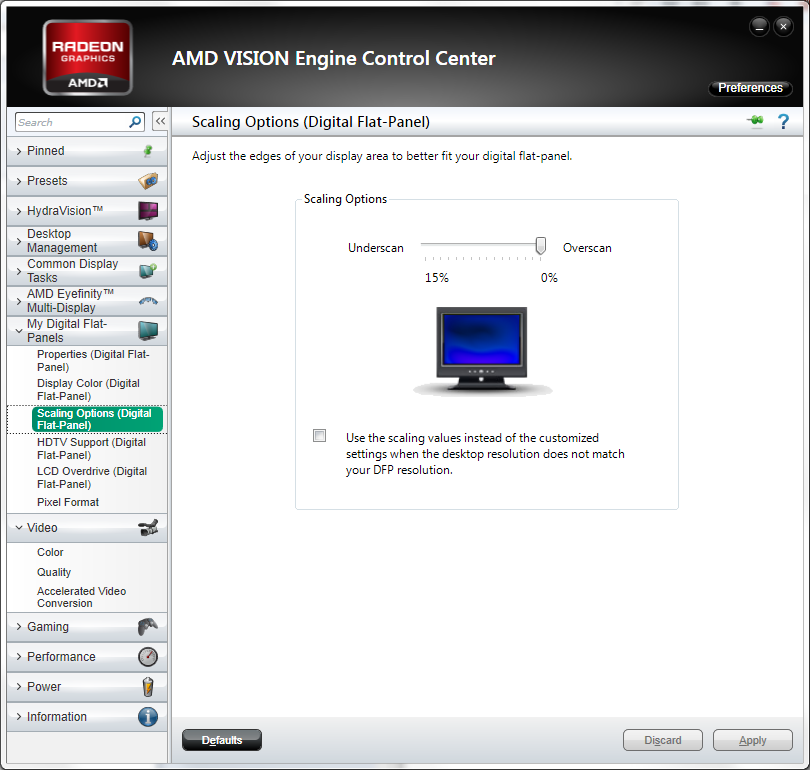
If I'm not mistaken, it will be found under "My Digital Flat Panels" in "Scaling Options (Digital Flat Panel)", on an external display. Or so that's where I find it on my notebook's legacy CCC.

Looks to be the same on the newer one:
usHxvcP.png'


Not really sure what to tell you about the USB. First place I'd check would be Device Manager, look for an "!" next to it = might need a driver update. If you're really unlucky, it could be a controller burnout.
 

My Computer My Computer

Computer type
PC/Desktop
Computer Manufacturer/Model Number
Custom [03/21/2014]
OS
7 Ultimate SP1 x64
CPU
AMD FX-8350 4.0GHz
Motherboard
Asus M5A99FX Pro R2.0
Memory
8GB Corsair Vengeance LP DDR3 1600
Graphics Card(s)
EVGA GTX760 SC 2GB GDDR5
Sound Card
Realtek ALC892
Monitor(s) Displays
23" Syncmaster P2370HD
Screen Resolution
1920 x 1080
Hard Drives
Scorpio Black WD1003FZEX 1TB
PSU
Corsair RM 750W
Case
Gigabyte Sumo Omega
Cooling
Noctua NH-D14 | 6 120mm case.
Keyboard
Tt eSPORTS Poesidon Z - Blue Switch
Mouse
Logitech M510
Internet Speed
FiOS 100/100
Antivirus
MBAM
Browser
WaterFox & Chrome
Other Info
NETWORKING:
FiOS G1100 (v1.03)
Netgear WNDR37AV
Actiontec MI424WR (Rev. I)
PRINTER:
Canon MX340
Hi Welcome to Seven Forums ... What is the Model Number of your Motherboard ? .... Have you any errors in the Device Manager ? Do you have any USB 3 Ports ? ...
 

My Computer My Computer

Computer Manufacturer/Model Number
W530-3630QM1
OS
windows 7 home 64bit
CPU
INTEL-CORE I7
Memory
16GB
Hard Drives
750GB
Browser
Chrome
Did you even install the drivers for the AMD ?

I would get rid of that card and get an nvidia brand, even if the AMD was free ;)
 

My Computer My Computer

Computer type
PC/Desktop
Computer Manufacturer/Model Number
Skylake Special #666
OS
Windows 10 Pro x64
CPU
Intel Core i7 6700K
Motherboard
Asus Sabertooth Z170 Mark 1
Memory
GSkill TridentZ RGB 16GB 3600 16-16-16-36
Graphics Card(s)
EVGA GTX 980 Ti SC x2
Sound Card
Realtek High Definition
Monitor(s) Displays
AOC G2460PG
Screen Resolution
1920 x 1080 144Hz
Hard Drives
Samsung 860 Pro 256GB, Seagate Barracuda 4TB x2
PSU
EVGA 1000 P2, EVGA White Custom Braided Cables
Case
Corsair Vengeance C70 Gunmetal Black
Cooling
Corsair H100i v2, Corsair ML120 x2, Thermal Grizzly Kryonaut
Keyboard
Logitech G910 Orion Spectrum
Mouse
Logitech G700s
Internet Speed
Verizon Fios Quantum Gateway 75/75
Antivirus
Windows Defender, Malwarebytes Free 3.8.3
Browser
Chrome
Other Info
Corsair SP120 x4, LG Blu-ray Drive, Durabrand HT-395 100 Watt Dolby Digital Amp, Corsair H2100 Wireless 7.1 Headset
@MagusMagnus , I tried finding 'My Digital Flat Panels' but it was never there in CCC and never showed up , i searched everywhere in every part of CCC. I even tried GPU scaling and that was worse.

@AddRAM , I have the latest drivers for AMD CCC always had the latest.

Its weird because when i didn't have a graphics card , i never had the black border , or the non working USB;s. Ever since my 1TB HDD Broke & had to get a SATA HDD , my graphics look maybe different , like i feel things have changed.. Iv'e recently bought a VGA to HDMI cable , because My monitor is VGA only and I use a DVI Adapter for my graphics card , im hoping the new cable might help??
 

My Computer My Computer

Computer type
PC/Desktop
Computer Manufacturer/Model Number
Custom Build
OS
Windows 7 Ultimate 64bit
CPU
- Processor - AMD A10-6800K APU with Radeon (tm) graphics
Graphics Card(s)
AMD Radeon 7770
Hard Drives
SATA 256 HDD
Antivirus
AVG
Browser
Google chrome
Alright. Is your 7770 by chance an ASUS? If so, they use their own version and it apparently doesn't have scaling options (for whatever stupid reason). So if that's the case, you will need to uninstall ASUS' and install AMD's directly from their support site (be sure its the one for the 7000 series). You should then, definitely, find "My Digital Flat Panels" and be able to apply the appropriate scaling options. If not though, I'd have to say a call to either AMD or your card's manufacturer support line is due.

Why they don't just leave it 0% by default is mind boggling. Been an 'issue' with their cards for many years...

EDIT: AMD Vision Engine Control Center. Have you looked there? That's where it is for some now, not in CCC.
 

My Computer My Computer

Computer type
PC/Desktop
Computer Manufacturer/Model Number
Custom [03/21/2014]
OS
7 Ultimate SP1 x64
CPU
AMD FX-8350 4.0GHz
Motherboard
Asus M5A99FX Pro R2.0
Memory
8GB Corsair Vengeance LP DDR3 1600
Graphics Card(s)
EVGA GTX760 SC 2GB GDDR5
Sound Card
Realtek ALC892
Monitor(s) Displays
23" Syncmaster P2370HD
Screen Resolution
1920 x 1080
Hard Drives
Scorpio Black WD1003FZEX 1TB
PSU
Corsair RM 750W
Case
Gigabyte Sumo Omega
Cooling
Noctua NH-D14 | 6 120mm case.
Keyboard
Tt eSPORTS Poesidon Z - Blue Switch
Mouse
Logitech M510
Internet Speed
FiOS 100/100
Antivirus
MBAM
Browser
WaterFox & Chrome
Other Info
NETWORKING:
FiOS G1100 (v1.03)
Netgear WNDR37AV
Actiontec MI424WR (Rev. I)
PRINTER:
Canon MX340
Also I've noticed that the black border is still on the monitor even when turned off?! & @MagusMagnus , I've tried to find AMD vision engine control centre but cannot find the download anywhere.. And might be stupid but how do i check if my graphics cards a ASUS? And recently I've bought a VGA to HDMI cable & the my digital flat panels come up but no scaling options T.T
 

My Computer My Computer

Computer type
PC/Desktop
Computer Manufacturer/Model Number
Custom Build
OS
Windows 7 Ultimate 64bit
CPU
- Processor - AMD A10-6800K APU with Radeon (tm) graphics
Graphics Card(s)
AMD Radeon 7770
Hard Drives
SATA 256 HDD
Antivirus
AVG
Browser
Google chrome
@Maxie , Seen that weeks ago , Like I said , no scaling options , underscan/overscan option doesnt show.
 

My Computer My Computer

Computer type
PC/Desktop
Computer Manufacturer/Model Number
Custom Build
OS
Windows 7 Ultimate 64bit
CPU
- Processor - AMD A10-6800K APU with Radeon (tm) graphics
Graphics Card(s)
AMD Radeon 7770
Hard Drives
SATA 256 HDD
Antivirus
AVG
Browser
Google chrome
Now you know there is no Download for the AMD vision engine
 

My Computer My Computer

Computer Manufacturer/Model Number
W530-3630QM1
OS
windows 7 home 64bit
CPU
INTEL-CORE I7
Memory
16GB
Hard Drives
750GB
Browser
Chrome
The point of that article was that unless you’re using a digital connnection (DVI - via DVI to HDMI adapter -, HDMI or Displayport), the scaling options are not available. Analogue (VGA and S-Video) and are not supported for scaling options. You will need a display capable of the aforementioned three connection ports for that to work. Otherwise, you’re going to be stuck with the black borders.

So essentially, if your DVI adapter was a DVI (to the display) and HDMI (to the GPU port), you should have had the availability of the scaling options (because that would be an entirely digital connection). If this was a VGA (to the display) and DVI (to the GPU), scaling options would still not be supported because that is not a digital connection, because of the VGA end (analogue).

Can you perhaps give us your display's model number (should be on the back somewhere)? It's possible you can adjust this natively on the display, but that's a big maybe. It entirely depends on what your display is and what its options are. We might able to look into it and figure it out. But we can't do that without knowing the specific model (and this also hinges on if the manual or specifications are still available for it online too).
 

My Computer My Computer

Computer type
PC/Desktop
Computer Manufacturer/Model Number
Custom [03/21/2014]
OS
7 Ultimate SP1 x64
CPU
AMD FX-8350 4.0GHz
Motherboard
Asus M5A99FX Pro R2.0
Memory
8GB Corsair Vengeance LP DDR3 1600
Graphics Card(s)
EVGA GTX760 SC 2GB GDDR5
Sound Card
Realtek ALC892
Monitor(s) Displays
23" Syncmaster P2370HD
Screen Resolution
1920 x 1080
Hard Drives
Scorpio Black WD1003FZEX 1TB
PSU
Corsair RM 750W
Case
Gigabyte Sumo Omega
Cooling
Noctua NH-D14 | 6 120mm case.
Keyboard
Tt eSPORTS Poesidon Z - Blue Switch
Mouse
Logitech M510
Internet Speed
FiOS 100/100
Antivirus
MBAM
Browser
WaterFox & Chrome
Other Info
NETWORKING:
FiOS G1100 (v1.03)
Netgear WNDR37AV
Actiontec MI424WR (Rev. I)
PRINTER:
Canon MX340
AMD Catalyst

AMD Catalyst™ HDMI Scaling Hotfix Software Suite

When connecting some TVs to AMD Radeon graphics through HDMI connector, users may see small black border around the image on the TV, then user can use HDMI scaling slider on Catalyst Control Center to adjust the image.


This AMD Catalyst HDMI Hotfix driver does not downscale the image, therefore, on most HDMI displays image will be displayed in proper size.
 

My Computer My Computer

Computer type
PC/Desktop
Computer Manufacturer/Model Number
Me
OS
Win 7 Ultimate x64
CPU
FX-8350 @ 4.6 GHz so far
Motherboard
Asus M5A97 EVO
Memory
ADATA XPG V1 Series Black 8GB DDR3 1600
Graphics Card(s)
Sapphire R9 270x Dual-X
Sound Card
Xonar DGX w/ Corsair Vengence 1300
Monitor(s) Displays
Acer S232HL Abid
Screen Resolution
1920x1080
Hard Drives
120 GB OCZ Vertex 3
500 GB Seagate 7200.12
PSU
Antec Earthwatts 650W Green
Case
Antec Three Hundred
Cooling
Cooler Master 212 EVO
Keyboard
Logitech G510
Mouse
Logitech G500s
Internet Speed
35000/3000
@MagusMagnus , My monitor is only a VGA. So does that mean Im stuck with those borders? The display model for the monitor is S22C150N. Or the model code is LS22C150N/EN.

& @stormy13 , I will look into that and let you know Thanks!
 

My Computer My Computer

Computer type
PC/Desktop
Computer Manufacturer/Model Number
Custom Build
OS
Windows 7 Ultimate 64bit
CPU
- Processor - AMD A10-6800K APU with Radeon (tm) graphics
Graphics Card(s)
AMD Radeon 7770
Hard Drives
SATA 256 HDD
Antivirus
AVG
Browser
Google chrome
Alright, see page 55 of your manual (here). Set it to "Wide" instead of "Auto". That's going to be your best bet to ditch the black borers (essentially, to override your GPU's setting). Hopefully, that works. There's nothing else you're going to be able to bank on in getting rid of this on an AMD card and an analogue-only display, unfortunately.
 

My Computer My Computer

Computer type
PC/Desktop
Computer Manufacturer/Model Number
Custom [03/21/2014]
OS
7 Ultimate SP1 x64
CPU
AMD FX-8350 4.0GHz
Motherboard
Asus M5A99FX Pro R2.0
Memory
8GB Corsair Vengeance LP DDR3 1600
Graphics Card(s)
EVGA GTX760 SC 2GB GDDR5
Sound Card
Realtek ALC892
Monitor(s) Displays
23" Syncmaster P2370HD
Screen Resolution
1920 x 1080
Hard Drives
Scorpio Black WD1003FZEX 1TB
PSU
Corsair RM 750W
Case
Gigabyte Sumo Omega
Cooling
Noctua NH-D14 | 6 120mm case.
Keyboard
Tt eSPORTS Poesidon Z - Blue Switch
Mouse
Logitech M510
Internet Speed
FiOS 100/100
Antivirus
MBAM
Browser
WaterFox & Chrome
Other Info
NETWORKING:
FiOS G1100 (v1.03)
Netgear WNDR37AV
Actiontec MI424WR (Rev. I)
PRINTER:
Canon MX340
@MagusMagnus, Your amazing , a really good helper but sadly that didn't work either :( , I have no idea why on earth its appeared out of nowhere. SAMSUNG has told me to try the monitor with a different PC or try my PC with a different monitor. My graphics card will be taken out to see if the black border is still there when the monitor is connected to the PC's main montior port on the tower & not the Graphics card port. But its weird I've noticed Also the black border is still on the monitor even when turned off (black border isn't actually black when turned off but you can see the outline of it still.

@stormy , I tried that but it didnt change or do anything , sorry :( but thanks!
 

My Computer My Computer

Computer type
PC/Desktop
Computer Manufacturer/Model Number
Custom Build
OS
Windows 7 Ultimate 64bit
CPU
- Processor - AMD A10-6800K APU with Radeon (tm) graphics
Graphics Card(s)
AMD Radeon 7770
Hard Drives
SATA 256 HDD
Antivirus
AVG
Browser
Google chrome
That certainly is weird and you shouldn't see any discoloration on a display screen, whether on or off (unless of course it was designed that way. A few are designed with a slight border around the screen edges apart from the panel frame). Perhaps your display is at fault and not the GPU at all. The timing certainly would be coincidental for it, but they can and do go bad also. On the other hand, this could also have happened from "pixel burn in"... if you've neglected the use of a screen saver. I mean, if you left the same image on the screen for a long time, the pixels can get stuck with a 'ghost' of that image indefinitely. But that seems far less likely in this case, IMO.

Well, I'm sorry I couldn't really help you. But I do hope you get this resolved.
 

My Computer My Computer

Computer type
PC/Desktop
Computer Manufacturer/Model Number
Custom [03/21/2014]
OS
7 Ultimate SP1 x64
CPU
AMD FX-8350 4.0GHz
Motherboard
Asus M5A99FX Pro R2.0
Memory
8GB Corsair Vengeance LP DDR3 1600
Graphics Card(s)
EVGA GTX760 SC 2GB GDDR5
Sound Card
Realtek ALC892
Monitor(s) Displays
23" Syncmaster P2370HD
Screen Resolution
1920 x 1080
Hard Drives
Scorpio Black WD1003FZEX 1TB
PSU
Corsair RM 750W
Case
Gigabyte Sumo Omega
Cooling
Noctua NH-D14 | 6 120mm case.
Keyboard
Tt eSPORTS Poesidon Z - Blue Switch
Mouse
Logitech M510
Internet Speed
FiOS 100/100
Antivirus
MBAM
Browser
WaterFox & Chrome
Other Info
NETWORKING:
FiOS G1100 (v1.03)
Netgear WNDR37AV
Actiontec MI424WR (Rev. I)
PRINTER:
Canon MX340
Back
Top