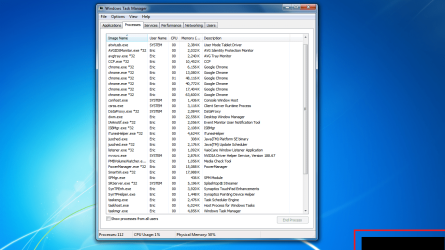
Black Box in notification area of taskbar

eeisner

New member
Local time
11:34 AM
Messages
5
So I have a problem...

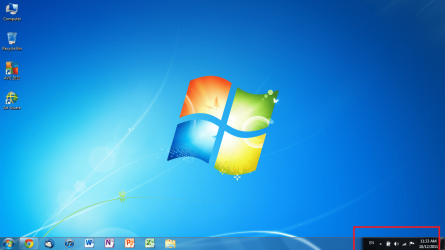
I am currently running a SONY VAIO VPCCW21FX with an NVIDIA 310M graphics card installed. Recently, a black box has appeared in the right side of the taskbar, starting from just left of the change language dialog and going all the way right. When ending the explorer.exe process, the box remain, and when highlighting it, the loading cursor appears. I've attached some screenshots to give a better visual. Any ideas and/or known causes/fixes to this issue? It does not seem to affect performance at all, but it worries me that a more serious unseen issue may exist as well.

Thanks!

Edit: it should be noted that clicking the box turns it white, and after a few more clicks it goes away. Also, I apologize if this was posted in the wrong forum... I am still unsure as to if this is a hardware issue with my graphics card or a software issue.
 

Attachments
  • Screen Problem 1.png
    Screen Problem 1.png
    302.3 KB · Views: 59
  • Screen Problem 2.png
    Screen Problem 2.png
    176 KB · Views: 46

My Computer My Computer

At a glance

Arizona
OS
Arizona
So I have a problem...

I am currently running a SONY VAIO VPCCW21FX with an NVIDIA 310M graphics card installed. Recently, a black box has appeared in the right side of the taskbar, starting from just left of the change language dialog and going all the way right. When ending the explorer.exe process, the box remain, and when highlighting it, the loading cursor appears. I've attached some screenshots to give a better visual. Any ideas and/or known causes/fixes to this issue? It does not seem to affect performance at all, but it worries me that a more serious unseen issue may exist as well.

Thanks!

Edit: it should be noted that clicking the box turns it white, and after a few more clicks it goes away. Also, I apologize if this was posted in the wrong forum... I am still unsure as to if this is a hardware issue with my graphics card or a software issue.


The thing you descibe is called the system tray and is supposed top be there and is perfectly normal
 
Last edited:

My Computer My Computer

At a glance

Win 8 Release candidate 8400[email protected]4 gigsNvidia 9600M
Computer Manufacturer/Model Number
HP Pavillion dv-7 1005 Tx
OS
Win 8 Release candidate 8400
CPU
[email protected]
Memory
4 gigs
Graphics Card(s)
Nvidia 9600M
Sound Card
HD built-in
Monitor(s) Displays
17" Wxga
Screen Resolution
1440x900
Cooling
none
Internet Speed
45Mb down 5Mb up
i understand what the system tray is hahaa id concider myself to be pretty computer smart. you are misssing that black rectangle in the bottom. thats where the unidentified problem is. look at the second screenshot. now imagine a mouse there with a loading cursor. that is not normal. its almost as if that corner of the monitor has not fully loaded.
 

My Computer My Computer

At a glance

Arizona
OS
Arizona
i understand what the system tray is hahaa id concider myself to be pretty computer smart. you are misssing that black rectangle in the bottom. thats where the unidentified problem is. look at the second screenshot. now imagine a mouse there with a loading cursor. that is not normal. its almost as if that corner of the monitor has not fully loaded.


See snip
 
Last edited:

My Computer My Computer

At a glance

Win 8 Release candidate 8400[email protected]4 gigsNvidia 9600M
Computer Manufacturer/Model Number
HP Pavillion dv-7 1005 Tx
OS
Win 8 Release candidate 8400
CPU
[email protected]
Memory
4 gigs
Graphics Card(s)
Nvidia 9600M
Sound Card
HD built-in
Monitor(s) Displays
17" Wxga
Screen Resolution
1440x900
Cooling
none
Internet Speed
45Mb down 5Mb up
the problem is located behind the system tray... yes where you are pointing to with problem in quotes. you are failing to see the black rectangle behind the system tray that should not be there... the entire task bar should be transparent, but as you can see that one section is black and dark. look at my second sreenshot... occasionally that black rectangle will show up in a full screen application, such as a game or movie. compare my system tray to yours, and then end the explorer.exe process on your compter and compare your screen to the second screenshot i uploaded to my original post. that is the problem.
 

My Computer My Computer

At a glance

Arizona
OS
Arizona
the problem is located behind the system tray... yes where you are pointing to with problem in quotes. you are failing to see the black rectangle behind the system tray that should not be there... the entire task bar should be transparent, but as you can see that one section is black and dark. look at my second sreenshot... occasionally that black rectangle will show up in a full screen application, such as a game or movie. compare my system tray to yours, and then end the explorer.exe process on your compter and compare your screen to the second screenshot i uploaded to my original post. that is the problem.

Understood.

Did you install anything around the time when it appeared?

Any chance of getting your system specs?
 

My Computer My Computer

At a glance

Win 8 Release candidate 8400[email protected]4 gigsNvidia 9600M
Computer Manufacturer/Model Number
HP Pavillion dv-7 1005 Tx
OS
Win 8 Release candidate 8400
CPU
[email protected]
Memory
4 gigs
Graphics Card(s)
Nvidia 9600M
Sound Card
HD built-in
Monitor(s) Displays
17" Wxga
Screen Resolution
1440x900
Cooling
none
Internet Speed
45Mb down 5Mb up
i have not installed anything recently, though if i have not noted it yet you should know that nvidia's installer refuses to install the latest version of the cards drivers (280.26)... it says that no compatable hardware was found.

computer is a sony vaio vpc-cw21fx, running an intel i3 m330, nvidia 310m graphics card, 4gb ram... computer was bought january 2010 (thats when sony released this laptop). all drivers besides graphics up to date. any other info you want?
 

My Computer My Computer

At a glance

Arizona
OS
Arizona
i have not installed anything recently, though if i have not noted it yet you should know that nvidia's installer refuses to install the latest version of the cards drivers (280.26)... it says that no compatable hardware was found.

computer is a sony vaio vpc-cw21fx, running an intel i3 m330, nvidia 310m graphics card, 4gb ram... computer was bought january 2010 (thats when sony released this laptop). all drivers besides graphics up to date. any other info you want?

Is it there when you boot info safe mode (F8)?
 

My Computer My Computer

At a glance

Win 8 Release candidate 8400[email protected]4 gigsNvidia 9600M
Computer Manufacturer/Model Number
HP Pavillion dv-7 1005 Tx
OS
Win 8 Release candidate 8400
CPU
[email protected]
Memory
4 gigs
Graphics Card(s)
Nvidia 9600M
Sound Card
HD built-in
Monitor(s) Displays
17" Wxga
Screen Resolution
1440x900
Cooling
none
Internet Speed
45Mb down 5Mb up
Nvidia Driver 280.26 - Supported Products

Notes:
  1. Notebooks supporting Hybrid Power technology with Intel chipsets are not supported by this release.
  2. The following Sony VAIO notebooks are supported: Sony VAIO F Series with NVIDIA GeForce 310M, GeForce GT 335M, GeForce GT 425M, GeForce GT 520M or GeForce GT 540M. Other Sony VAIO notebooks are not supported at this time (please contact Sony for driver support).
  3. Fujitsu notebooks are not supported by this release (Fujitsu Siemens notebooks are supported).
 

My Computer My Computer

At a glance

Windows 7 Ultimate x64Intel Pentium Dual Core E5200 2.5GHz (3.77GHz...Corsair 4GB DDR2 (4x1GB CM2X1024-6400C4)Palit GeForce GTS 250 (1024MB)
Computer Manufacturer/Model Number
Self built
OS
Windows 7 Ultimate x64
CPU
Intel Pentium Dual Core E5200 2.5GHz (3.77GHz OC)
Motherboard
Asus P5Q-E
Memory
Corsair 4GB DDR2 (4x1GB CM2X1024-6400C4)
Graphics Card(s)
Palit GeForce GTS 250 (1024MB)
Sound Card
On Board (ADI AD2000B 8ch HD)
Monitor(s) Displays
Samsung 32in LCD TV
Screen Resolution
1360x768
Hard Drives
2 x 1TB Samsung 103SJ (Raid0)
2 x External 500GB Samsung 502IJ (NexStar 3 HD Enclosures)
PSU
550W Antec Neo HE 550
Case
Antec P180
Cooling
Xigmatex Red Scorpion CPU Cooler. 3x120mm Fans
Keyboard
Logitech MX5000 Laser (Combo)
Mouse
Logitech MX5000 Laser (Combo)
Internet Speed
ADSL2+ (avg 10 Mbps Down, 0.80 Mbps up)
Other Info
Gigabyte GN-WP01GS 54g Wireless Lan Card
Try running the aero troubleshooter. Have you installed any custom themes. Looks like the aero isn't applying but just over the system tray. Very odd.

Danny
 

My Computer My Computer

At a glance

Windows 7 Home Premium x64 SP1intel(R)core(TM)2 duo CPU T6600 @ 2.20GHz3 gb ddr3ati radeon hd4570/512mb
Computer Manufacturer/Model Number
acer aspire 5935g
OS
Windows 7 Home Premium x64 SP1
CPU
intel(R)core(TM)2 duo CPU T6600 @ 2.20GHz
Motherboard
intel gm45/gm47 revision 07
Memory
3 gb ddr3
Graphics Card(s)
ati radeon hd4570/512mb
Monitor(s) Displays
lop156wh2-tle1 15.3 flat
Screen Resolution
1366x768
Hard Drives
OCZ-Agility3 60gig ssd
320gig external hdd
500gig external hdd
Mouse
Optical
Internet Speed
30Mbps Down/30Mbps Up
I am having the same problem. Brand new HP Pavilion g7 with Windows 7 Home Premium. I must admit I've been running countless updates as I get notified about their availability as you do with a new computer, so I'm not sure when the problem appeared.
 

My Computer My Computer

At a glance

Windows 7 Home Premium6GB
Computer Manufacturer/Model Number
HP Pavilion g7
OS
Windows 7 Home Premium
Memory
6GB
Back
Top