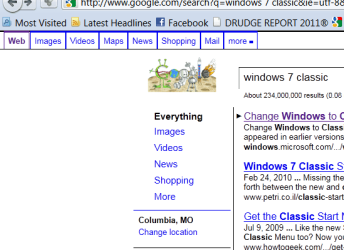
M mikelmahoo New member Local time 11:25 PM Messages 2 May 20, 2011 #1 These boxes appeared in firefox around links. How do I get rid of them? Attachments Black Boxes.PNG 19.7 KB · Views: 71 My Computer OSWindows 7 64bit
DustSailor Capt. Cruncher Guru Gold Member VIP Local time 9:25 PM Messages 2,587 Location Southern California, USA May 21, 2011 #2 download firefox 4 from mozilla and install it, I think your settings should stay the same. This should fix your problem. If it requires you to uninstall firefox first, I believe it gives you the option to keep your current settings for a later install http://www.mozilla.com/en-US/firefox/new/ My Computer Computer typePC/DesktopComputer Manufacturer/Model NumberCustom Asus BuildOSMicrosoft Windows 8.1 Pro 64-bitCPUIntel(R) Core(TM) i3-4130 CPU @ 3.40GHzMotherboardB85M-EMemory8.00 GBGraphics Card(s)NoneSound CardRealtek High Definition AudioMonitor(s) DisplaysAsus 23.6" MonitorScreen Resolution1920 x 1080 x 32 bits (4294967296 colors) @ 60 HzHard DrivesINTEL SSDSC2BW180A4 Samsung SSD 840 PRO SeriesPSUSeasonic S12II-380BronzeCaseLian LiCoolingFan, PassiveKeyboardLogitech K120MouseMicrosoft Touch MouseInternet Speed4ms Ping, 19.0 Mbps Download, 19.0 Mbps UploadAntivirusEset EndpointBrowserInternet Explorer, Chrome
download firefox 4 from mozilla and install it, I think your settings should stay the same. This should fix your problem. If it requires you to uninstall firefox first, I believe it gives you the option to keep your current settings for a later install http://www.mozilla.com/en-US/firefox/new/
M mikelmahoo New member Thread Starter Local time 11:25 PM Messages 2 May 21, 2011 #3 Thank you My Computer OSWindows 7 64bit
DustSailor Capt. Cruncher Guru Gold Member VIP Local time 9:25 PM Messages 2,587 Location Southern California, USA May 21, 2011 #4 hope u get it working My Computer Computer typePC/DesktopComputer Manufacturer/Model NumberCustom Asus BuildOSMicrosoft Windows 8.1 Pro 64-bitCPUIntel(R) Core(TM) i3-4130 CPU @ 3.40GHzMotherboardB85M-EMemory8.00 GBGraphics Card(s)NoneSound CardRealtek High Definition AudioMonitor(s) DisplaysAsus 23.6" MonitorScreen Resolution1920 x 1080 x 32 bits (4294967296 colors) @ 60 HzHard DrivesINTEL SSDSC2BW180A4 Samsung SSD 840 PRO SeriesPSUSeasonic S12II-380BronzeCaseLian LiCoolingFan, PassiveKeyboardLogitech K120MouseMicrosoft Touch MouseInternet Speed4ms Ping, 19.0 Mbps Download, 19.0 Mbps UploadAntivirusEset EndpointBrowserInternet Explorer, Chrome