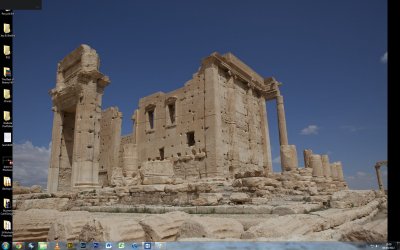
Black Rectangle appears on desktop after locking PC

shafiq786110

New member
Local time
10:23 AM
Messages
2
Hi guys
recently I've noticed if i lock my pc and then unlock when i come back to my workstation, a dark grey square with inactive arrows appears in the top left of the screen, i cant move it, click on it or close it! It doesn't seem to have any "always on top" setting as i can put any program or explorer window above it and it stays happily on the desktop behind the window.
A restart of the PC removes it but that's not always practical to do
Have a look at the screenshot attached and let me know what you think it could be and how i can remove it!
Thanks
:)
 

Attachments

  • Untitled.jpg
    Untitled.jpg
    261.8 KB · Views: 10

My Computer

OS
Windows 7 Ultimate 64bit
It would appear an tray application or some background app you have is not loading properly when you unlock the machine. It's possible the act of locking it actually causes the problem with the specific program in question.
If it happens all the time I would guess it's something in your startup programs.

If you go to the search box and type msconfig and hit enter then go over to the startup tab, could you screen and post that ... just the one tab.
 

My Computer

Computer Manufacturer/Model Number
Insane hobo technologies. ;-)
OS
Windows 7 x64
CPU
Intel i7 2600k
Motherboard
Asrock z68 extreme 4 gen 3
Memory
G.skill Ripjaw 16gigs @ 1866
Graphics Card(s)
Nvidia gtx580 (evga)
Sound Card
Integrated HD audio + hdmi
Monitor(s) Displays
24" ASUS widescreen + 42" insignia
Screen Resolution
1080p (1920x1080)
Hard Drives
128 Samsung 830
256 Samsung 840
3 x 1tb storage drive (various)
1 western digital 1tb (eSATA)
1 Seagate 1tb (eSATA)
PSU
1 kilowatt SLI/Crossfire rated Silverstone modular
Case
NZXT Phantom + additional 220 fan
Cooling
Zalmann
Keyboard
Microsoft wireless 3000 (v2)
Mouse
MS - wireless 5000 (bluetrack)
Internet Speed
depends on if you ask me or my provider.
Other Info
The above information is provided as is, and the author assumes no responsibility for issues it may cause with your sanity or fanboyism.
hi maguscreed
its a pretty long list of things, the box doesnt come up all the time, ive narrowed it down to appearing just when i lock then unlock the pc
ive put a screengrab in the attachment but as you can see, it doesnt even cover half of the startup items!
 

Attachments

  • Untitled2.jpg
    Untitled2.jpg
    213.4 KB · Views: 5

My Computer

OS
Windows 7 Ultimate 64bit
All I can gather from that is that you have atheros devices.
Their drivers are known to cause problems because of power plans and other things like log off/ locking.
If at all possible you may want to make sure what you have for your atheros device is the latest available.
 

My Computer

Computer Manufacturer/Model Number
Insane hobo technologies. ;-)
OS
Windows 7 x64
CPU
Intel i7 2600k
Motherboard
Asrock z68 extreme 4 gen 3
Memory
G.skill Ripjaw 16gigs @ 1866
Graphics Card(s)
Nvidia gtx580 (evga)
Sound Card
Integrated HD audio + hdmi
Monitor(s) Displays
24" ASUS widescreen + 42" insignia
Screen Resolution
1080p (1920x1080)
Hard Drives
128 Samsung 830
256 Samsung 840
3 x 1tb storage drive (various)
1 western digital 1tb (eSATA)
1 Seagate 1tb (eSATA)
PSU
1 kilowatt SLI/Crossfire rated Silverstone modular
Case
NZXT Phantom + additional 220 fan
Cooling
Zalmann
Keyboard
Microsoft wireless 3000 (v2)
Mouse
MS - wireless 5000 (bluetrack)
Internet Speed
depends on if you ask me or my provider.
Other Info
The above information is provided as is, and the author assumes no responsibility for issues it may cause with your sanity or fanboyism.
Back
Top