Black screen ACI VK192 monitor recognised and working

translucidstudi

New member
Local time
9:34 PM
Messages
2
Hi,

I really need some help with this issue as I need this monitor to do my work. My Asus VK192 monitor turns on fine and even displays the desktop fine, but only for a couple of seconds. This has been going on about a week, I have previously fixed the issue by turning the monitor on and off several times until it stayed but now it just wont keep the image. Strangely, the actual monitor never loses it's connection and the IO light stays on.

Because it is clearly capable of working I can only assume this is a driver issue. The options to update the monitors drivers are all greyed out and Asus only have multiframe and lifeframe downloads which seem to be extra software for managing your monitors, not dedicated drivers.

I have looked and looked but the only solutions I have found are "buy a new monitor" or "buy a new graphics card". I need this sorted asap and can't really afford to buy anything. As it does work for a couple of seconds, there has surely got to be a fix?

My graphics card is an nvidia geforce 9800 gt if that is of any help.

TIA :)
 

My Computer My Computer

At a glance

windows 7 ultimate x64amd phenom II black edition x44gb RAMNvidia gt9800
Computer type
PC/Desktop
Computer Manufacturer/Model Number
custom build
OS
windows 7 ultimate x64
CPU
amd phenom II black edition x4
Memory
4gb RAM
Graphics Card(s)
Nvidia gt9800
Antivirus
Avast Free
Browser
Mozillla Firefox
Hi welcome to the forum

from what you describe its most likely a faulty monitor. monitors do not have drivers they are plug and play. you would need to have testing equipment to figure out whats actually faulty in the monitor. which probably cost more than what the monitor is worth. and bring it to a repair shop probably not going to be worth it neither. probably cheaper to replace monitor. unless you still have warranty on the monitor.
 

My Computer My Computer

At a glance

win 10
Computer type
PC/Desktop
Computer Manufacturer/Model Number
dell xps 9000
OS
win 10
oscer1 is right, you could always try using your monitor with another computer to see if it works then.
Monitors are all designed in a similar way - they usually have two circuit boards inside, one for the power and the other one that actually drives the screen.

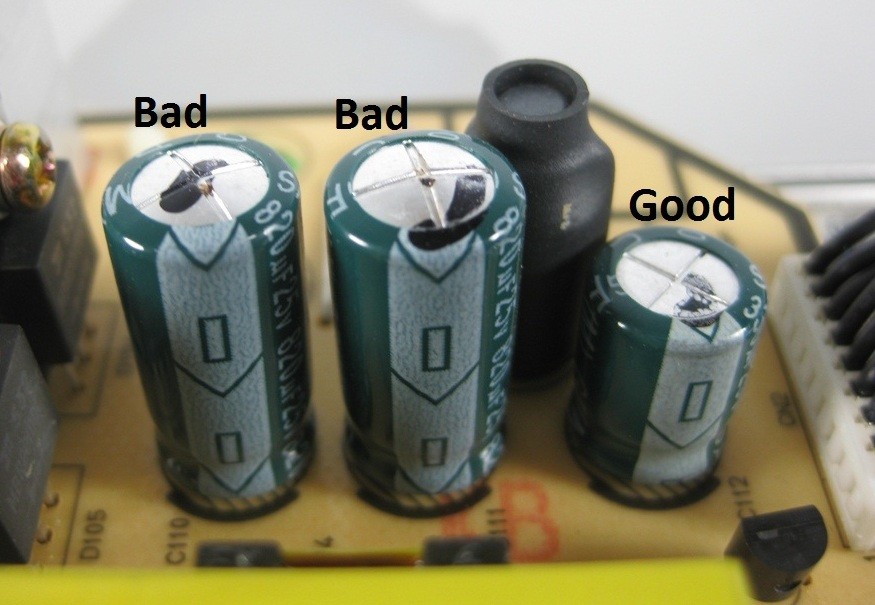
If you decide to buy a new monitor and throw this one away because it's too expensive to fix - open it up, have a look at the capacitors (usually the ones on the power board go bad). They're a very common problem. Because of the heat inside the monitor, or the age of the capacitors themselves, they often expand and start leaking - resulting in symptoms that you're experiencing, or no image at all. Here's what (blown, and good) capacitors look like:
458360537_o.jpg

If you have some time and soldering skills, you can buy exact same capacitors (surprisingly cheap) and replace them - your monitor should work just fine. It's worth checking for other clues while you're in there, like burn marks or loose cables and such.
 

My Computer My Computer

At a glance

Windows 7 x64
OS
Windows 7 x64
Ah shame, I never knew that it's one of the circuits that 'drives' it. Well I have got a soldering iron and have been meaning to learn how to solder properly, I guess I'll take it apart to see if it's the capacitors that are the problem. If they are, I will get some more, take it over to my electrician friends and get him to teach me and if it's not or I bungle it up, the monitor was physically dead anyways.

I really appreciate your help guys. I love learning new things, thanks! :)
 

My Computer My Computer

At a glance

windows 7 ultimate x64amd phenom II black edition x44gb RAMNvidia gt9800
Computer type
PC/Desktop
Computer Manufacturer/Model Number
custom build
OS
windows 7 ultimate x64
CPU
amd phenom II black edition x4
Memory
4gb RAM
Graphics Card(s)
Nvidia gt9800
Antivirus
Avast Free
Browser
Mozillla Firefox
best of luck hope something simple as just some bad capacitors
 

My Computer My Computer

At a glance

win 10
Computer type
PC/Desktop
Computer Manufacturer/Model Number
dell xps 9000
OS
win 10
Ah shame, I never knew that it's one of the circuits that 'drives' it. Well I have got a soldering iron and have been meaning to learn how to solder properly, I guess I'll take it apart to see if it's the capacitors that are the problem. If they are, I will get some more, take it over to my electrician friends and get him to teach me and if it's not or I bungle it up, the monitor was physically dead anyways.

I really appreciate your help guys. I love learning new things, thanks! :)

We're all glad to help here, and it makes me incredibly happy to see someone who's wiling to try and fix something rather than throw it away :) good luck.

And some more notes from me:
- The capacitors are usually the problem that causes these symptoms, it could be something else though - you might want to ask your electrician friends to check if there's some other signs of failure (burn marks, etc).
- If they are blown, it's worth trying to replace them - just use one's with exactly the same parameters.
- It's usually the one's on the power board that go bad, because there's a lot of heat there.

If you get your monitor working again - you'll get that feeling of satisfaction that you wouldn't get if you've spent money on a new one ;)
 

My Computer My Computer

At a glance

Windows 7 x64
OS
Windows 7 x64
Back
Top