Black screen at startup

Napoleon

New member
Local time
11:15 PM
Messages
6
Hi All,

I have encountered a problem that is starting to annoy me. The other day my laptop froze and I restarted. After the flash windows screen it goes black and I can see nothing, doesn't get to the users screen. I have had windows 7 on for 2 months and all has been perfect.

I have tried to install the Nvidia drivers again (re downloaded drivers 179.48 and 186.82 with mod .inf). Both said installed correctly but after the restart still got black screen. Currently I am in safe mode on video controller as the display card. I uninstalled the old drivers as well.

the 179.48 were on previously and I have had no problems until the other day. I am stuck for any other solutions on what to do.

I have a dell m1710 with a 7950 gtx. Win 7 build is 7201 64bit.

All help would be greatly appreciated as I am at a wits end...
Cheers
 

My Computer

Computer Manufacturer/Model Number
Dell XPS M1710
OS
Win 7
Hi All,

I have encountered a problem that is starting to annoy me. The other day my laptop froze and I restarted. After the flash windows screen it goes black and I can see nothing, doesn't get to the users screen. I have had windows 7 on for 2 months and all has been perfect.

I have tried to install the Nvidia drivers again (re downloaded drivers 179.48 and 186.82 with mod .inf). Both said installed correctly but after the restart still got black screen. Currently I am in safe mode on video controller as the display card. I uninstalled the old drivers as well.

the 179.48 were on previously and I have had no problems until the other day. I am stuck for any other solutions on what to do.

I have a dell m1710 with a 7950 gtx. Win 7 build is 7201 64bit.

All help would be greatly appreciated as I am at a wits end...
Cheers


Boot into safe mode and check device manager for display driver function. In safe mode you dont load the vid driver. If not the vid driver, try going into event viewer (type event in search) and go to windows logs>application tab and check for errors. If there are could you use the snipping tool (type snip) to take a screenshot and upload it to us

Ken
 

My Computer

Computer Manufacturer/Model Number
HP Pavillion dv-7 1005 Tx
OS
Win 8 Release candidate 8400
CPU
[email protected]
Memory
4 gigs
Graphics Card(s)
Nvidia 9600M
Sound Card
HD built-in
Monitor(s) Displays
17" Wxga
Screen Resolution
1440x900
Cooling
none
Internet Speed
45Mb down 5Mb up
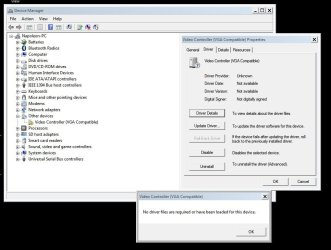
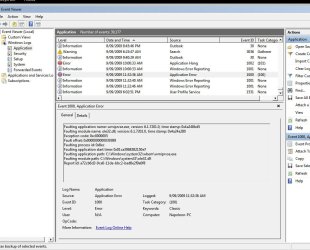
Driver info on the video adapter and the last error I had.
 

Attachments

  • snip1.JPG
    snip1.JPG
    74.2 KB · Views: 79
  • snip2.JPG
    snip2.JPG
    107.1 KB · Views: 81

My Computer

Computer Manufacturer/Model Number
Dell XPS M1710
OS
Win 7
N

That device driver was in safe mode right? OK so you dont have a video driver installed. the event ID 1000 source 100 hang is about ole32.dll and wmiprsve.exe are not related (but should be fixed). You need to find the most current video driver for win 7 (or vista) for your video card. You can install it in safe mode, then reboot.

If that doesn't work let us know

Ken
 

My Computer

Computer Manufacturer/Model Number
HP Pavillion dv-7 1005 Tx
OS
Win 8 Release candidate 8400
CPU
[email protected]
Memory
4 gigs
Graphics Card(s)
Nvidia 9600M
Sound Card
HD built-in
Monitor(s) Displays
17" Wxga
Screen Resolution
1440x900
Cooling
none
Internet Speed
45Mb down 5Mb up
If you are stuck again I would try a repair install with the Windows 7 CD. It sounds like the original drivers were working ok but ran into a problem. The repair will take your system back in time to a point where it was working.
 

My Computer

Computer type
PC/Desktop
Computer Manufacturer/Model Number
Home built
OS
Windows 7 Ult, Windows 8.1 Pro,
CPU
Q9650-4.275GHz, E8600 4.5GHz, E6750-3.8GHz
Motherboard
Evga 780i FTW
Memory
G.Skill PC2 9600 1200Mhz 5 5 5 15 2T
Graphics Card(s)
GTX480
Sound Card
Asus Xonar D2
Monitor(s) Displays
HannsG
Screen Resolution
1680X1050
Hard Drives
GSkill Phoenix Pro 120GB SSD
PSU
ThermalTake Toughpower 1000Watt modular
Case
ThermalTake XaserV
Cooling
Xigmatek S1283
Keyboard
Logitech G15
Mouse
Logitech G9
Internet Speed
T1
1. Restart you computer.

2. At the boot screen hit F8

3. Select "Enable low resolution video (640 X 480)"

4. Windows 7 will then start and complete the install.

5. Then follow with a Windows Update to get the right video driver and restart your computer (if needed).


Hi,Try This.
 

My Computer

Computer Manufacturer/Model Number
Self Build 64bit
OS
Vista Ult64, Win7600
CPU
Intel Core 2 Quad Q6600 @ 2400 MHz 64bit OS
Motherboard
Asus P5E3 Deluxe WiFi @p 64 bit OS
Memory
4096 MB DDR3-SDRAM
Graphics Card(s)
ATI Radeon HD 3870 Series x2 Crossfired
Sound Card
Realtek on board
Monitor(s) Displays
Samsung SyncMaster - 23 inches
Screen Resolution
1680x1050 pixels at 60 Hz in True Colors
Hard Drives
Hitachi (250 GB)/Samsung 750 GB. /Barracuda 160 GB.
My Book 1 TB external..
PSU
Cooler Master 1000w
Case
Cooler Master Cosmos 1000.
Cooling
Fans and fresh air,
Keyboard
Wireless
Mouse
Wireless
Internet Speed
Never fast enough
Other Info
I use a Magnum.
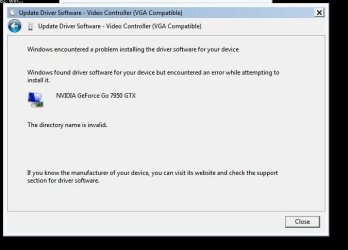
Tried the safe mode loading and the "Enable low resolution video (640 X 480)", but all I got was the following error on both.

This is worse than having a fight with the missus...
 

Attachments

  • snip3.JPG
    snip3.JPG
    35.3 KB · Views: 73

My Computer

Computer Manufacturer/Model Number
Dell XPS M1710
OS
Win 7
Tried the safe mode loading and the "Enable low resolution video (640 X 480)", but all I got was the following error on both.

This is worse than having a fight with the missus...

Where did you try to install it from and to?

Ken
 

My Computer

Computer Manufacturer/Model Number
HP Pavillion dv-7 1005 Tx
OS
Win 8 Release candidate 8400
CPU
[email protected]
Memory
4 gigs
Graphics Card(s)
Nvidia 9600M
Sound Card
HD built-in
Monitor(s) Displays
17" Wxga
Screen Resolution
1440x900
Cooling
none
Internet Speed
45Mb down 5Mb up
[QUOTE
Where did you try to install it from and to?

Ken[/QUOTE]

I went to the video adapter and clicked update driver and went to the location of the drivers and got the error message. This was in safe mode.

Also tried the "Enable low resolution video (640 X 480)" but got the same error message.

Haven't tried chev65 work around yet, but I don't know where my disc is.
 

My Computer

Computer Manufacturer/Model Number
Dell XPS M1710
OS
Win 7
Napoleon

Is there anything odd about the install? Like did your data come from a previous install on a different drive? The other thing I would think about is 7201 was somewhat buggy might want to try a newer build (7600).

Ken
 

My Computer

Computer Manufacturer/Model Number
HP Pavillion dv-7 1005 Tx
OS
Win 8 Release candidate 8400
CPU
[email protected]
Memory
4 gigs
Graphics Card(s)
Nvidia 9600M
Sound Card
HD built-in
Monitor(s) Displays
17" Wxga
Screen Resolution
1440x900
Cooling
none
Internet Speed
45Mb down 5Mb up
Was thinking of the newer build, just 7201 has been great over the 2 months I have had it.
 

My Computer

Computer Manufacturer/Model Number
Dell XPS M1710
OS
Win 7
Was thinking of the newer build, just 7201 has been great over the 2 months I have had it.


Im pretty sure it isn't your problem, but hey it couldnt hurt either right? 7600 does have a lot better driver support

Ken
 

My Computer

Computer Manufacturer/Model Number
HP Pavillion dv-7 1005 Tx
OS
Win 8 Release candidate 8400
CPU
[email protected]
Memory
4 gigs
Graphics Card(s)
Nvidia 9600M
Sound Card
HD built-in
Monitor(s) Displays
17" Wxga
Screen Resolution
1440x900
Cooling
none
Internet Speed
45Mb down 5Mb up

My Computer

Computer Manufacturer/Model Number
Self Build 64bit
OS
Vista Ult64, Win7600
CPU
Intel Core 2 Quad Q6600 @ 2400 MHz 64bit OS
Motherboard
Asus P5E3 Deluxe WiFi @p 64 bit OS
Memory
4096 MB DDR3-SDRAM
Graphics Card(s)
ATI Radeon HD 3870 Series x2 Crossfired
Sound Card
Realtek on board
Monitor(s) Displays
Samsung SyncMaster - 23 inches
Screen Resolution
1680x1050 pixels at 60 Hz in True Colors
Hard Drives
Hitachi (250 GB)/Samsung 750 GB. /Barracuda 160 GB.
My Book 1 TB external..
PSU
Cooler Master 1000w
Case
Cooler Master Cosmos 1000.
Cooling
Fans and fresh air,
Keyboard
Wireless
Mouse
Wireless
Internet Speed
Never fast enough
Other Info
I use a Magnum.
Back
Top