
Solved Black screen & flashing on start up after patching .dll theme file

Local time
4:17 AM
Messages
30
I'M SO SORRY IF THIS THREAD DOESNT BELONG HERE BUT I SOO CONFUSE WHERE TO POST THIS PROBLEM, WATHER ON " Windows 7 help and support > Customization »" or
RIGHT HERE...... :huh:

MY PROBLEM
This problem keep happen after I install "Universa lTheme Patcher by deepxw" software
or touch any/make any change on :-

1.themeservice.dll
2.themeui.dll
3.uxtheme.dll

I never having "Black screen and flashing" on patching .dll using "Universa lTheme Patcher by deepxw" software before but it happen after i reinstall my pc 1 year ago :huh:

You can say it depend on my luck because sometimes the "Black screen and flashing" didnt happen after i patching .dll using "Universa lTheme Patcher by deepxw" software but sometimes the "Black screen and flashing" happen AND IT MAKE ME CONFUSE, CAZY AND MAD!! :banghead:

I NEED TO FIGURE ABOUT THIS PROBLEM FAST BECAUSE MY ASSIGMENT DEPEND ON THAT SOFTWARE!!! [ I mean the "Universa lTheme Patcher by deepxw" software....]

I'm havig a theme maker porject right know so I NEED TO PATCH themeservice.dll, themeui.dll,uxtheme.dll" SO I CAN USE "Win7 Style Builder" for do my project BUT THE ONLY SOFTWARE THAT CAN MAKE THE "Win7 Style Builder" WORKS PROPERLY IS ONLY THE "Universa lTheme Patcher by deepxw" software I try use the " UxStyle_Core" but "Win7 Style Builder" always crash when i edit " Startmenu "! :mad2:

2 days ago i just make a clean reinstallation on my pc then the next day I'm patching .dll using "Universa lTheme Patcher by deepxw" software THEN THE "Black screen and flashing" PROBLEM HAPPEND AFTER I TRY TO OPEN MY PC ON THE NEXT MORNING AND I ALMOST HAVE TO REINSTALL MY PC AGAIN AFTER 2 OF MY " RESTORE POINT " THAT I MAKE DIDNT SOLVE THE PROBLEM & THANKS TO GOD THE LAST "RESTORE POINT" WORKS. :confused:

So can someone help me :(

Here how it goes

1. Form start up till here, works properly :-
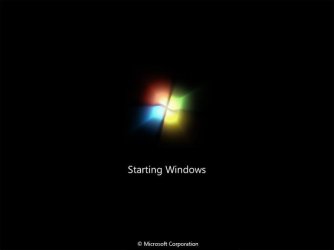
Windows_7_6956_Bootscreen_by_killer7ben.jpg


2. Then this happen....this screen will repeating flashing....
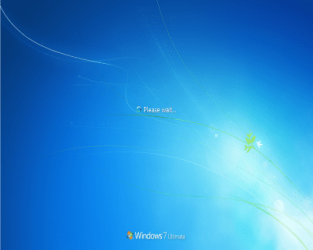
56-15.png

BTW I'm using Windows 7 Ultimate 32bit.
 
Last edited by a moderator:

My Computer My Computer

OS
Windows 7 Ultimate x32

My Computer My Computer

Computer type
PC/Desktop
Computer Manufacturer/Model Number
Self assembled
OS
Windows 10 Home 64Bit
CPU
Intel Core i5 10400 @ 2.90GHz
Motherboard
Intel Corporation DG41WV (PROCESSOR)
Memory
8.00GB Single-Channel Unknown @ 1329MHz (16-20-20-38)
Sound Card
Realtek High Definition Audio
Monitor(s) Displays
DELL E170S
Screen Resolution
1280x1024 pixels
Hard Drives
931GB TOSHIBA DT01ACA100 (SATA)
238GB TEAM TM8PS7256G (SATA SSD)
Case
Nothing Fancy
Cooling
Fans
Keyboard
A4 Tech Co LTD
Mouse
A4 Tech Co Ltd/Logitech
Internet Speed
25 Mbps
are you able to log in to your pc? or does it stay hanging on the please wait...
start off with http://www.sevenforums.com/tutorials/1538-sfc-scannow-command-system-file-checker.html

Right now my pc works fine because i manage to make a system restore but still i wanna know how to fix this problem.

when the time that problem happen [ 3 days ago....] i cant log in on my pc , it stay hanging/flashing on the "please wait" i try everything on the "F8" setting/CMD : -

windows-7-startup-menu.png


but still cant log in & hanging on the "please wait", and sometimes system restore didnt work and i have to reinstall/reformat my pc.

This is the 2nd times it happen to me, i check on " deepxw.blogspot.com/2008/11/universal-theme-patcher.html" the person who create the " Universal Theme Patcher" and many of them who using it experiences the same problem as me after they install the " Universal Theme Patcher".
 

My Computer My Computer

OS
Windows 7 Ultimate x32

My Computer My Computer

Computer type
PC/Desktop
Computer Manufacturer/Model Number
Self assembled
OS
Windows 10 Home 64Bit
CPU
Intel Core i5 10400 @ 2.90GHz
Motherboard
Intel Corporation DG41WV (PROCESSOR)
Memory
8.00GB Single-Channel Unknown @ 1329MHz (16-20-20-38)
Sound Card
Realtek High Definition Audio
Monitor(s) Displays
DELL E170S
Screen Resolution
1280x1024 pixels
Hard Drives
931GB TOSHIBA DT01ACA100 (SATA)
238GB TEAM TM8PS7256G (SATA SSD)
Case
Nothing Fancy
Cooling
Fans
Keyboard
A4 Tech Co LTD
Mouse
A4 Tech Co Ltd/Logitech
Internet Speed
25 Mbps
Right now my pc works fine [ I manage to make a system restore], i just wanna know how to fix it because I already do everything you say & also fix/clean the registry but some times it fix and sometimes dont ....... :(

Back to the days whan i was experiences the " Black screen & flashing on start up", I manage to make a system restore, and today i patch my .dll file with UxStyle Core. Then i try open the win7 style builder and try works on the " start menu" section and it works fine, but i dont know about other section [ exp : Windows 7 caption button,Explorer & Shell & etc ] works properly or not....but hope it works properly . Since i already patch the .dll file with the UxStyle Core, hope i didnt experiences the " Black screen & flashing on start up" again..... :huh:

BTW Thanks for reply my problem, i really appriciate it :)
 

My Computer My Computer

OS
Windows 7 Ultimate x32
You say that you need to patch your theme for a school assignment, but are worried that it will cause problems again?

First follow koolkat's suggestion to run now SFC -SCANNOW Command

Then if you need to reinstall the patch I would save a Win7 backup image as well as set a Restore Point so that you have two methods of recovery, if it messes up again.
Backup Complete Computer - Create an Image Backup
System Restore Point - Create

Read the Download page carefully to make sure it's supposed to work with Win7, any hardware requirements, or other known issues.
 

My Computer My Computer

Computer type
PC/Desktop
OS
Windows 10 Home x64
CPU
INTEL Core i5-750 Quad-Core 3.37GHz
Motherboard
ASUS P7P55D
Memory
HyperX Fury Black Series 8GB (2 x 4GB) 1866Mhz
Graphics Card(s)
EVGA GeForce GTX 750 Superclocked 1GB 128-Bit GDDR5
Monitor(s) Displays
LG 32MA68HY 32" IPS
Screen Resolution
1920 x 1080
Hard Drives
Samsung 840 Evo 120GB, SEAGATE 500GB Barracuda® 7200.12, SATA 3 Gb/s, 7200 RPM, 16MB cache
PSU
ANTEC TruePower New TP-550, 80 PLUS, 550W
Case
ANTEC Three Hundred Illusion
Cooling
COOLER MASTER Hyper 212 Plus, 4 x 120mm 1 x 140mm Noctua's
Internet Speed
85 + Mbps
Antivirus
Avast
Browser
Vivaldi
You say that you need to patch your theme for a school assignment, but are worried that it will cause problems again?

First follow koolkat's suggestion to run now SFC -SCANNOW Command

Then if you need to reinstall the patch I would save a Win7 backup image as well as set a Restore Point so that you have two methods of recovery, if it messes up again.
Backup Complete Computer - Create an Image Backup
System Restore Point - Create

Read the Download page carefully to make sure it's supposed to work with Win7, any hardware requirements, or other known issues.


Huh....:shock: Okey, i repeat again...I already did that " SFC Scan Now" and EVERYTHING THAT ON THE " F8 " section : -

windows-7-startup-menu.png


Regedit, fix the registry / .dll file....still not solve..... and this morning it happen again,but a manage to repair it......

I already search on the internet & I think this problem maybe have to do with the Hard drive ........ because i just reinstall my pc 4-5 days ago, i dont even touch/make change any .dll file or system32 folder and this " Black screen & flashing" still happen....

BTW thank for reply on my thread, One more think its collage assigment not school :geek:
 

My Computer My Computer

OS
Windows 7 Ultimate x32

My Computer My Computer

OS
Windows 7 Ultimate x32
Solve, Universa lTheme Patcher by deepxw do have some bug and many people expirient same thing as me. Know i'm using UxStyle, it better & safe from Universa lTheme Patcher by deepxw.

And thank to people who reply to make thread :)
 
Last edited:

My Computer My Computer

OS
Windows 7 Ultimate x32
Share your fix with us, it may help others. A Guy
 

My Computer My Computer

Computer type
PC/Desktop
OS
Windows 10 Home x64
CPU
INTEL Core i5-750 Quad-Core 3.37GHz
Motherboard
ASUS P7P55D
Memory
HyperX Fury Black Series 8GB (2 x 4GB) 1866Mhz
Graphics Card(s)
EVGA GeForce GTX 750 Superclocked 1GB 128-Bit GDDR5
Monitor(s) Displays
LG 32MA68HY 32" IPS
Screen Resolution
1920 x 1080
Hard Drives
Samsung 840 Evo 120GB, SEAGATE 500GB Barracuda® 7200.12, SATA 3 Gb/s, 7200 RPM, 16MB cache
PSU
ANTEC TruePower New TP-550, 80 PLUS, 550W
Case
ANTEC Three Hundred Illusion
Cooling
COOLER MASTER Hyper 212 Plus, 4 x 120mm 1 x 140mm Noctua's
Internet Speed
85 + Mbps
Antivirus
Avast
Browser
Vivaldi
Back
Top