
You are using an out of date browser. It may not display this or other websites correctly.
You should upgrade or use an alternative browser.
You should upgrade or use an alternative browser.
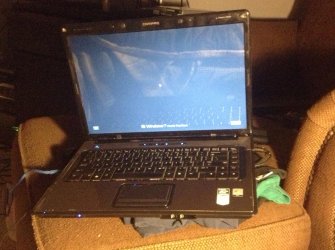
Black windows 7 log in screen
- Thread starter cbute
- Start date
does the account show up in safe mode?
Will check on that now.
My Computer
- OS
- Windows 7 Home Premium x64
does the account show up in safe mode?
No, it doesn't. It shows the same screen.
My Computer
- OS
- Windows 7 Home Premium x64
hmm, I'm wondering what happened here, follow the below instructions to enable the built in Administrator Account, and see if an account named Admnistrator pops up... Strange, never seen this happen before, hope someone else has more experiance with this than me  LOL
LOL
Link (use method TWO (BE VERY CAREFUL) >> >> http://www.sevenforums.com/tutorials/102552-built-administrator-enable-winre.html
I'll give you further instructions after you finish hope everything works out!
LOLLink (use method TWO (BE VERY CAREFUL) >> >> http://www.sevenforums.com/tutorials/102552-built-administrator-enable-winre.html
I'll give you further instructions after you finish
hope everything works out!My Computer
- Computer type
- PC/Desktop
- OS
- .
hmm, I'm wondering what happened here, follow the below instructions to enable the built in Administrator Account, and see if an account named Admnistrator pops up... Strange, never seen this happen before, hope someone else has more experiance with this than me
Link (use method TWO (BE VERY CAREFUL) >> >> http://www.sevenforums.com/tutorials/102552-built-administrator-enable-winre.html
I'll give you further instructions after you finish
Uh oh- when I try to boot to Safe Mode with Command Prompt, it gives me the same screen as before!
 I don't have a disc to get Command Prompt either... I have a feeling something is really messed up...
My Computer
- OS
- Windows 7 Home Premium x64
hmmm, let me see if i can find anything about it, i'll be back in about ten min, and hopefully someone else will start helping too
Alright thanks for your help so far!
My Computer
- OS
- Windows 7 Home Premium x64

- Local time
- 3:46 AM
- Messages
- 50,634
Work through the same steps for Troubleshooting Windows 7 Failure to Start to check for infection and disinfect, run Startup Repairs, System Restore, Check System Files - if necessary from boot mode until you can get into Win7.
do you remember downloading anything new, any updates or anything that may have changed your account?
Yeah, it was a new install and it popped up saying it installed drivers for everything then said to reboot so I did and then a disk check came on. Then this happened the next time I booted.
My Computer
- OS
- Windows 7 Home Premium x64
so far he cant get to safe mode of safe mode with command prompt, i think we need an external registry editor to unhide the account...Work through the same steps for Troubleshooting Windows 7 Failure to Start to check for infection and disinfect, run Startup Repairs, System Restore, Check System Files - if necessary from boot mode until you can get into Win7.
But, see if you can do a system restore, work thru the seteps Greg gave you and see if any help
if you need any help, just askMy Computer
- Computer type
- PC/Desktop
- OS
- .
- Local time
- 3:46 AM
- Messages
- 50,634
You can make a WIn7 installation DVD or flash stick from Step 11 in the tutorial which you'll need for repairs anyway, then from its System Recovery Options Command Prompt you can try Redfang's idea for enabling Built-In Admin accounts to see if it will Log In.
But I'd check for infection first to get that out of the way, Startup Repair, System Restore and run SFC also from disk System Recovery Options
Built-in Administrator - Enable from WinRE
But I'd check for infection first to get that out of the way, Startup Repair, System Restore and run SFC also from disk System Recovery Options
Built-in Administrator - Enable from WinRE
- Local time
- 3:46 AM
- Messages
- 50,634
This is why to check for and clean up infection first, check all boot parameters with Startup Repair, if it doesn't automate System Restore run it from the Options list, then run SFC /SCANNOW Run in Command Prompt at Boot.
Work through the same steps for Troubleshooting Windows 7 Failure to Start to check for infection and disinfect, run Startup Repairs, System Restore, Check System Files - if necessary from boot mode until you can get into Win7.
so far he cant get to safe mode of safe mode with command prompt, i think we need an external registry editor to unhide the account...Work through the same steps for Troubleshooting Windows 7 Failure to Start to check for infection and disinfect, run Startup Repairs, System Restore, Check System Files - if necessary from boot mode until you can get into Win7.
But, see if you can do a system restore, work thru the seteps Greg gave you and see if any help
How would I go about restoring it?
My Computer
- OS
- Windows 7 Home Premium x64
This is why to check for and clean up infection first, check all boot parameters with Startup Repair, if it doesn't automate System Restore run it from the Options list, then run SFC /SCANNOW Run in Command Prompt at Boot.
I am really confused. How do I get to these options if I can't login?
My Computer
- OS
- Windows 7 Home Premium x64
EDIT: Do gregs idea first
press CTR+ALT+DEL keys at the login and see if any accounts show up
Nothing changed when I did those keys.
My Computer
- OS
- Windows 7 Home Premium x64