Blackberry users?

Scooter70

New member
Local time
2:19 AM
Messages
48
Location
Detroit
Has anybody had any issues syncing and/or updating your Blackberry OS under Windows 7? I'm thinking about putting 7 on my (old) laptop but I thought I had read something on crackberry.com that said that Win7 and Blackberry Desktop Manager didn't play well together. So, who's running Win7 and a Blackberry? Which version of Desktop Manager are you using?

Thanks.
 

My Computer

Computer Manufacturer/Model Number
Built by my Indian friend.
OS
Windows7 7201
CPU
Intel P4 2.8GHz
Motherboard
Asus P48X-X
Memory
2GB
Graphics Card(s)
GeForce 7300GT
Sound Card
on board
Monitor(s) Displays
HP w2007
Screen Resolution
1680x1050
Hard Drives
150GB IDE, 1TB SATA internal
1TB MyBook eSATA
PSU
RPI
Case
White and blue
Cooling
Air cooled
Keyboard
Logitech Wave
Mouse
Logitech cordless
Other Info
Also running W7 on an old Dell Insprion laptop (1.5Ghz, 1.5GB).
Windows7 with BB Desktop 4.7 and a Bold. Works fine for all normal things like synchronization. The only problem I've run into is updating the operating system on my Bold. Had to do it on a WindowsXP machine. I read it had to do with the USB driver in Windows7.
 

My Computer

Computer Manufacturer/Model Number
Dell / Studio xps
OS
Windows7 x64 7600 16385
CPU
Intel I7 920
Motherboard
Dell
Memory
6GB DDR3
Graphics Card(s)
ATI Radeon HD4350
Sound Card
Integrated 7.1 channel
Hard Drives
Hitachi HDT721064SLA360 (596 GB)
Keyboard
Logitech EX110
Mouse
Logitech LX8
Mine doesn't work at all. I just installed DM 4.7 and it doesn't recognize my Curve 8900 when I plug it USB :( Don't know why!
 

My Computer

OS
Windows 7 Beta
BB 8310 Curve here and the DM works fine, not a single issue. USB'd my BB and the drivers installed automatically from Windows Update. Works like a charm.
 

My Computer

Computer type
PC/Desktop
Computer Manufacturer/Model Number
Custom Build/Mod
OS
Windows 7 Home Premium x64
CPU
Intel QX9650 Extreme 4.0 GHz
Motherboard
ASUS Rampage Extreme Rev2
Memory
8GB (4x2) Corsair Dominator DDR3
Graphics Card(s)
2x Radeon R390X [8GB]
Sound Card
SupremeFX X-Fi
Monitor(s) Displays
Dell 2408WFP 26" Panel
Screen Resolution
1920x1200
Hard Drives
4x WD 2TB (8TB+ Total)
2x Crucial SSD 128GB (RAID-0)
1x LG Blu-ray read/write
1x Phillips LightScribe DVD read/write
PSU
Corsair HX1000
Case
CoolerMaster - Cosmos S
Cooling
Custom Liquid - 320mm rad w/ 3x 80mm fans, CPU/NB/SB Blocks
Keyboard
Logitech Illuminater Pro
Mouse
Logitech
Internet Speed
Fractional T1 - 125Mbps
Antivirus
ESET Security Suite / Microsoft Security Essentials
Browser
Cyberfox Intel x64
Other Info
OC'd to 5.0GHz @ 44c under full load
I have a Curve 8330 with desktop suite 4.7 it works great with USB and the bluetooth connections.
 

My Computer

Computer Manufacturer/Model Number
Custom Build
OS
Windows 7 Ultimate x64 SP1
CPU
AMD Phenom II 1090 3.2 six core
Motherboard
MSI 890FXA-GD65
Memory
16 gig DDR3
Graphics Card(s)
MSI R6950 2gig
Sound Card
on board
Monitor(s) Displays
Acer 23inch led
Screen Resolution
1900x1080 widescreen
Hard Drives
Seagate 1tb SATA6
2x 1tb HITACHI Deskstar
PSU
CORSAIR Enthusiast Series TX750 V2 750W
Case
CoolMaster HAF 922
Cooling
Box AMD Heatsink/Fan
Internet Speed
Cable 12Mbps/3Mbps
TiFa,
Did you try another USB port? Maybe you have one that's gone bad? Since I started this thread, I've used 7 to update, backup, and sync both my Pearl and Storm. No problems with either one.
 

My Computer

Computer Manufacturer/Model Number
Built by my Indian friend.
OS
Windows7 7201
CPU
Intel P4 2.8GHz
Motherboard
Asus P48X-X
Memory
2GB
Graphics Card(s)
GeForce 7300GT
Sound Card
on board
Monitor(s) Displays
HP w2007
Screen Resolution
1680x1050
Hard Drives
150GB IDE, 1TB SATA internal
1TB MyBook eSATA
PSU
RPI
Case
White and blue
Cooling
Air cooled
Keyboard
Logitech Wave
Mouse
Logitech cordless
Other Info
Also running W7 on an old Dell Insprion laptop (1.5Ghz, 1.5GB).
I still have problems

I have a Blackberry Tour which worked fine with Vista but no go on Win7 (64bit). I've tried the latest version of Desktop Manager and dropped back to 5.0 and 4.7. No go.
Oddly I had a similar problem with ColorMunki (a device that calibrates your monitors color). A friend suggested running it in compatibility mode and it now works fine. But it doesn't help the Blackberry.
 

My Computer

OS
Win 7
Blackberry & Windows 7 Professional

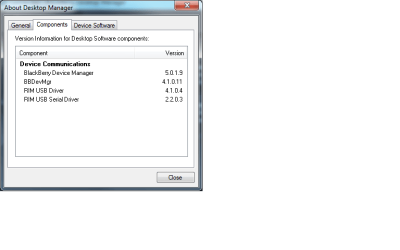
I've just finished upgrading from XP to W7 via Vista business. I upgraded my BB Desktop Manager to version 5.0.1.18 (Aug 21, 2009). Blackberry Bold & W7 are working and playing well with each other now, but I did uninstall & reinstall DTM using RevoUninstaller to be sure the registry keys were cleaned out.

Because I did not do a clean install of W7, I ended up with pretty severe permissions issues, but after spending alot of time manually giving myself rights to my files and folders things ran well. I originally forgot to configure synchronization in DTM and couldn't get synchronization between Outlook & Blackberry to work, but that was my own fault for not reading the instructions again.

FYI, I've attached the version information of all the components installed on my PC.
moz-screenshot.png
 

Attachments

  • DTM versions.png
    DTM versions.png
    9.5 KB · Views: 105

My Computer

Computer Manufacturer/Model Number
Dell Latitude D630
OS
Windows 7
CPU
Intel Core TM2 DUo CPU T7700 @2.40 GHz
Motherboard
?
Memory
4.00 GB
Graphics Card(s)
Mobile Intel 965 Express Chipset
Sound Card
SigmaTel High Definition Audio CODEC
Monitor(s) Displays
LCD 14 1WXGA Samsung, Acer P193W
Hard Drives
160 GB Free Fall Sensor 9.5 7.2K Seagate Galileo; 1TB Hitachi HDT721010SLA360 USB
PSU
?
Case
Dell standard
Cooling
Dell standard
My berry works fine with Win 7
 

My Computer

Computer type
PC/Desktop
Computer Manufacturer/Model Number
DELL VOSTRO 3650
OS
Windows 8.1 PRO
CPU
3rd Generation Intel Core i7‐3612QM CPU @ 2.10GHZ
Memory
8GB DDR3
Graphics Card(s)
NVIDIA GeForce GT 525M (128 bit), 1GB Grpahics
Screen Resolution
1920X1080
Hard Drives
750GB 5400RPM
Back
Top