BlackSOD crashing Explorer.exe referring msvcr80.dll after Login

dknia

New member
Local time
6:48 PM
Messages
5
Hi.

After a lot of searching and experimenting, I'm desperate and hope You guys can help. System specs in profile.

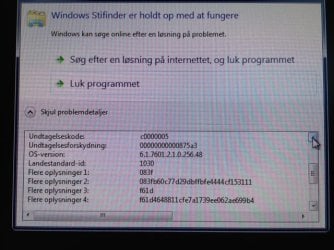
Problem started wit a Stop command that just flickered quickly short after the colored dots start animating in the very start of the boot process. It was a STOP: 0x0000007B. I somehow (don't remember how) managed to get one of my repair attempts to have the PC starting to the login prompt. When I press the start button, after a while i end up with a completely black screen. After a further minute or so, a crash screen comes up, complaining explorer.exe had an APPCRASH, and in the window it also refers to msvcr80.dll. This is documented in the attached pictures.

I can press C-A-D, and get task manager started. I can also start Chrome (but there is no network) and DirectoryOpus (file explorer) allowing me to access the file system. I have renamed all instances of msvcr80.dll, except for the ones that are in the directories under c:\Windows\winsxs\... and c:\Windows\Installer\$PatchCache$\... hoping to bypass the problem, but it still crashes with the same reference.

I have successfully done a fresh install of windows on another disk and also run memcheck, so the hardware seems OK.

I have no restore points to revert to.

I can not start regedit at all or a command prompt at Administrator level (normal cmd.exe is fine).

I need help on how to proceed :confused:
 

Attachments

  • foto 1.JPG
    foto 1.JPG
    47.2 KB · Views: 3
  • foto 2.JPG
    foto 2.JPG
    63.2 KB · Views: 3

My Computer My Computer

At a glance

Windows 7 Professional 64 bit ver. 6.1.7601Core i58GBIntel / Nvidia
Computer type
Laptop
Computer Manufacturer/Model Number
Thinkpad T420
OS
Windows 7 Professional 64 bit ver. 6.1.7601
CPU
Core i5
Memory
8GB
Graphics Card(s)
Intel / Nvidia
Hard Drives
Lenovo IBM SSD mSata Mini PCI-e
Antivirus
Avast
Browser
Chrome

My Computer My Computer

At a glance

Windows 7 enterprise 64 bit, Windows 7 Pro 64...Core i5-2400, Athlon 64 X2 6400+ ,Core i7-3632QM4GB, 4gb g.skill ddr2, 8gbRadeon HD 4550 sgb, Radeon HD 4870, NVIDIA Ge...
Computer Manufacturer/Model Number
Lenovo ThinkCenter, Custom Built PC, Acer Aspire V3-771G-9809
OS
Windows 7 enterprise 64 bit, Windows 7 Pro 64 bit ,Windows 8 64bit
CPU
Core i5-2400, Athlon 64 X2 6400+ ,Core i7-3632QM
Motherboard
ASUS M4A79 Deluxe
Memory
4GB, 4gb g.skill ddr2, 8gb
Graphics Card(s)
Radeon HD 4550 sgb, Radeon HD 4870, NVIDIA Geforce GT 650m
Monitor(s) Displays
dual samsung 22" monitors
Hard Drives
500GB, Western Digital WD Blue WD6400AAKS 640GB 7200 RPM 16MB Cache SATA 3.0Gb/s, 1TB
Case
Antec Twelve Hundred V3 Black Steel ATX Full Tower
Cooling
ASUS Silent Square Pro
Mouse
Razar Death adder
Internet Speed
20 mbps

My Computer My Computer

At a glance

Windows 7 Ultimate 32bit SP1Intel(R) Core(TM)2 Quad CPU @ 2.40GHz, 2400 MHz4 GBATI Radeon HD 2600 Pro
Computer type
PC/Desktop
Computer Manufacturer/Model Number
Bruce ... somewhere in his 40's
OS
Windows 7 Ultimate 32bit SP1
CPU
Intel(R) Core(TM)2 Quad CPU @ 2.40GHz, 2400 MHz
Motherboard
INTEL/D975XBX2
Memory
4 GB
Graphics Card(s)
ATI Radeon HD 2600 Pro
Monitor(s) Displays
Samsung SyncMaster 914v
Screen Resolution
1280 x 1024
Hard Drives
2/500GB each ... ST3500630AS ATA Device.
One is not connected
PSU
Rocketfish 700 W
Case
G.Skill Gigabyte Chassis
Keyboard
Standard PS/2 Keyboard
Mouse
Microsoft PS/2 Mouse
Internet Speed
DSL
Antivirus
Avira Internet Security
Browser
IE 11
Other Info
ATI HDMI Audio
Thanks for the quick responses :) - however, I'm still stuck :(

Dsprague: The disk is available, as I am actually able to boot and get past the login screen and even start certain programs as described by running them from the task manager. Its the explorer.exe shell that does not come up, but crashes with the attached error messages, leaving me on the black screen. I have also already performed a virus scan, as I can actually bring the AvastUI up.

Jacee: The Msvcr80.dll is actually not missing, but is (maybe) failing. Actually, I have tried to rename all the occurrences of that file just to get past this breaking point, but to no avail. I have looked through the options in your link (I actually fund and tried that before posting here). But most are irrelevant or impossible when you have no shell (can't install stuff) and have no way of running cmd.exe in elevated /Administrator mode. If I try to run cmd.exe as administrator (from DirectoryOpus), it fails saying (translated from the Danish version, so wording may not be exact): System could not find the ?requested? environment setting".

Other good tips or advice?
 

My Computer My Computer

At a glance

Windows 7 Professional 64 bit ver. 6.1.7601Core i58GBIntel / Nvidia
Computer type
Laptop
Computer Manufacturer/Model Number
Thinkpad T420
OS
Windows 7 Professional 64 bit ver. 6.1.7601
CPU
Core i5
Memory
8GB
Graphics Card(s)
Intel / Nvidia
Hard Drives
Lenovo IBM SSD mSata Mini PCI-e
Antivirus
Avast
Browser
Chrome

My Computer My Computer

At a glance

Windows 7 Ultimate 32bit SP1Intel(R) Core(TM)2 Quad CPU @ 2.40GHz, 2400 MHz4 GBATI Radeon HD 2600 Pro
Computer type
PC/Desktop
Computer Manufacturer/Model Number
Bruce ... somewhere in his 40's
OS
Windows 7 Ultimate 32bit SP1
CPU
Intel(R) Core(TM)2 Quad CPU @ 2.40GHz, 2400 MHz
Motherboard
INTEL/D975XBX2
Memory
4 GB
Graphics Card(s)
ATI Radeon HD 2600 Pro
Monitor(s) Displays
Samsung SyncMaster 914v
Screen Resolution
1280 x 1024
Hard Drives
2/500GB each ... ST3500630AS ATA Device.
One is not connected
PSU
Rocketfish 700 W
Case
G.Skill Gigabyte Chassis
Keyboard
Standard PS/2 Keyboard
Mouse
Microsoft PS/2 Mouse
Internet Speed
DSL
Antivirus
Avira Internet Security
Browser
IE 11
Other Info
ATI HDMI Audio
Jacee, thanks for the link. I had not seen it.

1, 2 and 5 all fail due to the system complaining "System could not find the ?requested? environment setting" like with other attempts mentioned above. 3 is not possible, as I have no access to the control panel and user settings, but I will try 4 once more with the download linked.

While I download and try this, other tips are welcome :-)
 

My Computer My Computer

At a glance

Windows 7 Professional 64 bit ver. 6.1.7601Core i58GBIntel / Nvidia
Computer type
Laptop
Computer Manufacturer/Model Number
Thinkpad T420
OS
Windows 7 Professional 64 bit ver. 6.1.7601
CPU
Core i5
Memory
8GB
Graphics Card(s)
Intel / Nvidia
Hard Drives
Lenovo IBM SSD mSata Mini PCI-e
Antivirus
Avast
Browser
Chrome
Unfortunately - I can not run the setup.exe from my rudimentary BlackSOD boot :cry: . It complains like above "System could not find the ?requested? environment setting" (in Danish: "Systemet kunne ikke finde den angivne miljøindstilling").

Am I out of luck or does any of you have some other (desparate) measures I can take? If it helps, I have another disk in the same machine where I have installed a fresh W7, so I can boot that and access the disk with the sick installation.
 

My Computer My Computer

At a glance

Windows 7 Professional 64 bit ver. 6.1.7601Core i58GBIntel / Nvidia
Computer type
Laptop
Computer Manufacturer/Model Number
Thinkpad T420
OS
Windows 7 Professional 64 bit ver. 6.1.7601
CPU
Core i5
Memory
8GB
Graphics Card(s)
Intel / Nvidia
Hard Drives
Lenovo IBM SSD mSata Mini PCI-e
Antivirus
Avast
Browser
Chrome
I managed to rename the remaining msvcr80.dll files in the WinSXS-folder after doing some ownership and access right changes. After this, the system managed to boot into the apparently normal shell, albeit with a lot of error popups from applications that were missing the renamed files.

I have renamed them back, but problems are still there. First and foremost it appears that my user have lost administrator rights. I can not run eg. cmd.exe in elevated mode, and I can still not run windows installer.

I'll keep working, and hoping for input from here as well...
 

My Computer My Computer

At a glance

Windows 7 Professional 64 bit ver. 6.1.7601Core i58GBIntel / Nvidia
Computer type
Laptop
Computer Manufacturer/Model Number
Thinkpad T420
OS
Windows 7 Professional 64 bit ver. 6.1.7601
CPU
Core i5
Memory
8GB
Graphics Card(s)
Intel / Nvidia
Hard Drives
Lenovo IBM SSD mSata Mini PCI-e
Antivirus
Avast
Browser
Chrome
Back
Top