
You are using an out of date browser. It may not display this or other websites correctly.
You should upgrade or use an alternative browser.
You should upgrade or use an alternative browser.
blank html icons
- Thread starter Marcink00
- Start date

- Local time
- 10:43 AM
- Messages
- 1,299
Hi there,
Give this tutorial a read: http://www.sevenforums.com/tutorials/19449-default-file-type-associations-restore.html
Let me know if that's helpful at all.
Cheers,
Walker
Windows Outreach Team
Give this tutorial a read: http://www.sevenforums.com/tutorials/19449-default-file-type-associations-restore.html
Let me know if that's helpful at all.
Cheers,
Walker
Windows Outreach Team
My Computer
- Computer Manufacturer/Model Number
- HP Pavilion dm3 (netbook) *** 27" iMac (Dual-Boot)
- OS
- Windows 7 Home Premium (64-bit) *** Windows XP SP3 (32-bit), OSX 10.6
- CPU
- AMD Athlon Neo X2 1.6GHz *** Intel Core i7 Quad Core 2.8GHz
- Memory
- 4.00 GB *** 4.00 GB
- Graphics Card(s)
- ATI Radeon HD 3200, 384MB *** ATI Radeon HD 4850, 1GB
- Sound Card
- ATI High Definition Audio *** ATI High Definition Audio
- Monitor(s) Displays
- LG Flatron W2053TX
- Screen Resolution
- 1600 x 900 (monitor), 1266 x 768 (laptop) *** 2560 x 1440
- Hard Drives
- 300 GB SATA (internal), 500 GB HP SimpleSave (external) *** 1 TB SATA (internal), 160 GB LaCie (external)
- Mouse
- Logitech Cordless Optical Mouse for Notebooks
- Internet Speed
- Broadband
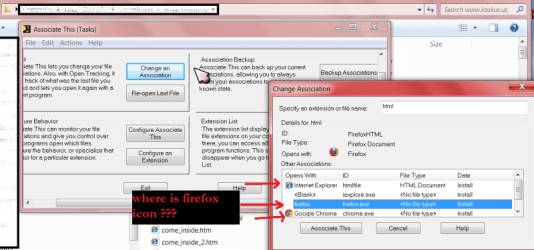
I tried, but i didn't fix my problem. After use reg file html and htm files are opened with Internet Explorer and I can see the icon IE, but when I changed programm to open with firefox the icons is still blank
My Computer
- OS
- win7 x64

- Local time
- 1:43 PM
- Messages
- 5,063
I've had similar problems with Icons in W7 using stuff like StandAlone Stacks and 7Stacks. Seems like there's always one "blank page" icon in the list of programs. If I set it to a custom icon, that one is "fixed" but then a different one comes up blank. I don't have this in Vista64 using the same programs.
Try MS Knowledge Base or Windows Annoyances.
Try MS Knowledge Base or Windows Annoyances.
My Computer
- Computer Manufacturer/Model Number
- HP Media Center
- OS
- Windows 7 32 bit
- CPU
- AMD 5200+ dual core
- Memory
- 2 GB
- Graphics Card(s)
- NVidia GeForce 6150SE 128 MB
- Monitor(s) Displays
- CRT
- Screen Resolution
- 1280x1024
- Hard Drives
- 500 GB Sata internal :
SIIG USB 3.0 docking stations w/WD Caviar Black 6 Gb/s drives
- Keyboard
- PS/2
- Mouse
- PS/2 Wheel Mouse
- Other Info
- SIIG USB 3.0 PCIexpress card.

- Local time
- 1:43 PM
- Messages
- 196
You could try to rebuild the icon cache used by windows. The location of the cache file is hidden so you need to unhide it... Open Windows Explorer, click organize, then select Folder and search options > Views tab then select show Hidden files and folders. Next go to the C:\Users\"your user name"\AppData\Local folder and delete the hidden file called IconCache.db and reboot. Windows will rebuild the icon cache.
Go back an rehide the folder when done.
Go back an rehide the folder when done.
My Computer
- Computer Manufacturer/Model Number
- ultraplanet - model 23
- OS
- Windows 7
- CPU
- P4 3.0 HT
- Motherboard
- Intel DQ965GF
- Memory
- 4 gigs of Crucial DDR2
- Graphics Card(s)
- nVidia GeForce 7800GT 256MB 256-bit w/ ACCELS1 Rev 2
- Sound Card
- on board
- Monitor(s) Displays
- HP 2509m
- Screen Resolution
- 1920x1080
- Hard Drives
- 2x 320gb Seagate Barracuda's - SATA 3Gbit/s - RAID-0 array
- PSU
- 650 watt
- Case
- Antec
- Cooling
- Cool Master
- Keyboard
- Logitech diNovo Media Desktop
- Mouse
- see keyboard
- Internet Speed
- comcast cable
- Other Info
- 7 Ultimate and 7 Pro twice each at home - Gigabit on the Network - Tomato on the Linksys - I freely share my wireless with my neighbors (8-10 additional devices)

- Local time
- 12:43 PM
- Messages
- 5,053
- Open RegEdit.
- Browse to HKEY_LOCAL_MACHINE\SOFTWARE\Classes\FirefoxHTML.
- Delete the ShellEx\IconHandler registry key entry.
- Close RegEdit.
- Delete the iconcache.db file.
- Reboot.
My Computer
- Computer Manufacturer/Model Number
- Too many to describe...
- OS
- Windows 7 x64 pro/ Windows 7 x86 Pro/ XP SP3 x86

i thought only office 10 beta having this sort of problem  . it nothings work out. try system restore
. it nothings work out. try system restoreMy Computer
- OS
- window's 7
- CPU
- core 2 quad
- Motherboard
- gigabyte
- Memory
- 2gb corsair
- Graphics Card(s)
- ati hd4850
- Monitor(s) Displays
- lg
- Screen Resolution
- 1600 X 900
- Case
- power logic
- Other Info
- none of the spec above is accurate
- Local time
- 1:43 PM
- Messages
- 5,063
I think it's a Seven bug. I tried all the delete cache tricks and nothing made any difference.
Win95 or Win98, I forget which, used to do the same thing. The dreaded blank page icon. We're back full circle.
Win95 or Win98, I forget which, used to do the same thing. The dreaded blank page icon. We're back full circle.
My Computer
- Computer Manufacturer/Model Number
- HP Media Center
- OS
- Windows 7 32 bit
- CPU
- AMD 5200+ dual core
- Memory
- 2 GB
- Graphics Card(s)
- NVidia GeForce 6150SE 128 MB
- Monitor(s) Displays
- CRT
- Screen Resolution
- 1280x1024
- Hard Drives
- 500 GB Sata internal :
SIIG USB 3.0 docking stations w/WD Caviar Black 6 Gb/s drives
- Keyboard
- PS/2
- Mouse
- PS/2 Wheel Mouse
- Other Info
- SIIG USB 3.0 PCIexpress card.
Maybe it's a bug. Ive faced a problem where unknown icon keep appearing on desktop and even after delete,it will appear again when i refresh. I sorted it out by deleting desktop.ini.
My Computer
- OS
- window's 7
- CPU
- core 2 quad
- Motherboard
- gigabyte
- Memory
- 2gb corsair
- Graphics Card(s)
- ati hd4850
- Monitor(s) Displays
- lg
- Screen Resolution
- 1600 X 900
- Case
- power logic
- Other Info
- none of the spec above is accurate
- Local time
- 1:43 PM
- Messages
- 5,063
Maybe it's a bug. Ive faced a problem where unknown icon keep appearing on desktop and even after delete,it will appear again when i refresh. I sorted it out by deleting desktop.ini.
The only way I could fix it was to uninstall the program in the StandAlone Stack that had the paper icon. I didn't like it that much anyway!
 I tried to delete desktop.ini but since StandAlone Stacks uses a shortcut to contain everything, there was nothing with a desktop.ini to delete that had any effect.
So far so good. SAS seems to be working normally.
My Computer
- Computer Manufacturer/Model Number
- HP Media Center
- OS
- Windows 7 32 bit
- CPU
- AMD 5200+ dual core
- Memory
- 2 GB
- Graphics Card(s)
- NVidia GeForce 6150SE 128 MB
- Monitor(s) Displays
- CRT
- Screen Resolution
- 1280x1024
- Hard Drives
- 500 GB Sata internal :
SIIG USB 3.0 docking stations w/WD Caviar Black 6 Gb/s drives
- Keyboard
- PS/2
- Mouse
- PS/2 Wheel Mouse
- Other Info
- SIIG USB 3.0 PCIexpress card.

 )
)
My Computer
- Computer Manufacturer/Model Number
- Compaq 510
- OS
- windows 7 starter Edition 32bit
- CPU
- Intel Core 2 Duo Processor T5870 (2.0 GHz, 2 MB L2 cache, 80
- Memory
- 1 GB 800 MHz DDR2 SDRAM
- Graphics Card(s)
- Mobile Intel(R) GMA X3100 256MB (shared)
- Sound Card
- Integrated
- Monitor(s) Displays
- 14″ WXGA TFT
- Hard Drives
- 250 GB Serial ATA 5400 RPM