Solved blank screen after logon

TC1981

New member
Local time
2:16 PM
Messages
6
I recently had some automatic updates and after restarting my computer I had a blank screen after the logging on with my user name. I ran system restore to an earlier time and tried installing updates one at a time to see which was the problem, but when I restarted the rest installed at that time and I was back where I started. After a second system restore I hid all uninstalled updates, emptied the folder at C:\Windows\SoftwareDistribution\Download, but still at every shut down or restart I get the configuring updates, do not turn off computer. It goes to 100% and then shuts down, but on restart (or start up, if it had been completely shut down) I once again get the blank screen after logging on. And once again have to do a system restore. Safe mode is also a blank screen, the only way I can get to system restore is to use safe mode with command prompt. Leaving the computer on after the system restore is my only option right now, but I can't leave it on forever and I'm running out of restore points. Thanks for your time and any possible help you can give.
 

My Computer

Computer Manufacturer/Model Number
SYX Venture H431 BTO PC (desktop)
OS
Microsoft Windows 7 Professional 64-bit
CPU
Pentium(R) Dual-Core CPU E5800 @ 3.20GHz
Motherboard
ASUSTeK Computer INC. P5G41T-M LX2/GB
Memory
2.00 GB
Graphics Card(s)
NVIDIA GeForce 210
Sound Card
(1) NVIDIA High Definition Audio (2) NVIDIA High Definitio
Monitor(s) Displays
ASUS VH202 (1600x900@60Hz)
Screen Resolution
1600x900 pixels
Hard Drives
244GB Hitachi Hitachi HDP725025GLA380 ATA Device (SATA)
Keyboard
SYX 104 Keyboard (usb)
Mouse
MS USB Comfort optical mouse 3000
Other Info
optical drive HL-DT-ST DVDRAM GH24NS50 ATA Device

audio High Definition Audio Device
Have you tried startup repair after blank screen

Have you tried SFC \scannow
 

My Computer

Computer type
PC/Desktop
Computer Manufacturer/Model Number
Pauly Special
OS
Win7 Ultimate X64
CPU
Intel i5 3570K
Motherboard
Gigabyte Z77X-DS3H
Memory
8GB DDR3 1600
Graphics Card(s)
Onboard
Sound Card
Onboard
Screen Resolution
1280x1024
Hard Drives
Samsung 840 Evo SSD (OS)
1TB Spinner (Data)
PSU
800W Arctic
Case
Cooler Master
Cooling
3x120mm Fans
Keyboard
MS Wireless
Mouse
MS Wireless
Internet Speed
20M
Hi Pauly, thanks for the reply. Can you tell me how to do start up repair from safe mode with command prompt? SF with command prompt is the only way I can do anything when this happens.
What is SFC \scannow? Sorry, but I'm not very tech-savvy, though I do follow clear directions well.
 

My Computer

Computer Manufacturer/Model Number
SYX Venture H431 BTO PC (desktop)
OS
Microsoft Windows 7 Professional 64-bit
CPU
Pentium(R) Dual-Core CPU E5800 @ 3.20GHz
Motherboard
ASUSTeK Computer INC. P5G41T-M LX2/GB
Memory
2.00 GB
Graphics Card(s)
NVIDIA GeForce 210
Sound Card
(1) NVIDIA High Definition Audio (2) NVIDIA High Definitio
Monitor(s) Displays
ASUS VH202 (1600x900@60Hz)
Screen Resolution
1600x900 pixels
Hard Drives
244GB Hitachi Hitachi HDP725025GLA380 ATA Device (SATA)
Keyboard
SYX 104 Keyboard (usb)
Mouse
MS USB Comfort optical mouse 3000
Other Info
optical drive HL-DT-ST DVDRAM GH24NS50 ATA Device

audio High Definition Audio Device
TC,
Fluff out your System Specs for us please.

Update your SevenForums System Specs
User CP (located on the top menu bar) |
Your Profile | Edit System Spec
(left-hand column)

To gather info, use Speccy (my favorite) or SIW or System Info

ADD the word laptop or desktop or netbook to the
“system manufacturer” block, for example,
Toshiba Satellite L305D notebook.

Provide full windows version info, for example:
MS Windows 7 Ultimate SP1 64-bit

Use the “Other Info” block for Optical Reader,
Mouse, touchpad, wifi adapter, speakers, monitor, etc

Scroll down and click on SAVE CHANGES.
==============================================================

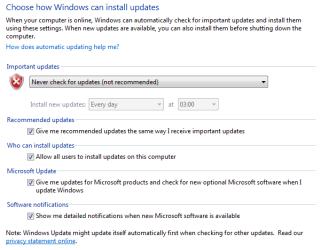
Now first thing we need to do is to stop the auto-updating until your problem is fixed.

Control Panel | Windows Update | Change Settings (on the left-side list) |

Set the settings to agree with the snapshot

Update Settings.png
OK button
 

My Computer

Computer Manufacturer/Model Number
Toshiba Satellite S875D-S7239 laptop
OS
MS Windows 7 Ultimate SP1 64-bit
CPU
AMD A10-4600M
Motherboard
AMD Pumori (Socket FT1)
Memory
6.00 GB Dual-Channel DDR3 @ 798MHz (11-11-12-28)
Graphics Card(s)
AMD Radeon HD 7660G
Sound Card
High Definition Audio Device
Monitor(s) Displays
Generic PnP Monitor (1600x900@60Hz)
Screen Resolution
1600x900@60Hz
Hard Drives
SSD 119GB Corsair CSSD-V128GB2 ATA Device
Keyboard
Standard PS/2 Keyboard
Mouse
HP Wireless Optical Mobile Mouse Model FHA-3410
Internet Speed
What the local pub, local coffee shop offers.
Other Info
Optical Drive:MATSHITA BD-CMB UJ160B ATA Device


Also have an Asus ha1002xp netbook with Win 7 Ultimate installed.
I updated my system specs using speccy.
I had already changed my update settings to check for updates but let me download and install, but have now changed it to your recommendation.
 

My Computer

Computer Manufacturer/Model Number
SYX Venture H431 BTO PC (desktop)
OS
Microsoft Windows 7 Professional 64-bit
CPU
Pentium(R) Dual-Core CPU E5800 @ 3.20GHz
Motherboard
ASUSTeK Computer INC. P5G41T-M LX2/GB
Memory
2.00 GB
Graphics Card(s)
NVIDIA GeForce 210
Sound Card
(1) NVIDIA High Definition Audio (2) NVIDIA High Definitio
Monitor(s) Displays
ASUS VH202 (1600x900@60Hz)
Screen Resolution
1600x900 pixels
Hard Drives
244GB Hitachi Hitachi HDP725025GLA380 ATA Device (SATA)
Keyboard
SYX 104 Keyboard (usb)
Mouse
MS USB Comfort optical mouse 3000
Other Info
optical drive HL-DT-ST DVDRAM GH24NS50 ATA Device

audio High Definition Audio Device
I see that I overlooked your SFC question.

Please run 3 times as mentioned in the writeup and then upload sfcdetails. txt

http://www.sevenforums.com/tutorials/1538-sfc-scannow-command-system-file-checker.html

After and only after you've sent the sfcdetails.txt file then please upload the two files generated by this procedure:

PHP:
# ************************************************************
# Places InstalledUpdates.txt on your DESKTOP
# Places NotInstalledUpdates.TXT on your DESKTOP
#
# Hidden updates are ignored.
# ************************************************************

# Start copying with first line that does NOT start with #
# Copy thru 2nd EXIT; 
# Paste into PowerShell using right-click

Try
{
   $error.clear()
   $file = "$env:userprofile\Desktop\InstalledUpdates.TXT"
   If (test-path -path $file) {del $file}
   $update = new-object -com Microsoft.update.Session
   $searcher = $update.CreateUpdateSearcher()
   write-host "`n`n Patience. I'm slowly, but steadily working on fetching the list of installed updates.`n`n"
   $pending = $searcher.Search("IsInstalled=1") 
   foreach($entry in $pending.Updates)
   {
   IF ($entry.IsHidden -ne $true) {
       "Title: " + $entry.Title | Out-file -append $File
       "Downloaded? " + $entry.IsDownloaded | Out-file -append $File
       "Description: " + $entry.Description | Out-file -append $File
       foreach($category in $entry.Categories)
       {
           $d + "Category: " + $category.name | Out-file -append $File
       }
       "" | Out-file -append $file
       }
   }
   If ((Test-Path -path $file) -eq $false) {"No updates have been installed." | Out-file $file} 
# Now to check the uninstalled updates that aren't hidden
   $file = "$env:userprofile\Desktop\NotInstalledUpdates.TXT"
   If (test-path -path $file) {del $file}
   $update = new-object -com Microsoft.update.Session
   $searcher = $update.CreateUpdateSearcher()
   write-host "`n`n Patience. I'm slowly, but steadily working on fetching the list of uninstalled updates.`n`n"
   $pending = $searcher.Search("IsInstalled=0") 
   foreach($entry in $pending.Updates)
   {
   IF ($entry.IsHidden -ne $true) {
       "Title: " + $entry.Title | Out-file -append $File
       "Downloaded? " + $entry.IsDownloaded | Out-file -append $File
       "Description: " + $entry.Description | Out-file -append $File
       foreach($category in $entry.Categories)
       {
           $d + "Category: " + $category.name | Out-file -append $File
       }
       "" | Out-file -append $file
       }
   }
   If (-not(Test-Path -path -$file)) {"There are no uninstalled updates which are unhidden." | Out-file $file} 
}
Catch 
{
   "Unable to fetch update list from Microsoft site"
}
Finally
{
   "End of script"
   EXIT
}

EXIT
EXIT

# ************************************************************
# Places InstalledUpdates.txt on your DESKTOP
# Places NotInstalledUpdates.TXT on your DESKTOP
#
# Hidden updates are ignored.
# **********************INSTRUCTIONS**************************
# STEP 1 *****************************************************
# RUN PowerShell as administrator
# START ORB | type POWERSHELL | CTRL+SHIFT+ENTER key combo | YES
# ************************************************************
# STEP 2 *****************************************************
# COPY (using CTRL + C) every line down thru both EXIT statements
# PASTE into Powershell by right-clicking at the PowerShell Prompt
# (Ctrl V does not work)
# ************************************************************
# ***************** NOTE - POWERSHELL VERSION*****************
# if you receive this error msg:
# Get-WinEvent: The system can not find the path specified
# you need to update your PowerShell
# you must be using Powershell 2.0 or later.
#
# To determine your Powershell version:
# Run PowerShell
# enter following $host.version
# you should see at least:
# Major Minor Build Revision
# ----- ----- ----- --------
# 2 0 -1 -1
#
# If you do not see the above, update your Vista/Win 7.
# ************************************************************
# *************** NOTE - EXECUTION POLICY*********************
# If you haven't set the execution policy, you may need to:
# Run PowerShell
# enter following without the #
# Set-ExecutionPolicy -executionpolicy remotesigned
#
# ************************************************************

 

My Computer

Computer Manufacturer/Model Number
Toshiba Satellite S875D-S7239 laptop
OS
MS Windows 7 Ultimate SP1 64-bit
CPU
AMD A10-4600M
Motherboard
AMD Pumori (Socket FT1)
Memory
6.00 GB Dual-Channel DDR3 @ 798MHz (11-11-12-28)
Graphics Card(s)
AMD Radeon HD 7660G
Sound Card
High Definition Audio Device
Monitor(s) Displays
Generic PnP Monitor (1600x900@60Hz)
Screen Resolution
1600x900@60Hz
Hard Drives
SSD 119GB Corsair CSSD-V128GB2 ATA Device
Keyboard
Standard PS/2 Keyboard
Mouse
HP Wireless Optical Mobile Mouse Model FHA-3410
Internet Speed
What the local pub, local coffee shop offers.
Other Info
Optical Drive:MATSHITA BD-CMB UJ160B ATA Device


Also have an Asus ha1002xp netbook with Win 7 Ultimate installed.
Ok, hope I've done this right. I've attached the sfcdetails.txt
 

Attachments

My Computer

Computer Manufacturer/Model Number
SYX Venture H431 BTO PC (desktop)
OS
Microsoft Windows 7 Professional 64-bit
CPU
Pentium(R) Dual-Core CPU E5800 @ 3.20GHz
Motherboard
ASUSTeK Computer INC. P5G41T-M LX2/GB
Memory
2.00 GB
Graphics Card(s)
NVIDIA GeForce 210
Sound Card
(1) NVIDIA High Definition Audio (2) NVIDIA High Definitio
Monitor(s) Displays
ASUS VH202 (1600x900@60Hz)
Screen Resolution
1600x900 pixels
Hard Drives
244GB Hitachi Hitachi HDP725025GLA380 ATA Device (SATA)
Keyboard
SYX 104 Keyboard (usb)
Mouse
MS USB Comfort optical mouse 3000
Other Info
optical drive HL-DT-ST DVDRAM GH24NS50 ATA Device

audio High Definition Audio Device
And here are the two files generated by powershell. One thing though...I have windows powershell (x86), windows powershell ISE (x86), windows powershell ISE, and windows powershell. Not knowing which to pick I just picked windows powershell. Please advise if I need to run using a different option.
 

Attachments

My Computer

Computer Manufacturer/Model Number
SYX Venture H431 BTO PC (desktop)
OS
Microsoft Windows 7 Professional 64-bit
CPU
Pentium(R) Dual-Core CPU E5800 @ 3.20GHz
Motherboard
ASUSTeK Computer INC. P5G41T-M LX2/GB
Memory
2.00 GB
Graphics Card(s)
NVIDIA GeForce 210
Sound Card
(1) NVIDIA High Definition Audio (2) NVIDIA High Definitio
Monitor(s) Displays
ASUS VH202 (1600x900@60Hz)
Screen Resolution
1600x900 pixels
Hard Drives
244GB Hitachi Hitachi HDP725025GLA380 ATA Device (SATA)
Keyboard
SYX 104 Keyboard (usb)
Mouse
MS USB Comfort optical mouse 3000
Other Info
optical drive HL-DT-ST DVDRAM GH24NS50 ATA Device

audio High Definition Audio Device
You have two corrupted files for which also the backups are missing:
C:\Windows\"twunk_32.exe"; source file in store is also corrupted
C:\Windows\System32\"QUTIL.DLL"; source file in store is also corrupted

I suspect that my final recommendation is going to either a Repair Install or a Reinstall.

Even a Repair Install is not a painless operation.

In either case, you should backup everything dear to your heart to an external drive.

Supposedly the repair install won't mess up your data files, but...

I'll look at the other two files now.
 

My Computer

Computer Manufacturer/Model Number
Toshiba Satellite S875D-S7239 laptop
OS
MS Windows 7 Ultimate SP1 64-bit
CPU
AMD A10-4600M
Motherboard
AMD Pumori (Socket FT1)
Memory
6.00 GB Dual-Channel DDR3 @ 798MHz (11-11-12-28)
Graphics Card(s)
AMD Radeon HD 7660G
Sound Card
High Definition Audio Device
Monitor(s) Displays
Generic PnP Monitor (1600x900@60Hz)
Screen Resolution
1600x900@60Hz
Hard Drives
SSD 119GB Corsair CSSD-V128GB2 ATA Device
Keyboard
Standard PS/2 Keyboard
Mouse
HP Wireless Optical Mobile Mouse Model FHA-3410
Internet Speed
What the local pub, local coffee shop offers.
Other Info
Optical Drive:MATSHITA BD-CMB UJ160B ATA Device


Also have an Asus ha1002xp netbook with Win 7 Ultimate installed.

My Computer

Computer Manufacturer/Model Number
Toshiba Satellite S875D-S7239 laptop
OS
MS Windows 7 Ultimate SP1 64-bit
CPU
AMD A10-4600M
Motherboard
AMD Pumori (Socket FT1)
Memory
6.00 GB Dual-Channel DDR3 @ 798MHz (11-11-12-28)
Graphics Card(s)
AMD Radeon HD 7660G
Sound Card
High Definition Audio Device
Monitor(s) Displays
Generic PnP Monitor (1600x900@60Hz)
Screen Resolution
1600x900@60Hz
Hard Drives
SSD 119GB Corsair CSSD-V128GB2 ATA Device
Keyboard
Standard PS/2 Keyboard
Mouse
HP Wireless Optical Mobile Mouse Model FHA-3410
Internet Speed
What the local pub, local coffee shop offers.
Other Info
Optical Drive:MATSHITA BD-CMB UJ160B ATA Device


Also have an Asus ha1002xp netbook with Win 7 Ultimate installed.
Thank you so much for looking them over for me. I truly appreciate your help.
I've done a reinstall before, but not a repair install....guess I'm off to learn something new, lol. Thanks for the link. I'll mark this as solved.
 

My Computer

Computer Manufacturer/Model Number
SYX Venture H431 BTO PC (desktop)
OS
Microsoft Windows 7 Professional 64-bit
CPU
Pentium(R) Dual-Core CPU E5800 @ 3.20GHz
Motherboard
ASUSTeK Computer INC. P5G41T-M LX2/GB
Memory
2.00 GB
Graphics Card(s)
NVIDIA GeForce 210
Sound Card
(1) NVIDIA High Definition Audio (2) NVIDIA High Definitio
Monitor(s) Displays
ASUS VH202 (1600x900@60Hz)
Screen Resolution
1600x900 pixels
Hard Drives
244GB Hitachi Hitachi HDP725025GLA380 ATA Device (SATA)
Keyboard
SYX 104 Keyboard (usb)
Mouse
MS USB Comfort optical mouse 3000
Other Info
optical drive HL-DT-ST DVDRAM GH24NS50 ATA Device

audio High Definition Audio Device
Back
Top