
Tokkemon
New member
Hello Kind People!
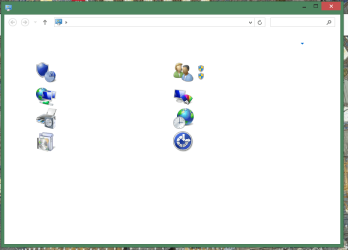
I've got an older Windows 8.1 system here. All the text within all Windows GUI contexts have disappeared. An example, here's the control panel:
All right-click menus, all filenames are blank. You can occasionally see the odd bit of bold text (maybe it didn't get corrupted). An odd other thing: in Google Chrome, the address bar's text is minuscule, and (it seems) that several extensions (including AdBlock) were disabled. Not sure if that's connected but the timing makes sense.
From what I can tell, its corruption to system files but I'm not sure how to go forward from here. System restore doesn't work, automatic startup repair doesn't work. SFC /scannow ran but returned the cannot fix message. The log is attached in case anyone can make heads or tails of it.
Thanks all!
Justin
I've got an older Windows 8.1 system here. All the text within all Windows GUI contexts have disappeared. An example, here's the control panel:
All right-click menus, all filenames are blank. You can occasionally see the odd bit of bold text (maybe it didn't get corrupted). An odd other thing: in Google Chrome, the address bar's text is minuscule, and (it seems) that several extensions (including AdBlock) were disabled. Not sure if that's connected but the timing makes sense.
From what I can tell, its corruption to system files but I'm not sure how to go forward from here. System restore doesn't work, automatic startup repair doesn't work. SFC /scannow ran but returned the cannot fix message. The log is attached in case anyone can make heads or tails of it.
Thanks all!
Justin
Attachments
My Computer
- Computer Manufacturer/Model Number
- Dell Studio 540
- OS
- Windows 7 Home Premium 64bit
- CPU
- Intel Quad-Core
- Memory
- 8 GB
- Sound Card
- None
- Monitor(s) Displays
- 2 Acer G235HAbd 23'' Widescreen LCD
- Screen Resolution
- 1920X1080
- PSU
- Dynex 520W
- Keyboard
- Dell L20U
- Mouse
- Logitech G500


