Block webistes

avrserver

New member
Local time
2:22 AM
Messages
2
Wants to block all websites except Google, without using any third party software"
anyone pls help me to find it.

A guy said that a single file can do this blocking...but he didint tell the steps.Its not a browser based setting. Is it possible.

Please help
 

My Computer

Computer type
PC/Desktop
Computer Manufacturer/Model Number
Acer
OS
Windows 7 Professional 32bit
CPU
Dual core
Motherboard
Intel
Memory
2GB
Graphics Card(s)
Intel
Hard Drives
Segate
Antivirus
Esset
Browser
Chrome
Hi and Welcome to SevenForums,

It could possibly be done through the Windows Firewall, i haven't done it myself so can't really offer advice on that without testing myself but i'm sure another member here will be able to.

I have used and really like Windows Family Safety, you do need to install it but it is by Microsoft.
You will be able to block all site except ones you allow etc..
Setting up Family Safety - Windows Help

The only thing i would mention, if you block all but only allow www.google.com what would you do as all sites you try to visit from google would get blocked?

Regards,
Jamie
 

My Computer

Computer type
PC/Desktop
Computer Manufacturer/Model Number
Self Built
OS
Windows 8.1 Pro x64
CPU
Intel Core i5-2500K @ 3.30GHz - S1155
Motherboard
Asus P8P67 LE Rev3, Intel P67, S115
Memory
8GB Corsair DDR3 XMS3, PC3-12800
Graphics Card(s)
NVIDIA GeForce GTX 650
Sound Card
On-Board
Monitor(s) Displays
3 x 24" {Extended Display}
Screen Resolution
1920 x 1080
Hard Drives
300GB Seagate Barracuda 7200
PSU
550W Coolermaster GX550
Case
Silverstone Precision PS04B
Cooling
Stock
Keyboard
Logitech K120
Mouse
World of Warcraft Cataclysm MMO Gaming Mouse
Internet Speed
80 MB
Antivirus
MSE / Windows Defender
Browser
Chrome
I agree, that doesn't make sense.

Maybe this guy was talking about the HOSTS file, but that doesn't accept wildcards. There are some alternatives suggested here: windows - Wildcards in a hosts file - Stack Overflow

However the most simple thing I can think of is to set a proxy in the browser, to google.com Then every site you try to go to will take you to Google. But you'll have to do this for every installed browser if you have more than one.
 

My Computer

Computer type
Laptop
Computer Manufacturer/Model Number
HP Elitebook 8540p
OS
Windows 7 Pro 32
CPU
Intel(R) Core(TM) i5 CPU M 540 @ 2.53GHz
Motherboard
Hewlett-Packard 1521
Memory
4,00 GB (Usable 2,98)
Graphics Card(s)
NVIDIA NVS 5100M
Sound Card
NVIDIA High Definition Audio
Screen Resolution
1600x900
Hard Drives
INTEL SSDSA2CW120G3
Antivirus
F-Secure Internet Security
Browser
IE, Firefox, Opera
Other Info
Sandboxie,
SRP (Software Restriction Policy),
EMET (Enhanced Mitigation Experience Toolkit),
WFC (Windows Firewall Control by BiniSoft),
Malwarebytes Premium
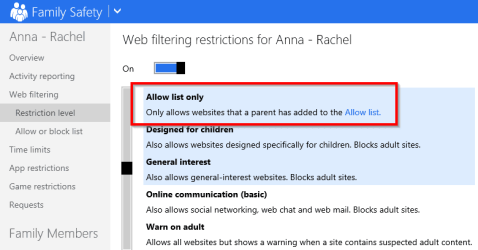
Here is a quick view of the Windows Family Safety web filter screens if it helps...

Here you can set the web filtering to allowed list only:

2014-09-12 18_47_11-Family Safety - Internet Explorer.png


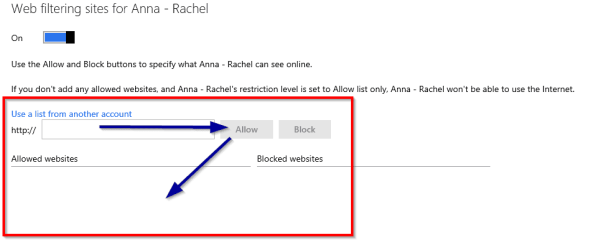
And then you just add the URLs to this list:

2014-09-12 18_47_46-Family Safety - Internet Explorer.png


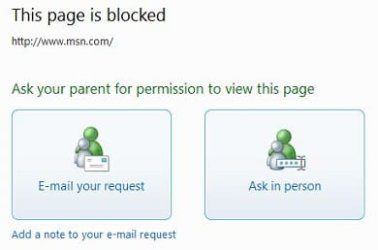
The nice thing is, if they go to a site they get blocked on they get a screen like this:

ed9ccfd5-8bb0-455f-bd82-9b22c41f637d_0.jpg


This is where they can request permission to access the site via email or ask in person if you are there and you enter the password and it allows them in.

There are also other things you can restrict and you also get reports on their usage

Regards,
Jamie
 

My Computer

Computer type
PC/Desktop
Computer Manufacturer/Model Number
Self Built
OS
Windows 8.1 Pro x64
CPU
Intel Core i5-2500K @ 3.30GHz - S1155
Motherboard
Asus P8P67 LE Rev3, Intel P67, S115
Memory
8GB Corsair DDR3 XMS3, PC3-12800
Graphics Card(s)
NVIDIA GeForce GTX 650
Sound Card
On-Board
Monitor(s) Displays
3 x 24" {Extended Display}
Screen Resolution
1920 x 1080
Hard Drives
300GB Seagate Barracuda 7200
PSU
550W Coolermaster GX550
Case
Silverstone Precision PS04B
Cooling
Stock
Keyboard
Logitech K120
Mouse
World of Warcraft Cataclysm MMO Gaming Mouse
Internet Speed
80 MB
Antivirus
MSE / Windows Defender
Browser
Chrome
Its just for a testing
 

My Computer

Computer type
PC/Desktop
Computer Manufacturer/Model Number
Acer
OS
Windows 7 Professional 32bit
CPU
Dual core
Motherboard
Intel
Memory
2GB
Graphics Card(s)
Intel
Hard Drives
Segate
Antivirus
Esset
Browser
Chrome
In what environment? (Home, Business etc..)

The Family Safety option posted above would be good for home but not business.
Another thing to mention about Family Safety is that you can install the client on computer outside your home (such as family members) and change settings remotely.

Regards,
Jamie
 

My Computer

Computer type
PC/Desktop
Computer Manufacturer/Model Number
Self Built
OS
Windows 8.1 Pro x64
CPU
Intel Core i5-2500K @ 3.30GHz - S1155
Motherboard
Asus P8P67 LE Rev3, Intel P67, S115
Memory
8GB Corsair DDR3 XMS3, PC3-12800
Graphics Card(s)
NVIDIA GeForce GTX 650
Sound Card
On-Board
Monitor(s) Displays
3 x 24" {Extended Display}
Screen Resolution
1920 x 1080
Hard Drives
300GB Seagate Barracuda 7200
PSU
550W Coolermaster GX550
Case
Silverstone Precision PS04B
Cooling
Stock
Keyboard
Logitech K120
Mouse
World of Warcraft Cataclysm MMO Gaming Mouse
Internet Speed
80 MB
Antivirus
MSE / Windows Defender
Browser
Chrome
Back
Top