Blocked Senders

mikegc

New member
Power User
Local time
12:33 AM
Messages
79
In Outlook 2010, how do I check the properties of an unrecoginzed e-mail in order to add it and/or its domain to my Blocked Senders list? In 2003, I could right click on an unknown e-mail and get all of that.

Thanks,

Mike
 

My Computer

Computer Manufacturer/Model Number
Dell XPS
OS
Windows 7 Ultimate x64
CPU
Intel® Core™ i7-840QM (1.86GHz, 8 threads, turbo boost up to
Memory
8 GB Shared Dual Channel DDR3 Memory
Graphics Card(s)
NVIDIA® GeForce® GT 435M 2GB graphics
Hard Drives
640GB 7200 RPM SATA Hard Drive
Before you actually read the email. You see the information from, date, etc
Right click on the subject and then details.
 

My Computer

Computer type
PC/Desktop
Computer Manufacturer/Model Number
Dell XPS 420
OS
Windows 10, Home Clean Install
CPU
Intel Core2 processsor Q8200(2.33Ghz 1333FSB) Quad Core Tech
Motherboard
Dell
Memory
6 gb
Graphics Card(s)
ATI Radeon 256MB HD3650
Sound Card
Intergrated 7.1 Channel Audio
Monitor(s) Displays
Dell SP2009W 20"
Hard Drives
640 GB Serial ATA Hard drive
Cooling
Fan
Keyboard
Dell USB Keyboard
Mouse
Dell Premium Optical USB
Internet Speed
DSL 2.85
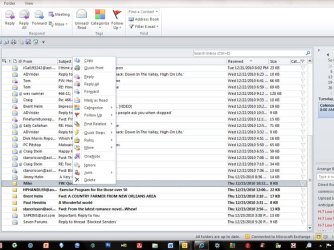
Gosh, that sure sounds easy but I just don't see "details." These are the tools I'm getting.

Mike
 

Attachments

  • Picture1.jpg
    Picture1.jpg
    74.6 KB · Views: 34

My Computer

Computer Manufacturer/Model Number
Dell XPS
OS
Windows 7 Ultimate x64
CPU
Intel® Core™ i7-840QM (1.86GHz, 8 threads, turbo boost up to
Memory
8 GB Shared Dual Channel DDR3 Memory
Graphics Card(s)
NVIDIA® GeForce® GT 435M 2GB graphics
Hard Drives
640GB 7200 RPM SATA Hard Drive
Me bad
Its the holidays so be kind
I forgot right click and then properties
:o
You right click on one of the emails subjects.
 

My Computer

Computer type
PC/Desktop
Computer Manufacturer/Model Number
Dell XPS 420
OS
Windows 10, Home Clean Install
CPU
Intel Core2 processsor Q8200(2.33Ghz 1333FSB) Quad Core Tech
Motherboard
Dell
Memory
6 gb
Graphics Card(s)
ATI Radeon 256MB HD3650
Sound Card
Intergrated 7.1 Channel Audio
Monitor(s) Displays
Dell SP2009W 20"
Hard Drives
640 GB Serial ATA Hard drive
Cooling
Fan
Keyboard
Dell USB Keyboard
Mouse
Dell Premium Optical USB
Internet Speed
DSL 2.85
You need to double-click the email to bring it up in a separate window. Next, click on File and select the Info tab. Now click on Properties and the Internet headers: section is at the bottom.
 

My Computer

Computer type
PC/Desktop
Computer Manufacturer/Model Number
Dwarf Dwf/11/2012 r09/2013
OS
Windows 8.1 Pro RTM x64
CPU
Intel Core-i5-3570K 4-core @ 3.4GHz (Ivy Bridge) (OC 4.4GHz)
Motherboard
ASRock Z77 Extreme4-M
Memory
4 x 4GB DDR3-1600 Corsair Vengeance CMZ8GX3M2A1600C9B (16GB)
Graphics Card(s)
MSI GeForce GTX770 Gaming OC 2GB
Sound Card
Realtek High Definition on board solution (ALC 898)
Monitor(s) Displays
ViewSonic VA1912w Widescreen (VGA)
Screen Resolution
1440x900
Hard Drives
OCZ Agility 3 SSD 120GB SATA III x2 (RAID 0)
Samsung HD501LJ 500GB SATA II x2
Hitachi HDS721010CLA332 1TB SATA II
Iomega 1.5TB Ext USB 2.0
WD 2.0TB Ext USB 3.0
PSU
XFX Pro Series 850W Semi-Modular
Case
Gigabyte IF233
Cooling
1 x 120mm Front Inlet 1 x 120mm Rear Exhaust
Keyboard
Microsoft Comfort Curve Keyboard 3000 (USB)
Mouse
Microsoft Comfort Mouse 3000 for Business (USB)
Internet Speed
NetGear DG834Gv3 ADSL Modem/Router (Ethernet) ~4.0 Mb/s (O2)
Antivirus
Avast! 8.0.1497
Browser
IE 11
Other Info
Optical Drive: HL-DT-ST BD-RE BH10LS30 SATA Bluray
Lexmark S305 Printer/Scanner/Copier (USB)
WEI Score: 8.1/8.1/8.5/8.5/8.25
Asus Eee PC 1011PX Netbook (Windows 7 x86 Starter)
Me bad
Its the holidays so be kind
I forgot right click and then properties
:o
You right click on one of the emails subjects.


Thanks, Rich, but Properties just isn't in the drop down menu. I've looked into every option after right click on the subject to see is Properties is listed in a subcatagory. It isn't there.

Mike
 

My Computer

Computer Manufacturer/Model Number
Dell XPS
OS
Windows 7 Ultimate x64
CPU
Intel® Core™ i7-840QM (1.86GHz, 8 threads, turbo boost up to
Memory
8 GB Shared Dual Channel DDR3 Memory
Graphics Card(s)
NVIDIA® GeForce® GT 435M 2GB graphics
Hard Drives
640GB 7200 RPM SATA Hard Drive
I would go with Dwarf
To be honest, I was testing on Windows Live Mail with the hope that it would be the same
It was the same for outlook express, live mail and windows live mai.
 

My Computer

Computer type
PC/Desktop
Computer Manufacturer/Model Number
Dell XPS 420
OS
Windows 10, Home Clean Install
CPU
Intel Core2 processsor Q8200(2.33Ghz 1333FSB) Quad Core Tech
Motherboard
Dell
Memory
6 gb
Graphics Card(s)
ATI Radeon 256MB HD3650
Sound Card
Intergrated 7.1 Channel Audio
Monitor(s) Displays
Dell SP2009W 20"
Hard Drives
640 GB Serial ATA Hard drive
Cooling
Fan
Keyboard
Dell USB Keyboard
Mouse
Dell Premium Optical USB
Internet Speed
DSL 2.85
Bocked Senders

You need to double-click the email to bring it up in a separate window. Next, click on File and select the Info tab. Now click on Properties and the Internet headers: section is at the bottom.


So, I have to open it to get to Properties? What if the message his infected with a virus or some other malware? Am I now leaving myself open for a "hit?"

Mike
 

My Computer

Computer Manufacturer/Model Number
Dell XPS
OS
Windows 7 Ultimate x64
CPU
Intel® Core™ i7-840QM (1.86GHz, 8 threads, turbo boost up to
Memory
8 GB Shared Dual Channel DDR3 Memory
Graphics Card(s)
NVIDIA® GeForce® GT 435M 2GB graphics
Hard Drives
640GB 7200 RPM SATA Hard Drive
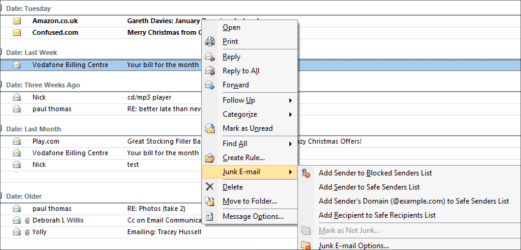
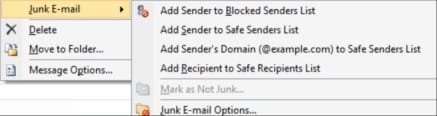
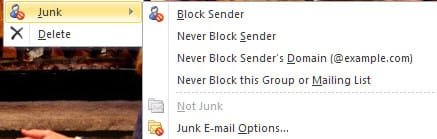
Have you got the option in here ? (1st pic is outlook 2007, 2nd pic is your image) ... soz I haven't installed 2010 yet .... but it's on my list of things to do :(
 

Attachments

  • outlook junk II.png
    outlook junk II.png
    13.9 KB · Views: 359
  • outlook junk.png
    outlook junk.png
    55.1 KB · Views: 14

My Computer

Computer type
PC/Desktop
Computer Manufacturer/Model Number
Self Built
OS
Windows 7 Ultimate 64bit
CPU
AMD Phenom Quad core 9950 black edition
Motherboard
Gigabyte
Memory
16Gb
Graphics Card(s)
2x XFX Radeon 5850
Sound Card
PCI Express X-Fi Titanium / Logitech G35
Monitor(s) Displays
2x HP 2410i
Screen Resolution
1920x1080
Hard Drives
2x 500Gb Seagate
1x 300Gb Seagate
1x 1Tb Seagate
2x 1Tb Hitatchi
PSU
Jean Tech Storm 700W
Case
Cooler Master COSMOS S
Cooling
Akasa Evo Blue Pro
Keyboard
Logitech G15
Mouse
Mad Catz M.M.O. 7
Internet Speed
12mb
Have you got the option in here ? (1st pic is outlook 2007, 2nd pic is your image) ... soz I haven't installed 2010 yet .... but it's on my list of things to do :(


Thanks, PooMan UK. You're solution is what I've been doing. I just can't figure out how to access unwanted e-mail addresses/domains so I can add them to the Blocked Senders list. Maybe this feature isn't available in 2010.

I'm really missing my Outlook 2003,

Mike
 

My Computer

Computer Manufacturer/Model Number
Dell XPS
OS
Windows 7 Ultimate x64
CPU
Intel® Core™ i7-840QM (1.86GHz, 8 threads, turbo boost up to
Memory
8 GB Shared Dual Channel DDR3 Memory
Graphics Card(s)
NVIDIA® GeForce® GT 435M 2GB graphics
Hard Drives
640GB 7200 RPM SATA Hard Drive

My Computer

Computer Manufacturer/Model Number
Dell XPS
OS
Windows 7 Ultimate x64
CPU
Intel® Core™ i7-840QM (1.86GHz, 8 threads, turbo boost up to
Memory
8 GB Shared Dual Channel DDR3 Memory
Graphics Card(s)
NVIDIA® GeForce® GT 435M 2GB graphics
Hard Drives
640GB 7200 RPM SATA Hard Drive
Thanks, Bill. +Rep.

This is something that should have been included as standard on the right-click menu.

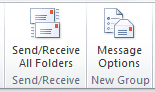
I suggest that you set it up as follows (slightly different to the article you linked to):
  • Click File and then click Options
  • Click Customize Ribbon
  • In the left-hand panel, set the option in the Choose commands from: dropdown box to Commands Not in the Ribbon
  • In the right-hand panel, set the option in the Customize the Ribbon: dropdown box to Main Tabs
  • In the panel directly underneath, click to highlight Home (Mail) and then click New Group
  • The category will automatically expand, and the option New Group (Custom) will be highlighted (you can rename this group if you wish)
  • In the left-hand panel, scroll down and click on Message Options...
  • Click Add >> and then click OK
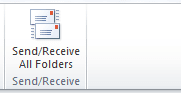
Before:
Capture.PNG

After:
Capture1.PNG
 

My Computer

Computer type
PC/Desktop
Computer Manufacturer/Model Number
Dwarf Dwf/11/2012 r09/2013
OS
Windows 8.1 Pro RTM x64
CPU
Intel Core-i5-3570K 4-core @ 3.4GHz (Ivy Bridge) (OC 4.4GHz)
Motherboard
ASRock Z77 Extreme4-M
Memory
4 x 4GB DDR3-1600 Corsair Vengeance CMZ8GX3M2A1600C9B (16GB)
Graphics Card(s)
MSI GeForce GTX770 Gaming OC 2GB
Sound Card
Realtek High Definition on board solution (ALC 898)
Monitor(s) Displays
ViewSonic VA1912w Widescreen (VGA)
Screen Resolution
1440x900
Hard Drives
OCZ Agility 3 SSD 120GB SATA III x2 (RAID 0)
Samsung HD501LJ 500GB SATA II x2
Hitachi HDS721010CLA332 1TB SATA II
Iomega 1.5TB Ext USB 2.0
WD 2.0TB Ext USB 3.0
PSU
XFX Pro Series 850W Semi-Modular
Case
Gigabyte IF233
Cooling
1 x 120mm Front Inlet 1 x 120mm Rear Exhaust
Keyboard
Microsoft Comfort Curve Keyboard 3000 (USB)
Mouse
Microsoft Comfort Mouse 3000 for Business (USB)
Internet Speed
NetGear DG834Gv3 ADSL Modem/Router (Ethernet) ~4.0 Mb/s (O2)
Antivirus
Avast! 8.0.1497
Browser
IE 11
Other Info
Optical Drive: HL-DT-ST BD-RE BH10LS30 SATA Bluray
Lexmark S305 Printer/Scanner/Copier (USB)
WEI Score: 8.1/8.1/8.5/8.5/8.25
Asus Eee PC 1011PX Netbook (Windows 7 x86 Starter)
Thanks, Bill. +Rep.

This is something that should have been included as standard on the right-click menu.


I suggest that you set it up as follows (slightly different to the article you linked to):
  • Click File and then click Options
  • Click Customize Ribbon
  • In the left-hand panel, set the option in the Choose commands from: dropdown box to Commands Not in the Ribbon
  • In the right-hand panel, set the option in the Customize the Ribbon: dropdown box to Main Tabs
  • In the panel directly underneath, click to highlight Home (Mail) and then click New Group
  • The category will automatically expand, and the option New Group (Custom) will be highlighted (you can rename this group if you wish)
  • In the left-hand panel, scroll down and click on Message Options...
  • Click Add >> and then click OK
Thanks, Dwarf, that works well.

Mike
 

My Computer

Computer Manufacturer/Model Number
Dell XPS
OS
Windows 7 Ultimate x64
CPU
Intel® Core™ i7-840QM (1.86GHz, 8 threads, turbo boost up to
Memory
8 GB Shared Dual Channel DDR3 Memory
Graphics Card(s)
NVIDIA® GeForce® GT 435M 2GB graphics
Hard Drives
640GB 7200 RPM SATA Hard Drive
You're welcome, Mike. :)
 

My Computer

Computer type
PC/Desktop
Computer Manufacturer/Model Number
Dwarf Dwf/11/2012 r09/2013
OS
Windows 8.1 Pro RTM x64
CPU
Intel Core-i5-3570K 4-core @ 3.4GHz (Ivy Bridge) (OC 4.4GHz)
Motherboard
ASRock Z77 Extreme4-M
Memory
4 x 4GB DDR3-1600 Corsair Vengeance CMZ8GX3M2A1600C9B (16GB)
Graphics Card(s)
MSI GeForce GTX770 Gaming OC 2GB
Sound Card
Realtek High Definition on board solution (ALC 898)
Monitor(s) Displays
ViewSonic VA1912w Widescreen (VGA)
Screen Resolution
1440x900
Hard Drives
OCZ Agility 3 SSD 120GB SATA III x2 (RAID 0)
Samsung HD501LJ 500GB SATA II x2
Hitachi HDS721010CLA332 1TB SATA II
Iomega 1.5TB Ext USB 2.0
WD 2.0TB Ext USB 3.0
PSU
XFX Pro Series 850W Semi-Modular
Case
Gigabyte IF233
Cooling
1 x 120mm Front Inlet 1 x 120mm Rear Exhaust
Keyboard
Microsoft Comfort Curve Keyboard 3000 (USB)
Mouse
Microsoft Comfort Mouse 3000 for Business (USB)
Internet Speed
NetGear DG834Gv3 ADSL Modem/Router (Ethernet) ~4.0 Mb/s (O2)
Antivirus
Avast! 8.0.1497
Browser
IE 11
Other Info
Optical Drive: HL-DT-ST BD-RE BH10LS30 SATA Bluray
Lexmark S305 Printer/Scanner/Copier (USB)
WEI Score: 8.1/8.1/8.5/8.5/8.25
Asus Eee PC 1011PX Netbook (Windows 7 x86 Starter)
Have you got the option in here ?
PooMan UK, your 2007 snip for Junk Mail options is the same as it is for 2010 (just a bit of alteration with regard to the wording):

Your 2007 snip:

ScreenShot00298.jpg

A 2010 snip:

ScreenShot00297.jpg

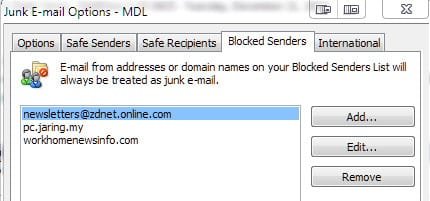
In order to block a sender's domain one can send the email to the "Junk" folder by clicking on "Junk" and then "Block Sender" as indicated above. Afterward, to block the domain of the sender, one should click the "Junk" option (right click on any email as was done above - it doesn't matter which email) and then click "Junk E-mail Options" (reference the screen cap above):

Once that has been selected, go to the "Blocked Senders" tab and select the email you just blocked (I'm not really blocking zdnet, just using it as an example), select it and then select "Edit...":

ScreenShot00301.jpg

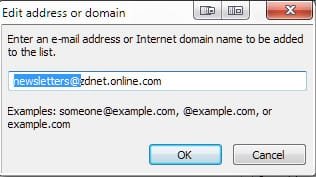
Remove the "@" and everything before it to block the domain:

ScreenShot00302.jpg

I'm going to go back now and remove this from my blocked senders list because I love my ZDNet emails. :)

@Dwarf and Bill, great advice! Thanks! :D
 

My Computer

Computer Manufacturer/Model Number
Toshiba L355D
OS
Windows 7 Ultimate x64 SP1
CPU
Core2 Duo
Motherboard
Intel
Memory
4 GB
Graphics Card(s)
GM965 on-board
Sound Card
RealTek on-board
Monitor(s) Displays
19"+17"(laptop)
Screen Resolution
1440x900 (x 2)
Hard Drives
500GB Ext. 200GB Internal
PSU
N/A
Case
N/A
Cooling
N/A
Back
Top