'blocky' display

misuk11

New member
Local time
4:50 PM
Messages
29
Ive just bought a new windows 7 64bit machine and have noticed a strange problem that happens when Im installing software and i get the 'authorisation' window.

The display dims when the confirmation window appears which I guess is by design, but I also get random blocks of colour appearing briefly, they are usually at the top of the screen and stretch about 75% of the way across the screen

everything seems to be working ok with the system as a whole. Im using an aero theme and that looks ok, its just a problem when the confirmation box appears.

heres my system specs

Intel® Core™i7 Processor i7-960 (3.20GHz) 4.8GTs/8MB Cache
12GB CORSAIR XMS3 TRI-DDR3 1333MHz
ASUS® RAMPAGE II EXTREME: DDR3, 3-Way SLI & CrossFireX on Demand
Windows 7 Professional 64 Bit
1GB ATI RADEON™ HD 5770 PCI EXPRESS - DirectX® 11


anyone else had a similar problem ? is there a fix ?
 

My Computer

Computer Manufacturer/Model Number
PC Specialists
OS
windows 7 professional 64 bit
CPU
Intel® Core™i7 Processor i7-960 (3.20GHz) 4.8GTs/8MB Cache
Motherboard
ASUS® RAMPAGE II EXTREME: DDR3, 3-Way SLI & CrossFireX on De
Memory
12GB CORSAIR XMS3 TRI-DDR3 1333MHz
Graphics Card(s)
1GB ATI RADEON™ HD 5770
Sound Card
EMU 1820M
Monitor(s) Displays
dual (acer)
Hard Drives
1TB RAID 1 500GB partitions (2)
Western Digital 500GB
PSU
600W Quiet Quad Rail
Case
ANTEC 900 BLACK GAMING CASE
Cooling
SUPER QUIET 22dBA TRIPLE COPPER HEATPIPE CPU COOLER
Keyboard
logitech wireless
Mouse
logitech wireless
Internet Speed
up to 8MB

My Computer

Computer Manufacturer/Model Number
Self Build 64bit
OS
Vista Ult64, Win7600
CPU
Intel Core 2 Quad Q6600 @ 2400 MHz 64bit OS
Motherboard
Asus P5E3 Deluxe WiFi @p 64 bit OS
Memory
4096 MB DDR3-SDRAM
Graphics Card(s)
ATI Radeon HD 3870 Series x2 Crossfired
Sound Card
Realtek on board
Monitor(s) Displays
Samsung SyncMaster - 23 inches
Screen Resolution
1680x1050 pixels at 60 Hz in True Colors
Hard Drives
Hitachi (250 GB)/Samsung 750 GB. /Barracuda 160 GB.
My Book 1 TB external..
PSU
Cooler Master 1000w
Case
Cooler Master Cosmos 1000.
Cooling
Fans and fresh air,
Keyboard
Wireless
Mouse
Wireless
Internet Speed
Never fast enough
Other Info
I use a Magnum.
hi

there are a whole bunch of downloads on that page, none of which seem to relate to my ATI RADEON HD 5770, they are all ATI Catalyst, are they just a generic set of drivers ? or do I need a specific one ?
 

My Computer

Computer Manufacturer/Model Number
PC Specialists
OS
windows 7 professional 64 bit
CPU
Intel® Core™i7 Processor i7-960 (3.20GHz) 4.8GTs/8MB Cache
Motherboard
ASUS® RAMPAGE II EXTREME: DDR3, 3-Way SLI & CrossFireX on De
Memory
12GB CORSAIR XMS3 TRI-DDR3 1333MHz
Graphics Card(s)
1GB ATI RADEON™ HD 5770
Sound Card
EMU 1820M
Monitor(s) Displays
dual (acer)
Hard Drives
1TB RAID 1 500GB partitions (2)
Western Digital 500GB
PSU
600W Quiet Quad Rail
Case
ANTEC 900 BLACK GAMING CASE
Cooling
SUPER QUIET 22dBA TRIPLE COPPER HEATPIPE CPU COOLER
Keyboard
logitech wireless
Mouse
logitech wireless
Internet Speed
up to 8MB
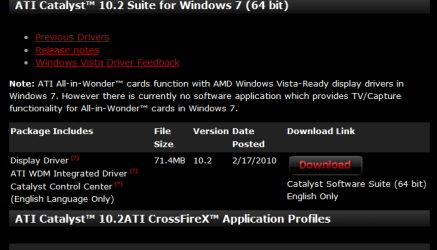
Hi get this one for your card as in the picture, click on the download button and then install it when it
comes in.

10.2.PNG
 

My Computer

Computer Manufacturer/Model Number
Self Build 64bit
OS
Vista Ult64, Win7600
CPU
Intel Core 2 Quad Q6600 @ 2400 MHz 64bit OS
Motherboard
Asus P5E3 Deluxe WiFi @p 64 bit OS
Memory
4096 MB DDR3-SDRAM
Graphics Card(s)
ATI Radeon HD 3870 Series x2 Crossfired
Sound Card
Realtek on board
Monitor(s) Displays
Samsung SyncMaster - 23 inches
Screen Resolution
1680x1050 pixels at 60 Hz in True Colors
Hard Drives
Hitachi (250 GB)/Samsung 750 GB. /Barracuda 160 GB.
My Book 1 TB external..
PSU
Cooler Master 1000w
Case
Cooler Master Cosmos 1000.
Cooling
Fans and fresh air,
Keyboard
Wireless
Mouse
Wireless
Internet Speed
Never fast enough
Other Info
I use a Magnum.
Ok, Ive downloaded it and run it, but it wont install, I get a compatibility error. The next time I run it, it just wont install at all, i get the option to close or debug. I have downloaded the correct file, its the win 7 64 bit version (74mb)
 

My Computer

Computer Manufacturer/Model Number
PC Specialists
OS
windows 7 professional 64 bit
CPU
Intel® Core™i7 Processor i7-960 (3.20GHz) 4.8GTs/8MB Cache
Motherboard
ASUS® RAMPAGE II EXTREME: DDR3, 3-Way SLI & CrossFireX on De
Memory
12GB CORSAIR XMS3 TRI-DDR3 1333MHz
Graphics Card(s)
1GB ATI RADEON™ HD 5770
Sound Card
EMU 1820M
Monitor(s) Displays
dual (acer)
Hard Drives
1TB RAID 1 500GB partitions (2)
Western Digital 500GB
PSU
600W Quiet Quad Rail
Case
ANTEC 900 BLACK GAMING CASE
Cooling
SUPER QUIET 22dBA TRIPLE COPPER HEATPIPE CPU COOLER
Keyboard
logitech wireless
Mouse
logitech wireless
Internet Speed
up to 8MB
none of these programs will install under windows 7 64 bit. Does anyone know where I can get the correct drivers from for my graphics card ?
 

My Computer

Computer Manufacturer/Model Number
PC Specialists
OS
windows 7 professional 64 bit
CPU
Intel® Core™i7 Processor i7-960 (3.20GHz) 4.8GTs/8MB Cache
Motherboard
ASUS® RAMPAGE II EXTREME: DDR3, 3-Way SLI & CrossFireX on De
Memory
12GB CORSAIR XMS3 TRI-DDR3 1333MHz
Graphics Card(s)
1GB ATI RADEON™ HD 5770
Sound Card
EMU 1820M
Monitor(s) Displays
dual (acer)
Hard Drives
1TB RAID 1 500GB partitions (2)
Western Digital 500GB
PSU
600W Quiet Quad Rail
Case
ANTEC 900 BLACK GAMING CASE
Cooling
SUPER QUIET 22dBA TRIPLE COPPER HEATPIPE CPU COOLER
Keyboard
logitech wireless
Mouse
logitech wireless
Internet Speed
up to 8MB

My Computer

Computer Manufacturer/Model Number
Self Build 64bit
OS
Vista Ult64, Win7600
CPU
Intel Core 2 Quad Q6600 @ 2400 MHz 64bit OS
Motherboard
Asus P5E3 Deluxe WiFi @p 64 bit OS
Memory
4096 MB DDR3-SDRAM
Graphics Card(s)
ATI Radeon HD 3870 Series x2 Crossfired
Sound Card
Realtek on board
Monitor(s) Displays
Samsung SyncMaster - 23 inches
Screen Resolution
1680x1050 pixels at 60 Hz in True Colors
Hard Drives
Hitachi (250 GB)/Samsung 750 GB. /Barracuda 160 GB.
My Book 1 TB external..
PSU
Cooler Master 1000w
Case
Cooler Master Cosmos 1000.
Cooling
Fans and fresh air,
Keyboard
Wireless
Mouse
Wireless
Internet Speed
Never fast enough
Other Info
I use a Magnum.
the compatibility mode checkbox is greyed out. Its supposed to work for windows 7 anyway
 

My Computer

Computer Manufacturer/Model Number
PC Specialists
OS
windows 7 professional 64 bit
CPU
Intel® Core™i7 Processor i7-960 (3.20GHz) 4.8GTs/8MB Cache
Motherboard
ASUS® RAMPAGE II EXTREME: DDR3, 3-Way SLI & CrossFireX on De
Memory
12GB CORSAIR XMS3 TRI-DDR3 1333MHz
Graphics Card(s)
1GB ATI RADEON™ HD 5770
Sound Card
EMU 1820M
Monitor(s) Displays
dual (acer)
Hard Drives
1TB RAID 1 500GB partitions (2)
Western Digital 500GB
PSU
600W Quiet Quad Rail
Case
ANTEC 900 BLACK GAMING CASE
Cooling
SUPER QUIET 22dBA TRIPLE COPPER HEATPIPE CPU COOLER
Keyboard
logitech wireless
Mouse
logitech wireless
Internet Speed
up to 8MB
Have you fixed your problem with the display dimming? I have a smiliar problem. I have messed with the Power Options every which way and than some. I have set the UAC setting to the lowest and no change - display still dims. It's darn annoying.

Try setting up 2 user accounts and see if you have the problem with the new user account. I tried it and don't have the problem with the secondary user account. No monitor display dimming.

Anyone know where I can find the power settings in the Registry. I want to compare the User Account Settings between both Users and perhaps I can find the odd setting.

Config: Windows 7 Home Premium
HP Pavilion Desktop, Intel Core i7 CPU 920, 9GM DDR3 memory, 600GB & 1TB Hard disk
ATI Radeon HD4650 with latest driver
 

My Computer

Computer Manufacturer/Model Number
HP Pavilion Elite 9280t
OS
Windows 7
CPU
Intel Core i7 CPU 920
Memory
9GB DDR3
Graphics Card(s)
ATI Radeon 4650
Monitor(s) Displays
Samsung 24"
Screen Resolution
1776 x 1000
Hard Drives
600GB & 1.5TB
Internet Speed
Verizon Fios
Back
Top