Blue DVI Port

TonyR

New member
Local time
10:53 PM
Messages
3
Location
Cumbria
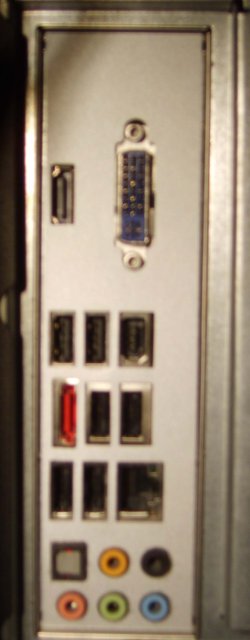
Hi, i have a blue DVI port and also a HDMI port, when i plug my monitor into the dvi port nothing happens same thing for the HDMI port. What is this port for? and would it be better than my Nvidia GEforce 9600 GT Graphics card?

i have looked in the BIOS but found nothing that points to these ports.....unless i dont know what i'm looking :D

See attachments for picture of the rear of my pc....bit blurred i'm afraid but you can see where they are.

there's also an attachment detailing my system hardware.

Any help would be muchly appreciated
 

Attachments
My Computer

Computer Manufacturer/Model Number
ADVENT QC8003
OS
Windows 7 Ultimate x64
CPU
2.33 gigahertz Intel Core2 Quad Q8200
Motherboard
Intel Corporation DG45ID AAE46743-301
Memory
8 Gigabyte
Graphics Card(s)
NVIDIA GeForce 9600 GT
Sound Card
IDT High Definition Audio CODEC
Monitor(s) Displays
Toshiba LCD-MONITOR (22.0")
Screen Resolution
1680 x 1050
Hard Drives
WDC WD5000AAKS-00M9A0 ATA Device (500.11 GB) Western Digital
Keyboard
Logitech (Wired)
Mouse
Logitech (Wireless)
Welcome!

When you say "nothing happens", do you mean that your monitor gets no signal?

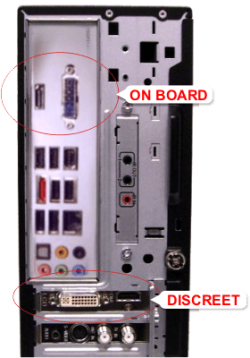
From what I gather, you have a discreet graphics card, and also on-board graphics. If you want to use the on-board card, you need to enable it in your BIOS.

However, I suspect the nVidia is better than the onboard, so keep using it.
 

My Computer

Computer Manufacturer/Model Number
Custom
OS
Windows 7 Professional x64
CPU
Intel i7 2600K OC'd @ 4620 MHz
Motherboard
Asus P8Z68-V Pro
Memory
16GB GSkill Sniper 2133 Mhz (4x4GB)
Graphics Card(s)
EVGA GeForce GTX 480 SuperClocked+
Sound Card
Realtek High Definition Audio
Monitor(s) Displays
2x Acer S273HLbmii 27"
Screen Resolution
2 x 1920x1080
Hard Drives
64GB Crucial M4 SSD

Storage: Hitachi 1TB 5400RPM, Samsung 1.5TB 5400RPM
PSU
Corsair HW Series 750w (modular)
Case
Cooler Master HAF 932 Advanced Blue Edition
Cooling
CM Hyper 212+ CPU cooler, 3x 230mm + 1x 140mm case fans
Keyboard
Logitech MK320 (wireless)
Mouse
Logitech MK320 (wireless)
Internet Speed
30 Mb/s : 2 Mb/s
Hi Jonathan_King
what exactley do you mean by 'discreet graphics card? and yes i mean nothing happens when i hook up the blue dvi port to my monitor...what about the HDMI port? do i need to get a hdmi cable and connect my tv to it after enableing the onboard graphics card?
why would there be 2 graphics card in the pc?....questions questions lol
when i bought the pc it already had the Nvidia card installed

apologies for sounding a bit thick but i've never heard of a blue DVI port....especially a discreet one lol
 

My Computer

Computer Manufacturer/Model Number
ADVENT QC8003
OS
Windows 7 Ultimate x64
CPU
2.33 gigahertz Intel Core2 Quad Q8200
Motherboard
Intel Corporation DG45ID AAE46743-301
Memory
8 Gigabyte
Graphics Card(s)
NVIDIA GeForce 9600 GT
Sound Card
IDT High Definition Audio CODEC
Monitor(s) Displays
Toshiba LCD-MONITOR (22.0")
Screen Resolution
1680 x 1050
Hard Drives
WDC WD5000AAKS-00M9A0 ATA Device (500.11 GB) Western Digital
Keyboard
Logitech (Wired)
Mouse
Logitech (Wireless)
The discreet card is the other card, connected via PICe most likely. In other words, it is added, and not built-in to the motherboard.

If you want to use the HDMI port, and if the discreet card does not have one, enable the onboard card.

There are 2 graphics cards because one is built-in to the motherboard, and the other is a better card added by the OEM.
 

My Computer

Computer Manufacturer/Model Number
Custom
OS
Windows 7 Professional x64
CPU
Intel i7 2600K OC'd @ 4620 MHz
Motherboard
Asus P8Z68-V Pro
Memory
16GB GSkill Sniper 2133 Mhz (4x4GB)
Graphics Card(s)
EVGA GeForce GTX 480 SuperClocked+
Sound Card
Realtek High Definition Audio
Monitor(s) Displays
2x Acer S273HLbmii 27"
Screen Resolution
2 x 1920x1080
Hard Drives
64GB Crucial M4 SSD

Storage: Hitachi 1TB 5400RPM, Samsung 1.5TB 5400RPM
PSU
Corsair HW Series 750w (modular)
Case
Cooler Master HAF 932 Advanced Blue Edition
Cooling
CM Hyper 212+ CPU cooler, 3x 230mm + 1x 140mm case fans
Keyboard
Logitech MK320 (wireless)
Mouse
Logitech MK320 (wireless)
Internet Speed
30 Mb/s : 2 Mb/s
Specs on TonyR's computer,

UKT Support - Advent QC8003 PC

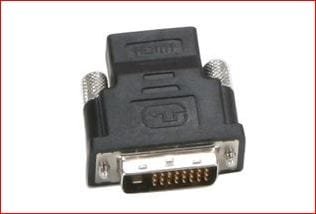
And yes the 9600 GT is far better than the integrated Intel video. If you want to connect via HDMI, if you can take a good look at the 9600 GT and find out who it was made by. And no it wasn't Nvidia, it will be one of their AIB partners (EVGA, BFG, XFX, Zotca, etc). Once you find who made the card then try contacting them and asking for a DVI-HDMI adapter like this (it is not a standard DVI-HDMI adpater, as the one that comes with most cards is pinned differently so that it can carry audio),

hdmidviadapter.JPG

Most that I have seen that have contacted the manufacturer have received the adapter for a low cost, and in most cases free. Unfortunately the 9600 cards were hit and miss as to whether that adapter was included with the card. If you didn't get one maybe even contact the place you bought the PC from and see if they have them.

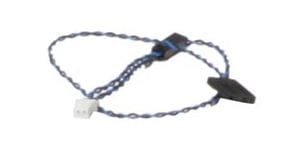
While you're at it if you want audio over HDMI with the 9600 GT you will need one of these cables,

asusspdif.JPG

which connects the SPDIF header on the sound card or onboard audio to the corresponding SPDIF header on the video card.
 

My Computer

Computer type
PC/Desktop
Computer Manufacturer/Model Number
Me
OS
Win 7 Ultimate x64
CPU
FX-8350 @ 4.6 GHz so far
Motherboard
Asus M5A97 EVO
Memory
ADATA XPG V1 Series Black 8GB DDR3 1600
Graphics Card(s)
Sapphire R9 270x Dual-X
Sound Card
Xonar DGX w/ Corsair Vengence 1300
Monitor(s) Displays
Acer S232HL Abid
Screen Resolution
1920x1080
Hard Drives
120 GB OCZ Vertex 3
500 GB Seagate 7200.12
PSU
Antec Earthwatts 650W Green
Case
Antec Three Hundred
Cooling
Cooler Master 212 EVO
Keyboard
Logitech G510
Mouse
Logitech G500s
Internet Speed
35000/3000
Hi Jonathan_King

why would there be 2 graphics card in the pc?....questions questions lol
when i bought the pc it already had the Nvidia card installed

apologies for sounding a bit thick but i've never heard of a blue DVI port....especially a discreet one lol

One example of using 2 graphics cards is to output to 2 monitors (but there are other reasons)

Here's a pic of what Jonathan is trying to explain ;)
 

Attachments

  • onboard_plus_vga_card.png
    onboard_plus_vga_card.png
    49.4 KB · Views: 73

My Computer

Computer type
PC/Desktop
Computer Manufacturer/Model Number
Self Built
OS
Windows 7 Ultimate 64bit
CPU
AMD Phenom Quad core 9950 black edition
Motherboard
Gigabyte
Memory
16Gb
Graphics Card(s)
2x XFX Radeon 5850
Sound Card
PCI Express X-Fi Titanium / Logitech G35
Monitor(s) Displays
2x HP 2410i
Screen Resolution
1920x1080
Hard Drives
2x 500Gb Seagate
1x 300Gb Seagate
1x 1Tb Seagate
2x 1Tb Hitatchi
PSU
Jean Tech Storm 700W
Case
Cooler Master COSMOS S
Cooling
Akasa Evo Blue Pro
Keyboard
Logitech G15
Mouse
Mad Catz M.M.O. 7
Internet Speed
12mb
Cutting to the bottom line, the picture that you show in your OP is of the I/O port of the motherboard, not the video card, which has it's own separate connectors in the PCI slots. You could use either, but the separate card would be superior. If using the onboard card, then it needs to be enabled in the BIOS, if using the Nvidia card, the onboard card needs to be disabled.
 

My Computer

Computer Manufacturer/Model Number
DIY
OS
W7x64 Pro, SuSe 12.1/** W7 x64 Pro, XP MCE
CPU
Phenom II 1090T w/Noctua NH-D14 /**4400+ X2 w/CM Hyper TX 3
Motherboard
ASRock 890FX Deluxe 4/**A8N-SLI
Memory
2 x 2GB Patriot PGS34g1600LLKA/**4x1GB Corsair VS
Graphics Card(s)
EVGA GTX460 SC/**EVGA 8800GTS
Sound Card
Asus Xonar D2X/**Xonar D1
Monitor(s) Displays
Acer X233H, Dell E152FPc /**LG M237-WD
Screen Resolution
1920x1080 & 1024x768/**1980x1080
Hard Drives
WDC 2TB, 1.5TB, 1TB, 500GB,Seagate 500GB , Maxtor 80GB /**500GB Seagate & WDC 1TB Black
PSU
CM RS600 w/ APC BX1000G/**Antec 500 TP w/ APC BX1000
Case
HAF922/**Antec 1040IIB
Cooling
3x200mm, 1x140 and 1x120mm/**5x80mm fans
Keyboard
Logitech Media USB/**Saitek Eclipse
Mouse
Cordless Trackman Wheel/**Ditto
Internet Speed
3.3Mbps
Other Info
SB 560 5.1 w/ Sennheiser RS140/**Creative T20 speakers, Dvico FusionHDTV7 Gold RT, Cisco E3000, HP 5510V AIO, Linksys E3000, Belkin F5U237 hub and **F5D8055 adapter
(** = 2nd rig)
Hi all, thanks for all the info, i will stick to using the 'plugged in' card ( might even upgrade) and at least now i know what the other ports are :D

thanks for all your help and advice
 

My Computer

Computer Manufacturer/Model Number
ADVENT QC8003
OS
Windows 7 Ultimate x64
CPU
2.33 gigahertz Intel Core2 Quad Q8200
Motherboard
Intel Corporation DG45ID AAE46743-301
Memory
8 Gigabyte
Graphics Card(s)
NVIDIA GeForce 9600 GT
Sound Card
IDT High Definition Audio CODEC
Monitor(s) Displays
Toshiba LCD-MONITOR (22.0")
Screen Resolution
1680 x 1050
Hard Drives
WDC WD5000AAKS-00M9A0 ATA Device (500.11 GB) Western Digital
Keyboard
Logitech (Wired)
Mouse
Logitech (Wireless)
Back
Top