Bluetooth: Cellphone/PC connection issues

PsychoNavigator

New member
Local time
1:24 PM
Messages
9
Hello all,

I have a Motorola Rizr Z3 that I am trying to connect via Bluetooth to my computer. I bought a Bluetooth USB dongle and plugged it in, which shows as having installed with no conflicts.

In the devices menu, I selected Add Device, then set my phone as findable. Once Windows recognised my phone, I selected it, then selected to pair it with with a code. I've tried both automatically as well as creating my own pairing code to no avail. I get the system error below.

Adding this Device to this computer failed.

Adding the device failed resulting in an unknown error. The reported error is 0x0004005.

Contact your device manufacturer for assistance.
Does anyone have any idea or suggestions in regards to this one?

Thanks in advance.

EDIT: I just tried doing the same thing on my laptop, which has a 64bit install of W7 RC, and it's the same thing. So, I'm willing to guess it's not hardware related, as least as far as the computers go. The cellphone itself may be another story.
 

My Computer

OS
Windows 7 x64 Ultimate Signature Edition (Steve Balmer, baby... Woo!)
CPU
Intel Q8200
Motherboard
Gigabyte EP31-DS3L Rev 2.0
Memory
Kingston PC2-6400 2x2GB
Graphics Card(s)
Gainward nVidia GeForce GTX460 1GB GLH
Sound Card
E-Mu 1212M
Monitor(s) Displays
Benq G2412HD
Screen Resolution
1920x1080
Hard Drives
Samsung 1TB
Samsung 2TB
WD 2TB
WD750GB
PSU
Seasonic 650W Modular
Case
ThermalTake V9
Cooling
Stock
Keyboard
Logitech S510 combo
Internet Speed
8192/384
Try not to pair it with with a code.
You can add code later.
 

My Computer

OS
OS
Per your instructions, I can see it in the devices now, but there is a triangular yellow alert tag. It appears that two drivers might be missing, as it only recognises it as a phone modem. I'm going to try and find driver updates since windows does not seem to be able to find them.

Thanks for that first step! The simplest thing right in front me, and
I missed it completely!
 

My Computer

OS
Windows 7 x64 Ultimate Signature Edition (Steve Balmer, baby... Woo!)
CPU
Intel Q8200
Motherboard
Gigabyte EP31-DS3L Rev 2.0
Memory
Kingston PC2-6400 2x2GB
Graphics Card(s)
Gainward nVidia GeForce GTX460 1GB GLH
Sound Card
E-Mu 1212M
Monitor(s) Displays
Benq G2412HD
Screen Resolution
1920x1080
Hard Drives
Samsung 1TB
Samsung 2TB
WD 2TB
WD750GB
PSU
Seasonic 650W Modular
Case
ThermalTake V9
Cooling
Stock
Keyboard
Logitech S510 combo
Internet Speed
8192/384
UPDATE: Okay, my Motorola Z3 is visible but about all it'd be good for is probably nothing but as a modem. The only driver it's able to install is for a BIP Responder. Attempting to pair it after the fact is useless. I'm suspect ing that it has to do with the fact that it is unable to install the remaining Bluetooth drivers.

Also, I tried my wife's Nokia 3500c and this unit didn't even give the chance to choose to connect without pairing. It goes straight to prompting a number to input the number into the phone. Just like the Z3, I get the same error code.

So, everything combined leads me to believe that W7 doesn't much like Bluetooth. I'm trying to do a search for bluetooth drivers, but either I'm asking Google the wrong questions or they're a little hard to come by.

Very aggravating.
 

My Computer

OS
Windows 7 x64 Ultimate Signature Edition (Steve Balmer, baby... Woo!)
CPU
Intel Q8200
Motherboard
Gigabyte EP31-DS3L Rev 2.0
Memory
Kingston PC2-6400 2x2GB
Graphics Card(s)
Gainward nVidia GeForce GTX460 1GB GLH
Sound Card
E-Mu 1212M
Monitor(s) Displays
Benq G2412HD
Screen Resolution
1920x1080
Hard Drives
Samsung 1TB
Samsung 2TB
WD 2TB
WD750GB
PSU
Seasonic 650W Modular
Case
ThermalTake V9
Cooling
Stock
Keyboard
Logitech S510 combo
Internet Speed
8192/384
2nd Update: I tried connecting with a bluetooth mouse and it got exactly the same error! Seriously, this error code has me baffled! I have NFI as to what the problem is. :sad panda:
 

My Computer

OS
Windows 7 x64 Ultimate Signature Edition (Steve Balmer, baby... Woo!)
CPU
Intel Q8200
Motherboard
Gigabyte EP31-DS3L Rev 2.0
Memory
Kingston PC2-6400 2x2GB
Graphics Card(s)
Gainward nVidia GeForce GTX460 1GB GLH
Sound Card
E-Mu 1212M
Monitor(s) Displays
Benq G2412HD
Screen Resolution
1920x1080
Hard Drives
Samsung 1TB
Samsung 2TB
WD 2TB
WD750GB
PSU
Seasonic 650W Modular
Case
ThermalTake V9
Cooling
Stock
Keyboard
Logitech S510 combo
Internet Speed
8192/384
2nd Update: I tried connecting with a bluetooth mouse and it got exactly the same error! Seriously, this error code has me baffled! I have NFI as to what the problem is. :sad panda:

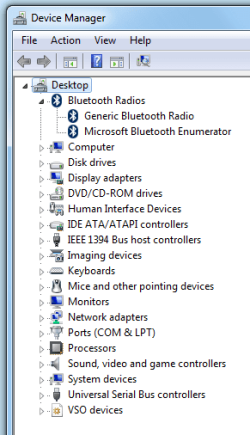
Have you gone into device manager (type device manager in search) and look for the bluetooth deivice. If it is missing , or has a yellow triangle on it the driver isnt working.

Let us know if you need help

Ken
 

My Computer

Computer Manufacturer/Model Number
HP Pavillion dv-7 1005 Tx
OS
Win 8 Release candidate 8400
CPU
[email protected]
Memory
4 gigs
Graphics Card(s)
Nvidia 9600M
Sound Card
HD built-in
Monitor(s) Displays
17" Wxga
Screen Resolution
1440x900
Cooling
none
Internet Speed
45Mb down 5Mb up
Have you gone into device manager (type device manager in search) and look for the bluetooth deivice. If it is missing , or has a yellow triangle on it the driver isnt working.

Let us know if you need help

Ken

Nope, all my devices are good. It's weird.
 

Attachments

  • bluetooth.png
    bluetooth.png
    12.9 KB · Views: 173

My Computer

OS
Windows 7 x64 Ultimate Signature Edition (Steve Balmer, baby... Woo!)
CPU
Intel Q8200
Motherboard
Gigabyte EP31-DS3L Rev 2.0
Memory
Kingston PC2-6400 2x2GB
Graphics Card(s)
Gainward nVidia GeForce GTX460 1GB GLH
Sound Card
E-Mu 1212M
Monitor(s) Displays
Benq G2412HD
Screen Resolution
1920x1080
Hard Drives
Samsung 1TB
Samsung 2TB
WD 2TB
WD750GB
PSU
Seasonic 650W Modular
Case
ThermalTake V9
Cooling
Stock
Keyboard
Logitech S510 combo
Internet Speed
8192/384
Back
Top