Bluetooth Devices (Widcomm)

NoN

New member
Guru
Gold Member
VIP
Local time
2:48 AM
Messages
4,101
Location
LostInSpace, Vol15 - Cool It
Just to tell that the Widcomm 5.1 provided on a link on this forum, does work fine and install very well through Windows Update for most of the bluetooth drivers...

Version on my Original CD Install is around 4.1 or 4.3 dated 2003, have an issue with tray control (windows pops up every time) and is buggy.

I'm with a PCMCIA Bluetooth TDK PC Card Type II, to transfert files and pictures with OBEX from a 3rd S60 platform mobile phone.

I didn't wanted to install a PC suite, just basic transfert from Phone to PC.

Widcomm 5.1 suit most of the bluetooth devices known by now.


I was looking back yesterday the post for the link and couldn't find it back. Orbital Shark may you have the link?

The purpose of this new thread.:confused:

Thanks.
 

My Computer

Computer type
PC/Desktop
Computer Manufacturer/Model Number
Custom Build
OS
Windows 7 Professional SP1 - x64 [Non-UEFI Boot]
CPU
Ivy Bridge Core i5 3570K (Delidded)
Motherboard
Asus P8Z77-V LE PLUS
Memory
G.Skill "Ares" DDR3 PC3-12800 - 1600MHz (16Gb)
Graphics Card(s)
Asus Dual-RX480-O4G
Sound Card
Creative Sound Blaster Z w/5.1 sound system
Monitor(s) Displays
Asus IPS 23"
Screen Resolution
16/9
Hard Drives
Internal:
500Go Sata 6Gb/s (x2)
500Go Sata 3Gb/s (x2)
SSD 60Go Sata 6Gb/s
PSU
In Win C 900W Series 80+ Platinum
Case
Thermaltake Chaser A71
Cooling
Custom Water Cooling Loop
Keyboard
Cooler Master QuickFire XTi
Mouse
Razer Imperator 2012 (4G)
Antivirus
MSE
Browser
IE 11.0.xxx Rtm
Other Info
"Raid0" with Intel Smart Response Technology (HDD/SSD)
Have you tried the following:

Broadcom Corporation - Bluetooth Software Download

Using the Broadcom updater I managed to get a very recent version installed:

Bluetooth (WIDCOMM) driver v.6.2.0.8900 (22/04/2009) for Win7

The updater should work with all Broadcom based BT chipsets...

If WIDCOMM v.5.1 worked for you this might too...

netRAT.
 

My Computer

OS
Win7 7201 X64
Have you tried the following:

Broadcom Corporation - Bluetooth Software Download

Using the Broadcom updater I managed to get a very recent version installed:

Bluetooth (WIDCOMM) driver v.6.2.0.8900 (22/04/2009) for Win7

The updater should work with all Broadcom based BT chipsets...

If WIDCOMM v.5.1 worked for you this might too...

netRAT.

Well i'll try that broadcomm later on another build (7201).

It is true the Widcomm 5.1 is an already 2006 dated.

But it doubt my TDK Pc Card II accept the broadcomm chipsets, as it was provided with widcomm CD install.

Thanks.:)
 

My Computer

Computer type
PC/Desktop
Computer Manufacturer/Model Number
Custom Build
OS
Windows 7 Professional SP1 - x64 [Non-UEFI Boot]
CPU
Ivy Bridge Core i5 3570K (Delidded)
Motherboard
Asus P8Z77-V LE PLUS
Memory
G.Skill "Ares" DDR3 PC3-12800 - 1600MHz (16Gb)
Graphics Card(s)
Asus Dual-RX480-O4G
Sound Card
Creative Sound Blaster Z w/5.1 sound system
Monitor(s) Displays
Asus IPS 23"
Screen Resolution
16/9
Hard Drives
Internal:
500Go Sata 6Gb/s (x2)
500Go Sata 3Gb/s (x2)
SSD 60Go Sata 6Gb/s
PSU
In Win C 900W Series 80+ Platinum
Case
Thermaltake Chaser A71
Cooling
Custom Water Cooling Loop
Keyboard
Cooler Master QuickFire XTi
Mouse
Razer Imperator 2012 (4G)
Antivirus
MSE
Browser
IE 11.0.xxx Rtm
Other Info
"Raid0" with Intel Smart Response Technology (HDD/SSD)
Hey ,i installed RTM build 7600.It works perfectly,but bluetooth isn't working.
i installed the vista driver (even in compatiblity mode.)but it didnt worked:-( .
Bluetooth icon apppears but neither it gets detected by any device ,nor does it connects to any device.
and the broadcom update app. deoes nt works on the OS.it simply gives error.
I downloaded the newest version of drivers from dell website.Even they are not compatible.

Pls help...

Im using dell 1545 .widcomm wireless 365 module.
 

My Computer

Computer Manufacturer/Model Number
dell 1545
OS
7
CPU
core2D
Memory
3GB
Graphics Card(s)
intel45gmchipset
Hard Drives
SATA 320GB
Have you tried checking in W7 Services that Bluetooth is running and set to Automatic Start?
 

My Computer

Computer Manufacturer/Model Number
Custom built machine
OS
W7 x64
CPU
Intel Q9300 2.5Ghz Quad LGA775 (Would like Q9650)
Motherboard
Gigabyte GA-EP45T-UD3R (F6 Bios)
Memory
4Gb OCZ Gold 1,333Mhz
Graphics Card(s)
Palit HD4850 O/C Sonic 512Mb DDR3, Dual DViD's
Sound Card
Azalia to twin Samson 50w Studio Monitors
Monitor(s) Displays
Twin Dell (E-IPS) U2311H 23.6" Screens
Screen Resolution
1920 x 1080 @ 60Hz
Hard Drives
Crucial M4 SSD, archives on twin Western Digital Caviar Black WD2002FAEX, 2TB, 7200rpm HDD's, Samsung Ritemaster CD/DVD Burner...
PSU
OCZ 600w
Case
Lian-Li PC8 acoustifoamed' aluminium tower
Cooling
Scythe 140mm Zipang
Keyboard
Cherry PS/2 custom model
Mouse
Lenovo USB laser "Thinkpad" Mouse
Internet Speed
ADSL2+ @14Mbps downstream & Cat6 Gigabit Ethernet
Antivirus
NOD32
Browser
Opera
Other Info
Silicon Dust HD Homerun Dual FTA (Ethernet) TV Tuners, Dray Tek Vigor 2850Vn router and 8x HP Gigabit Switch. Lian-Li CR26 Card Reader, Canon MF4430 iSensys laser printer/scanner.
Have you tried checking in W7 Services that Bluetooth is running and set to Automatic Start?
how can i check it.
 

My Computer

Computer Manufacturer/Model Number
dell 1545
OS
7
CPU
core2D
Memory
3GB
Graphics Card(s)
intel45gmchipset
Hard Drives
SATA 320GB
It's precisely the same as older microsoft OS's... go to start... then run (or search in W7)... type... services.msc then navigate down the list of services to Bluetooth...
 

My Computer

Computer Manufacturer/Model Number
Custom built machine
OS
W7 x64
CPU
Intel Q9300 2.5Ghz Quad LGA775 (Would like Q9650)
Motherboard
Gigabyte GA-EP45T-UD3R (F6 Bios)
Memory
4Gb OCZ Gold 1,333Mhz
Graphics Card(s)
Palit HD4850 O/C Sonic 512Mb DDR3, Dual DViD's
Sound Card
Azalia to twin Samson 50w Studio Monitors
Monitor(s) Displays
Twin Dell (E-IPS) U2311H 23.6" Screens
Screen Resolution
1920 x 1080 @ 60Hz
Hard Drives
Crucial M4 SSD, archives on twin Western Digital Caviar Black WD2002FAEX, 2TB, 7200rpm HDD's, Samsung Ritemaster CD/DVD Burner...
PSU
OCZ 600w
Case
Lian-Li PC8 acoustifoamed' aluminium tower
Cooling
Scythe 140mm Zipang
Keyboard
Cherry PS/2 custom model
Mouse
Lenovo USB laser "Thinkpad" Mouse
Internet Speed
ADSL2+ @14Mbps downstream & Cat6 Gigabit Ethernet
Antivirus
NOD32
Browser
Opera
Other Info
Silicon Dust HD Homerun Dual FTA (Ethernet) TV Tuners, Dray Tek Vigor 2850Vn router and 8x HP Gigabit Switch. Lian-Li CR26 Card Reader, Canon MF4430 iSensys laser printer/scanner.
It's precisely the same as older microsoft OS's... go to start... then run (or search in W7)... type... services.msc then navigate down the list of services to Bluetooth...
For that i will have to restart the system , and i will lose the communication as i working on vista right now.
please instruct me how to proceed of my own after running services.msc.


thnx ..
 

My Computer

Computer Manufacturer/Model Number
dell 1545
OS
7
CPU
core2D
Memory
3GB
Graphics Card(s)
intel45gmchipset
Hard Drives
SATA 320GB
It's precisely the same as older microsoft OS's... go to start... then run (or search in W7)... type... services.msc then navigate down the list of services to Bluetooth...
For that i will have to restart the system , and i will lose the communication as i working on vista right now.
please instruct me how to proceed of my own after running services.msc.


thnx ..

thnx for that answer .
i started the bluetooth sevice and now bluetooth is working .i m able to send and recieve files.
but i am not able to connect via bluetooth modem.
it asks for remote access connection manager service to be running.but this service is not starting from there directly.this remote access connection service requires some other service to be executed .
please help me enabling this service.
:shock:
thnx.
 

My Computer

Computer Manufacturer/Model Number
dell 1545
OS
7
CPU
core2D
Memory
3GB
Graphics Card(s)
intel45gmchipset
Hard Drives
SATA 320GB
Bluetooth modem not working.

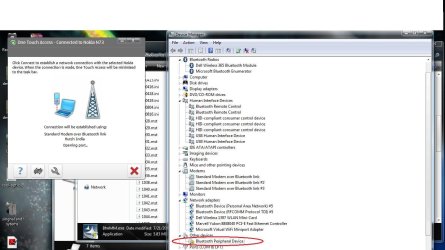
The device manager shoes up in this way.(The screenshot of the device manager is attached ).it shows one uninstalled device.pls help.:sick:
The nokia one touch acess just shows 'CONNECTING' for long time(without actually connecting)..I m not able to use "use computer as speakers for call and music"feature.
while installing the bluetooth driver.it shows abt 8-9 drivers being successfully configured.eg.bluetooth AV,remote control etc.The "remote access connection manager" service is not running.

Thanks
 

Attachments

  • blue.jpg
    blue.jpg
    111.1 KB · Views: 1,728

My Computer

Computer Manufacturer/Model Number
dell 1545
OS
7
CPU
core2D
Memory
3GB
Graphics Card(s)
intel45gmchipset
Hard Drives
SATA 320GB
I think the pblm is only with"Remote Access Conn."servi

I just want to use my nokia phone as modem with my laptop.
for that when i connect phone to internet from paired device list.
It gives an error "Remote Access Connection Manager service not running" from the SERVICES.msc, i am not able to start this service, as this service requires "secure socket tunneling protocol service"to be running. When i start "secure socket tunneling protocol service",it says "the service terminates automatically ,if not used by some other service".
please help.
thanks .:party:
 

My Computer

Computer Manufacturer/Model Number
dell 1545
OS
7
CPU
core2D
Memory
3GB
Graphics Card(s)
intel45gmchipset
Hard Drives
SATA 320GB
I just want to use my nokia phone as modem with my laptop.
for that when i connect phone to internet from paired device list.
It gives an error "Remote Access Connection Manager service not running" from the SERVICES.msc, i am not able to start this service, as this service requires "secure socket tunneling protocol service"to be running. When i start "secure socket tunneling protocol service",it says "the service terminates automatically ,if not used by some other service".
please help.
thanks .:party:

Hi shikhar and welcome

I would be more than happy to help you.

First-- you device manger picture shows the unknown device i assume is the blutooth modem. It has a yellow exclamation point on it to tell you the driver is not installed or configured correctly. You need to find a driver (even vista will work like you said) for your system 32bit or 64. Untill that is installed correctly the modem isnt going to work consistently. I would not even worry about playing with services untill you do as you may mess them up as well. there are things the services depend on that mustbe running and things that depend on this that must be running.

DRIVER FIRST

Did you try the broadcom driver that netrat suggested?
have you googled your model to find a driver for it?

let us know

Ken J++
 

My Computer

Computer Manufacturer/Model Number
HP Pavillion dv-7 1005 Tx
OS
Win 8 Release candidate 8400
CPU
[email protected]
Memory
4 gigs
Graphics Card(s)
Nvidia 9600M
Sound Card
HD built-in
Monitor(s) Displays
17" Wxga
Screen Resolution
1440x900
Cooling
none
Internet Speed
45Mb down 5Mb up
Hi, my apologies for reviving this old thread, but not being able to solve my Bluetooth woes in Windows 7 is exasperating me!

Basically, I have tried everything to get it to work - including upgrading and downgrading the driver(s) - from all sources such as Broadcom website, Acer website, Microsoft bluetooth stack, Toshiba etc.; deleting the hidden drivers, turning on/off Windows Upgrade, auto and manual installation of drivers, changing the services.msc to both Local System and User blah blah...

But Bluetooth NEVER came back to me again.... although the driver is correctly installed and NO error message was shown.

On an end note, I believe the problem lies in the SERVICES.MSC, which unfortunately is a cryptic part of Windows where I do not know what each variable inside each dialog is supposed to do.

Please HELP ME. Thank you so much in advance.

:cry:
 

My Computer

OS
Windows 7
with that new driver, if you use autoruns.exe youll find a bunch of the bt drivers are missing, use a decompressed widcomm install to replace the missing files
 

My Computer

Computer Manufacturer/Model Number
dell m5030
OS
windows 7 premium 64 bit
CPU
AMD Athlon IIP360 Dual core 2.3ghz
Memory
4GB PC3
Graphics Card(s)
ATI Mobility Radeon HD 4250
Monitor(s) Displays
15.6 inch
Hard Drives
120gb Patriot PYRO
Back
Top