Bluetooth Diagnostics?

tr888

New member
Local time
8:04 AM
Messages
11
Are there diagnostics that can determine if the Bluetooth Radio hardware is working properly?

I cannot get a new Microsoft Sculpt Bluetooth (dongle-less) Mouse to be recognized after putting it in discovery mode.

My phone can see the mouse, so I'm pretty sure the mouse is not broken.

The computer cannot see the phone, so I'm pretty sure that something is hosed with the computer hardware or the O/S, but all the drivers seem to be in order.

Windows 7 x64 Ultimate.
ASUS P8H67-I Deluxe m/b.
Qualcomm Atheros Communications Port_#0004.Hub_#0003

The ASUS m/b has built-in Bluetooth, and the ASUS Bluetooth drivers are up-to-date and the Microsoft Bluetooth Enumerator is up-to-date, and both are enabled and "working properly", and the Bluetooth icon is in my system tray.

I can see the Bluetooth Radio blinking on the back of the m/b.

Here are the current settings.

[x] Allow Bluetooth devices to find this computer
[x] Allow Bluetooth devices to connect to this computer
[x] Alert me when a new Bluetooth device wants to connect
[x] Show Bluetooth icon in the notification area

[ ] Turn off the Bluetooth Adapter


Thanks
 

My Computer

OS
Windows 7 Ultimate x64
Hello tr888 mate for what it is worth I have an Asus G750JM ROG as a sub for my main desktop and I too have the Sculpt mouse. Now I have tried many times to get this thing to pair with the laptop when I can get the laptop to find the device. But the bad news is that only once has this wretched Sculpt paired up and worked and then it worked in a very random manner, and finally fizzled after a few power on and reboots.

To be honest currently I am using a cheap $22 Blu tooth mouse from a local super store - BE is the brand for what it is worth and I am using three of these right now . Not keen on Logitec Blu tooths so be aware that I also have had a few issues with them. These devices I agree are superior to using those rotten wifi dongles;)

This doesn't mean you shouldn't run diagnostics on the Blu tooth system for your machine plus redo the driver/s.
 

My Computer

Computer type
PC/Desktop
Computer Manufacturer/Model Number
Own build (new) Desk1 / Asus ROG Win 7 / Desk2 1st build
OS
Desk1 7 Home Prem / Desk2 10 Pro / Main lap Asus ROG 10 Pro 2 laptop Toshiba 7 Pro Asus P2520 7 & 10
CPU
Desk1 i5 3750K / Laptop i7 GTX 860M / Desk2 i5 2500
Motherboard
Desk1 Asus P877-V / Desk2 Gigabyte H67 UD3H / Laptop ?
Memory
Desk1 8GB (1866) / Desk2 16GB (1333) / Laptop 8Gb DDR3
Graphics Card(s)
Desk 1& 2NVidia GTX 650 & Laptops on board Intel
Sound Card
Desk 1 & 2 -XONAR DG Realtek High Def audio Laptop
Monitor(s) Displays
Desk 1 Benq HD 2450 / Desk2 Philips 24" / Laptop 17.5"
Screen Resolution
1920x1080 D1 & D2 & Laptop 1
Hard Drives
Desk1 Samsung 120GB 830 SSD
Asus ROG 256GB 850 Pro SSD
Desk2 Samsung 840 256 SSD
Toshiba 120GB EVO
PSU
Desk 1 Corsair HX 1050/ Laptop ? / Desk 2 Corsair HX 650
Case
Desk 1 Cooler HAF XM ? Toshiba laptop / Desk2 Coolermaster
Cooling
Fans on all Desk1 -2 Desk2 - all Coolermasters 5 Laptop ?
Keyboard
Desk 1 MS Sidewinder X6 Desk 2 MS Sidewinder X 4
Mouse
Desk 1&2 - Gigabyte MS 900 gamer - laptop - Logitec wireless
Internet Speed
ADSL2+
Other Info
One other Desktop (tester) and spare Toshba laptop both with SSD's
Running Kaspersky 2016 ISS on all machines config'd identically
Logitec audio stereo systems on each machine (x3)
Canon MG5250MFC
Router/modem TP-Link running WPA2SK
Thanks for the reply. I will look into trying out a cheap Bluetooth mouse.

I did finally get the Microsoft Bluetooth Sculpt Mouse to pair by removing the passwords on Local Service account:

Manage -> Services -> Bluetooth Support Services -> Log On tab -> (x) This account: Local Service

delete both passwords there.

But after a minute or two of use, this Sculpt mouse develops horrible lag on a two-monitor system (and I'm not the only one who has experienced that particular problem).

BTW, Logitech used to be regarded as a premium brand, but the things I've bought from them in the past few years (headset, wireless keyboard, wireless mice) have proven to be unreliable and/or cheaply made. The painted letters wore off the most-used keys on the wireless keyboard after a few months, and the headset was forever losing the ability to make sound or to pick up my voice when used as a headset with Skype.
 

My Computer

OS
Windows 7 Ultimate x64
Yep I agree with the Logitec stuff not what it is cracked up to be even the M555 Blu tooth mouse I think it was - never worked at all.

Well as it happens the sculpt mouse I had had that lag thing too and always needed a left click to get it start moving I tried redoing the Blu tooth drivers etc ad nauseum and still no mouse.

Now the cheap mouse I would buy it from a store not EBay have been there done that and don't like the results.

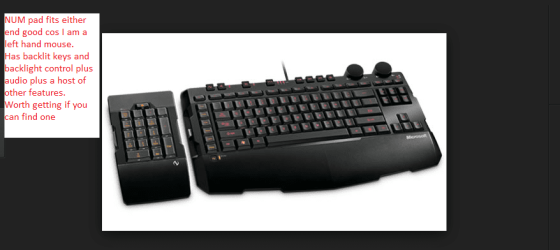
What gets me iis that I have used a lot of Microsoft externals over the years and the two that work perfectly the Sidewinder x4 and the x6 keyboards are no longer available at least I know the x6 isn't and is a really nice keyboard. The x4 is goof but not so many features and not backlit and a fixed NUM pad.
 

Attachments

  • X6.PNG
    X6.PNG
    42.6 KB · Views: 0

My Computer

Computer type
PC/Desktop
Computer Manufacturer/Model Number
Own build (new) Desk1 / Asus ROG Win 7 / Desk2 1st build
OS
Desk1 7 Home Prem / Desk2 10 Pro / Main lap Asus ROG 10 Pro 2 laptop Toshiba 7 Pro Asus P2520 7 & 10
CPU
Desk1 i5 3750K / Laptop i7 GTX 860M / Desk2 i5 2500
Motherboard
Desk1 Asus P877-V / Desk2 Gigabyte H67 UD3H / Laptop ?
Memory
Desk1 8GB (1866) / Desk2 16GB (1333) / Laptop 8Gb DDR3
Graphics Card(s)
Desk 1& 2NVidia GTX 650 & Laptops on board Intel
Sound Card
Desk 1 & 2 -XONAR DG Realtek High Def audio Laptop
Monitor(s) Displays
Desk 1 Benq HD 2450 / Desk2 Philips 24" / Laptop 17.5"
Screen Resolution
1920x1080 D1 & D2 & Laptop 1
Hard Drives
Desk1 Samsung 120GB 830 SSD
Asus ROG 256GB 850 Pro SSD
Desk2 Samsung 840 256 SSD
Toshiba 120GB EVO
PSU
Desk 1 Corsair HX 1050/ Laptop ? / Desk 2 Corsair HX 650
Case
Desk 1 Cooler HAF XM ? Toshiba laptop / Desk2 Coolermaster
Cooling
Fans on all Desk1 -2 Desk2 - all Coolermasters 5 Laptop ?
Keyboard
Desk 1 MS Sidewinder X6 Desk 2 MS Sidewinder X 4
Mouse
Desk 1&2 - Gigabyte MS 900 gamer - laptop - Logitec wireless
Internet Speed
ADSL2+
Other Info
One other Desktop (tester) and spare Toshba laptop both with SSD's
Running Kaspersky 2016 ISS on all machines config'd identically
Logitec audio stereo systems on each machine (x3)
Canon MG5250MFC
Router/modem TP-Link running WPA2SK
Back
Top