Bluetooth driver issue

septimus

New member
Local time
10:14 PM
Messages
11
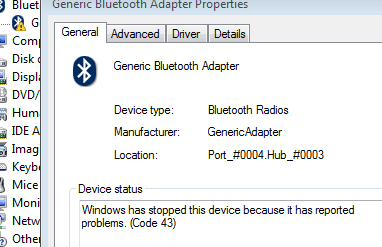
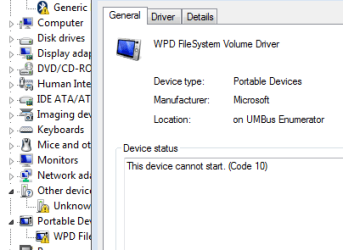
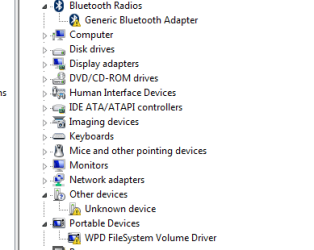
The BT driver is acting strange. I tried to disable it, uninstalled it, it's still appears at some point and it has the yellow triangle on it.. I figured there has to be some device connected to my laptop that uses this driver. The only USB dongle I use is the one for a wireless mouse. The mouse works fine. The driver still has the triangle.. And then there are couple of unidentified devices I have no idea what they are. Nothing is attached to my PC except the wireless mouse. I suspect the issue is in this USB dongle. Updating drivers does nothing.
 

Attachments
  • Untitled picture.png
    Untitled picture.png
    20.5 KB · Views: 26
  • Untitled picture2.png
    Untitled picture2.png
    18.8 KB · Views: 26
  • Untitled picture3.png
    Untitled picture3.png
    25.7 KB · Views: 26

My Computer

Computer type
Laptop
Computer Manufacturer/Model Number
Dell Vostro 3550
OS
W7 x64 Home Basic
CPU
Intel Core i5-2520M 2,50 GHz
Memory
4GB
Graphics Card(s)
Internal ATI Mobile Intel HD Graphics
Hello Septimus mate there isn't necessarily anything connected to your BT.

Now if yo go to the notifications area and right click on the Blu tooth icon and then click on Add a device it should search for any that are available and for example you may even pick up a signal from the person next door's headphones or someone else's mouse. Similarly if there are any devices connected to your machine via your Blu tooth they will be listed in the Device Manager.

I think the yellow triangle is probably letting you know the driver for the Blu tooth card if your machine has one is not installed or needs updating. I cannot tell you because your system specs mate are pretty minimal to check that out so if you are going to use this forum for problems it might be an idea to follow this please.
Now before we can help we do need to know what is in your machine so please do this System Info - See Your System Specs - Windows 7 Help Forums
or either enter the specs of your system in your forum profile the specs will appear when we click on that little box bottom left of the post screen it is for me the preferable option as it is easy. As you may appreciate it is very hard when you don’t know what one is working with for example a diesel or petrol engine.
*(pretyped to save time)
 

My Computer

Computer type
PC/Desktop
Computer Manufacturer/Model Number
Own build (new) Desk1 / Asus ROG Win 7 / Desk2 1st build
OS
Desk1 7 Home Prem / Desk2 10 Pro / Main lap Asus ROG 10 Pro 2 laptop Toshiba 7 Pro Asus P2520 7 & 10
CPU
Desk1 i5 3750K / Laptop i7 GTX 860M / Desk2 i5 2500
Motherboard
Desk1 Asus P877-V / Desk2 Gigabyte H67 UD3H / Laptop ?
Memory
Desk1 8GB (1866) / Desk2 16GB (1333) / Laptop 8Gb DDR3
Graphics Card(s)
Desk 1& 2NVidia GTX 650 & Laptops on board Intel
Sound Card
Desk 1 & 2 -XONAR DG Realtek High Def audio Laptop
Monitor(s) Displays
Desk 1 Benq HD 2450 / Desk2 Philips 24" / Laptop 17.5"
Screen Resolution
1920x1080 D1 & D2 & Laptop 1
Hard Drives
Desk1 Samsung 120GB 830 SSD
Asus ROG 256GB 850 Pro SSD
Desk2 Samsung 840 256 SSD
Toshiba 120GB EVO
PSU
Desk 1 Corsair HX 1050/ Laptop ? / Desk 2 Corsair HX 650
Case
Desk 1 Cooler HAF XM ? Toshiba laptop / Desk2 Coolermaster
Cooling
Fans on all Desk1 -2 Desk2 - all Coolermasters 5 Laptop ?
Keyboard
Desk 1 MS Sidewinder X6 Desk 2 MS Sidewinder X 4
Mouse
Desk 1&2 - Gigabyte MS 900 gamer - laptop - Logitec wireless
Internet Speed
ADSL2+
Other Info
One other Desktop (tester) and spare Toshba laptop both with SSD's
Running Kaspersky 2016 ISS on all machines config'd identically
Logitec audio stereo systems on each machine (x3)
Canon MG5250MFC
Router/modem TP-Link running WPA2SK
The Vostro range of business laptops ship with a built in Bluetooth radio and this is what is being detected in the windows driver scan.

This page ... Support for Vostro 3550 | Diagnostics | Dell UK ... has specific driver tests for Dell hardware run the Bluetooth test, ( or even better run the full 40 Minute hardware test), and let the site provide you with the drivers your are missing. ( you may find yourself redirected to your nearest dell site which means that you will get drivers suitable for the actual hardware used in your region)

Although not installing the drivers for hardware you are not presently using will not do any long term harm it will cause error messages and delays on boot as the system interrogates the hardware and software. basic rule is if you have the hardware install the driver, (this is the mantra that Windows follows, and basically all operating systems are the same). You do not have to use the hardware but it's best that it is correctly set-up as your next Mouse or other peripheral may need it
 

My Computers

System One System Two

  • Computer type
    PC/Desktop
    Computer Manufacturer/Model Number
    ChillBlast - Custom to my design
    OS
    Windows 11 Pro x64 [Latest Release and Release Preview]
    CPU
    Ryzen 9 5950X, 3.8 - 5.2 MHz
    Motherboard
    Asus Prime X570-Pro
    Memory
    64GB [2 x 32GB] DDR4 3200MHz
    Graphics Card(s)
    4GB NVIDIA GEFORCE GTX 1650 Ti
    Sound Card
    On-board SPDIF to 5.1 System + HDMI [5.1 system]
    Monitor(s) Displays
    32" UHD 32 Bit HDR Monitor + 43" UHD 4K 32Bit HDR TV
    Screen Resolution
    2 x 3840 x 2160 @60Hz
    Hard Drives
    1TB M2 SSD OS, 500GB Fast Access SSD, 2 x 8TB Data + Various Externals from 1TB to 4TB, 10TB NAS
    PSU
    NZXT C750 80 PLUS Gold 750W Modular PSU
    Case
    Workstation Case [Matt Black]
    Cooling
    NZXT Kraken X63 280mm CPU Cooler +2x Quiet Case fans
    Keyboard
    Logitech Wireless MX Keys & K400 + others
    Mouse
    Logitech Wireless MX Master 3S
    Internet Speed
    920 MB Down 50 MB Up
    Antivirus
    BitDefender Total Security Pro
    Browser
    Chrome (always run latest Non-Beta)
    Other Info
    Also run ...
    Laptop - Quad 8GB - Windows 10 Pro x64
    Nexus 7 Android tablet x2
    Samsung 10.2" tablet
    Blackview TAB 8 4G Android Tablet c/w Keyboard
    Wacom Intuos Pro Medium Pen Pad
    Wacom Intuos Pro Small Pen Pad
    Wacom Expresskeys Remote
    Loopdeck+ Graphics Controller
    Shuttle Pro v2 Control
  • Computer type
    Laptop
    System Manufacturer/Model Number
    Dell XPS 17 10750H
    OS
    Windows 11 Pro x64 Latest RP
    CPU
    Intel I7 10750H 5.0GHz
    Motherboard
    Dell XPS
    Memory
    32GB [2x16GB] DDR4 2933 MHz
    Graphics Card(s)
    nVidia GTX1650Ti 4 GB GDDR6
    Sound Card
    Stock [Realtek] 4 Speaker
    Monitor(s) Displays
    17" IPS UHD+ Infinity Edge Touchscreen
    Screen Resolution
    3840 x 2400
    Hard Drives
    2TB M2 NVMe, 4TB External + various 500GB & 1TB External NVMe (also have access to spinner HDD from
    PSU
    Stock
    Case
    Stock XPS Aluminium & Carbon Fibre
    Cooling
    Stock - Active Fan Control
    Keyboard
    Backlit + Various Logitech
    Mouse
    Stock Track Pad + Logitech MX Trackball
    Internet Speed
    72 MB Down 18MB Up
    Browser
    Chrome
    Other Info
    Also run ...
    Laptop - Quad 8GB - Windows 10 Pro x64
    Nexus 7 Android tablet x2
    10.2" tablet
    Sony Z3 Android Smartphone
    Wacom Intuos Pro Medium Pen Pad
    Wacom Intuos Pro Small Pen Pad
    Wacom Expresskeys Remote
    Loopdeck+ Graphics Controller
    Shuttle Pro v2 Control Pad
    10TB NAS
Hello Septimus mate there isn't necessarily anything connected to your BT.

Now if yo go to the notifications area and right click on the Blu tooth icon and then click on Add a device it should search for any that are available and for example you may even pick up a signal from the person next door's headphones or someone else's mouse. Similarly if there are any devices connected to your machine via your Blu tooth they will be listed in the Device Manager.

I think the yellow triangle is probably letting you know the driver for the Blu tooth card if your machine has one is not installed or needs updating. I cannot tell you because your system specs mate are pretty minimal to check that out so if you are going to use this forum for problems it might be an idea to follow this please.
Now before we can help we do need to know what is in your machine so please do this System Info - See Your System Specs - Windows 7 Help Forums
or either enter the specs of your system in your forum profile the specs will appear when we click on that little box bottom left of the post screen it is for me the preferable option as it is easy. As you may appreciate it is very hard when you don’t know what one is working with for example a diesel or petrol engine.
*(pretyped to save time)

Thanks for your reply. I updated my specs.

I just managed to disable the device in the Device manager and so far the triangle is gone.
 

My Computer

Computer type
Laptop
Computer Manufacturer/Model Number
Dell Vostro 3550
OS
W7 x64 Home Basic
CPU
Intel Core i5-2520M 2,50 GHz
Memory
4GB
Graphics Card(s)
Internal ATI Mobile Intel HD Graphics
The Vostro range of business laptops ship with a built in Bluetooth radio and this is what is being detected in the windows driver scan.

This page ... Support for Vostro 3550 | Diagnostics | Dell UK ... has specific driver tests for Dell hardware run the Bluetooth test, ( or even better run the full 40 Minute hardware test), and let the site provide you with the drivers your are missing. ( you may find yourself redirected to your nearest dell site which means that you will get drivers suitable for the actual hardware used in your region)

Although not installing the drivers for hardware you are not presently using will not do any long term harm it will cause error messages and delays on boot as the system interrogates the hardware and software. basic rule is if you have the hardware install the driver, (this is the mantra that Windows follows, and basically all operating systems are the same). You do not have to use the hardware but it's best that it is correctly set-up as your next Mouse or other peripheral may need it

Thank you for the link to the Dell diagnostics resource, it is useful.
I disabled the device and so far the triangle is gone. I agree that all devices should be set up correctly for smoother performance. But I'm going to leave this as it is and see how the machine works.
 

My Computer

Computer type
Laptop
Computer Manufacturer/Model Number
Dell Vostro 3550
OS
W7 x64 Home Basic
CPU
Intel Core i5-2520M 2,50 GHz
Memory
4GB
Graphics Card(s)
Internal ATI Mobile Intel HD Graphics
Back
Top