I'm having a problem with my bluetooth driver in my laptop. When i turn on my laptop, the bluetooth device will appear just for several minutes. After that, it will turn off automatically and disappear from the tray. I've tried find the bluetooth device through control panel and device management but i failed. i have to restart my laptop to see the bluetooth device but it will happen again and again. help me please!! i'm currently using Lenovo G460 laptop, model 20041.

My Computer
- OS
- Windows 7 Ultimate 32bit

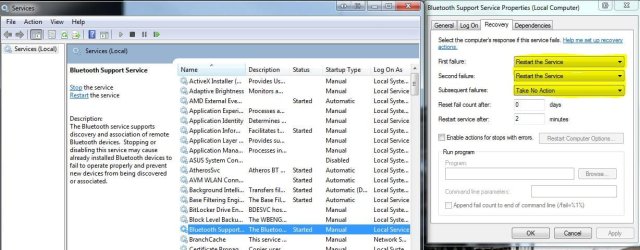
 rb: type services, when it appears in the list click on it, In the new window scroll down to Bluetooth support, double click on it and select recovery in the new window that opens make sure yours is set up as in the piccy