
Solved Bluetooth driver

ne6c

New member
Local time
12:23 PM
Messages
3
So, I recently bought a bluetooth dongle on ebay. It's the same as this one.

The first time I plugged it in(ASUS k50AB laptop, Windows 7 ultimate 64x), everything worked fine, no problems what so ever. But the second time I plugged the dongle in it started to re-install the drivers, so I thought to myself, this can't be right and it wasn't. When the installation got to the the point, where the Bluetooth Peripheral Device should be installed, it found an error and couldn't finish the installation and a message poped-up, saying that the installation failed.
So now I got the bluetooth logo under the notification area, but it doesn't work, when I try to find bluetooth devices, or try to recive/send a file.

I tried the dongle on other computers and it works, so it's definetly a problem with my computer and not the dongle.

Also, I need to mention, that I didn't get any CD with drivers and I don't know the manufactuer of the dongle.

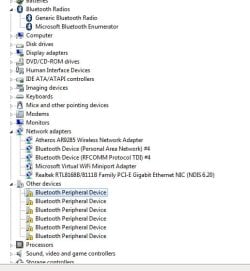
I also attached a screen of my Device Manager window.
 

Attachments
  • Untitled.jpg
    Untitled.jpg
    37.8 KB · Views: 137

My Computer

OS
Windows 7 Ultimate x64
Hello ne6c and welcome to the forum

Is there anything at all written on the dongle that will give a clue as to the make?
Did you get any USB error codes when trying to intall it?
Try this to see if it helps; [FONT=&quot][/FONT]http://support.microsoft.com/mats/hardware_device_problems
if not attempt to uninstall everything Bluetooth restart and attempt to reinstall the driver

[FONT=&quot]
[/FONT]
 

My Computer

Computer Manufacturer/Model Number
Something I threw together
OS
Windows 7 Ultimate x64
CPU
Intel Core i7-2600K
Motherboard
Asus P8P67
Memory
16 GB G Skill F3-10666 CL9D-4GBRL
Graphics Card(s)
ATI Radeon HD 6870
Sound Card
ATI Radeon HDMI / Realtek ALC892
Monitor(s) Displays
2 x 22" standard monitors / LG32LC56v TV to watch films
Screen Resolution
1920 x1080
Hard Drives
2 x OCZ Vertex2 111.79GB
3 x Samsung103SJ
1 x Samsung103UJ
1 x WD3200BEVT
1 x Hitachi5K320-160
PSU
Thermaltake Toughpower Cable Management 750W
Case
Antec 300
Cooling
Noctua NH-U12P SE2 and 5 120mm Case fans
Keyboard
Microsoft Comfort Curve Keyboard 2000
Mouse
Hama M3110 / Logitech M305
Internet Speed
16000
Other Info
I have also used Fedora, Suse, Ubuntu Linux
And all other Windows from 95 to date except ME
I allready tried uninstalling and reinstalling the plug&play drivers and it didn't work. And no, there isn't even a clue of whom the dongle was made, on the dongle.

It's strange, and I bet, if I format Windows it'll work without a problem.
 

My Computer

OS
Windows 7 Ultimate x64
I allready tried uninstalling and reinstalling the plug&play drivers and it didn't work. And no, there isn't even a clue of whom the dongle was made, on the dongle.

It's strange, and I bet, if I format Windows it'll work without a problem.

Yes it probably will that is often the last resort in USB problems
A repair install should also do the trick; http://www.sevenforums.com/tutorials/3413-repair-install.html then your bits and pieces will stay intact.

Try this first,

General USB problems

Remove all USB devices and cables

Click on start orb, Type Advanced System settings in the search box and click to go there.
Click on Advanced tab, Click on Enviroment Variables.
Under the window System variables click on New.
Type " devmgr_show_nonpresent_devices" (without the ") as the variable name and type 1 as the value.
Click ok 3 times to close the windows
Click on start orb, Type Device Manager in the search box and click to go there.
Click on View, Click on Show hidden devices.
Now you can uninstall all old and unknown USB devices.
Open windows Explorer go to computer in the menu bar, Search for infcache.1 and delete it
If it still does not work remove all USB devices and then uninstall the USB controller(s) followed by a new start
 

My Computer

Computer Manufacturer/Model Number
Something I threw together
OS
Windows 7 Ultimate x64
CPU
Intel Core i7-2600K
Motherboard
Asus P8P67
Memory
16 GB G Skill F3-10666 CL9D-4GBRL
Graphics Card(s)
ATI Radeon HD 6870
Sound Card
ATI Radeon HDMI / Realtek ALC892
Monitor(s) Displays
2 x 22" standard monitors / LG32LC56v TV to watch films
Screen Resolution
1920 x1080
Hard Drives
2 x OCZ Vertex2 111.79GB
3 x Samsung103SJ
1 x Samsung103UJ
1 x WD3200BEVT
1 x Hitachi5K320-160
PSU
Thermaltake Toughpower Cable Management 750W
Case
Antec 300
Cooling
Noctua NH-U12P SE2 and 5 120mm Case fans
Keyboard
Microsoft Comfort Curve Keyboard 2000
Mouse
Hama M3110 / Logitech M305
Internet Speed
16000
Other Info
I have also used Fedora, Suse, Ubuntu Linux
And all other Windows from 95 to date except ME
Thanks, that did the trick
 

My Computer

OS
Windows 7 Ultimate x64

My Computer

Computer Manufacturer/Model Number
Something I threw together
OS
Windows 7 Ultimate x64
CPU
Intel Core i7-2600K
Motherboard
Asus P8P67
Memory
16 GB G Skill F3-10666 CL9D-4GBRL
Graphics Card(s)
ATI Radeon HD 6870
Sound Card
ATI Radeon HDMI / Realtek ALC892
Monitor(s) Displays
2 x 22" standard monitors / LG32LC56v TV to watch films
Screen Resolution
1920 x1080
Hard Drives
2 x OCZ Vertex2 111.79GB
3 x Samsung103SJ
1 x Samsung103UJ
1 x WD3200BEVT
1 x Hitachi5K320-160
PSU
Thermaltake Toughpower Cable Management 750W
Case
Antec 300
Cooling
Noctua NH-U12P SE2 and 5 120mm Case fans
Keyboard
Microsoft Comfort Curve Keyboard 2000
Mouse
Hama M3110 / Logitech M305
Internet Speed
16000
Other Info
I have also used Fedora, Suse, Ubuntu Linux
And all other Windows from 95 to date except ME
Back
Top