Bluetooth headset connects and disconnect immediately

gammaray152

New member
Local time
2:28 PM
Messages
9
My Bluetooth headset seem to automatically disconnect from the headset immediately after connecting. Whenever I turn on my headset it blinks green and then blink gray a second later.


I reinstalled Window7 a few days ago after going pure Linux for two years and having Win8.1 beforehand. I suspect this is a hardware issue since I have no issues connecting my headphones to other devices (including the same BT adapter on Linux), nor do I have issues connecting my computer to other BT devices, including a speaker. Windows installed the drivers automatically, and Bluedio doesn't offer any drivers of its own. and the bluetooth adapter drivers were installed from the laptop manufacturer.


Headsets are Bluedio UFO2
Laptop is Lenovo B5400
OS is Win7 Professional x64
 

My Computer My Computer

At a glance

Win7 Professional x64
Computer type
PC/Desktop
OS
Win7 Professional x64
Welcome to the forum. Are you using wifi on the pc as that can interfere with it
 

My Computer My Computer

At a glance

win 8 32 bit
Computer type
PC/Desktop
OS
win 8 32 bit
generally yes I do use Wifi but almost certain its not interfering with it since the problem persist even after I disabled wifi, and it works fine on the same wifi, same laptop only different OS.
 

My Computer My Computer

At a glance

Win7 Professional x64
Computer type
PC/Desktop
OS
Win7 Professional x64
When you reinstalled Win 7, did you completely update it.?

Do you have Bluetooth 4.1 installed?

Did you pair it to your system similar to this method-

To pair your Bluetooth headset to a Windows computer:
Make sure your computer's Bluetooth chip supports the Headset or Handsfree Bluetooth profile (if your computer has a data-only Bluetooth profile, you cannot pair your headset to it).
Place your headset into pairing mode.
On your computer, click Start, and then click Devices and Printers. Note: Depending on your computer's configuration, you may first have to click Control Panel, then Devices and Printers.
Click Add a Device. The Add a Device windows appears, and immediately starts searching for your headset.
When your headset appears, select it, and then click Next. Windows connects to your headset.
If prompted for a passkey, enter "0000" (four zeros), and then click Next.
Click Close.
If necessary, right-click the headset icon, and then click Connect.
 

My Computer My Computer

At a glance

Windows 7 Pro SP1 64 bit8 GB
Computer type
Laptop
Computer Manufacturer/Model Number
Dell M6500 Precision Work Station
OS
Windows 7 Pro SP1 64 bit
Memory
8 GB
Screen Resolution
1920x
Internet Speed
30 Mbps
Antivirus
Norton Security
Browser
IE 11
yes, fully updated. according to my drivers its Bluetooth 4.0, windows installed the drivers automatically. Previously I ran the add devices from the bluetooth icon in the taskbar (rightclick, add a device) but I removed it and follow your steps to pair and the same thing happened. connected then immediately disconnected. and there is no option "connect" in the Devices and printers. it shows up in the Sound-Playback devices though.
 

My Computer My Computer

At a glance

Win7 Professional x64
Computer type
PC/Desktop
OS
Win7 Professional x64
I'd have to look again but I think one of the sites I looked at said that your headphones need (or use) 4.1. I don't know the difference but it might be worth installing it.
 

My Computer My Computer

At a glance

Windows 7 Pro SP1 64 bit8 GB
Computer type
Laptop
Computer Manufacturer/Model Number
Dell M6500 Precision Work Station
OS
Windows 7 Pro SP1 64 bit
Memory
8 GB
Screen Resolution
1920x
Internet Speed
30 Mbps
Antivirus
Norton Security
Browser
IE 11
According to the box it says Bluetooth 5, but I know my adapter is Bluetooth 4 (not sure is 4.0 or 4.1) and that the headset is backwards compatible.
 

My Computer My Computer

At a glance

Win7 Professional x64
Computer type
PC/Desktop
OS
Win7 Professional x64
Sorry for the delayed response. Been trying to find a good answer for you but so far, empty.

Nothing hurt by installing Bluetooth 5. If desired, you could set a system restore point before doing so.
 

My Computer My Computer

At a glance

Windows 7 Pro SP1 64 bit8 GB
Computer type
Laptop
Computer Manufacturer/Model Number
Dell M6500 Precision Work Station
OS
Windows 7 Pro SP1 64 bit
Memory
8 GB
Screen Resolution
1920x
Internet Speed
30 Mbps
Antivirus
Norton Security
Browser
IE 11
How do I install Bluetooth 5 if the adapter on the laptop is Bluetooth 4? I downloaded the drivers from the Lenovo website and there wasn't a choice between 4 or 5.
 

My Computer My Computer

At a glance

Win7 Professional x64
Computer type
PC/Desktop
OS
Win7 Professional x64

My Computer My Computer

At a glance

Windows 7 Pro SP1 64 bit8 GB
Computer type
Laptop
Computer Manufacturer/Model Number
Dell M6500 Precision Work Station
OS
Windows 7 Pro SP1 64 bit
Memory
8 GB
Screen Resolution
1920x
Internet Speed
30 Mbps
Antivirus
Norton Security
Browser
IE 11
my Join a Personal Area Network is empty, I cant choose the headset.

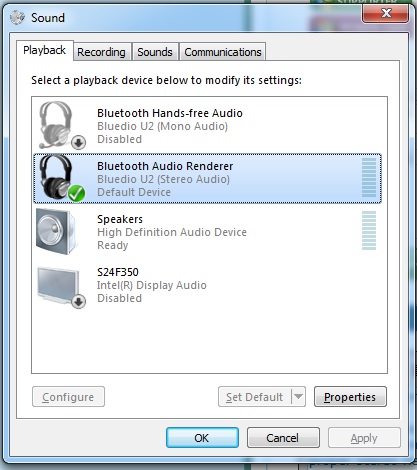
I uninstalled the drivers from the Lenovo site and used the automatic driver search in windows. This appears to have sort of fixed the issue of disconnection but the headphone still dont work properly. there are two "headsets" detected. low quality Hands-Free Mono and the proper stereo headphones, it seems to only work on the Hands-free mono mode with low mode, I have the Audio renderer set as default device but there is no audio coming out of it and the computer starts lagging if I try to play any audio while its set as the audio device.


WZFNc70.jpg
 

My Computer My Computer

At a glance

Win7 Professional x64
Computer type
PC/Desktop
OS
Win7 Professional x64
If you click on the Sound icon and select Mixer. What is the volume set to when you have the Audio Renderer selected?
 

My Computer My Computer

At a glance

Windows 7 Pro SP1 64 bit8 GB
Computer type
Laptop
Computer Manufacturer/Model Number
Dell M6500 Precision Work Station
OS
Windows 7 Pro SP1 64 bit
Memory
8 GB
Screen Resolution
1920x
Internet Speed
30 Mbps
Antivirus
Norton Security
Browser
IE 11
its on max and I can change it freely although it has a microfreeze whenever I try to change it due to it trying to play the testing audio. No actual audio though
 

My Computer My Computer

At a glance

Win7 Professional x64
Computer type
PC/Desktop
OS
Win7 Professional x64
Does the sound level in the Sound dialogue box move up and down during playback? If it does, are you sure there isn't some adjustment on your headphones you can make?
 

My Computer My Computer

At a glance

Windows 7 Pro SP1 64 bit8 GB
Computer type
Laptop
Computer Manufacturer/Model Number
Dell M6500 Precision Work Station
OS
Windows 7 Pro SP1 64 bit
Memory
8 GB
Screen Resolution
1920x
Internet Speed
30 Mbps
Antivirus
Norton Security
Browser
IE 11
I assume you mean the green bar? yes it does go up and down slightly.


There are no settings I can adjust on the headphones.
 

My Computer My Computer

At a glance

Win7 Professional x64
Computer type
PC/Desktop
OS
Win7 Professional x64
I found this in another blog which describes reinstalling Broadcomm drivers but don't know if it would help you-

I had this very same issue and was digging around everywhere for answers when I came across your post. Although I found no answer anywhere online, I did finally manage to get the issue fixed. I have an Asus and I use a bluetooth usb adapter, but otherwise everything was exactly the same issue you have where the headset would work fine with other devices such as my phones and tablets, but not in Windows 7 although it would connect and could be set as the default playback device, but would not play anything. I tried every checkbox and setting in bluetooth settings and in sound playback devices. The headset was working correctly a few days ago and I have tried removing it and rebooting the computer several times to no avail.

What eventually fixed the issue was going into the device manager (you can right-click on Computer and select Manage and then select Device Manager on the left), find Bluetooth Radios near the top of the list on the right and expand that option. I have a Broadcom BCM20702 Bluetooth 4.0 USB Device and a Microsoft Bluetooth Enumerator listed. I first tried disabling the Microsoft device, but it want to reboot my computer, so I decided to go ahead and Uninstall the Broadcom device before rebooting. Once I uninstalled it, both of the devices were removed from the list as expected. I never did reboot and just decided to remove the physical bluetooth adapter from the usb port and plugged it back in to allow it to reinstall all drivers. Once the drivers finished installing again, I reconnected my headset, set it as the default playback device again, and gave it a try and now it works just fine again.
 

My Computer My Computer

At a glance

Windows 7 Pro SP1 64 bit8 GB
Computer type
Laptop
Computer Manufacturer/Model Number
Dell M6500 Precision Work Station
OS
Windows 7 Pro SP1 64 bit
Memory
8 GB
Screen Resolution
1920x
Internet Speed
30 Mbps
Antivirus
Norton Security
Browser
IE 11
Same issue as before, low quality headset mode plays but stereo doesn't play.
 

My Computer My Computer

At a glance

Win7 Professional x64
Computer type
PC/Desktop
OS
Win7 Professional x64
I'm really out of ideas. The only other thing I could think of is to make sure your player is playing in stereo.
 

My Computer My Computer

At a glance

Windows 7 Pro SP1 64 bit8 GB
Computer type
Laptop
Computer Manufacturer/Model Number
Dell M6500 Precision Work Station
OS
Windows 7 Pro SP1 64 bit
Memory
8 GB
Screen Resolution
1920x
Internet Speed
30 Mbps
Antivirus
Norton Security
Browser
IE 11
Back
Top