Bluetooth Laser Mouse BT

Nasho23

New member
Local time
6:40 AM
Messages
16
Firstly, I hope this is the correct Forum for this post.

I have a New HP650 Laptop with Win 7 64bit Home Premium installed.

I purchased a Bluetooth Laser Mouse BT which I installed from the disc provided.
Initialy the Mouse worked fine, untill, win 7 went into standby mode. When I went back into Windows, the Mouse would no longer work. Nothing I attempted would recover it. Switch Off, Switch On, Press ID Button to reconnect, nothing.
I Un Installed the Program and Drivers.
I then Re Installed and it worked fine, untill, and you know the rest of the story.

This problem seems to associated with win 7 going into Standby Mode and Recovery.

Does anyone have a clue about this Nasty.

Regards
Owen Carlton
 

My Computer

Computer Manufacturer/Model Number
PC Clone
OS
WIn 7 Utlimate x64
CPU
Intel Quad Q94oo 2.6Ghz
Motherboard
GigaByte EP45-DS3P
Memory
Kingston DDR2 8GB
Graphics Card(s)
GeForce 9500
Sound Card
OnBoard
Monitor(s) Displays
ViewSonic 22.5
Hard Drives
C: WD 1.5TB 3 Partitions - G: WD 1.0TB - H: Seagate 250GB- I: Seagate 1.0TB
PSU
550W
Case
AOpen
Cooling
CPU + System
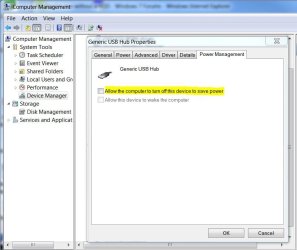
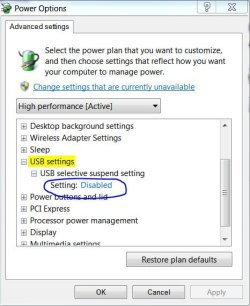
Does the BT transceiver plug into a USB port? Check that the two options shown below are Disabled. The first is accessed from Device Manager under the USB Hub Properties. The second is accessed through the Power Options in the Control Panel then clicking on Change Plan Settings (for plan you use) > Change advanced power settings. There seems to be a common problem with USB ports after the PC goes into hibernation.
 

Attachments

  • USB Hub Power Management.JPG
    USB Hub Power Management.JPG
    57.5 KB · Views: 3
  • USB Suspend Setting.JPG
    USB Suspend Setting.JPG
    46.6 KB · Views: 3

My Computer

Computer type
PC/Desktop
Computer Manufacturer/Model Number
Built 2/11/2011
OS
Windows 7 Pro-x64
CPU
i7-2600 3.4GHz - 3.8GHz Turbo
Motherboard
Intel DH67BL-B3
Memory
8Gb - 2x4GB, Muskin 991770 PC3-1333
Graphics Card(s)
Integrated Intel HD 2000
Sound Card
Integrated Intel 10.1 HD, RealTek ALC892
Monitor(s) Displays
Asus LCD VH222H, Haier HL24XSL2a
Screen Resolution
1920x1080, 1920x1080
Hard Drives
Crucial SSD C300-128Gb,
Western Digital WD5002AALX - 500Gb,
Western Digital WD7501AALS - 750Gb
PSU
Seasonic 650W 80+ Gold Modular
Case
Rosewill Defender
Cooling
Stock CPU, Four 120mm case fans, PCH fan added
Keyboard
Logitech EX100 Y-RBH94 Wireless
Mouse
Logitech EX100 M-RCE95 Wireless
Internet Speed
3.0/1.5 Mbs
Antivirus
Microsoft Security Essentials
Browser
Microsoft Internet Explorer 11
Other Info
Antec Veris Premier-Multimedia IR Station,
Cyber Accoustics-3602 Speakers,
AFT XM-5U Card Reader,
Hauppauge TV-HVR-2250,
Sony LX300 USB Turntable
Bluetooth LaserMouse BT

Thank you Carwiz, your idea looked good to me and sort of made sense to me, so I tried it.
Made both changes, as you suggested, Mouse was working, waited 30 minutes, Recovered Windows from Standby and, guess what, mouse would not work. I thought I may need to restart, which I did, Mouse not working, turned Mouse Off and back On, and it worked.
I do not know how long it takes Mouse and Receiver to respond to one another, after any event, such as Recover from Standby, Switch Off and ON, etc.
I still feel there is something in Windows that is causing this problem.

Thanks again.
 

My Computer

Computer Manufacturer/Model Number
PC Clone
OS
WIn 7 Utlimate x64
CPU
Intel Quad Q94oo 2.6Ghz
Motherboard
GigaByte EP45-DS3P
Memory
Kingston DDR2 8GB
Graphics Card(s)
GeForce 9500
Sound Card
OnBoard
Monitor(s) Displays
ViewSonic 22.5
Hard Drives
C: WD 1.5TB 3 Partitions - G: WD 1.0TB - H: Seagate 250GB- I: Seagate 1.0TB
PSU
550W
Case
AOpen
Cooling
CPU + System
Where do you have the BT dongle plugged in? Are you using one of the front hub ports? If you are, move it to one of the rear ports.

Just thought of something else too if the above doesn't work. Gigobites had some problems with USB on their motherboards a while back. Check for BIOS and Chip Set driver updates for your motherboard.
 
Last edited:

My Computer

Computer type
PC/Desktop
Computer Manufacturer/Model Number
Built 2/11/2011
OS
Windows 7 Pro-x64
CPU
i7-2600 3.4GHz - 3.8GHz Turbo
Motherboard
Intel DH67BL-B3
Memory
8Gb - 2x4GB, Muskin 991770 PC3-1333
Graphics Card(s)
Integrated Intel HD 2000
Sound Card
Integrated Intel 10.1 HD, RealTek ALC892
Monitor(s) Displays
Asus LCD VH222H, Haier HL24XSL2a
Screen Resolution
1920x1080, 1920x1080
Hard Drives
Crucial SSD C300-128Gb,
Western Digital WD5002AALX - 500Gb,
Western Digital WD7501AALS - 750Gb
PSU
Seasonic 650W 80+ Gold Modular
Case
Rosewill Defender
Cooling
Stock CPU, Four 120mm case fans, PCH fan added
Keyboard
Logitech EX100 Y-RBH94 Wireless
Mouse
Logitech EX100 M-RCE95 Wireless
Internet Speed
3.0/1.5 Mbs
Antivirus
Microsoft Security Essentials
Browser
Microsoft Internet Explorer 11
Other Info
Antec Veris Premier-Multimedia IR Station,
Cyber Accoustics-3602 Speakers,
AFT XM-5U Card Reader,
Hauppauge TV-HVR-2250,
Sony LX300 USB Turntable
Back
Top