
You are using an out of date browser. It may not display this or other websites correctly.
You should upgrade or use an alternative browser.
You should upgrade or use an alternative browser.
bluetooth peripheral device problem
- Thread starter tanjib2
- Start date


You've told us very little to nothing about your actual hardware. My guess is your motherboard has a bluetooth device in it that you haven't loaded the drivers for.
Hard to say with no specific information on your system.
Hard to say with no specific information on your system.
My Computer
- Computer Manufacturer/Model Number
- Insane hobo technologies. ;-)
- OS
- Windows 7 x64
- CPU
- Intel i7 2600k
- Motherboard
- Asrock z68 extreme 4 gen 3
- Memory
- G.skill Ripjaw 16gigs @ 1866
- Graphics Card(s)
- Nvidia gtx580 (evga)
- Sound Card
- Integrated HD audio + hdmi
- Monitor(s) Displays
- 24" ASUS widescreen + 42" insignia
- Screen Resolution
- 1080p (1920x1080)
- Hard Drives
- 128 Samsung 830
256 Samsung 840
3 x 1tb storage drive (various)
1 western digital 1tb (eSATA)
1 Seagate 1tb (eSATA)
- PSU
- 1 kilowatt SLI/Crossfire rated Silverstone modular
- Case
- NZXT Phantom + additional 220 fan
- Cooling
- Zalmann
- Keyboard
- Microsoft wireless 3000 (v2)
- Mouse
- MS - wireless 5000 (bluetrack)
- Internet Speed
- depends on if you ask me or my provider.
- Other Info
- The above information is provided as is, and the author assumes no responsibility for issues it may cause with your sanity or fanboyism.
Have you tried just right clicking and uninstalling them?
That may or may not get rid of them as they are likely to return on the next reboot.
That may or may not get rid of them as they are likely to return on the next reboot.
My Computer
- Computer Manufacturer/Model Number
- Insane hobo technologies. ;-)
- OS
- Windows 7 x64
- CPU
- Intel i7 2600k
- Motherboard
- Asrock z68 extreme 4 gen 3
- Memory
- G.skill Ripjaw 16gigs @ 1866
- Graphics Card(s)
- Nvidia gtx580 (evga)
- Sound Card
- Integrated HD audio + hdmi
- Monitor(s) Displays
- 24" ASUS widescreen + 42" insignia
- Screen Resolution
- 1080p (1920x1080)
- Hard Drives
- 128 Samsung 830
256 Samsung 840
3 x 1tb storage drive (various)
1 western digital 1tb (eSATA)
1 Seagate 1tb (eSATA)
- PSU
- 1 kilowatt SLI/Crossfire rated Silverstone modular
- Case
- NZXT Phantom + additional 220 fan
- Cooling
- Zalmann
- Keyboard
- Microsoft wireless 3000 (v2)
- Mouse
- MS - wireless 5000 (bluetrack)
- Internet Speed
- depends on if you ask me or my provider.
- Other Info
- The above information is provided as is, and the author assumes no responsibility for issues it may cause with your sanity or fanboyism.

How many BT enabled phones are nearby? Try turning off scan for BT devices in your Bluetooth console.
My Computer
- Computer type
- PC/Desktop
- Computer Manufacturer/Model Number
- Built 2/11/2011
- OS
- Windows 7 Pro-x64
- CPU
- i7-2600 3.4GHz - 3.8GHz Turbo
- Motherboard
- Intel DH67BL-B3
- Memory
- 8Gb - 2x4GB, Muskin 991770 PC3-1333
- Graphics Card(s)
- Integrated Intel HD 2000
- Sound Card
- Integrated Intel 10.1 HD, RealTek ALC892
- Monitor(s) Displays
- Asus LCD VH222H, Haier HL24XSL2a
- Screen Resolution
- 1920x1080, 1920x1080
- Hard Drives
- Crucial SSD C300-128Gb,
Western Digital WD5002AALX - 500Gb,
Western Digital WD7501AALS - 750Gb
- PSU
- Seasonic 650W 80+ Gold Modular
- Case
- Rosewill Defender
- Cooling
- Stock CPU, Four 120mm case fans, PCH fan added
- Keyboard
- Logitech EX100 Y-RBH94 Wireless
- Mouse
- Logitech EX100 M-RCE95 Wireless
- Internet Speed
- 3.0/1.5 Mbs
- Antivirus
- Microsoft Security Essentials
- Browser
- Microsoft Internet Explorer 11
- Other Info
- Antec Veris Premier-Multimedia IR Station,
Cyber Accoustics-3602 Speakers,
AFT XM-5U Card Reader,
Hauppauge TV-HVR-2250,
Sony LX300 USB Turntable
salam
dear frenz any body tell me about peripheral device driver how can i upgrade its driver bcoz i cant send or recieve any thing from my N8-00 ,... what should i do ... this message displays on my device " unable to connect "
dear frenz any body tell me about peripheral device driver how can i upgrade its driver bcoz i cant send or recieve any thing from my N8-00 ,... what should i do ... this message displays on my device " unable to connect "
My Computer
- OS
- Windows 7 Starter 32bit
Not sure what a N8-00 is but if it's a Nokia phone, you should be accessing the Nokia support site. If you mean the Nokia Ovi Suite for a PC, you can get that there too. This is a Windows 7 forum. If you get the download and install the Ovi Suite and have problems with Windows 7, come on back. But start your own thread. (Please)dear frenz any body tell me about peripheral device driver how can i upgrade its driver bcoz i cant send or recieve any thing from my N8-00 ,... what should i do ... this message displays on my device " unable to connect "
I think this is where you want to be. This is the User Manual. Access to the downloads are in the menu at the top of that page.
http://www.nokia.com/us-en/support/...2DCF-CC4C-4C01-B001-0BE05FC7C557_FILE001.html
Last edited:
My Computer
- Computer type
- PC/Desktop
- Computer Manufacturer/Model Number
- Built 2/11/2011
- OS
- Windows 7 Pro-x64
- CPU
- i7-2600 3.4GHz - 3.8GHz Turbo
- Motherboard
- Intel DH67BL-B3
- Memory
- 8Gb - 2x4GB, Muskin 991770 PC3-1333
- Graphics Card(s)
- Integrated Intel HD 2000
- Sound Card
- Integrated Intel 10.1 HD, RealTek ALC892
- Monitor(s) Displays
- Asus LCD VH222H, Haier HL24XSL2a
- Screen Resolution
- 1920x1080, 1920x1080
- Hard Drives
- Crucial SSD C300-128Gb,
Western Digital WD5002AALX - 500Gb,
Western Digital WD7501AALS - 750Gb
- PSU
- Seasonic 650W 80+ Gold Modular
- Case
- Rosewill Defender
- Cooling
- Stock CPU, Four 120mm case fans, PCH fan added
- Keyboard
- Logitech EX100 Y-RBH94 Wireless
- Mouse
- Logitech EX100 M-RCE95 Wireless
- Internet Speed
- 3.0/1.5 Mbs
- Antivirus
- Microsoft Security Essentials
- Browser
- Microsoft Internet Explorer 11
- Other Info
- Antec Veris Premier-Multimedia IR Station,
Cyber Accoustics-3602 Speakers,
AFT XM-5U Card Reader,
Hauppauge TV-HVR-2250,
Sony LX300 USB Turntable

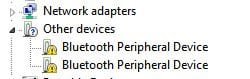
See my attachement.I own an old Nokia N 73 handset and i get the same Bluetooth Peripheral Device with yellow exclamation mark.
The problem is Windows 7 can't find the drivers for old Nokia phones and driver installation fails every time not that i need these Bluetooth drivers anyway.
The solution is to delete any Nokia phones from the Bluetooth Devices page and use Nokia proprietary software like Nokia Pc suite or OVI suite to tranfer data from laptop to phone and vice versa.
The problem is Windows 7 can't find the drivers for old Nokia phones and driver installation fails every time not that i need these Bluetooth drivers anyway.
The solution is to delete any Nokia phones from the Bluetooth Devices page and use Nokia proprietary software like Nokia Pc suite or OVI suite to tranfer data from laptop to phone and vice versa.
Attachments
My Computer
- Computer Manufacturer/Model Number
- DELL
- OS
- Windows 8 Pro
- CPU
- intel i3 2.40 Ghz
- Motherboard
- DELL inc
- Memory
- 6 GB RAM
- Graphics Card(s)
- Integrated Intel HD
- Sound Card
- Realtek high definition SRS surround sound
- Screen Resolution
- 1366*768
- Hard Drives
- 320 GB
- Internet Speed
- 1Mbps